
Introducción
This manual provides instructions for the MangoKit CD-X Portable CD Player. This device allows you to enjoy your favorite audio CDs, MP3, and WMA files on the go, with versatile connectivity options including Bluetooth 5.3, wired headphones, and AUX output. It features a rechargeable battery and anti-skip protection for uninterrupted listening.
Información de seguridad
- No exponga el dispositivo a temperaturas extremas, luz solar directa o humedad alta.
- Evite dejar caer o someter el dispositivo a impactos fuertes.
- No intente desmontar ni reparar el dispositivo usted mismo. Póngase en contacto con el servicio de atención al cliente para obtener ayuda.
- Use only the provided charging cable and a compatible power adapter (5V/1A recommended, not included) to charge the device.
- Mantenga el dispositivo alejado del agua y otros líquidos.
- When using headphones, adjust the volume to a moderate level to prevent hearing damage.
Contenido del paquete
Verifique que todos los artículos estén presentes en el paquete:
- 1 x MangoKit CD-X Portable CD Player
- 1 x Auriculares con cable
- Cable de carga 1 x USB tipo C
- 1 cable auxiliar de 3.5 mm a 3.5 mm
- 1 x Manual de usuario

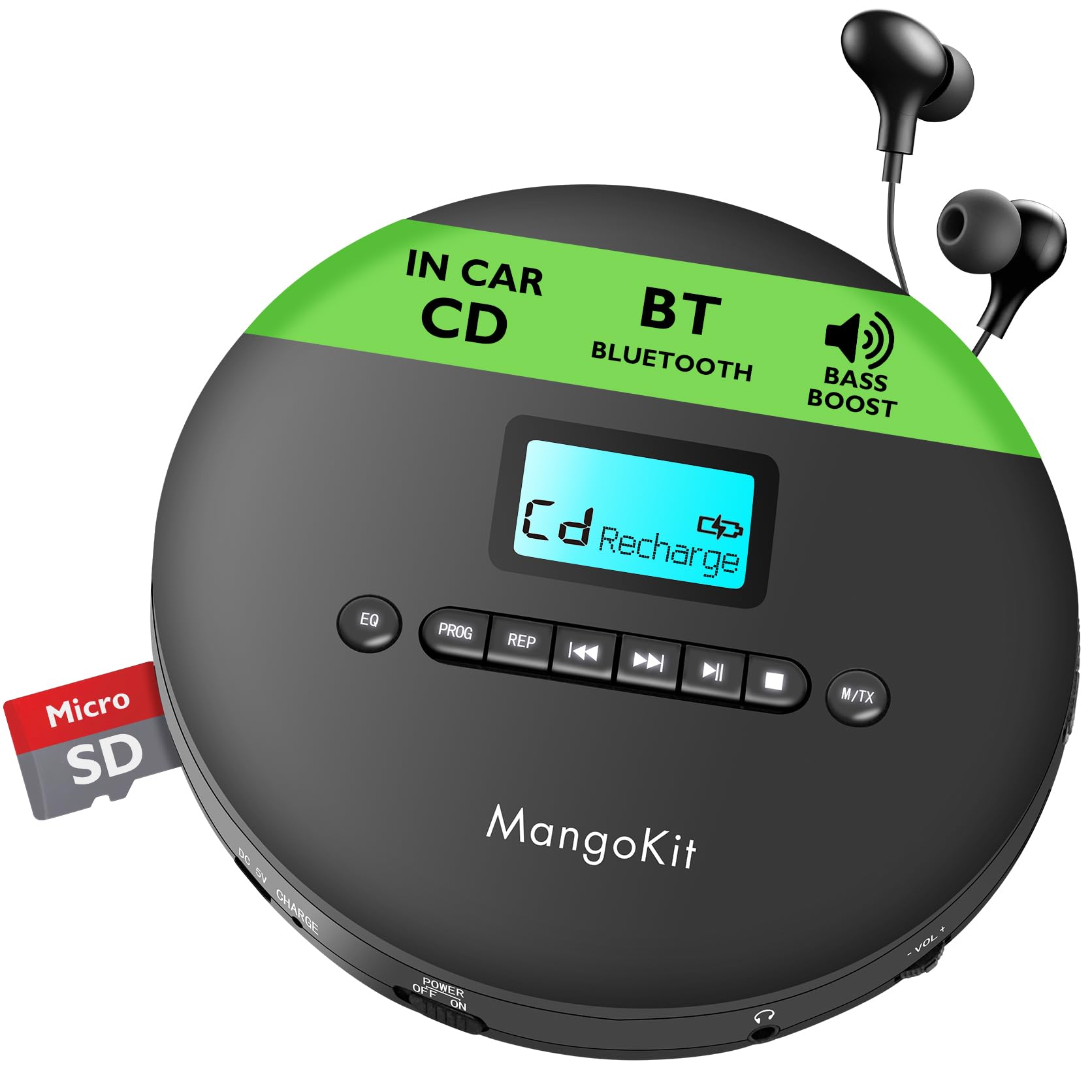
The MangoKit CD-X Portable CD Player and its included accessories, ready for use.
Producto terminadoview
The MangoKit CD-X features an intuitive layout for easy operation.
Controles del panel frontal:
- Botón EQ: Presione para recorrer los modos de sonido del ecualizador.
- Botón PROG: Used for programming track playback order.
- Botón REP: Cycles through repeat modes (repeat one, repeat all, random).
- Botón Anterior/Rebobinar: Presione brevemente para ir a la pista anterior, presione prolongadamente para rebobinar.
- Botón de reproducción/pausa: Inicia o pausa la reproducción.
- Botón Siguiente/Avance rápido: Presione brevemente para ir a la siguiente pista, presione prolongadamente para avanzar rápidamente.
- Botón Detener: Detiene la reproducción.
- M/TX Button: Mode/Bluetooth Transmit button.
- Pantalla LCD: Shows track number, time, battery status, and mode.
Side Panel Ports and Switches:
- DC 5V CHARGE Port: USB Type-C input for charging.
- POWER OFF/ON Switch: Enciende o apaga el dispositivo.
- Toma de auriculares (3.5 mm): Connect wired headphones or AUX cable.
- VOL- / VOL+: Botones de control de volumen.
- Ranura para tarjeta TF: Para reproducir MP3/WMA files de una tarjeta TF.

Detallado view of the MangoKit CD-X Portable CD Player's controls and ports.
Configuración
1. Carga del reproductor
Antes del primer uso, cargue completamente el dispositivo.
- Connect the USB Type-C charging cable to the DC 5V CHARGE port on the player.
- Connect the other end of the USB cable to a compatible USB power adapter (5V/1A recommended, not included) or a computer's USB port.
- The battery indicator on the LCD display will show charging status. It will indicate full when charging is complete.
Una carga completa proporciona hasta 12 horas de reproducción.
The CD player's compact design and long battery life for portable use.
2. Inserción de un CD
- Gently slide the "OPEN" switch to open the CD compartment lid.
- Place the CD with the label side facing up onto the center spindle.
- Presione el CD suavemente hasta que encaje en su lugar.
- Cierre firmemente la tapa del compartimiento del CD hasta que encaje.
3. Connecting Headphones or AUX Cable
- For wired listening, plug the included earphones or your own 3.5mm headphones into the headphone jack.
- To connect to an external speaker or car audio system, use the included 3.5mm AUX cable. Plug one end into the player's headphone jack and the other end into the AUX input of your external device.

Connecting the CD player to a car audio system using the AUX cable.
4. Bluetooth Pairing (for Headphones/Earphones)
The CD-X player supports Bluetooth 5.3 for wireless audio transmission to Bluetooth headphones or earphones.
- Ensure the CD player is powered on and a CD is inserted.
- Turn on your Bluetooth headphones/earphones and put them into pairing mode (refer to your headphone's manual for specific instructions).
- On the CD player, long press the M/TX button. The Bluetooth icon on the LCD display will flash, indicating it's searching for devices.
- Once paired, the Bluetooth icon will stop flashing and remain solid. You can now play audio wirelessly.
Note: Bluetooth is for connecting to headphones/earphones only and does not support car audio systems directly via Bluetooth. Use the AUX cable for car audio.

The CD player's Bluetooth feature for wireless headphone connection.
Instrucciones de funcionamiento
Encendido/apagado
Deslice el APAGADO / ENCENDIDO switch to "ON" to turn on the player. Slide to "OFF" to turn it off.
Reproducción básica
- After inserting a CD and powering on, the player will automatically start reading the disc.
- Presione el Reproducir/Pausa botón para iniciar o pausar la reproducción.
- Presione el Próximo botón para saltar a la siguiente pista.
- Presione el Anterior Botón para volver al principio de la pista actual o a la pista anterior.
- Mantenga pulsado el Próximo button for fast forward.
- Mantenga pulsado el Anterior button for rewind.
- Presione el Detener para detener la reproducción.
Control de volumen
Utilice el VOL+ y vol- buttons on the side of the player to adjust the volume level.
EQ (Equalizer) Settings
Presione el EQ button repeatedly to cycle through different sound modes (e.g., Bass, Pop, Jazz, Rock, Classic).
Repeat and Program Modes
Presione el REPS button repeatedly to select playback modes:
- REPETICIÓN 1: Repite la pista actual.
- TODO: Repite todas las pistas del disco.
- RANDA: Reproduce pistas en orden aleatorio.
- INTRODUCCIÓN: Plays the first 10 seconds of each track (if available).
Reproducción de programa
- En el modo de parada, presione el PROG Botón. La pantalla mostrará "PROG" y "01".
- Utilice el Anterior or Próximo Botones para seleccionar el número de pista deseado.
- Prensa PROG again to confirm the track and move to the next program slot.
- Repita los pasos 2 y 3 para programar hasta 20 pistas.
- Presione el Reproducir/Pausa Botón para iniciar la reproducción programada.
Protección Anti-Salto
The player features electronic skip protection: 100 seconds for standard CDs and 180 seconds for MP3 CDs. This function helps maintain continuous playback during movement or minor shocks.
Playing MP3/WMA CDs or TF Card
When an MP3/WMA CD is inserted or a TF card with MP3/WMA files is inserted into the TF CARD slot, the player will automatically detect the file type. Use the navigation buttons to browse folders and tracks.

The CD player is ideal for language learning and listening to audiobooks.
Mantenimiento
Limpieza del dispositivo
Wipe the player with a soft, dry cloth. Do not use abrasive cleaners or solvents.
Limpieza de la lente
If the player experiences reading errors, use a specialized CD lens cleaning disc (not included) to clean the laser lens.
Cuidado de la batería
- Para prolongar la vida útil de la batería, evite descargarla por completo con frecuencia.
- If the device will not be used for an extended period, charge it at least once every three months.
Solución de problemas
| Problema | Solución |
|---|---|
| El reproductor no se enciende. | Ensure the POWER switch is in the "ON" position. Check if the battery is charged; connect to power if necessary. |
| No hay sonido. | Check headphone connection. Adjust volume. Ensure headphones are properly paired if using Bluetooth. |
| Disc skipping or not playing. | Ensure the CD is clean and free of scratches. Make sure the CD is inserted correctly. Try a different CD. Clean the laser lens. |
| El emparejamiento de Bluetooth falla. | Ensure your Bluetooth headphones are in pairing mode and close to the player. Turn off and on both devices and try again. |
Presupuesto
| Característica | Detalle |
|---|---|
| Número de modelo | CD-X |
| Marca | mangokit |
| Dimensiones | 14 x 14 x 2.8 cm |
| Peso | 400 gramos |
| Batería | 2000 mAh Rechargeable (up to 12 hours playback) |
| Conectividad | Bluetooth 5.3, AUX (3.5mm Jack) |
| Formatos de audio compatibles | CD, CD-R, CD-RW, MP3, WMA |
| Protección Anti-Salto | 100 segundos (CD), 180 segundos (MP3) |
| Componentes incluidos | CD Player, Earphones, USB Type-C Cable, AUX Cable, User Manual |
Garantía y soporte
MangoKit products come with a standard manufacturer's warranty. For detailed warranty information, technical support, or any questions regarding your CD player, please refer to the contact information provided on the product packaging or visit the official MangoKit websitio.
Vídeos de productos
Este vídeo ofrece una visión generalview of the MangoKit CD-X Portable CD Player, showcasing su diseño, características y diversos escenarios de uso.