
1. Introducción
The ANJIELO SMART Wired Video Intercom System provides enhanced security and communication for your home or office. This system features a 7-inch HD IPS touch screen indoor monitor and a 1080P outdoor doorbell camera. With Tuya Smart app integration, motion detection, and anti-tamper alarm functions, you can monitor your property and communicate with visitors from anywhere. This manual provides detailed instructions for installation, operation, and maintenance of your intercom system.
2. Contenido del paquete
Por favor verifique que todos los artículos estén presentes en su paquete:
- 1 x Outdoor Doorbell Camera (1080P FHD)
- 2 x Indoor Monitors (7-inch HD IPS Touch Screen)
- Tarjeta Micro SD 1 x 32GB
- Adaptadores de corriente para monitores
- Herrajes de montaje
- Wiring Cables (for doorbell to monitor connection)
- Manual de usuario
3. Características del producto
The ANJIELO SMART Intercom System offers a range of features for comprehensive security and convenience:
- Monitor de interior: 7-inch HD IPS Touch Screen, Acrylic Wire Drawing Panel.
- Integración de aplicaciones: Supports Tuya Smart / Smart Life app for remote control and monitoring.
- Comunicación: Room-to-room intercom and hands-free dual-way communication with visitors.
- Monitoreo y control: Door answering, real-time monitoring, and remote unlocking of electric locks.
- Detección de movimiento: Automatically records videos or snapshots when motion is detected or doorbell is pressed.
- Almacenamiento: Built-in memory for 86 pictures, supports external Micro SD card up to 128GB (32GB included).
- Personalización: Adjustable color, brightness, volume, 6 selectable ringtones, weather/calendar/standby wallpaper settings.
- Seguridad: CCTV Anti-tamper Alarm, supports 3 home modes (At home, Leave home, Sleep home).
- Timbre exterior: 1080P FHD camera with 140° wide angle, anti-destructive metal material, 2 white LEDs for clear night vision.
- Control de acceso: Supports IC Card (13.56khz) and dual electric lock unlocking.
- Durabilidad: IP65 weatherproof design, high temperature resistance (-45℃ to +60℃).
- Capacidad de expansión: Supports up to 2 doorbells, 4 indoor monitors, and 2 external 1080P AHD CCTV cameras.
4. Instrucciones de configuración
4.1. Cableado del sistema
The indoor monitor and outdoor doorbell require a wired connection using a 4-wire cable. Ensure proper polarity and secure connections.
- Connect the 4-wire cable from the outdoor doorbell to the designated port on the indoor monitor.
- For extended distances (up to 100-200 meters), RVV4 (4-core wire), Cat5, or Cat6 cables can be used.
- Conecte el adaptador de corriente al monitor interior y enchúfelo a una toma de corriente.
4.2. Conexión de la aplicación (Tuya Smart / Smart Life)
To enable remote monitoring and control, connect the main indoor monitor to your home WiFi network via the Tuya Smart or Smart Life app.
- Descargar el Tuya inteligente or Vida inteligente aplicación desde la tienda de aplicaciones de su dispositivo móvil.
- Regístrese o inicie sesión en su cuenta.
- En el monitor interior, navegue a la configuración de red para mostrar el código QR.
- Open the app on your smartphone or tablet and select the option to add a device by scanning a QR code.
- Scan the QR code displayed on the monitor. Follow the in-app instructions to complete the connection.

Figure 1: Easy internet connection by scanning the QR code on the monitor to bind the app.
4.3. Connecting AHD Cameras (Optional)
The system supports connecting up to two 1080P AHD CCTV cameras for additional surveillance.
- Connect the BNC male connector of the AHD camera to the BNC female connector on the monitor. Tighten securely.
- Connect the 2P wire from the camera's power/video output to the CAM1 or CAM2 port on the monitor.
- Ensure the camera is set to AHD1080/AHD720/TVI720/TVI1080/CVI720/CVI1080/CVBS mode. If using a 1200TVL camera, set it to CVBS.
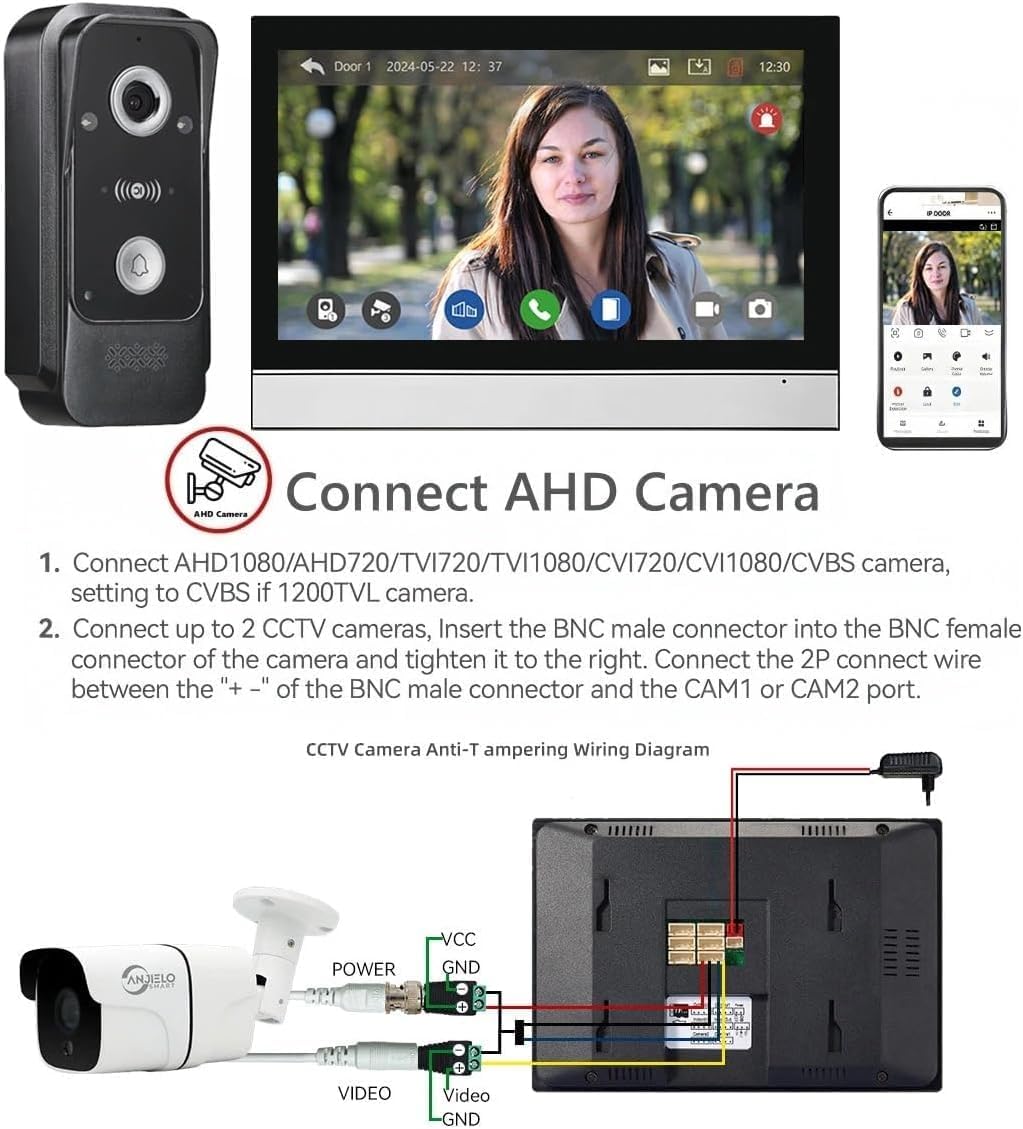
Figure 2: Wiring diagram for connecting an AHD camera to the indoor monitor.
4.4. Expansión del sistema
The system can be expanded to include multiple door stations, monitors, and CCTV cameras.
- Maximum capacity: 2 outdoor door stations, 4 indoor monitors, and 2 CCTV cameras.
- Each component connects to the main monitor or other extension monitors as per the system diagram.

Figure 3: System capacity diagram showing connections for multiple devices.
5. Instrucciones de funcionamiento
5.1. Respuesta y comunicación
When a visitor presses the doorbell, the indoor monitor will ring and display the visitor's image. You can communicate with them using the two-way audio feature.
- Toque el Respuesta icon on the monitor to begin a conversation.
- The system supports hands-free dual-way communication.
- You can also communicate with visitors remotely via the Tuya Smart app on your mobile device.

Figura 4: Comunicación de audio bidireccional con un visitante.
5.2. Desbloqueo de puertas
The system allows you to remotely unlock connected electric locks.
- During a call or while monitoring, tap the Descubrir icon on the monitor screen to open the connected electric lock.
- The system supports dual door unlocking for two separate electric locks (e.g., patio gate and main door).
- Unlocking can also be performed via the Tuya Smart app.

Figure 5: One-button operation to switch on the double-lock mode of the indoor unit.
5.3. Detección y grabación de movimiento
The system automatically detects motion and records events, providing continuous surveillance.
- When motion is detected by the outdoor doorbell camera, the system will automatically start recording video or take snapshots.
- These recordings are saved to the inserted Micro SD card (32GB included).
- You will receive alerts on your mobile phone via the Tuya Smart app when motion is detected.
- Review comida grabadatage directly on the monitor or through the app.

Figure 6: Motion detection triggering recording and mobile alerts.
5.4. Visión nocturna
The outdoor doorbell camera is equipped with infrared (IR) night vision for clear visibility in low-light conditions.
- The 2 white LEDs automatically activate in dark environments to provide illumination.
- This ensures that details are captured even at night.

Figure 7: IR Night Vision capturing details in darkness.
5.5. Anti-Tamper alarma
El sistema incluye un anti-tamper alarm feature for enhanced security.
- The CCTV Anti-tamper Alarm function provides an additional layer of security.
- When triggered, the system will alert you, helping to deter unauthorized access or vandalism.
6. Mantenimiento
El mantenimiento regular garantiza un rendimiento óptimo y la longevidad de su sistema de intercomunicación.
- Limpieza: Utilice un paño suave y seco para limpiar la pantalla del monitor y la lente de la cámara del timbre. Evite usar limpiadores abrasivos o disolventes.
- Conexiones de cable: Periodically check all wired connections for tightness and ensure they are free from damage.
- Actualizaciones de software: Check the Tuya Smart app or ANJIELO SMART websitio para obtener actualizaciones de firmware disponibles para su sistema.
- Tarjeta SD: Realice copias de seguridad periódicas de las grabaciones importantes de la tarjeta Micro SD y formatéela periódicamente para mantener el rendimiento.
- Unidad exterior: Ensure the outdoor doorbell is free from obstructions and debris. Its IP65 rating provides protection against weather, but extreme conditions may require additional shelter.

Figure 8: Outdoor doorbell with IP65 weatherproof rating.
7. Solución de problemas
If you encounter issues with your ANJIELO SMART Intercom System, refer to the following common problems and solutions:
| Problema | Posible causa | Solución |
|---|---|---|
| Sin imagen en el monitor | Loose wiring, power issue, camera fault. | Check all 4-wire connections. Ensure monitor and doorbell have power. Restart the system. |
| No hay audio durante la llamada | Problema con el micrófono/altavoz, el volumen es demasiado bajo. | Check volume settings on the monitor. Ensure wiring is secure. |
| App cannot connect to monitor | WiFi connectivity issue, incorrect app setup. | Ensure monitor is connected to 2.4GHz WiFi. Re-scan QR code in the app. Check router settings. |
| La detección de movimiento no funciona | Motion detection disabled, sensitivity too low. | Enable motion detection in monitor settings. Adjust sensitivity. Ensure clear view for doorbell camera. |
| El desbloqueo de la puerta no funciona | Incorrect wiring to electric lock, lock fault. | Verify wiring to the electric lock. Test the electric lock independently. |
Si el problema persiste después de intentar estas soluciones, comuníquese con el servicio de atención al cliente de ANJIELO SMART para obtener más ayuda.
8. Especificaciones
| Característica | Detalle |
|---|---|
| Número de modelo | Circuito integrado de gestión de potencia (PMIC)+AHD7024 |
| Pantalla de monitor de interior | Pantalla táctil IPS HD de 7 pulgadas |
| Cámara de timbre exterior | 1080P FHD, gran angular de 140° |
| Conectividad | Wired (monitor to doorbell), Wireless (WiFi for app) |
| Soporte de aplicaciones | Tuya inteligente/vida inteligente |
| Capacidad máxima del sistema | 2 Door Stations + 4 Monitors + 2 CCTV Cameras |
| Almacenamiento | Built-in memory (86 pictures), supports Max. 128GB Micro SD Card |
| Fuente de alimentación | DC15V 1.2A (for monitor) |
| Consumo de energía | 400 mA máx. |
| Conversation Duration | 120 segundos |
| Temperatura de funcionamiento | -45℃ to +60℃ (Outdoor Unit) |
| Clasificación a prueba de intemperie | IP65 (Unidad exterior) |
| Dimensiones (Monitor) | 7 x 5 x 0.7 pulgadas |
| Peso del artículo | 1 libra (aprox.) |
9. Garantía y soporte
Los productos ANJIELO SMART están diseñados para brindar confiabilidad y rendimiento. Para obtener detalles específicos sobre la garantía, consulte la tarjeta de garantía incluida con su producto o visite el sitio web oficial de ANJIELO SMART. websitio.
If you require technical assistance, troubleshooting, or have questions about your product, please contact ANJIELO SMART customer support. Have your model number (PMIC+AHD7024) and purchase information ready when contacting support.
ANJIELO SMART Customer Support:
- Consulte la información de contacto proporcionada en el embalaje de su producto.
- Visita el Tienda ANJIELO SMART en Amazon Para más información.