

1. Introducción
This manual provides essential information for the proper setup, operation, and maintenance of your MJX T3D 2.4GHz RC Car Transmitter. Please read this manual thoroughly before use to ensure safe and optimal performance of your remote control system.
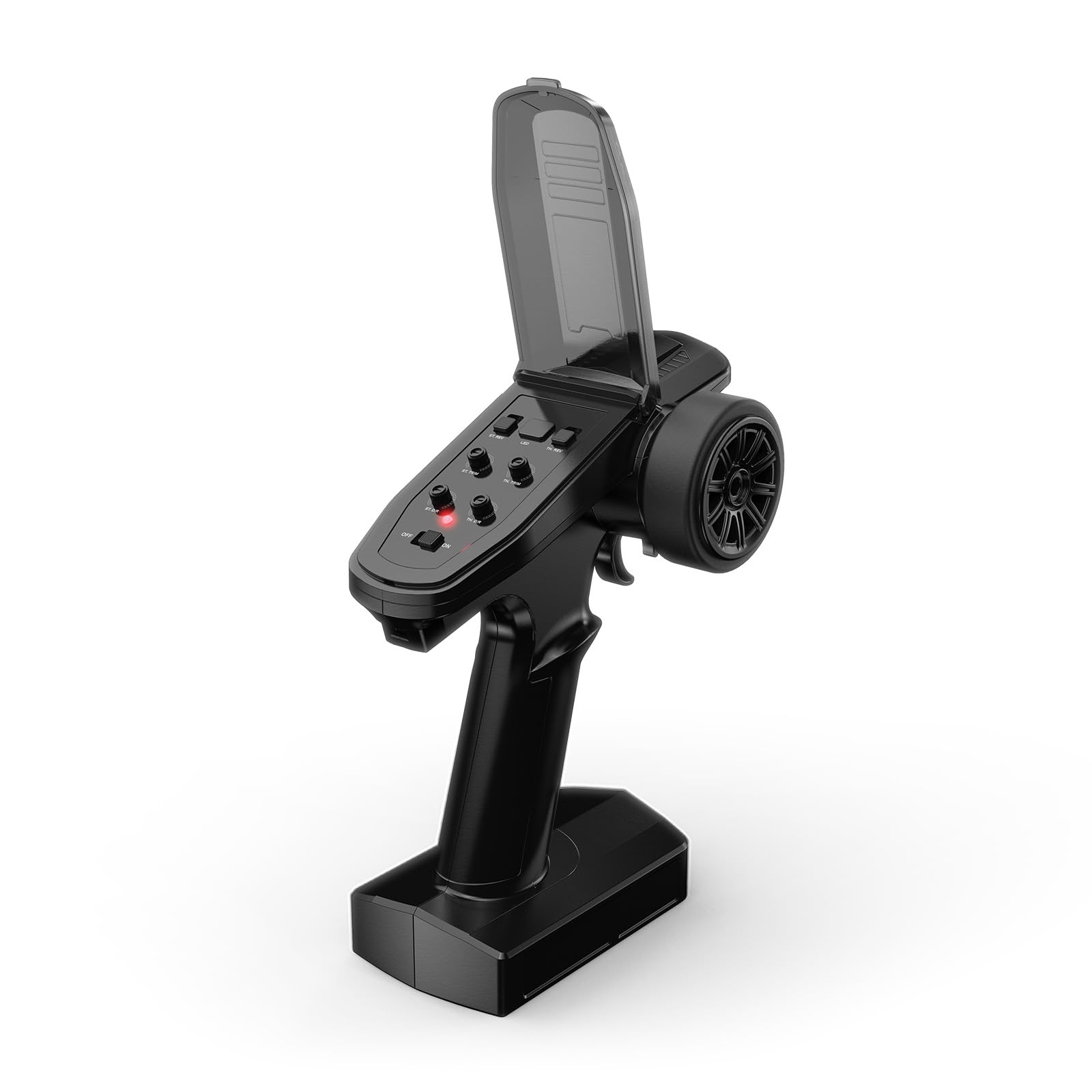
Figure 1: MJX T3D 2.4GHz RC Car Transmitter
The MJX T3D transmitter is designed for use with various MJX RC car models, offering enhanced control and functionality. This transmitter is a spare part and does not include a receiver.
2. Contenido del paquete
- MJX T3D 2.4GHz Transmitter
- R6FG Receiver (Note: While the product description states 'Receiver not Included', the video content indicates a receiver is often bundled. Please verify your specific package contents.)
- Battery Tray (for AA batteries)
- Acollador
- Manual de instrucciones
3. Configuración
3.1 Instalación de la batería
The transmitter requires 4 AA batteries (not included) or a compatible 2S LiPo battery. To install, open the battery compartment cover on the bottom of the transmitter. Insert the batteries according to the polarity markings or connect the LiPo battery to the designated connector. Close the cover securely.

Figure 2: Battery Tray for AA Batteries
3.2 Enlace del receptor
The R6FG receiver (if included) needs to be bound to the transmitter for communication. Refer to the detailed instructions in the included Instruction Manual for the specific binding procedure. Typically, this involves pressing a bind button on the receiver while powering it on, then initiating the binding process on the transmitter.

Figure 3: R6FG Receiver
4. Funcionamiento del transmisor
4.1 Controles del transmisor sobreview

Figure 4: Transmitter Controls
- Interruptor de alimentación: Enciende/apaga el transmisor.
- Luz indicadora: Muestra el estado de energía y conexión.
- Volante: Controls the direction of the RC car (left/right).
- Gatillo del acelerador: Controla el movimiento hacia adelante y hacia atrás y el frenado.
- ST.NOR REV (Steering Normal/Reverse): Invierte la dirección de la dirección.
- TH.NOR REV (Throttle Normal/Reverse): Invierte la dirección del acelerador.
- ST.TRIM (ajuste de dirección): Ajusta la posición neutra de la dirección.
- TH.TRIM (Ajuste del acelerador): Ajusta la posición neutra del acelerador.
- ST.D/R (Dirección de doble velocidad): Ajusta el ángulo de dirección máximo.
- TH.D/R (Velocidad dual del acelerador): Ajusta la salida máxima del acelerador.
- Control de luz: Controls the vehicle's lights (if applicable).
4.2 Funciones avanzadas
The MJX T3D transmitter offers advanced programming capabilities via its screen and buttons, allowing for fine-tuning of your RC vehicle's performance.

Figure 5: Transmitter Screen Display

Figure 6: Transmitter Screen Menu Options
- Tarifas duales: Adjust steering and throttle sensitivity on the fly for different driving conditions (e.g., crawling vs. high-speed).
- ABS Braking System: Program the transmitter to pulse the brakes, preventing wheel lock-up during hard braking and improving control.
- Steering Travel Adjustment: Fine-tune the endpoints of your steering servo for precise control and to prevent over-stressing the servo.
- Programmable Auxiliary Channels: Utilize additional channels for controlling accessories like winches, lights, or other custom functions on your RC car.
- Buddy Box System (DSC Port): The DSC port allows for trainer/student functionality, connecting two transmitters for shared control, ideal for learning or teaching.

Figure 7: USB and DSC Ports
4.3 Colocación de accesorios
The transmitter features a 1/4-20 screw mount on top, allowing for the attachment of various accessories such as mobile device holders or action cameras to record your RC experience.

Figure 8: Top Screw Mount
5. Mantenimiento
- Limpieza: Regularly wipe down the transmitter with a soft, dry cloth. Avoid using harsh chemicals or solvents.
- Cuidado de la batería: Remove batteries if the transmitter will not be used for an extended period to prevent leakage. If using LiPo batteries, follow proper charging and storage guidelines.
- Almacenamiento: Guarde el transmisor en un lugar fresco y seco, alejado de la luz solar directa y de temperaturas extremas.
6. Solución de problemas
- Sin energía: Check battery installation and ensure batteries are charged. Verify the power switch is in the 'ON' position.
- No Control: Ensure the transmitter and receiver are properly bound. Check all connections between the receiver and the RC car's components.
- Control errático: Check for interference from other 2.4GHz devices. Ensure the receiver antenna is properly positioned and not damaged.
- Steering/Throttle Not Centered: Use the ST.TRIM and TH.TRIM adjustments to fine-tune the neutral positions.
7. Especificaciones
- Número de artículo: T3D
- Dimensiones del producto: 0.2 x 0.5 x 0.5 pulgadas
- Peso del artículo: 1.6 onzas
- Fabricante: MJX
- Edad recomendada: 14 años y más
8. Garantía y soporte
For warranty information and technical support, please refer to the contact details provided on the product packaging or visit the official MJX webSitio. Conserve su recibo de compra como comprobante para reclamaciones de garantía.


