
1. Introducción
This manual provides essential information for the safe and efficient operation of your BOSYTRO AC to DC Converter, Model 0-24V 0-25A 600W. This device is designed to convert alternating current (AC) input from 110V-240V to an adjustable direct current (DC) output ranging from 0-24V and 0-25A, with a maximum power output of 600W. It is suitable for various applications including LED strips, motor pumps, CCTV systems, 3D printers, and laboratory equipment.
2. Instrucciones de seguridad
Read all safety instructions carefully before operating the device. Failure to follow these instructions may result in electric shock, fire, or serious injury.
- Vol de entradatage Selección: Asegúrese de que el volumen de entradatage selector switch (115V/230V) is set correctly for your local power supply before connecting the device to AC power. Incorrect selection can cause severe damage to the unit.
- Protección contra sobrecarga: The power supply features overload, over-current, short circuit, and over-temperature protection. However, it is recommended not to exceed 80% of the maximum rated power (480W for this 600W model) for continuous operation to ensure longevity and prevent overheating.
- Motor Loads: When powering motor devices, the peak power requirement of the motor should be considered. The power supply's maximum output should be at least two times the motor's peak power to handle startup surges.
- Ventilación: Ensure adequate ventilation around the unit. Do not block the cooling fan or ventilation holes. Operating in confined spaces without proper airflow can lead to overheating.
- Conexión: Always ensure all connections are secure and correct before applying power. Loose connections can cause arcing and damage.
- Desconexión: Disconnect the load before powering on the unit, especially if the current limiting setting is not at its minimum, to prevent sudden current surges to your device.
- Componentes internos: No abra la casing or attempt to repair the unit yourself. High voltages are present inside, posing a risk of electric shock. Refer all servicing to qualified personnel.
- Ambiente: Operate the device in a dry environment, away from moisture, flammable materials, and extreme temperatures.
3. Producto terminadoview
The BOSYTRO AC to DC Converter is designed for ease of use and reliability. Below are the key components and features of the device.
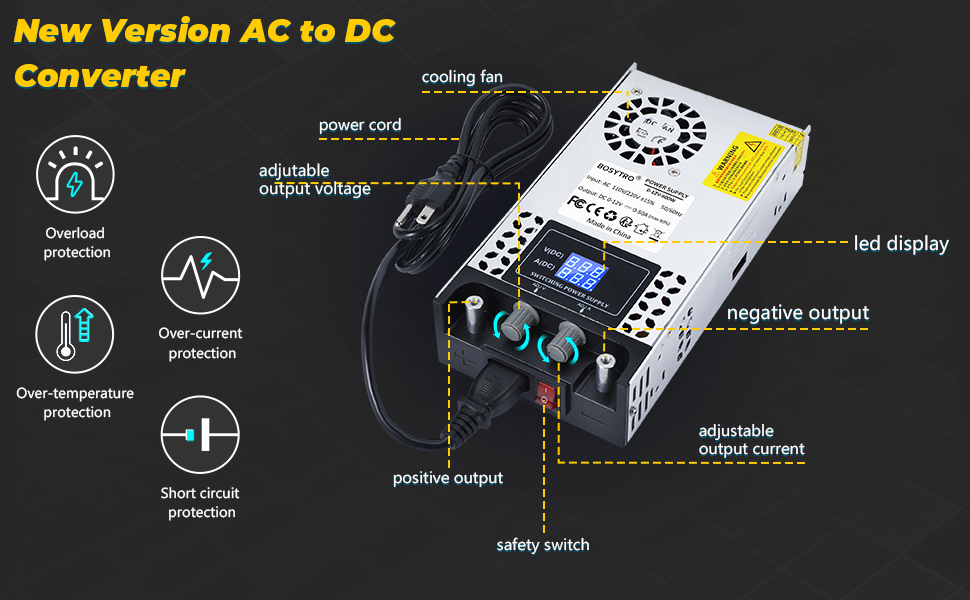
Figura 1: Frontal y superior view of the BOSYTRO AC to DC Converter, highlighting the cooling fan, power cord input, LED display, adjustable output voltage and current knobs, positive and negative output terminals, and safety switch.
Características principales:
- Salida ajustable: Independent knobs for precise adjustment of output voltage (0-24V) and current (0-25A).
- Pantalla LED: High-precision LED display shows real-time output voltage y corriente.
- Sistema de enfriamiento: Integrated aluminum alloy shell with multiple ventilation holes and a built-in cooling fan for efficient heat dissipation.
- Protección múltiple: Includes overload, over-current, short circuit, and over-temperature protection for device and load safety.
- Fácil operación: Features two nickel-plated copper terminals for direct connection via clamps, offering good electrical conductivity and high conversion efficiency.
- Vol de entradatagmiSelector: A switch on the side allows selection between 115V and 230V AC input.
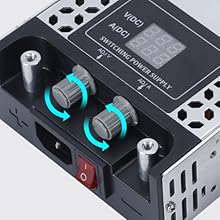
Figura 2: De cerca view of the adjustable voltage (ADJ V) and current (ADJ A) knobs, allowing fine-tuning of the power output.

Figura 3: Detail of the built-in cooling fan, which activates to prevent overheating during operation.

Figura 4: El volumen de entradatage selector switch, located on the side of the unit, for choosing between 115V and 230V AC input.
4. Especificaciones
| Característica | Especificación |
|---|---|
| Vol de entradatage | AC 110V-240V (selectable 115V/230V) |
| Vol de salidatage Rango | CC 0-24 V (ajustable) |
| Rango de corriente de salida | DC 0-25A (Adjustable) |
| Potencia máxima de salida | 600 W |
| Dimensiones del producto | 7.87 x 4.33 x 1.97 pulgadas (20 x 11 x 5 cm) |
| Peso del artículo | 2.2 libras (1 kg) |
| Material | Aluminio |
| Temperatura de funcionamiento | -10°C a 60°C |
| Temperatura de almacenamiento | -40°C a 85°C |
| Tipo de conector | Alligator Clips, Cable Lugs (included) |
5. Configuración
Follow these steps to set up your BOSYTRO AC to DC Converter:
- Desembalaje e inspección: Carefully remove the power supply and all accessories from the packaging. Inspect the unit for any signs of physical damage.
- Seleccionar volumen de entradatage: Locate the red switch on the side of the unit (refer to Figure 4). Set it to either 115 V or 230 V according to your local AC power supply. WARNING: Incorrect voltage selection will damage the unit.
- Conecte el cable de alimentación: Insert the provided AC power cord into the power input socket on the front of the unit. Ensure it is firmly seated.
- Prepare Output Connections: The unit features two nickel-plated copper terminals for output. You can use the included alligator clips or cable lugs for connecting your load. Ensure the positive (+) terminal of the power supply connects to the positive (+) terminal of your load, and the negative (-) terminal connects to the negative (-) terminal of your load.
- Ajuste inicial: Before connecting your load, it is recommended to turn the voltage (ADJ V) and current (ADJ A) adjustment knobs fully counter-clockwise to their minimum settings. This prevents accidental over-voltage or over-current to your connected device.
- Conectar carga: With the power supply turned OFF and the output knobs at minimum, connect your device to the output terminals using the appropriate connectors. Ensure connections are secure.
6. Instrucciones de funcionamiento
Una vez configurada la unidad, siga estos pasos para su funcionamiento:
- Encendido: Plug the AC power cord into a wall outlet. Flip the red safety switch on the front of the unit to the 'ON' position. The LED display will illuminate, showing the current voltage y lecturas actuales.
- Ajustar volumentage: Gire lentamente el volumentage adjustment knob (ADJ V) clockwise to increase the output voltage to your desired level. Observe the LED display for the real-time voltage lectura.
- Ajustar corriente: Slowly turn the current adjustment knob (ADJ A) clockwise to increase the output current. This knob sets the maximum current limit. The actual current drawn will depend on your connected load, up to this set limit.
- Pantalla del monitor: Continuously monitor the LED display to ensure the output voltage and current remain within the safe operating limits of your connected device.
- Funcionamiento del ventilador de refrigeración: The built-in cooling fan will activate automatically when the internal temperature rises to dissipate heat. Its operation is normal and indicates the cooling system is functioning.
- Apagado: To turn off the unit, first turn the voltage and current adjustment knobs fully counter-clockwise to their minimum settings. Then, flip the red safety switch to the 'OFF' position. Finally, unplug the AC power cord from the wall outlet.

Figura 5: Examples of connecting loads using alligator clips and cable lugs to the power supply's output terminals.
7. Mantenimiento
Proper maintenance ensures the longevity and reliable performance of your power supply.
- Limpieza: Regularly clean the exterior of the unit with a soft, dry cloth. Do not use liquid cleaners or solvents. Ensure the ventilation holes and cooling fan are free from dust and debris.
- Ventilación: Periodically check that the cooling fan is operating correctly and that airflow is not obstructed. A malfunctioning fan can lead to overheating and damage.
- Almacenamiento: Cuando no esté en uso durante períodos prolongados, guarde la fuente de alimentación en un lugar fresco y seco, lejos de la luz solar directa y de temperaturas extremas.
- Conexiones: Periodically inspect all input and output connections for wear, corrosion, or looseness. Tighten or replace as necessary.
8. Solución de problemas
If you encounter issues with your BOSYTRO AC to DC Converter, refer to the following common problems and solutions:
| Problema | Posible causa | Solución |
|---|---|---|
| Unit does not power on / No display |
|
|
| Sin volumen de salidatage/corriente |
|
|
| El ventilador de enfriamiento no funciona |
|
|
| Vol inexactotage/current display |
|
|
| Arcing sounds or burning smell |
|
|
9. Garantía y soporte
BOSYTRO products are designed for reliability and performance. For specific warranty information, please refer to the documentation included with your purchase or contact BOSYTRO customer support directly. If you experience any issues that cannot be resolved using the troubleshooting guide, please reach out to our support team for assistance.
Información del contacto: Please refer to your purchase documentation or the official BOSYTRO webSitio para obtener los detalles de contacto de atención al cliente más actualizados.