Introducción
This manual provides essential information for setting up, operating, maintaining, and troubleshooting your Thunderobot Zero 18 Pro 5070 Ti Gaming Laptop. Please read this guide thoroughly to ensure optimal performance and longevity of your device.
¿Qué hay en la caja?
Al desembalar, verifique que estén presentes todos los elementos enumerados a continuación:
- THUNDEROBOT Zero Laptop
- Adaptador de corriente
- Manual de usuario (este documento)
- Tarjeta de garantía
If any items are missing or damaged, contact your retailer or Thunderobot customer support immediately.
Configuración
Encendido inicial
- Connect the power adapter to the laptop's power input port and then to a wall outlet.
- Abra la tapa de la computadora portátil.
- Presione el botón de encendido para encender la computadora portátil.
- Siga las instrucciones en pantalla para completar la configuración de Windows 11 Home.
Conexión de periféricos
Utilize the available ports to connect external devices such as a mouse, keyboard, external display, or other accessories. Refer to the "Connectivity (Ports)" section for port details.
Instrucciones de funcionamiento
Encendido/apagado
- To power on: Press the power button located on the keyboard deck.
- To shut down: Click the Start button, then Power, and select "Shut down".
- To restart: Click the Start button, then Power, and select "Restart".
- To sleep: Close the laptop lid or click the Start button, then Power, and select "Sleep".
Keyboard and RGB Lighting
The laptop features a full-size keyboard with per-key customizable RGB backlighting and a dedicated numeric keypad.
- Per-Key RGB Backlight: Customize individual key lighting through the AI Intelligent Control Center software.
- Teclas de función: Utilice el Fn key in combination with other keys for various functions (e.g., volume control, screen brightness, keyboard backlight adjustment).
- Cambio de modo de rendimiento: Dedicated keys (Fn+Space) allow for quick toggling between performance profiles.
- One-Click Cooling: A dedicated key (often near the numeric keypad) can activate maximum cooling. Ensure cooling mode is exited before using the first three keys to switch modes.
Características de la pantalla
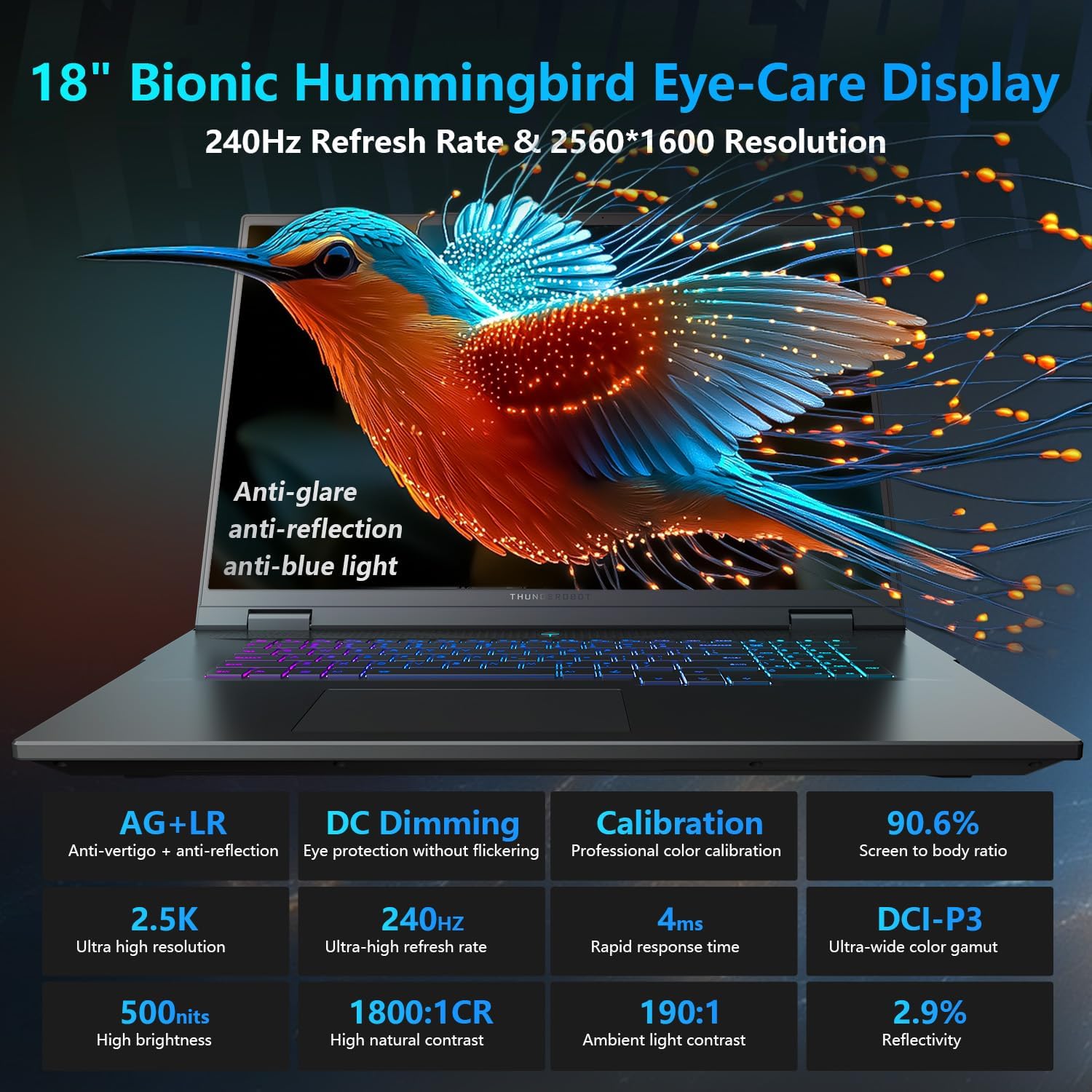
The 18-inch QHD+ (2560x1600) Bionic Hummingbird Eye-Care display offers a 240Hz refresh rate and 4ms response time for clear and fluid visuals. It includes anti-glare, anti-reflection, and anti-blue light technologies for eye comfort.

Connectivity (Ports)
The laptop is equipped with various ports for extensive connectivity:
- 3 puertos USB tipo A de supervelocidad
- 2 x Superspeed USB Type-C ports (including Thunderbolt 5 support)
- 1 x HDMI port (HDMI 2.1)
- 1 puerto Ethernet RJ-45
- 1 puerto de audio (3.5 mm)
- Lector de tarjetas SD UHS-II
- Wi-Fi 6E for high-speed wireless internet
- Bluetooth for wireless peripheral connections

Sistema de enfriamiento
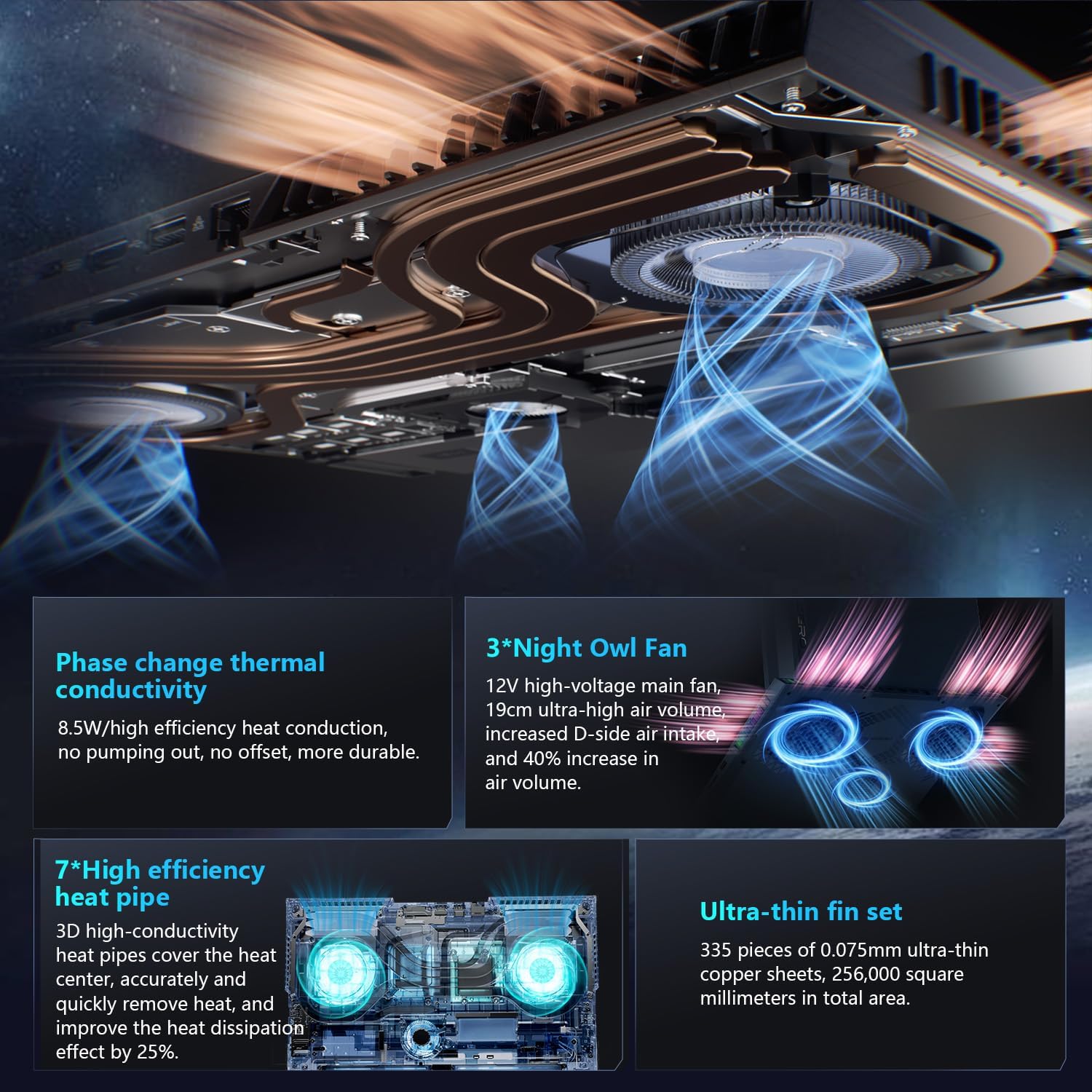
The advanced cooling system features 3 Night Owl fans, 7 high-efficiency heat pipes, and 338 ultra-thin copper fins to ensure optimal thermal management during intensive use, allowing for 270W super performance release.
AI Intelligent Control Center
The AI Intelligent Control Center software allows for comprehensive system management, including performance tuning, intelligent light adjustment, and personalized customization. This includes monitoring CPU/GPU temperatures and fan speeds.
- Ajuste del rendimiento: Adjust power settings for quiet, balanced, or turbo modes.
- Ajuste de luz inteligente: Customize keyboard, strip, and logo RGB lighting effects.
- Monitoreo del sistema: View real-time CPU and GPU status.
Nota: Para cambiar el modo del sistema en el Centro de control es necesario que el dispositivo esté conectado a una fuente de alimentación.
Mantenimiento
Limpieza de su computadora portátil
- Pantalla: Utilice un paño suave y sin pelusa ligeramenteampLimpiar con agua o un limpiador de pantallas. Evitar productos químicos agresivos.
- Teclado y chasis: Utilice un paño suave para limpiar las superficies. Para eliminar el polvo en las grietas, utilice aire comprimido.
- rejillas de ventilación: Limpie periódicamente las rejillas de ventilación con aire comprimido para evitar la acumulación de polvo, que puede afectar el rendimiento.
Cuidado de la batería
- Evite descargar completamente la batería con frecuencia.
- Guarde la computadora portátil en un lugar fresco y seco si no la utiliza durante períodos prolongados.
- Para una salud óptima de la batería, evite temperaturas extremas.
Actualizaciones de software
Regularly check for and install operating system updates (Windows Update) and driver updates (via Thunderobot's official website or the AI Intelligent Control Center) to ensure system stability and performance.
Solución de problemas
| Problema | Posible causa | Solución |
|---|---|---|
| La computadora portátil no se enciende. | Sin energía, batería descargada o problema de hardware. |
|
| La pantalla está en blanco o negra. | Configuración de pantalla, monitor externo conectado o problema de hardware. |
|
| Sobrecalentamiento durante el uso. | Blocked vents, high performance settings, or dust buildup. |
|
| Problemas de conexión Wi-Fi. | Wi-Fi deshabilitado, problemas con el controlador o problemas con el enrutador. |
|
For further assistance, please contact Thunderobot customer support.
Presupuesto
| Característica | Detalle |
|---|---|
| Nombre del modelo | Cero 18 Pro |
| Procesador | Intel Core Ultra 9 275HX (24 núcleos, 24 subprocesos, hasta 5.40 GHz) |
| Gráficos | NVIDIA GeForce RTX 5070 Ti (8 GB GDDR6 Dedicated) |
| RAM | 32 GB DDR5 (4800 MHz) |
| Almacenamiento | SSD PCIe M.2 de 2 TB |
| Mostrar | Pantalla Bionic Hummingbird Eye-Care de 18 pulgadas QHD+ (2560x1600) y 240 Hz |
| Sistema operativo | Inicio de Windows 11 |
| Conectividad | Wi-Fi 6E, Bluetooth, 3x USB-A, 2x USB-C (Thunderbolt 5), HDMI 2.1, RJ-45, Audio Port |
| Teclado | Teclado numérico con retroiluminación RGB por tecla |
| Dimensiones (LxAnxAl) | 16.04 x 11.78 x 1.41 pulgadas |
| Peso del artículo | 15 libras |
| Fuente de poder | CA y batería |
Garantía y soporte
Cada computadora portátil Thunderobot incluye un Garantía de 12 meses, ofreciendo soporte experto, diagnósticos exhaustivos y repuestos originales si se necesita una reparación. Además, un Garantía de 90 días Se incluye en todas las piezas de repuesto en garantía, lo que garantiza reparaciones sin complicaciones. Su completa satisfacción es nuestro compromiso.
For technical support, warranty claims, or service inquiries, please visit the official Thunderobot website or contact their customer service department. Keep your purchase receipt and serial number handy for faster service.