
1. Introducción
Gracias por la compraasing the Supersonic Professional Stereo Amplifier AV-972SA. This amplifier is designed to provide high-fidelity audio for your home entertainment or karaoke system. With its versatile features, including USB/SD card playback, FM radio, and microphone inputs, it offers a powerful and clear sound experience. Please read this manual carefully before operating the unit to ensure proper use and to maximize its performance.
2. Instrucciones de seguridad importantes
- Fuente de alimentación: Asegúrese de que la fuente de alimentación voltage matches the requirements specified on the unit (220V~250V/50Hz).
- Ventilación: No obstruya las aberturas de ventilación. Instale el producto según las instrucciones del fabricante.
- Agua y humedad: No exponga este aparato a la lluvia ni a la humedad. No coloque objetos con líquido, como jarrones, sobre él.
- Calor: No lo instale cerca de fuentes de calor como radiadores, rejillas de calefacción, estufas u otros aparatos (incluidos ampificadores) que producen calor.
- Limpieza: Limpiar únicamente con un paño seco.
- Servicio: No intente reparar este producto usted mismo. Refiera todo el servicio a personal de servicio calificado.
- Conexión de altavoz: Ensure correct polarity when connecting speakers to prevent damage to the ampElevador y altavoces.
3. Características principales
- Luxury Color Pointer Screen Display
- High-Fidelity Stereo Dynamic Ampdiseño más duradero
- Bass-enhancement Technology
- Potente salida de 3000 W
- Professional Karaoke FM Radio Tuner
- USB/SD Card Playback for MP3 files
- Low Leak Magnetic Ring type Voltage
- Optimized for use with 12", 15", and 18" loudspeakers
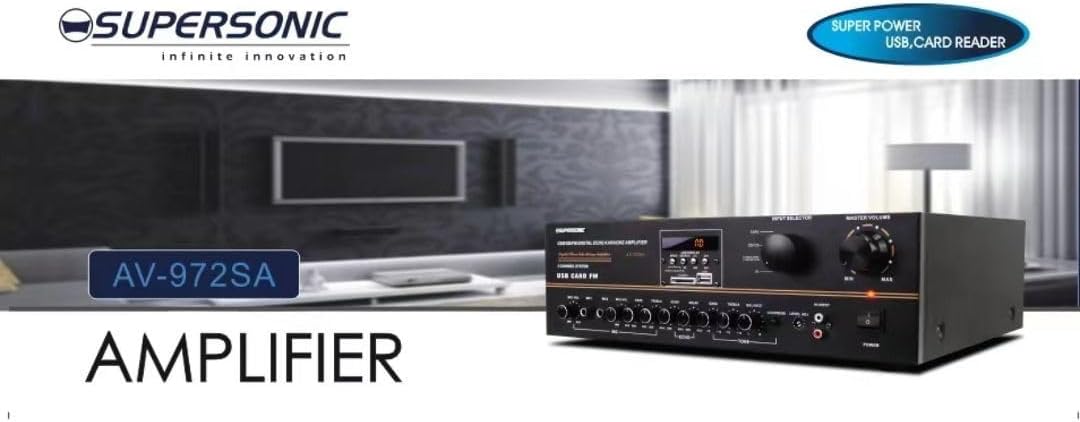
Imagen 3.1: A visual representation of the key features of the Supersonic AV-972SA amplifier, including its display, power output, and connectivity options.
4. Producto terminadoview
The Supersonic AV-972SA amplifier features a user-friendly front panel for easy control and a rear panel for all necessary connections.
4.1 Panel frontal

Imagen 4.1: Frente view of the Supersonic AV-972SA amplificador, espectáculoasing its controls, display, and input ports in a home setting.
El panel frontal incluye:
- Botón de encendido: Gira el ampmás vivaz encendido o apagado.
- Control de volumen maestro: Ajusta el volumen de salida general.
- Controles de graves y agudos: Adjusts low and high frequency response.
- Selector de entrada: Switches between different audio sources (e.g., USB, SD, FM, AUX).
- Ranura para tarjeta USB/SD: Para reproducir audio files directamente desde unidades USB o tarjetas SD.
- FM Tuner Controls: For radio station selection and tuning.
- Entradas de micrófono: For connecting microphones for karaoke or public address.
- Pantalla de visualización: Muestra el modo actual, información de la pista o frecuencia FM.
4.2 Panel trasero
The rear panel provides all necessary connections for speakers, power, and external audio sources.
- Terminales de altavoz: Connect your loudspeakers here. Ensure correct polarity (+ to + and - to -).
- Entrada de audio (RCA): For connecting external audio devices like CD players, DVD players, or other audio sources.
- Entrada del cable de alimentación: Conecte aquí el cable de alimentación proporcionado.
- Entrada de antena FM: Conecte la antena FM para una mejor recepción de radio.
5. Guía de configuración
Follow these steps to set up your Supersonic AV-972SA ampmás duradero:
- Colocación: Coloque el amplifier on a stable, flat surface with adequate ventilation around it. Avoid direct sunlight, heat sources, or areas with high humidity.
- Conexión de altavoz: Connect your loudspeakers to the speaker terminals on the rear panel. Match the positive (+) terminal on the amplifier to the positive (+) terminal on your speaker, and the negative (-) to the negative (-). Ensure all connections are secure. This amplifier is designed to work best with 12", 15", or 18" loudspeakers.
- Conexión de fuente de audio:
- Dispositivos externos: Connect your CD player, DVD player, or other audio sources to the RCA audio input jacks on the rear panel.
- Tarjeta USB / SD: Insert a USB flash drive or SD card into the respective slot on the front panel.
- Antena FM: Connect the FM antenna to the designated input on the rear panel for optimal radio reception.
- Conexión de energía: Asegúrese de que ampEl interruptor de encendido del energizador está en la posición de apagado. Conecte el cable de alimentación a la toma de corriente. amplifier's power input and then plug it into a suitable 220V~250V/50Hz AC power outlet.
6. Instrucciones de funcionamiento
6.1 Encendido / Apagado
Presione el Botón de encendido en el panel frontal para girar el amplifier ON. The display will illuminate. Press it again to turn the amplificador apagado.
6.2 Selección de la fuente de audio
Utilice el Selector de entrada button or knob on the front panel to cycle through available audio sources: USB, SD, FM, or AUX (RCA input).
6.3 Control de volumen y tono
- Volumen principal: Girar el Volumen maestro knob to adjust the overall sound level. Start with a low volume and gradually increase it.
- Graves agudos: Utilice el Bajo y Triplicar knobs to fine-tune the low and high frequencies of the audio output to your preference.
6.4 Reproducción de tarjeta USB/SD
Once a USB drive or SD card containing MP3 audio files is inserted, the amplifier will automatically switch to USB/SD mode and begin playback. Use the control buttons (Play/Pause, Next, Previous) on the front panel to manage playback.
6.5 Funcionamiento de la radio FM
Select the FM input using the Selector de entrada. Use the FM tuner controls to scan for and select radio stations. The display will show the current frequency.
6.6 Uso del micrófono (karaoke)
Connect your microphones to the microphone input jacks on the front panel. Adjust the microphone volume and echo effects (if available) using the dedicated controls. Ensure the main volume is set appropriately to avoid feedback.
7. Mantenimiento
- Limpieza: Desconecte la alimentación antes de limpiar. Utilice un paño suave y seco para limpiar el exterior del amplificador. No utilice limpiadores líquidos ni aerosoles.
- Ventilación: Compruebe periódicamente que las aberturas de ventilación estén libres de polvo y residuos para evitar el sobrecalentamiento.
- Almacenamiento: Si almacena el ampSi va a almacenar el dispositivo durante un período prolongado, asegúrese de guardarlo en un lugar fresco y seco, alejado de la luz solar directa y de temperaturas extremas.
8. Solución de problemas
| Problema | Posible causa | Solución |
|---|---|---|
| Sin poder | Cable de alimentación no conectado; Toma de corriente defectuosa; Ampinterruptor de encendido del elevador apagado | Verifique la conexión del cable de alimentación; Pruebe con una toma de corriente diferente; Asegúrese de que el interruptor de encendido esté encendido |
| No hay salida de sonido | Volume too low; Incorrect input selected; Speaker wires loose or incorrectly connected; Faulty audio source | Increase master volume; Select correct input; Check speaker connections and polarity; Test with a different audio source |
| Recepción de FM deficiente | Antenna not connected or poorly positioned; Weak signal | Connect FM antenna securely; Adjust antenna position; Try manual tuning |
| USB/SD no reproduce | Incorrecto file format; USB/SD card faulty or not inserted correctly; Amplifier not in USB/SD mode | Asegurar files are MP3 format; Reinsert USB/SD card; Select USB/SD input mode |
9. Especificaciones
| Característica | Especificación |
|---|---|
| Marca | Supersónico |
| Número de modelo | AMP-AV972SA |
| Salida Wattage | 3000 W |
| Tecnología de conectividad | USB |
| Característica especial | Diseño compacto |
| Color | Negro |
| Dimensiones del producto | 25D x 45W x 26H centímetros |
| Peso del artículo | 1 kilogramos |
| Método de control | Tocar |
| Fuente de alimentación | 220V ~ 250V / 50Hz |
10. Garantía y soporte
This Supersonic AV-972SA ampEl amplificador viene con un 6 meses de garantía del fabricante Desde la fecha de compra. Esta garantía cubre defectos de fabricación en condiciones normales de uso. No cubre daños causados por mal uso, accidentes, modificaciones no autorizadas o instalación incorrecta.
For warranty claims or technical support, please contact your retailer or the Supersonic customer service department. Please have your proof of purchase and product model number (AMP-AV972SA) ready when contacting support.