
1. Introducción
This manual provides detailed instructions for the setup, operation, maintenance, and troubleshooting of your Gvyugke Captain 780 Wireless Gaming Headset. Please read this manual thoroughly before using the product to ensure optimal performance and longevity.

Figure 1: Gvyugke Captain 780 Wireless Gaming Headset
2. Contenido del paquete
Verifique que todos los elementos enumerados a continuación estén incluidos en el paquete de su producto:
- 1 x Gvyugke Captain 780 Wireless Gaming Headset
- 1 adaptador inalámbrico USB de 2.4 GHz
- Cable de carga 1 x USB-C
- 1 cable de audio de 3.5 mm
- 1 x Manual de usuario (este documento)

Figura 2: Auriculares y accesorios incluidos
3. Características del producto
- Conectividad 4 en 1: Supports 2.4GHz wireless, Bluetooth 5.3, and wired (3.5mm) connections for versatile use across multiple platforms.
- Sonido envolvente 7.1 inmersivo: Equipped with 50mm speakers for enhanced audio clarity and positional accuracy in games.
- Micrófono con cancelación de ruido: A rotating microphone designed to reduce background noise for clear communication.
- Mayor duración de la batería: Features a 1200mAh battery providing up to 70 hours of playtime, with quick charge capability (2 hours of use after 5 minutes of charging).
- Diseño cómodo: Protein leather ear pads with memory foam and an adjustable headband ensure comfort during prolonged use.
- Plegable y ligero: Diseñado para portabilidad y fácil almacenamiento.
- Iluminación LED azul: Integrated lighting effects enhance the gaming aesthetic.
4. Guía de configuración
4.1. Conexión inalámbrica de 2.4 GHz (USB Dongle)
This mode offers low-latency audio for gaming on compatible devices.
- Insert the 2.4GHz USB wireless dongle into an available USB port on your PC, PS5, PS4, or Nintendo Switch (in docked mode).
- Power on your Gvyugke Captain 780 headset.
- Slide the connection mode switch on the headset to the '2.4G' position.
- The headset will automatically pair with the dongle. A solid blue light on the headset indicates a successful connection.

Figure 3: 2.4GHz USB Wireless Dongle
4.2. Conexión mediante Bluetooth 5.3
Use Bluetooth for mobile devices, tablets, and laptops.
- Asegúrese de que el auricular esté encendido.
- Slide the connection mode switch on the headset to the 'BT' (Bluetooth) position. The LED indicator will flash blue, indicating pairing mode.
- On your device (phone, tablet, laptop), go to Bluetooth settings and search for 'Captain 780'.
- Select 'Captain 780' to pair. The LED indicator will turn solid blue upon successful connection.
4.3. Connecting via Wired (3.5mm Audio Cable)
For devices that support a 3.5mm audio jack, such as Xbox controllers or when battery is low.
- Conecte un extremo del cable de audio de 3.5 mm al puerto de 3.5 mm de los auriculares.
- Conecte el otro extremo al conector de audio de 3.5 mm de su dispositivo.
- El auricular cambiará automáticamente al modo cableado.
4.4. Device Compatibility Overview

Figure 4: 4-in-1 Connection Compatibility
| Modo de conexión | Dispositivos compatibles | Notas |
|---|---|---|
| 2.4GHz Wireless (USB-A) | PC, PS4, PS5, Laptop, Desktop | Low latency, stable connection. |
| 2.4GHz Wireless (USB-C) | Nintendo Switch, Phone, Tablet | Requires USB-C adapter for some devices. |
| Bluetooth 5.3 | Teléfono, tableta, ordenador portátil | For general audio and calls. |
| Con cable (conector de 3.5 mm) | PS4, PS5, Xbox, PC, Nintendo Switch | Microphone functionality may be limited on Switch in wired mode due to platform limitations. |
5. Instrucciones de funcionamiento
5.1. Controles de los auriculares
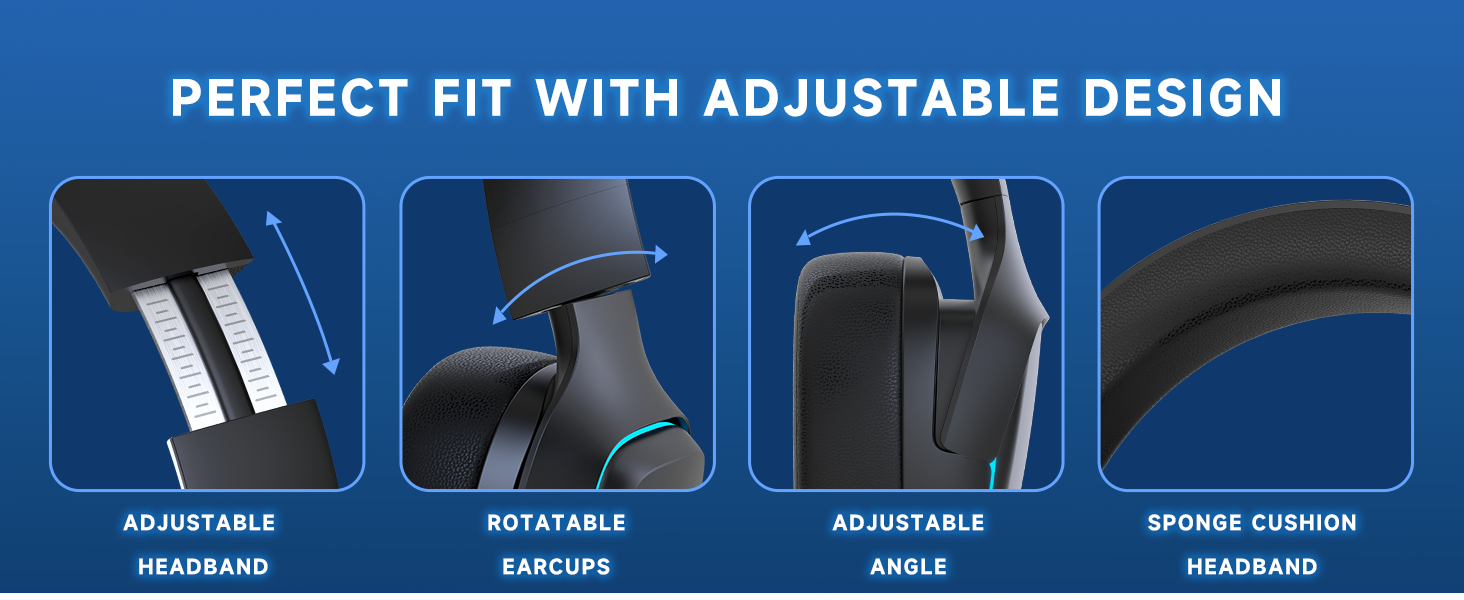
Figura 5: Disposición del control de los auriculares
- Indicador de estado de energía: Muestra el nivel de la batería y el estado de la conexión.
- Botón de encendido/silencio: Press and hold to power on/off. Short press to mute/unmute microphone.
- Rueda de volumen: Desplácese hacia arriba o hacia abajo para ajustar el volumen del audio.
- BT/2.4G Mode Switch Button: Slide to switch between Bluetooth and 2.4GHz wireless modes.
- Puerto de carga tipo C: Conecte el cable USB-C para cargar.
- Indicador de estado de carga: Shows charging progress.
5.2. Uso del micrófono
The rotating noise-canceling microphone can be adjusted for optimal voice pickup. Flip the microphone up to automatically mute it, and flip it down to unmute.

Figure 6: Noise-Canceling Microphone
5.3. Cargar los auriculares
Connect the provided USB-C charging cable to the headset's charging port and a power source. The charging indicator will show the charging status. A full charge provides up to 70 hours of playtime. Quick charge provides 2 hours of use after just 5 minutes of charging.

Figura 7: Duración de la batería de 70 horas
6. Mantenimiento
- Limpieza: Utilice un paño suave y seco para limpiar los auriculares. Evite utilizar productos químicos agresivos o materiales abrasivos.
- Almacenamiento: Guarde los auriculares en un lugar fresco y seco, alejados de la luz solar directa y temperaturas extremas. Su diseño plegable permite un almacenamiento compacto.
- Cuidado de la batería: Para prolongar la vida útil de la batería, evite descargar completamente los auriculares con frecuencia. Cárguelos regularmente, incluso si no los usa durante períodos prolongados.

Figura 8: Diseño plegable para almacenamiento
7. Solución de problemas
7.1. No hay sonido o el volumen es bajo
- Ensure the headset is powered on and connected correctly (2.4GHz, Bluetooth, or wired).
- Verifique la rueda de volumen de los auriculares y la configuración de volumen en su dispositivo conectado.
- Si utiliza una conexión inalámbrica de 2.4 GHz, asegúrese de que el dispositivo USB esté conectado de forma segura y sea reconocido por el dispositivo.
7.2. El micrófono no funciona
- Ensure the microphone is flipped down and not muted via the power/mute button.
- Check the microphone input settings on your connected device. Select 'Captain 780' as the input device.
- For Nintendo Switch in wired mode, microphone functionality may be limited.
7.3. Problemas de conexión
- 2.4 GHz: Ensure the dongle is within range and there are no major obstructions. Try re-pairing by turning the headset off and on, and re-inserting the dongle.
- Bluetooth: Asegúrate de que el Bluetooth esté activado en tu dispositivo y que los auriculares estén en modo de emparejamiento. Olvídalo en la configuración de Bluetooth e intenta emparejarlo de nuevo.
7.4. Echo in Microphone
If you experience an echo in the microphone, especially on PC, it might be due to a monitoring function being enabled. Follow the steps in the video below to adjust your sound settings.
Video 1: How to resolve microphone echo on PC. This video demonstrates navigating Windows sound settings to disable the microphone monitoring function, which can cause an echo.
8. Especificaciones técnicas
| Característica | Especificación |
|---|---|
| Nombre del modelo | Capitán 780 |
| Tecnología de conectividad | Inalámbrico (2.4 GHz, Bluetooth 5.3), con cable (conector de 3.5 mm) |
| Tamaño del controlador de audio | 50 milímetros |
| Control de ruido | Cancelación pasiva de ruido |
| Respuesta de frecuencia | 20 kHz |
| Latencia de audio | 20 milisegundos (2.4 GHz) |
| Duración de la batería | Hasta 70 horas |
| Tiempo de carga | 2 horas |
| Peso del artículo | 0.49 kilogramos (1.08 libras) |
| Material | Plástico |
| Dispositivos compatibles | PC, PS5, PS4, Nintendo Switch, Phone, Xbox (wired) |
9. Garantía y soporte
9.1. Información de garantía
Gvyugke products are manufactured with high-quality standards. For specific warranty details and terms, please refer to the warranty card included in your product packaging or visit the official Gvyugke websitio.
9.2. Atención al cliente
If you encounter any issues or have questions regarding your Gvyugke Captain 780 headset, please contact our customer support team. You can find contact information and additional resources on the Gvyugke Brand Store on Amazon.