
1. Introducción
Thank you for choosing the New Bee Clip-On Guitar Tuner. This rechargeable chromatic tuner is designed for precise and easy tuning of various string instruments, including guitar, bass, ukulele, and violin. Featuring a bright color screen, 360° rotatable clip, and long-lasting rechargeable battery, it offers convenience and accuracy for musicians of all levels. This manual provides essential information for proper setup, operation, and maintenance of your device.

Figure 1.1: New Bee Clip-On Guitar Tuner with USB-C charging cable. The tuner features a clear color display and a sturdy clip mechanism.
2. Contenido del paquete
- New Bee Clip-On Guitar Tuner (1 unit)
- Cable de carga USB-C (1 unidad)
- LIR2030 Rechargeable Battery (2 units, 1 pre-installed, 1 spare)
- Manual de usuario (este documento)
3. Características del producto
- Bright Color Screen & Easy Reading: High-brightness color display ensures clear visibility in any light, with intuitive note indicators for quick tuning.
- Ultra-Accurate for 5+ Instruments: Precision tuning for guitar, bass, ukulele, violin, chromatic, and 12-tone equal temperament modes.
- 360° Adjustable & Scratch-Proof Clip: Rotate the screen for perfect viewing angles; silicone-padded clamp grips securely without damaging your instrument.
- Batería recargable de larga duración: Equipped with 2 USB rechargeable LIR2030 batteries, supporting 130+ tuning sessions per charge (1-year lifespan), eco-friendly and cost-saving.
- Compact & Effortless to Use: Pocket-sized, lightweight design with plug-and-play simplicity—ideal for beginners and professionals.

Figure 3.1: The upgraded tuner features a bright color screen for enhanced readability compared to older models.

Figure 3.2: The tuner is compatible with various instruments including guitar, bass, ukulele, and violin, offering dedicated tuning modes.
4. Configuración
4.1 Charging the Tuner
Before first use, or when the battery indicator on the screen shows low power, charge the tuner using the provided USB-C cable. Connect the USB-C end to the tuner's charging port and the USB-A end to a standard USB power adapter (not included) or a computer USB port.
- El indicador de batería en la pantalla mostrará el estado de carga.
- Una carga completa suele tardar aproximadamente 30 minutos.
- The tuner is equipped with two LIR2030 rechargeable batteries (one pre-installed, one spare).
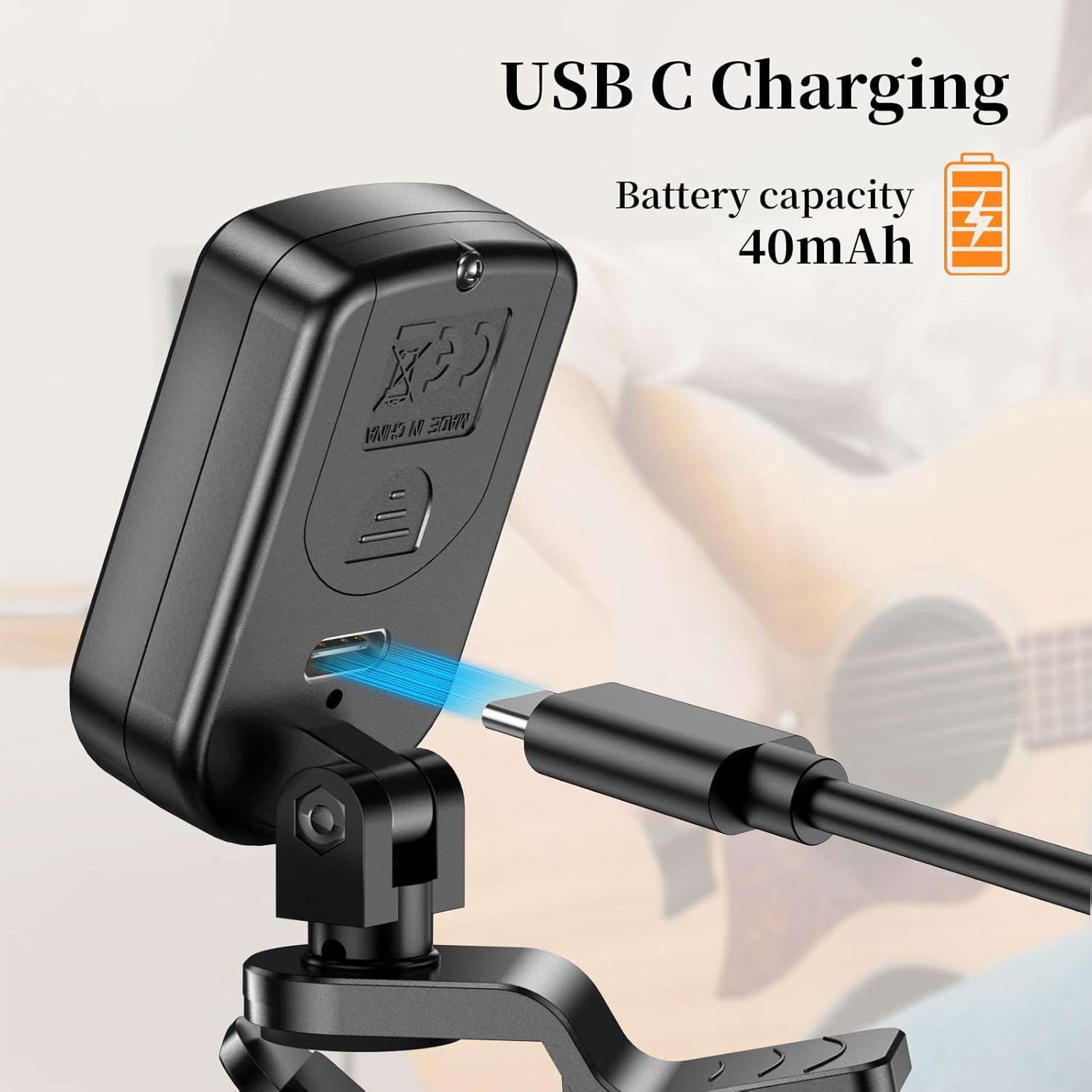
Figure 4.1: The tuner features a convenient USB-C charging port for easy recharging.
4.2 Cómo conectar el afinador a su instrumento
The tuner features a clip-on design for easy attachment to the headstock of your instrument.
- Gently open the clip by pressing the two ends together.
- Attach the clip securely to the headstock of your guitar, bass, ukulele, or violin. Ensure the silicone pads on the clip make firm contact with the instrument's surface to prevent scratches and ensure accurate vibration detection.
- Ajuste el ángulo de la pantalla para una visualización óptima. viewing. The tuner head can rotate 360° and tilt 135° forward and backward.

Figure 4.2: The tuner offers flexible rotation (360°) and tilt (135°) for optimal viewing angles, with silicone pads for secure, scratch-free attachment.
5. Instrucciones de funcionamiento
5.1 Encendido/apagado y selección de modo
Locate the power/mode button on the front of the tuner, below the screen.
- Encendido: Mantenga presionado el botón durante aproximadamente 2 segundos.
- Apagado: Press and hold the button for approximately 2 seconds. The tuner will also automatically power off after 3 minutes of inactivity to conserve battery.
- Cambiar modo: Briefly press the button to cycle through the available tuning modes:
| Modo de visualización | Instrument/Type |
|---|---|
| C | Chromatic (for all instruments and custom tunings) |
| G | Guitarra |
| B | Bajo |
| U | Ukelele |
| V | Violín |
5.2 Afinación de su instrumento
Once the tuner is powered on and the correct mode is selected:
- Pluck a single string on your instrument. The tuner will detect the vibration and display the note name and pitch accuracy on the screen.
- Interpretación de la pantalla:
- Plano: If the needle points to the left and the display is red/yellow, the note is flat. Tighten the string until the needle is centered and the display turns green.
- Afinado: When the needle is centered (0) and the display is green, the note is in tune.
- Afilado: If the needle points to the right and the display is red/yellow, the note is sharp. Loosen the string until the needle is centered and the display turns green.
- Repita esto para todas las cuerdas hasta que su instrumento esté perfectamente afinado.

Figure 5.1: The tuner's intuitive display clearly indicates whether a note is flat, in tune, or sharp using a needle and color changes.
6. Mantenimiento
- Limpieza: Limpie el sintonizador con un paño suave y seco. No utilice limpiadores abrasivos ni disolventes.
- Cuidado de la batería: The tuner uses rechargeable LIR2030 batteries. To maximize battery lifespan, avoid fully discharging the battery frequently. If the tuner will not be used for an extended period (e.g., more than a month), it is recommended to charge it once a month to maintain battery health.
- Almacenamiento: Guarde el sintonizador en un lugar fresco y seco, alejado de la luz solar directa y de temperaturas extremas.
7. Solución de problemas
| Problema | Posible causa | Solución |
|---|---|---|
| El sintonizador no se enciende. | Batería baja o agotada. | Charge the tuner using the provided USB-C cable. Ensure the charging cable and power source are working. |
| Tuner does not detect notes or is inaccurate. | 1. Tuner not securely clipped. 2. Incorrect tuning mode selected. 3. Excessive background noise. | 1. Ensure the tuner is firmly clipped to the instrument's headstock, making good contact. 2. Verify that the correct instrument mode (G, B, U, V) or Chromatic (C) mode is selected. 3. Tune in a quiet environment. The tuner primarily detects vibrations from the instrument. |
| La pantalla está oscura o parpadea. | Batería baja. | Recharge the tuner. |
| Tuner falls off instrument easily. | Clip not properly secured or damaged. | Ensure the clip is fully opened and securely attached to a stable part of the headstock. If the clip is damaged, contact customer support. |
8. Especificaciones
| Característica | Detalle |
|---|---|
| Número de modelo | NBGT20 |
| Modos de afinación | Cromático (C), Guitarra (G), Bajo (B), Ukelele (U), Violín (V) |
| Método de detección | Vibration (Clip) |
| Fuente de alimentación | Rechargeable Lithium Polymer Battery (LIR2030) |
| Puerto de carga | USB-C |
| Dimensiones (L x An x Al) | 1.85 x 1.96 x 1.22 pulgadas (aproximadamente 47 x 50 x 31 mm) |
| Peso del artículo | 1.44 onzas (aproximadamente 40.8 gramos) |
| Color | Negro |
9. Garantía y soporte
For warranty information and customer support, please refer to the product packaging or visit the official New bee store online. Keep your purchase receipt for any warranty claims.
New bee Store: https://www.amazon.com/stores/NewBee/page/F13351B4-8C5D-48D4-A34F-A758265181C6