AULA WIN60 HE PRO 60% Mechanical Gaming Keyboard User Manual
Model: WIN60 HE PRO | Brand: AULA
1. Introducción
This manual provides detailed instructions for the AULA WIN60 HE PRO 60% Mechanical Gaming Keyboard. Designed for high-performance gaming, this keyboard features Hall Effect magnetic switches, rapid trigger mode, an 8000Hz polling rate, and customizable RGB lighting. Please read this manual thoroughly to ensure proper setup, operation, and maintenance of your keyboard.
Figure 1: AULA WIN60 HE PRO 60% Mechanical Gaming Keyboard with highlighted features.
2. Configuración
2.1 Desembalaje
Retire con cuidado todos los componentes del embalaje. Asegúrese de que estén presentes los siguientes elementos:
AULA WIN60 HE PRO Keyboard
Cable USB-C
Extractor de teclas
Extra Switches (if included)
Video 1: Unboxing the AULA WIN60 HE Gaming Keyboard, showing the contents including the keyboard, USB-C cable, and switch puller.
2.2 Conexión del teclado
Localice el puerto USB-C en la parte posterior del teclado.
Conecte el cable USB-C proporcionado al teclado.
Conecte el otro extremo del cable USB-C a un puerto USB disponible en su computadora.
The keyboard will automatically be recognized by your operating system (Windows PC/Laptop compatible).
Note: This keyboard is not compatible with PlayStation 5/4 (PS5/PS4) and OBOX.
2.3 Instalación del controlador (Web-Basado)
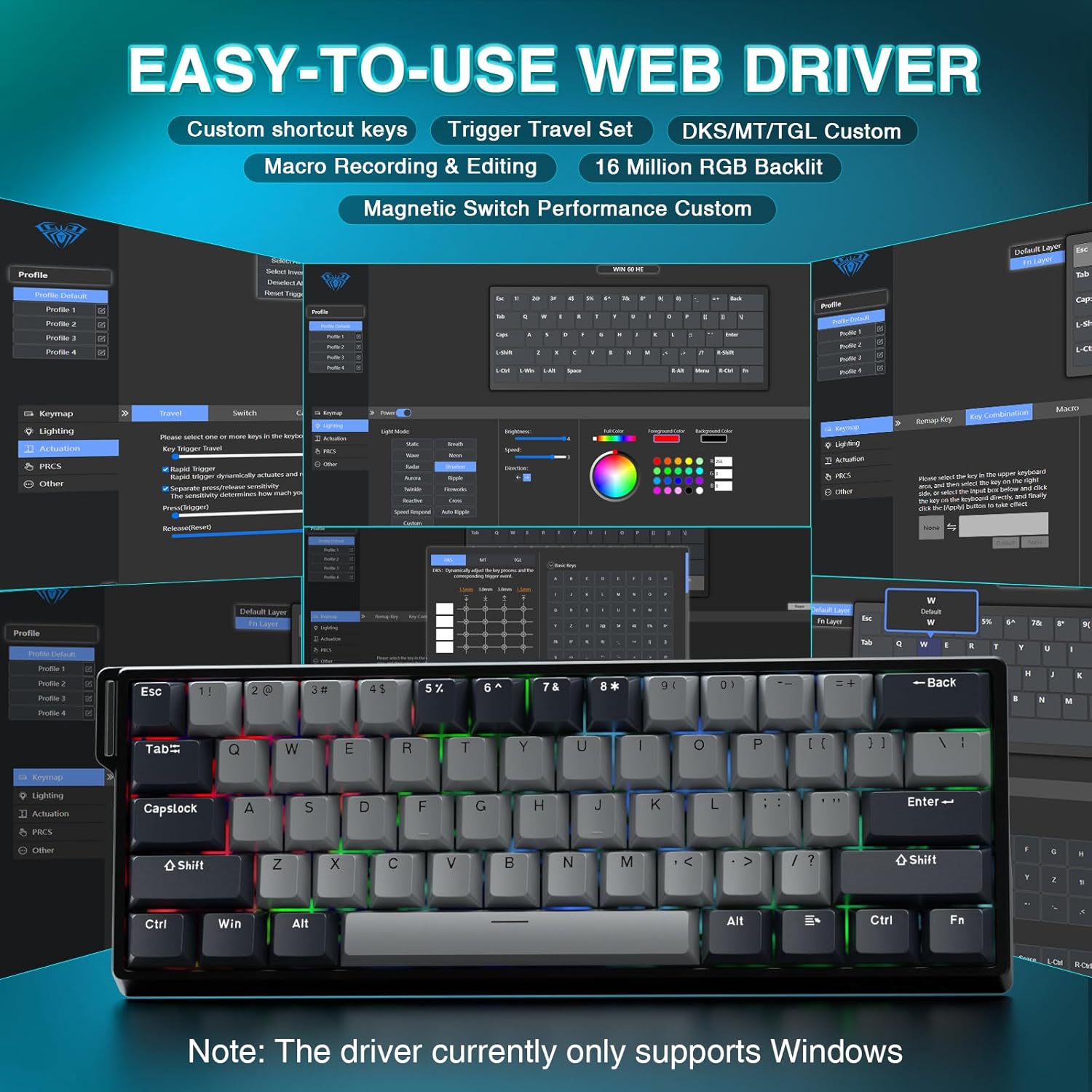
The AULA WIN60 HE PRO utilizes a web-based driver for customization, eliminating the need for software downloads.
Asegúrese de que su computadora esté conectada a Internet.
Abre tu preferido web navegador.
Navigate to the official AULA web driver portal (refer to the product packaging or manufacturer's websitio para la información exacta URL).
El web interface will allow you to customize settings directly.
Figura 2: Fácil de usar web Interfaz de controlador para personalización.
Nota: El web driver currently only supports Windows operating systems.
3. Operación
3.1 Hall Effect Magnetic Switches & Rapid Trigger
The AULA WIN60 HE PRO features advanced Hall Effect magnetic switches, which detect key presses using magnetic fields rather than physical contact. This design provides:
Actuación ajustable: Customize the actuation point of each key to your preference for faster response or more deliberate presses.
Modo de disparo rápido: Allows keys to activate and deactivate based on movement rather than a fixed actuation point, enabling ultra-fast repeated inputs and precise control, especially beneficial for FPS games. The ultra-low RT step distance is 0.02mm.
Durabilidad: Absence of physical contact reduces wear and tear.
Figure 3: Rapid Trigger technology for enhanced gaming performance.
Video 2: Demonstrating the hot-swappable magnetic switches, including Gray Wood Magnetic Switch and Wing Chun Magnetic Switch variants.
3.2 Frecuencia de sondeo de 8000 Hz
The keyboard features an 8000Hz polling rate, meaning it reports key presses to your computer 8000 times per second. This results in:
Ultra-Fast Response Times: Minimizes input lag for immediate in-game actions.
Control de precisión: Ensures every keystroke is registered accurately and without delay.
Figure 4: 8000Hz Hyper-Polling Technology for minimal latency.
3.3 Iluminación RGB dinámica
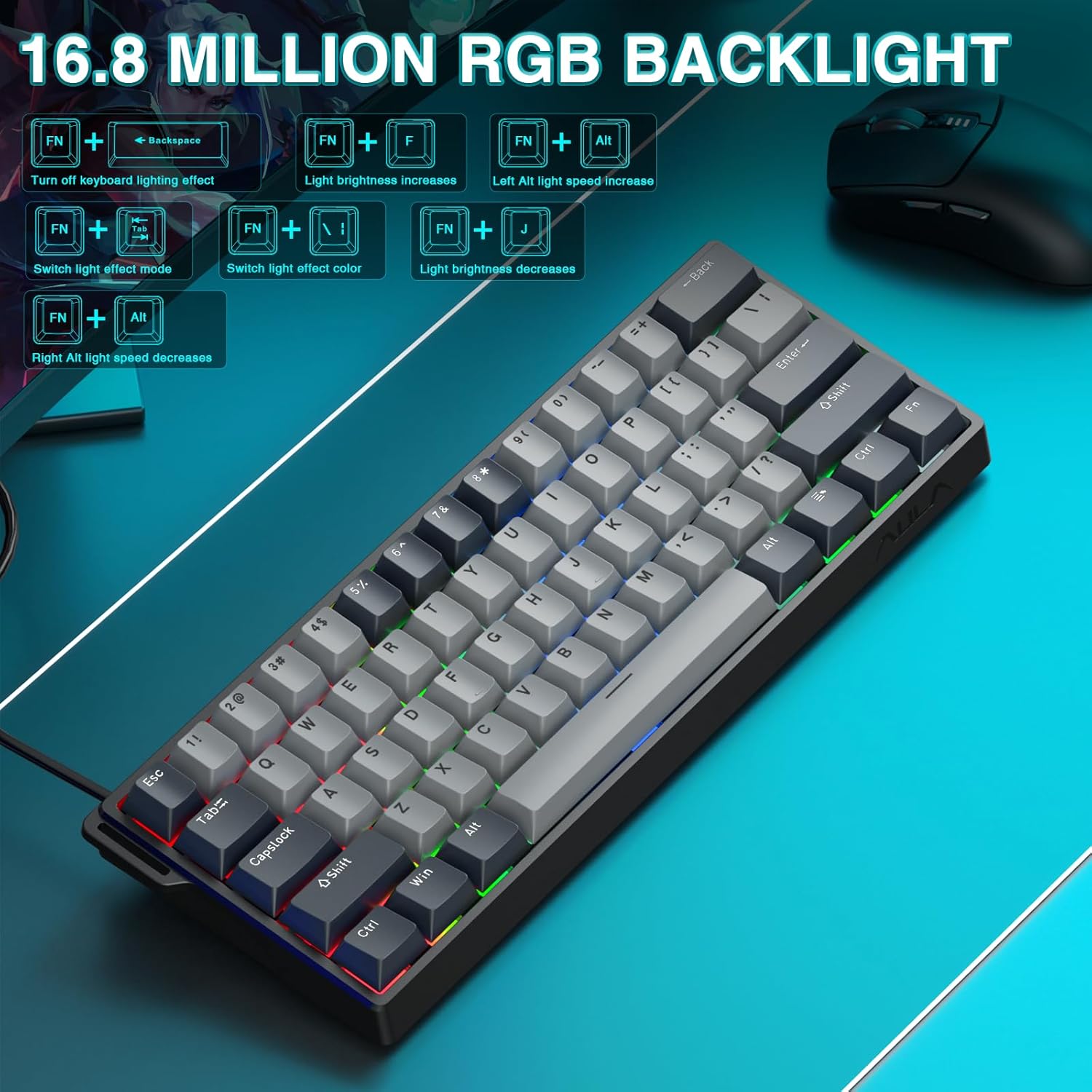
The keyboard offers 16.8 million customizable RGB color options and various lighting effects. Use the following key combinations for quick adjustments:
RGB Lighting Control Hotkeys
Combinación de teclas
Función
FN + Retroceso
Turn off keyboard lighting effect
FN + [
El brillo de la luz aumenta
FN + ]
El brillo de la luz disminuye
FN + {
Left Alt light speed increase
FN + }
Right Alt light speed decrease
FN + \
Cambiar el modo de efecto de luz
FN + Alt
Cambiar el color del efecto de luz
Figura 5: Controles y efectos de retroiluminación RGB.
3.4 Customization with Web Conductor
El web-based driver provides extensive customization options:
Reasignación de teclas: Asignar cualquier función a cualquier tecla.
Creación de macros: Registre y asigne secuencias complejas de comandos a una sola tecla.
Personalización de iluminación RGB: Fine-tune lighting effects, colors, and patterns beyond the basic hotkeys.
Ajuste del punto de actuación: Precisely set the actuation distance for each magnetic switch.
Acceder a la web driver as described in Section 2.3.
4. Mantenimiento
4.1 Limpieza del teclado
Para mantener un rendimiento y una apariencia óptimos:
Desconecte el teclado de su computadora antes de limpiarlo.
Utilice un paño suave y sin pelusa ligeramente seco.ampLimpie con agua o una solución de limpieza suave las teclas y el chasis.
Para eliminar el polvo y los residuos entre las teclas, utilice aire comprimido.
Evite productos químicos agresivos o materiales abrasivos.
4.2 Conmutadores intercambiables en caliente
The AULA WIN60 HE PRO features hot-swappable magnetic switches, allowing for easy replacement or customization without soldering.
Utilice el extractor de teclas provisto para quitar con cuidado la tecla.
Use a switch puller (not explicitly mentioned as included, but implied by "hot-swappable" and video) to carefully remove the switch.
Align the new switch with the socket and press firmly until it clicks into place.
Reemplace la tecla.
Caution: Apply gentle force to avoid damaging the switch sockets.
5. Solución de problemas
5.1 El teclado no responde
Asegúrese de que el cable USB-C esté conectado de forma segura tanto al teclado como a la computadora.
Intente conectar el teclado a un puerto USB diferente en su computadora.
Pruebe el teclado en otra computadora para descartar problemas específicos del sistema.
Reinicie su computadora.
5.2 La iluminación RGB no funciona
Check if the lighting is turned off using the FN + Retroceso tecla de acceso rápido.
Ajuste el brillo usando FN + [ or FN + ].
Asegúrese de que web driver settings haven't disabled lighting.
5.3 Teclas atascadas o no registradas
Limpie alrededor de la tecla afectada para eliminar cualquier residuo.
Si un interruptor específico está defectuoso, considere reemplazarlo utilizando la función de intercambio en caliente (consulte la Sección 4.2).
Check the actuation point settings in the web driver; it might be set too high or too low for your preference.
6. Especificaciones
Característica
Detalle
Modelo
WIN60 HE PRO
Tipo de teclado
Teclado mecánico para juegos al 60%
Tipo de interruptor
Hall Effect Magnetic Switch, Hot-Swappable
Conectividad
Cable USB-C
Tasa de sondeo
8000 Hz
Características especiales
Rapid Trigger Mode, Adjustable Actuation, RGB Backlit, Programmable Keys, Hotkeys and Media Keys, Portable
Dispositivos compatibles
Laptop, PC Windows (Not compatible with PS5/PS4, OBOX)
Dimensiones del producto
11 x 5 x 1.1 pulgadas (27.94 x 12.7 x 2.79 cm)
Peso del artículo
2.18 libras (0.99 kg)
Fabricante
AULA
Figure 6: Detailed comparison of AULA WIN60 HE series magnetic switches.
7. Garantía y soporte
For warranty information, technical support, or service inquiries, please refer to the warranty card included with your product or visit the official AULA/CORBOBO webSitio. También puede contactar directamente al vendedor a través de su plataforma de compra para obtener ayuda.
Ask about setup, troubleshooting, compatibility, parts, safety, or missing instructions. Manuals+ will review the question and use this page’s manual context to help answer it.