
Inefala B0F4WWTY94
Manual de usuario de la radio estéreo para coche Android de doble DIN Inefala
Model: B0F4WWTY94
1. Introducción
Thank you for choosing the Inefala Double Din Android Car Radio Stereo. This advanced automotive entertainment system features a Qualcomm 8-Core processor, 4GB RAM, 64GB ROM, and a 10-inch IPS 1280*720 capacitive touchscreen. It supports wireless Carplay and Android Auto, GPS navigation, Bluetooth, FM/RDS radio, DSP, steering wheel controls, and includes a backup camera. This manual provides detailed instructions for installation, operation, and maintenance to ensure optimal performance and user experience.
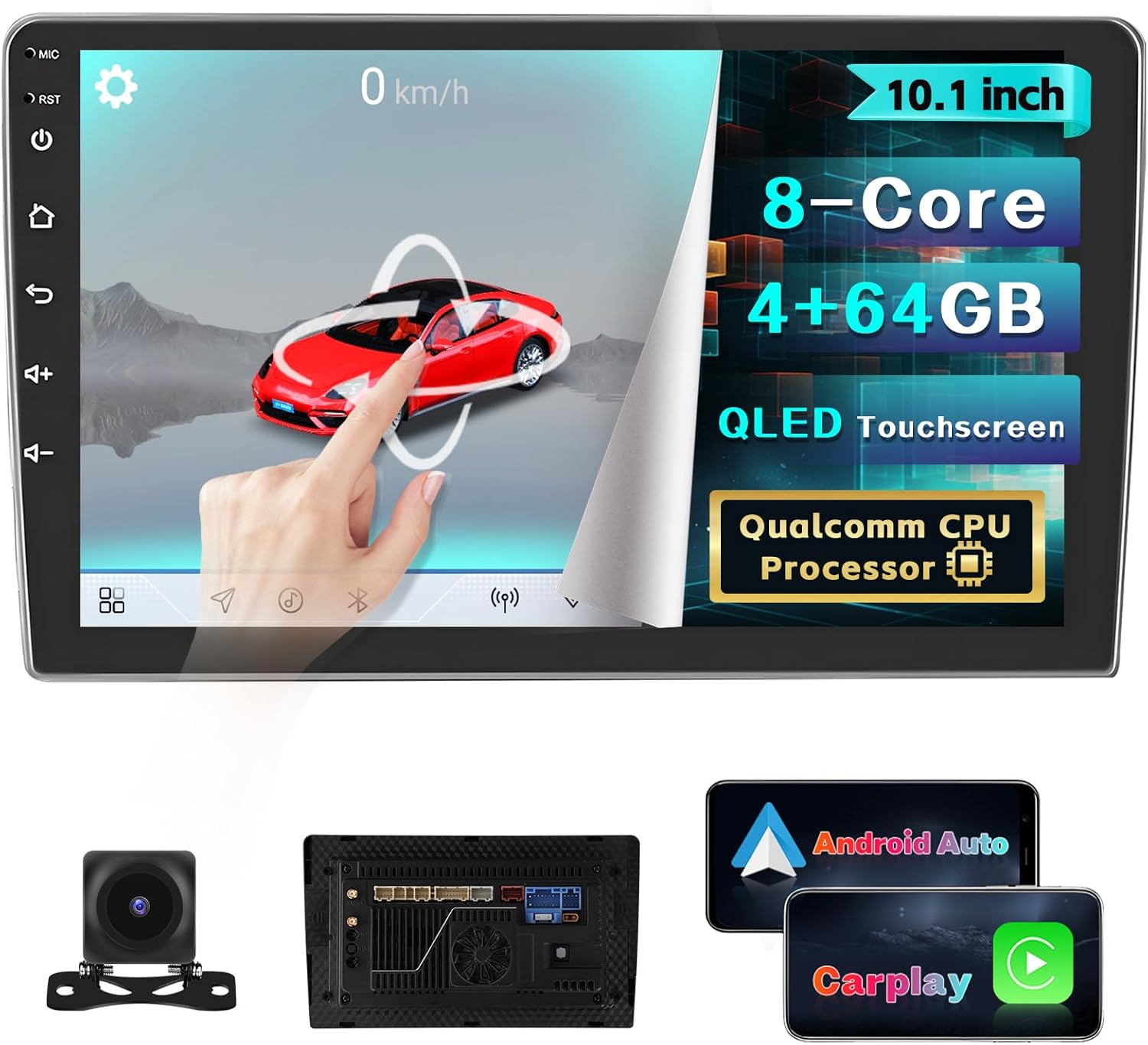
Figure 1.1: Inefala Double Din Android Car Radio Stereo showcasing its main features and included accessories like the backup camera and wiring.
2. Contenido del paquete
Verifique que todos los artículos enumerados a continuación estén incluidos en su paquete. Si falta algún artículo o está dañado, comuníquese con atención al cliente.
- 1 radio para coche Android
- 1 x cable de alimentación
- Cable 1 x RCA
- 1 x Antena GPS
- 1 x Manual de usuario
- 2 x cable USB
- 1 x cable de entrada de cámara trasera
- 1 x cable adaptador de radio
- 2 x Soporte de montaje
- 1 cámara de respaldo.
- 1 x MIC (micrófono externo)

Figure 2.1: Visual representation of the package contents and product dimensions.
3. Especificaciones
| Característica | Descripción |
|---|---|
| Procesador | Qualcomm Snapdragon 460 (SM4250), ocho núcleos |
| Sistema operativo | Androide 15 |
| RAM | 4 GB |
| memoria de sólo lectura | 64 GB |
| Tamaño de pantalla | 10 pulgadas |
| Tipo de pantalla | IPS 1280*720 Capacitive Touchscreen (QLED) |
| Conectividad | Bluetooth 5.1, Wi-Fi, USB |
| Características especiales | Wireless Carplay, Android Auto, Mirror Link, GPS, FM/RDS Radio, DSP, Steering Wheel Control (SWC), Backup Camera Support, 3D Car Model Display, Picture-in-Picture (PIP), Cooling Fan |
| Dimensiones del producto | 45 mm de profundidad x 248 mm de ancho x 143 mm de alto (1.77" de profundidad x 9.76" de ancho x 5.63" de alto) |
| Peso del artículo | 3.63 libras |
| Compatibilidad con codificación de vídeo | 3G2/AVI/TS/M2TS/MKV/WEBFormatos de archivo M/MPG/HEIC/HEIF/ASF/MOV/3GP/MPEG-4, etc. |
4. Guía de instalación
4.1 Consideraciones previas a la instalación
- Ensure your vehicle's dashboard can accommodate a double din unit (10-inch screen).
- Desconecte la batería del vehículo antes de comenzar la instalación para evitar cortocircuitos eléctricos.
- Refer to your vehicle's specific wiring diagram if available, in addition to the provided manual.
- Se recomienda la instalación profesional si no está familiarizado con el cableado de audio del automóvil.
4.2 Diagrama de cableado
Follow the wiring diagram carefully to connect the car stereo to your vehicle's electrical system. Ensure all connections are secure to prevent malfunctions.

Figure 4.1: Comprehensive wiring diagram for the Inefala car stereo system.
- Cable de energía: Conectar a la fuente de alimentación del vehículo (ACC, B+, GND).
- Cable RCA: Para salida de audio (altavoces delanteros/traseros, subwoofer) y entrada/salida de vídeo.
- Antena GPS: Conéctese al puerto GPS dedicado y móntelo en un lugar con cielo despejado view.
- Cables USB: Para conectar dispositivos USB y cargar.
- Cable de entrada de cámara trasera: Connect the backup camera to this input. Ensure the reverse trigger wire (usually pink) is connected to the vehicle's reverse light signal.
- micrófono: Conecte el micrófono externo para realizar llamadas manos libres más claras.
4.3 Montaje de la unidad
Use the provided mounting brackets to secure the car stereo into your vehicle's double din slot. Ensure the unit is firmly in place to prevent vibration and movement during driving.

Figura 4.2: Antes y después de la instalación view, demonstrating the integrated look of the new stereo.
5. Instrucciones de funcionamiento
5.1 Funcionamiento básico
- Encendido/apagado: Mantenga presionado el botón de encendido (generalmente en el lado izquierdo de la unidad) para encender o apagar el dispositivo.
- Control de volumen: Use the volume buttons or the touchscreen interface to adjust audio levels.
- Pantalla de inicio: Toque el ícono de inicio para regresar a la interfaz principal.
- Ajustes: Acceda a la configuración del sistema a través del ícono del engranaje para personalizar la pantalla, el sonido, la red y otras preferencias.
5.2 Carplay inalámbrico/Android Auto y Mirror Link
Connect your smartphone wirelessly for seamless integration of navigation, music, calls, and messaging directly on the car stereo display.

Figura 5.1: Interfaz inalámbrica Carplay y Android Auto.
- Conexión inalámbrica: Enable Bluetooth and Wi-Fi on your smartphone. Pair your phone with the car stereo via Bluetooth. Once paired, the system will prompt you to activate Carplay or Android Auto.
- Enlace espejo: For devices not supporting Carplay/Android Auto, use Mirror Link to display your phone's screen on the stereo. Follow on-screen instructions for setup (requires USB connection for some devices).
5.3 Conectividad Bluetooth
La unidad cuenta con Bluetooth 5.1 para una transmisión de audio estable y de alta calidad y llamadas manos libres.

Figure 5.2: Bluetooth, FM/RDS, and DSP features.
- Emparejamiento: Go to the Bluetooth menu on the stereo, enable Bluetooth on your phone, search for the stereo's device name, and pair.
- Llamadas manos libres: Once paired, you can make and receive calls directly from the stereo's interface. The external microphone ensures clear voice transmission.
- Transmisión auditiva: Reproduce música desde tu teléfono a través de los altavoces del coche.
Radio FM/RDS 5.4
Disfrute de sus estaciones de radio favoritas con una recepción clara e información RDS (sistema de datos de radio).
- Sintonización: Use the touchscreen to manually tune or auto-scan for available stations.
- Presets: Save your preferred stations to the 30 available preset slots for quick access.
- RDS: Displays station information such as song title, artist, and traffic announcements where available.
5.5 DSP (Procesador de sonido digital)
Customize your audio experience with the integrated DSP chip, offering superior sound quality and various equalization options.
- Ecualizador: Ajuste las bandas de frecuencia para que coincidan con sus preferencias de audio.
- Campo de sonido: Optimizar el sonidotaging and balance for different seating positions.
- Refuerzo de graves: Enhance low-frequency output.
5.6 Navegación GPS y WiFi
Navigate with precision using the built-in GPS and access online features via Wi-Fi.

Figura 5.3: Navegación GPS y conectividad WiFi.
- GPS: The system comes with pre-installed map data or supports online navigation apps. Ensure the GPS antenna is properly installed for accurate positioning.
- Wi-Fi: Connect to a mobile hotspot or home Wi-Fi network to download apps, stream content, and update maps.
5.7 Control del volante (SWC)
Controle funciones esenciales directamente desde el volante para una conducción más segura.

Figure 5.4: Steering Wheel Control and Backup Camera features.
- Configuración: Access the SWC settings menu to map your vehicle's steering wheel buttons to specific functions on the stereo (e.g., volume, track skip, mode).
5.8 Cámara de respaldo
La cámara de respaldo incluida proporciona una visión clara view del área detrás de su vehículo al dar marcha atrás, mejorando la seguridad.
- Visualización automática: Cuando el vehículo se pone en reversa, el estéreo muestra automáticamente la señal de la cámara.
- Pautas de estacionamiento: Dynamic or static parking guidelines assist with maneuvering.
5.9 Visualización del modelo de coche en 3D
Explore interactive 3D car models on the homepage, adding a dynamic visual element to your dashboard.

Figure 5.5: 3D Car Dynamic Effects on the home screen.
5.10 Picture-in-Picture (PIP) Video & Split Screen
Multitask efficiently with the ability to view videos in a floating window or run two applications side-by-side.

Figure 5.6: Picture-in-Picture video and Split Screen functionality.
- PEPITA: While using navigation or another app, you can play a video in a resizable, movable window.
- Pantalla dividida: Run two compatible applications simultaneously on the screen, such as navigation and music player.
5.11 Configuración del ventilador de enfriamiento
The built-in cooling fan helps maintain optimal operating temperature and prevents overheating during extended use.

Figure 5.7: Cooling Fan mechanism for optimal performance.
6. Mantenimiento
- Limpieza de pantalla: Utilice un paño suave y sin pelusa para limpiar suavemente la pantalla táctil. Para manchas difíciles, limpie ligeramenteampEnjuague el paño con agua o un limpiador de pantallas. Evite productos químicos agresivos o materiales abrasivos.
- Limpieza general: Mantenga la unidad libre de polvo y residuos. Utilice un cepillo suave o aire comprimido para limpiar las rejillas de ventilación y los puertos.
- Actualizaciones de software: Compruebe periódicamente si hay actualizaciones de software a través de la configuración del sistema para garantizar un rendimiento óptimo y acceso a nuevas funciones.
- Evite temperaturas extremas: No exponga la unidad a calor o frío extremos durante períodos prolongados, ya que esto puede afectar su vida útil y rendimiento.
7. Solución de problemas
If you encounter issues with your Inefala car stereo, please refer to the following common troubleshooting steps before contacting support.
- Sin energía:
- Verifique todas las conexiones de alimentación (B+, ACC, GND) para asegurarse de que estén seguras y cableadas correctamente.
- Verifique que el fusible del estéreo del vehículo no esté quemado.
- Sin sonido:
- Verifique las conexiones de los cables de los altavoces.
- Asegúrese de que el volumen no esté silenciado o demasiado bajo.
- Verifique la configuración de audio en el menú DSP.
- Problemas de conexión Bluetooth:
- Asegúrese de que Bluetooth esté habilitado tanto en el estéreo como en su teléfono.
- Elimina los emparejamientos anteriores e intenta volver a realizar el emparejamiento.
- Reinicie ambos dispositivos.
- Pérdida de señal GPS:
- Asegúrese de que la antena GPS esté conectada de forma segura y colocada en un lugar con una vista despejada. view del cielo (por ejemplo, tablero de instrumentos, debajo del parabrisas).
- La cámara de respaldo no se muestra:
- Verifique la conexión del cable de entrada de video de la cámara al estéreo.
- Verify the reverse trigger wire (pink wire) is correctly connected to the vehicle's reverse light signal.
- Ensure the camera itself is powered.
- El sistema se bloquea/rendimiento lento:
- Reinicie la unidad.
- Cierre las aplicaciones en segundo plano innecesarias.
- Considere un restablecimiento de fábrica (nota: esto borrará todos los datos y configuraciones del usuario).
8. Garantía y soporte
Inefala products are designed for reliability and performance. We offer support to ensure your satisfaction.
- Política de devoluciones: Este producto es elegible para una política de reembolso/reemplazo de 30 días a partir de la fecha de compra.
- Seguro de calidad: Somos responsables de gestionar todos los problemas de calidad dentro de los 24 meses a partir de la fecha de compra.
- Apoyo técnico: For any questions or assistance, please contact Inefala customer support directly. You can reach us via email at inefalatech@163.comNuestro objetivo es proporcionar respuestas en línea dentro de las 24 horas.

Figure 8.1: How to contact Inefala customer support.
Ask a question about this manual
Ask about setup, troubleshooting, compatibility, parts, safety, or missing instructions. Manuals+ will review the question and use this page’s manual context to help answer it.