
Introducción
This user manual provides detailed instructions for the FJFJOPK 4K Video Camera Camcorder, Model HDV-3051L. Please read this manual thoroughly before operating the device to ensure proper usage and to maximize its performance. Keep this manual for future reference.

Figure 1: FJFJOPK 4K Video Camera Camcorder with included accessories like external microphone, handheld stabilizer, and remote control.
Contenido del paquete
Verifique que todos los artículos enumerados a continuación estén incluidos en su paquete. Si falta algún artículo o está dañado, comuníquese con atención al cliente.
- Cámara de video 4K
- Estabilizador de mano
- Mando a distancia
- Micrófono
- Parasol
- Tarjeta SD de 32 GB
- Baterías recargables 2 x
- Cable de carga
- Manual de usuario
- Estuche para la camara
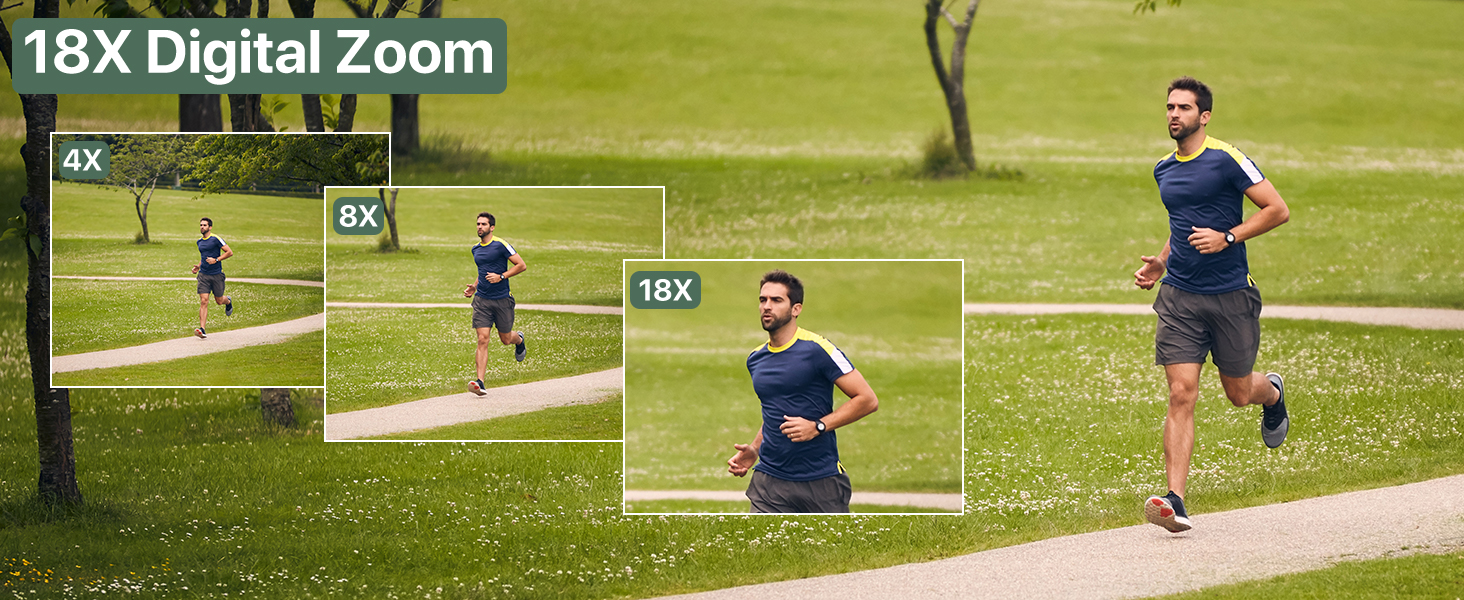
Figure 2: Visual representation of the complete packing list for the camcorder.
Guía de configuración
1. Instalación de la batería
The camcorder uses two long-lasting rechargeable batteries. Ensure batteries are fully charged before first use.
- Localice el compartimiento de la batería en la videocámara.
- Abra la tapa del compartimiento de la batería.
- Insert the charged batteries according to the polarity indicators inside the compartment.
- Cierre bien la tapa del compartimento de la batería.

Figure 3: Proper insertion of batteries into the camcorder.
2. Instalación de la tarjeta SD
A 32GB SD card is included for immediate use. The camcorder supports SD cards for storing your videos and photos.
- Localice la ranura de la tarjeta SD, normalmente cerca del compartimiento de la batería.
- Inserte la tarjeta SD con los contactos metálicos hacia abajo hasta que encaje en su lugar.
- Para retirarla, presione suavemente la tarjeta hasta que salga.
3. Colocación de accesorios
Mejore su experiencia de grabación conectando los accesorios incluidos.
- External Stereo Microphone: Attach the microphone to the hot shoe mount on top of the camcorder. Connect the microphone cable to the designated audio input port. This ensures clear audio capture.
- Estabilizador de mano: The anti-shake handheld stabilizer can be attached to the bottom tripod mount of the camcorder. This accessory helps in achieving smooth and steady shots, especially during movement.
- Cubierta de lente: Screw the lens hood onto the front of the camcorder's lens. The lens hood is designed to reduce glare and lens flare, improving image quality in bright outdoor conditions.

Figure 4: Handheld stabilizer attached for improved stability.

Figure 5: External microphone for enhanced audio recording.

Figure 6: The lens hood reduces glare for clearer outdoor shots.
Instrucciones de funcionamiento
1. Encendido / apagado
Para encender la videocámara, abra la pantalla LCD. Para apagarla, ciérrela o mantenga presionado el botón de encendido.
2. Using the 3.0-inch Touch Screen
The camcorder features a 3.0-inch IPS touch screen that is 270° rotatable, allowing for versatile viewing angles, including selfie-angle recording.
- Navegación: Tap on-screen icons to navigate menus and settings.
- Rotación: Gently rotate the screen to your desired angle for comfortable viewing or self-recording.

Figure 7: The 270° rotatable touch screen provides flexible viewOpciones de grabación y captura de pantalla.
3. Grabación de vídeos y toma de fotografías
The camcorder supports 4K Ultra HD video recording and 64MP still image capture.
- Grabación de vídeo: Press the Record button to start and stop video recording. The camcorder captures every detail with stunning clarity.
- Captura de fotos: Switch to photo mode and press the Shutter button to take 64MP high-definition photos.
- Zoom digital 18X: Use the zoom controls to magnify your subject up to 18 times. This feature allows for clear footage even from a distance.
- Visión nocturna IR: Activate IR Night Vision mode for clear recording in low-light conditions or complete darkness.

Figure 8: Experience superior image and video quality with 4K UHD and 64MP resolution.

Figure 9: The 18X digital zoom allows for detailed capture of distant subjects.

Figure 10: IR Night Vision provides clear visibility in low-light or dark environments.
4. Funciones avanzadas
- Anti vibración: The built-in anti-shake function, complemented by the handheld stabilizer, ensures smooth and stable footage incluso durante movimientos dinámicos.
- Fotografía Time-Lapse: Capture stunning time-lapse videos by setting the desired interval in the camera settings.
- Detección de rostro: The camcorder can detect faces in the frame, optimizing focus and exposure for portraits and group shots.
- One-Click Live Streaming: Conecte la videocámara a su computadora a través de USB para usarla como webCámara para transmisión en vivo.
- Grabación durante la carga: The camcorder supports recording while connected to a power source, ideal for extended shooting sessions.
- Control remoto inalámbrico: Use the included remote control for convenient wireless operation, perfect for self-recording or group shots.

Figure 11: Explore various shooting modes including anti-shake, slow motion, and time-lapse.

Figure 12: Continuous recording is possible while the camcorder is charging.
Mantenimiento
- Limpieza: Utilice un paño suave y seco para limpiar el cuerpo de la cámara. Para la lente, utilice un paño y una solución especiales para limpiar lentes. Evite los materiales abrasivos.
- Almacenamiento: Guarde la videocámara en un lugar fresco y seco, alejado de la luz solar directa y de temperaturas extremas. Retire las baterías si la va a guardar durante un período prolongado.
- Cuidado de la batería: Fully charge batteries before storage and recharge them every few months to maintain their lifespan.
Solución de problemas
Si tiene problemas con su videocámara, consulte las siguientes soluciones comunes:
| Problema | Posible causa | Solución |
|---|---|---|
| La cámara no se enciende. | Batería baja o descargada; batería insertada incorrectamente. | Cargue completamente las baterías. Asegúrese de que estén correctamente insertadas. |
| Mala calidad de imagen/video. | Lente sucia; iluminación insuficiente; ajustes incorrectos. | Clean the lens. Use IR Night Vision in low light. Adjust exposure settings. |
| Error de la tarjeta SD. | SD card full; incorrectly inserted; incompatible card. | Borrar files or use a new SD card. Reinsert card correctly. Ensure card is compatible (up to 32GB). |
| Sin grabación de audio. | External microphone not connected properly or turned off. | Check microphone connection and ensure it is powered on if applicable. |
Presupuesto
| Característica | Detalle |
|---|---|
| Marca | FJFJOPK |
| Número de modelo | HDV-3051L |
| Resolución de captura de video | 4K |
| Tecnología de fotosensor | CMOS |
| Distancia focal máxima | 64 milímetros |
| Apertura máxima | 7.36 f |
| Tipo de memoria flash | SD (32 GB incluidos) |
| Formato de captura de video | Avión |
| Tamaño de pantalla | 3 Inches (270° Rotatable IPS Touch Screen) |
| Características especiales | Anti-Shake, Image Stabilization, IR Night Vision, 18X Digital Zoom, External Microphone Support, Webcam Function, Time-Lapse, Face Detection, Recording While Charging, Wireless Remote Control |
| Peso del artículo | 2.05 libras |
| Dimensiones del paquete | 7.48 x 5.87 x 4.21 pulgadas |
Garantía y soporte
For warranty information and customer support, please refer to the warranty card included in your package or contact FJFJOPK customer service directly. Optional protection plans are available for purchase to extend coverage beyond the standard manufacturer's warranty.
- Plan de protección de 2 años: Disponible para cobertura extendida.
- Plan de protección de 3 años: Disponible para cobertura extendida.
- Protección completa: Plan mensual que cubre compras pasadas y futuras elegibles.