
Lobo libre T96
Manual del usuario del teclado y ratón inalámbricos para juegos FREEWOLF T96
Modelo: T96
Introducción
This user manual provides detailed instructions for the FREEWOLF T96 Smart Display Wireless Gaming Keyboard and Mouse Combo. This combo is designed for a seamless and responsive experience across various devices and applications, from gaming to office work.
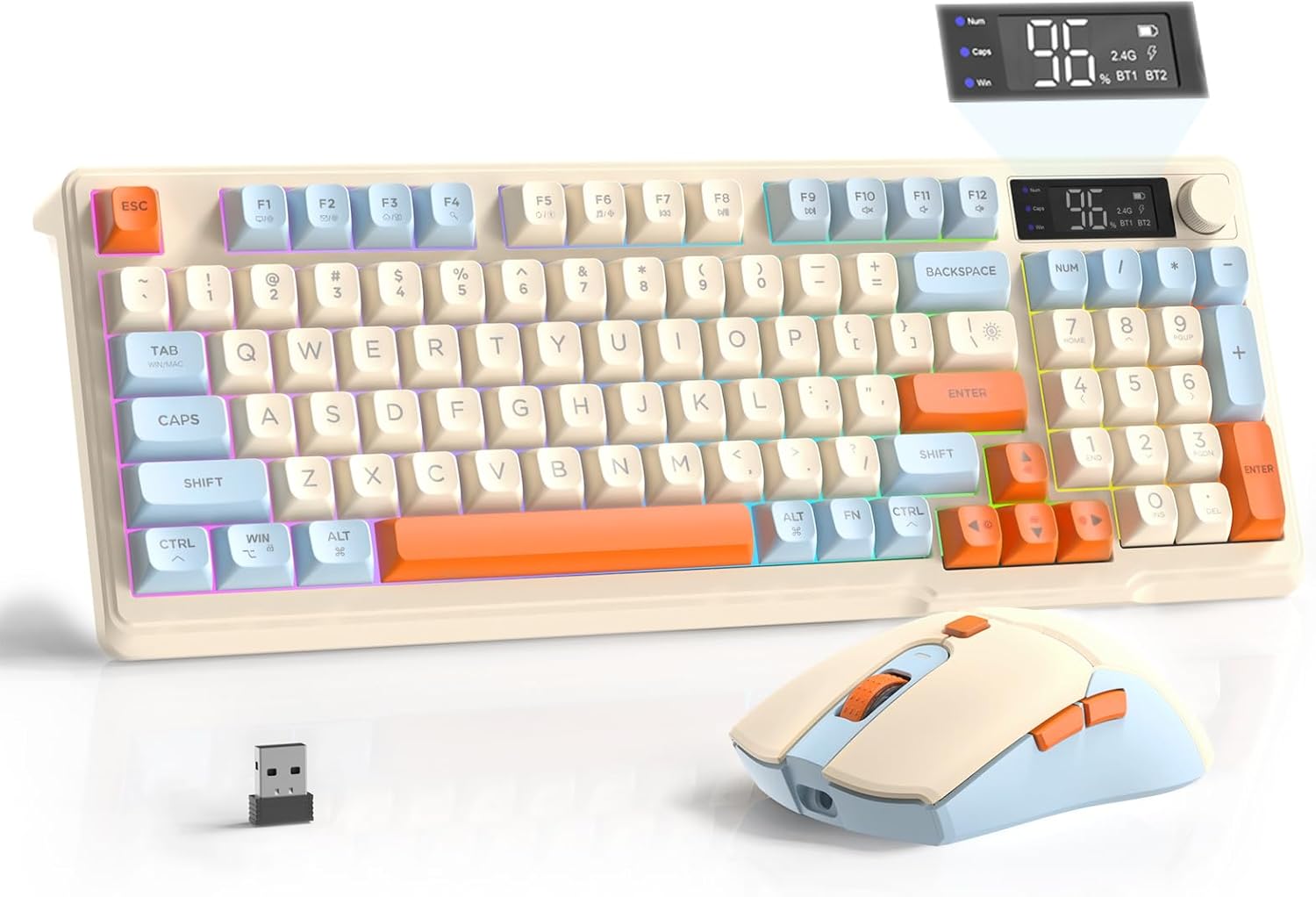
Image: The FREEWOLF T96 Wireless Gaming Keyboard and Mouse Combo, featuring the keyboard, mouse, and USB receiver.
Contenido del paquete
Asegúrese de que todos los artículos estén presentes en el paquete:
- 1 teclado de membrana T96
- 1 ratón inalámbrico T96
- 1 cable USB-C
- 1 x USB Receiver (stored in mouse bottom slot)
- 1 x Manual de usuario
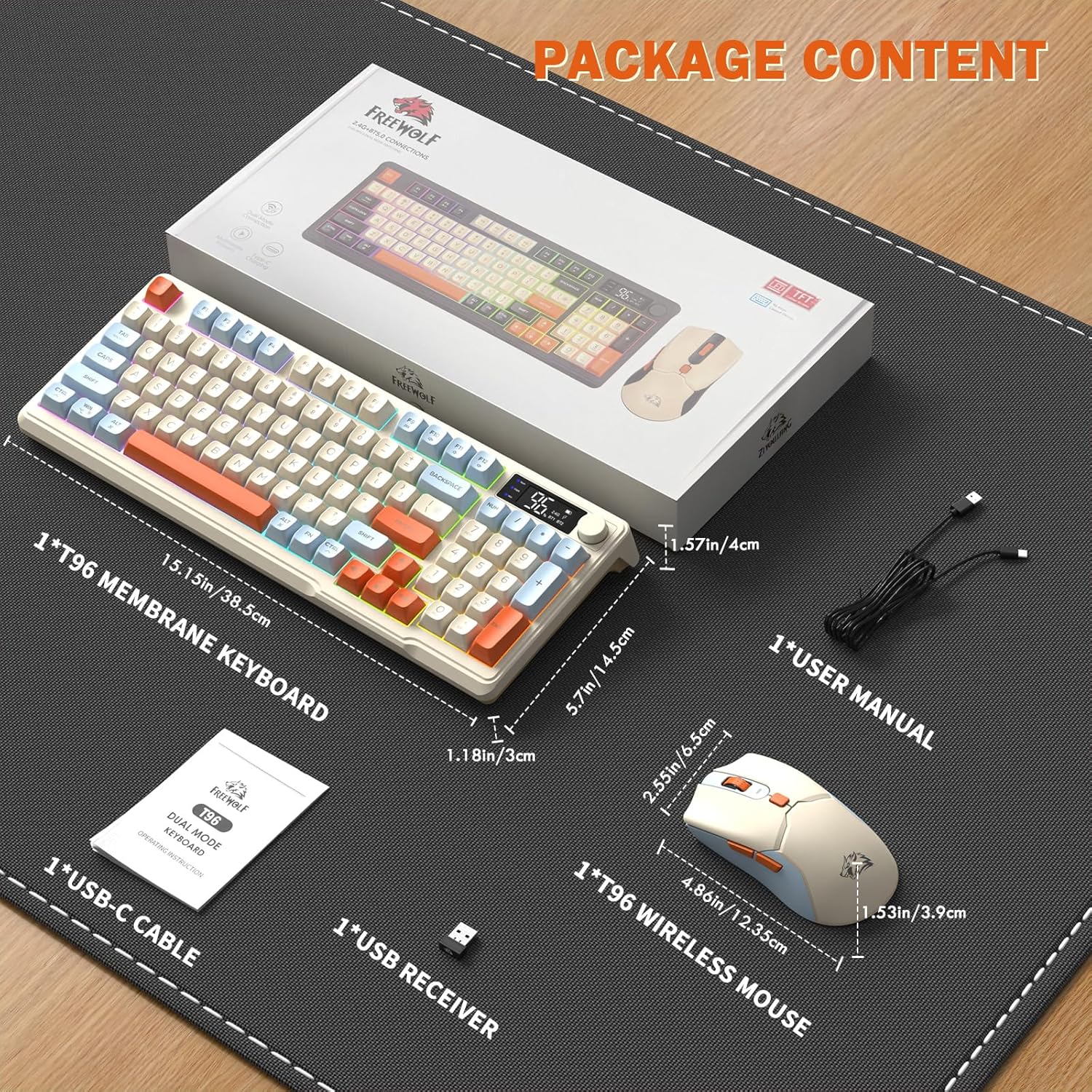
Image: A visual representation of the package contents, including the keyboard, mouse, USB-C cable, USB receiver, and user manual.
Configuración
Opciones de conectividad
El combo T96 admite conectividad inalámbrica de modo dual:
- Conexión inalámbrica 2.4G: Utilizes the included USB receiver for a stable, plug-and-play connection.
- Bluetooth Connections (BT1/BT2): Allows pairing with up to two Bluetooth-enabled devices, enabling seamless switching.
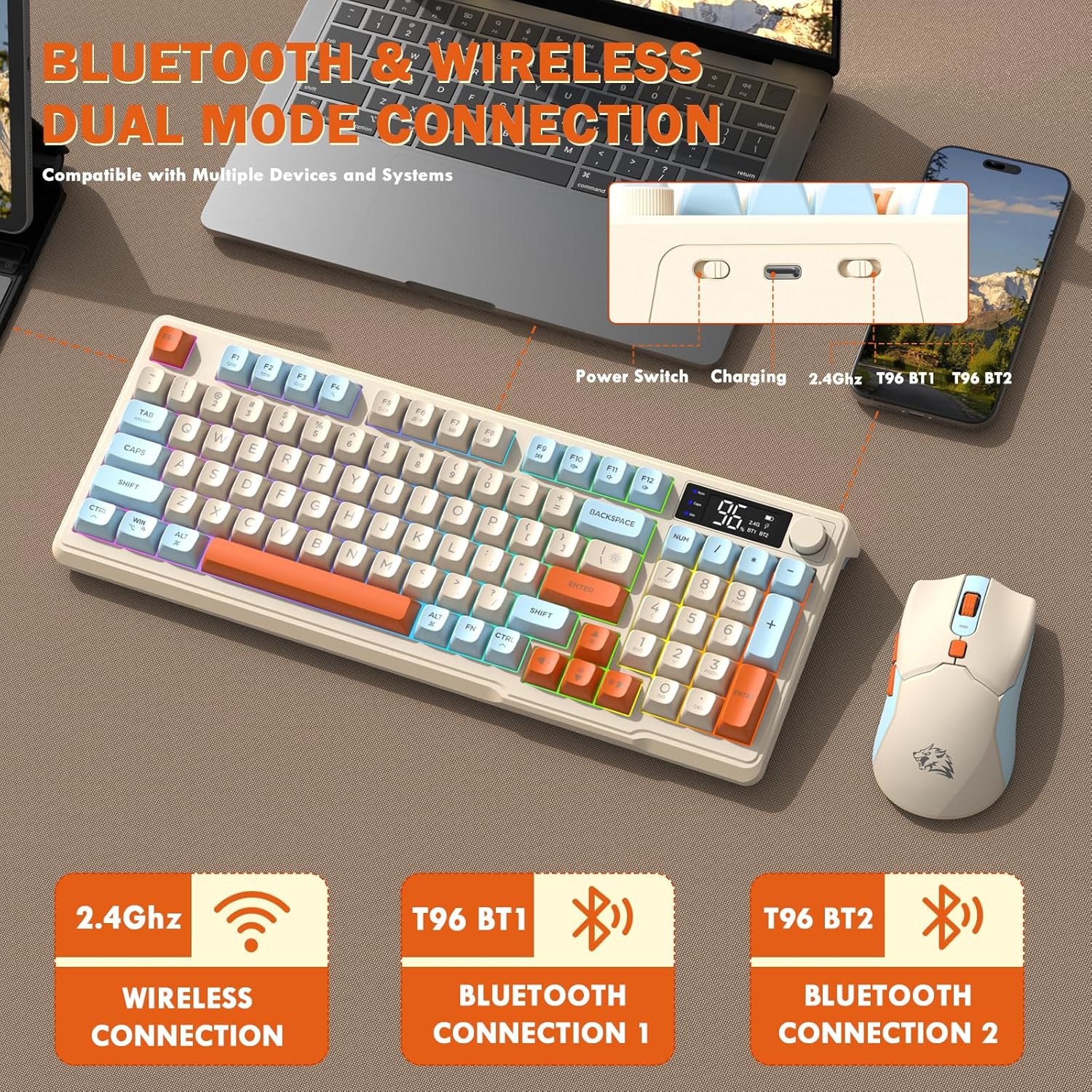
Image: Diagram illustrating the dual-mode connection options (2.4GHz, Bluetooth 1, Bluetooth 2) and the location of the power switch, charging port, and connection indicators on the keyboard.
Pasos de configuración inicial
- Dispositivos de carga: Before first use, fully charge both the keyboard and mouse using the provided USB-C cable. The keyboard has a 2000mAh battery, and the mouse has a 500mAh battery. The smart display on the keyboard will show charging progress.
- Localizar el receptor USB: The USB receiver for 2.4G wireless connection is stored in a slot on the bottom of the mouse. Remove it for use.
- Encendido: Encienda el teclado y el mouse utilizando sus respectivos interruptores de encendido.
- Connect via 2.4G Wireless:
- Inserte el receptor USB en un puerto USB disponible en su computadora.
- Ensure the keyboard and mouse are set to 2.4G mode (indicated on the keyboard's smart display). They should connect automatically.
- Conectar a través de Bluetooth:
- Switch the keyboard and mouse to BT1 or BT2 mode.
- On your device (PC, laptop, tablet, smartphone), open Bluetooth settings.
- Buscar "T96 Keyboard" and "T96 Mouse" in the list of available devices and pair them.
- The smart display will indicate the active Bluetooth connection (BT1 or BT2).
Instrucciones de funcionamiento
Operación del teclado
The T96 keyboard features a 94-key compact layout with various functions to enhance your experience.
Funciones de pantalla inteligente
La pantalla LED inteligente proporciona información en tiempo real:
- Estado de la batería: Muestra el porcentaje de batería restantetage.
- Modo de conexión: Indicates active connection (2.4G, BT1, BT2).
- Progreso de carga: Displays charging status when connected to power.
- Caps Lock/Num Lock/Win Lock Indicators: Shows status of these keys.
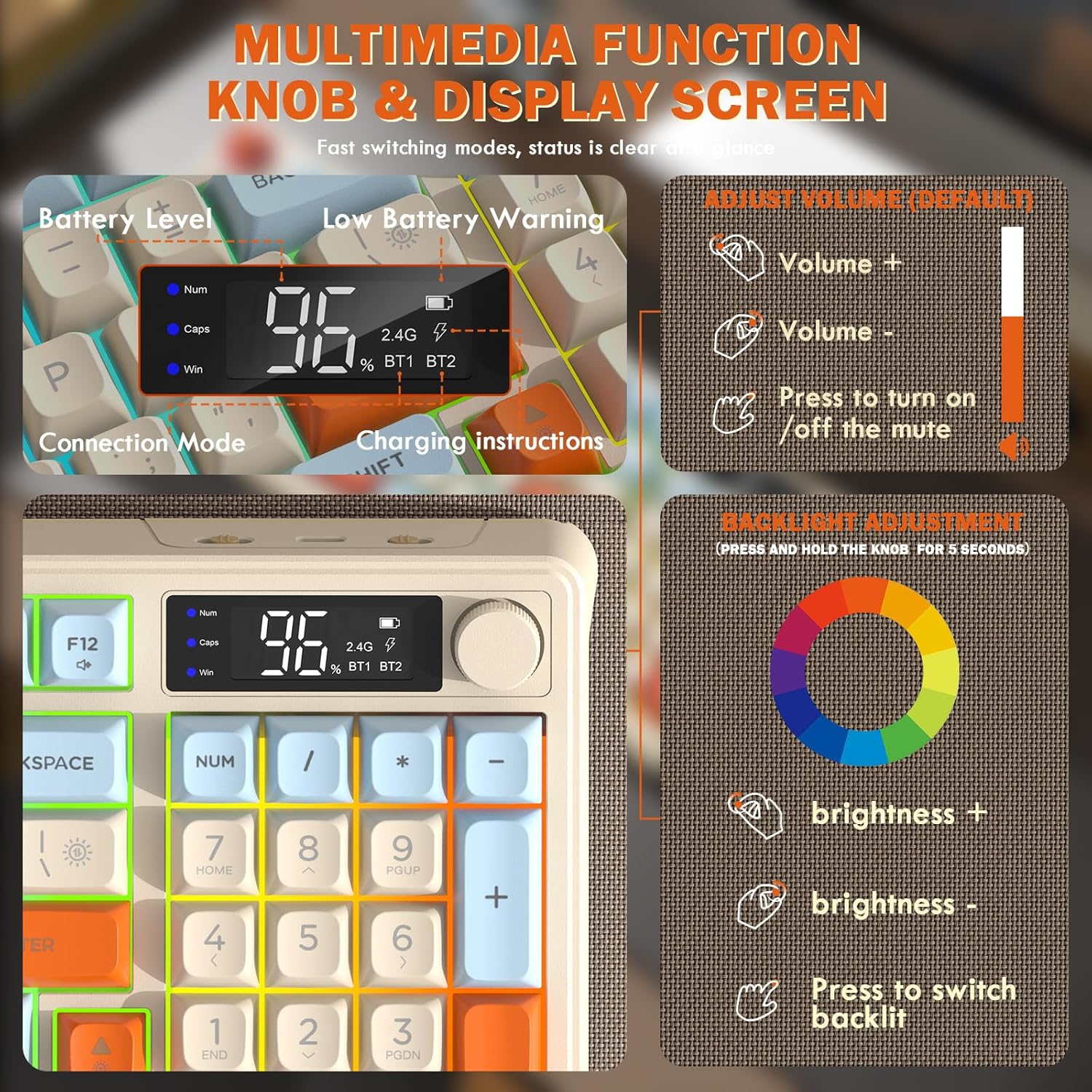
Image: Close-up of the keyboard's smart display showing battery level, connection mode, and charging instructions. Also details the multimedia knob's functions for volume and backlight control.
Perilla de control multimedia
Located on the top right of the keyboard, this knob offers quick control:
- Girar: Adjusts system volume (clockwise for volume up, counter-clockwise for volume down).
- Prensa: Toggles mute on/off.
- Mantener pulsado (5 segundos): Activates backlight adjustment mode. Rotate to change brightness, press to switch light effects.
Multimedia Hotkeys (FN Combinations)
The keyboard includes 12 dedicated multimedia hotkeys accessible via the FN llave:
- FN + F1-F12: Access various multimedia and system functions (e.g., media playback, volume, browser, email). Refer to keycap legends for specific functions.
Control de luz de fondo
The keyboard features vibrant rainbow LED backlighting. Control it using the following combinations:
- FN + Flecha arriba: Aumentar el brillo de la luz de fondo.
- FN + Flecha hacia abajo: Disminuir el brillo de la luz de fondo.
- FN + Flecha derecha: Aumentar la velocidad de la luz de fondo.
- FN + Flecha izquierda: Disminuir la velocidad de la luz de fondo.
- FN + \|: Switch between different lighting modes (e.g., always on, breathing, off).
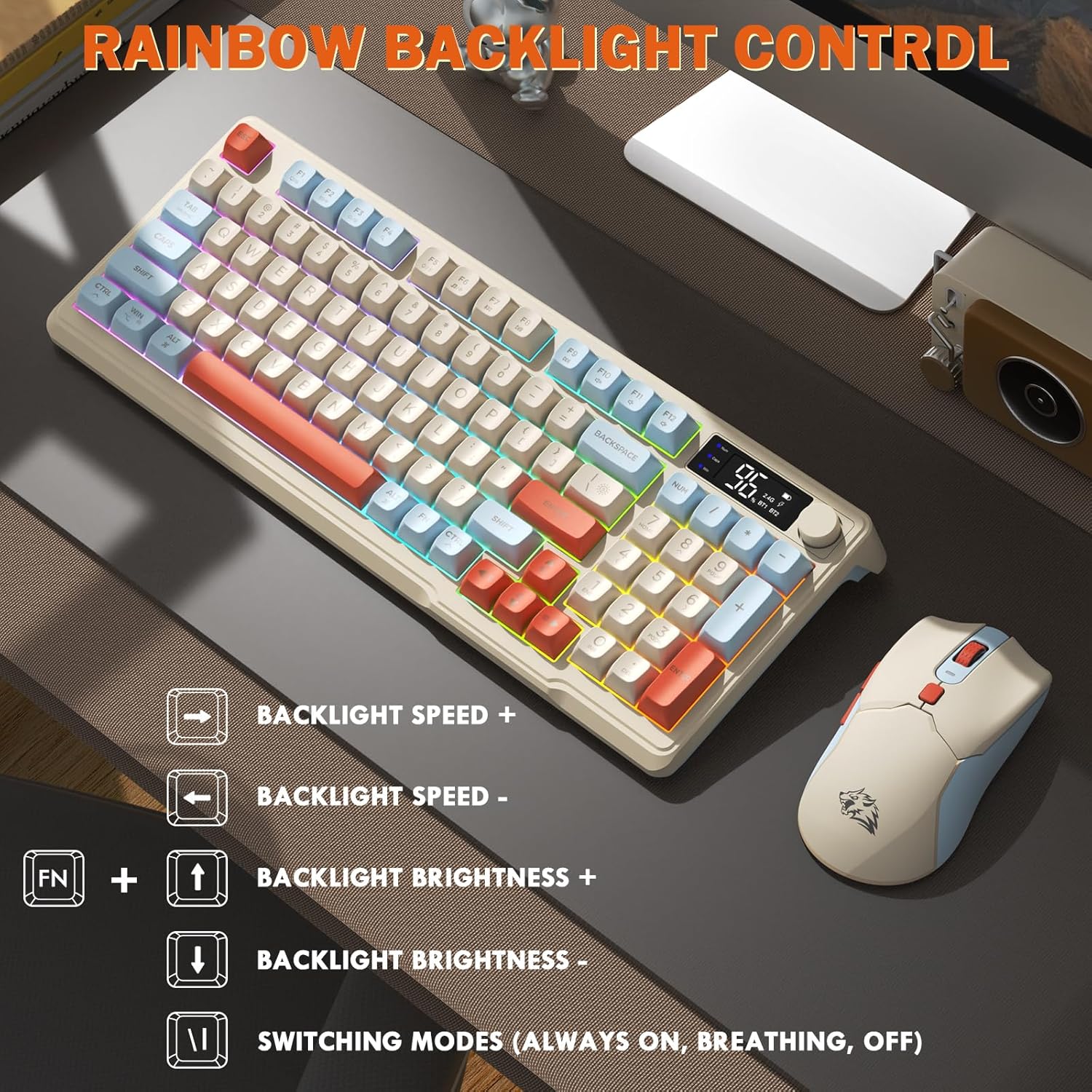
Image: Visual guide for controlling the rainbow LED backlight, showing key combinations for brightness, speed, and mode switching.
Anti-efecto fantasma
The keyboard supports 26-key rollover anti-ghosting technology, ensuring accurate registration of multiple simultaneous key presses, crucial for gaming.
Operación del ratón
The T96 gaming mouse is designed for precision and comfort.
Ajuste de DPI
Adjust the mouse sensitivity (DPI) to suit your preference:
- Presione el Botón DPI (located behind the scroll wheel) to cycle through available DPI settings: 800 / 1600 / 2400 / 4000 DPI.
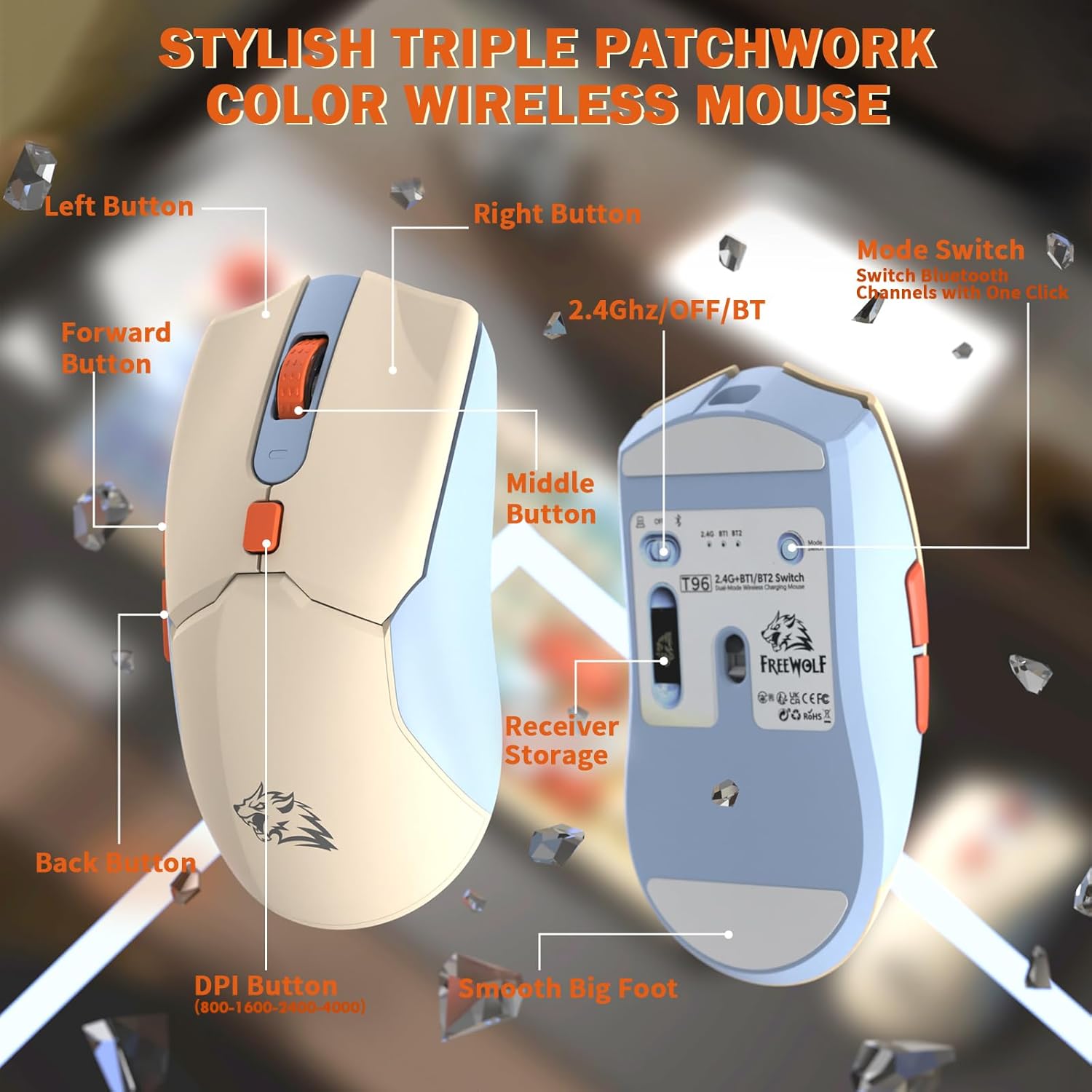
Imagen: Detallada view of the T96 wireless mouse, highlighting its buttons (Left, Right, Middle, Forward, Back, DPI) and the receiver storage compartment on the bottom.
Botones programables
The mouse features six programmable buttons. Refer to specific software (if applicable, not mentioned in data) or operating system settings for customization options.
Tasas de sondeo
The mouse operates at different polling rates depending on the connection mode:
- Bluetooth (BT): 115 Hz
- 2.4G inalámbrico: 125 Hz
Mantenimiento
Limpieza
- Utilice un paño suave y seco para limpiar las superficies del teclado y el mouse.
- Para suciedad difícil, ligeramente dampLimpie el paño con agua o un limpiador suave no abrasivo.
- Evite utilizar productos químicos agresivos, disolventes o materiales abrasivos, ya que pueden dañar el acabado.
- No sumerja los dispositivos en agua ni en ningún líquido.
Cuidado de la batería
Para maximizar la vida útil y el rendimiento de la batería:
- Recharge the devices when the low battery indicator appears on the keyboard's smart display.
- Evite descargar completamente la batería con frecuencia.
- Guarde los dispositivos en un lugar fresco y seco cuando no los utilice durante períodos prolongados.
- The devices feature smart power-saving modes: the keyboard enters sleep mode after 3 minutes of inactivity, and the mouse after 2 minutes. They wake instantly upon touch.

Image: Illustration showing the 2000mAh battery capacity of the keyboard and 500mAh battery capacity of the mouse, emphasizing long-lasting power.
Solución de problemas
If you encounter issues with your T96 combo, refer to the following common solutions:
| Problema | Posible causa | Solución |
|---|---|---|
| El teclado/ratón no responde | Low battery; Incorrect connection mode; USB receiver not connected (2.4G); Bluetooth not paired. |
|
| Conexión intermitente o con retraso | Interferencia; Distancia del receptor/dispositivo; Batería baja. |
|
| La luz de fondo no funciona o está tenue | Luz de fondo apagada; Brillo configurado demasiado bajo; Batería baja. |
|
| El DPI del mouse no cambia | El botón DPI no está presionado correctamente. |
|
Presupuesto
| Característica | Detalle |
|---|---|
| Marca | LOBO LIBRE |
| Modelo | T96 |
| Tecnología de conectividad | 2.4Ghz Wireless, Bluetooth (BT1, BT2) |
| Tipo de teclado | Membrane, 94-Key Compact Layout |
| Teclas | PBT Triple-Tone Spherical Keycaps |
| Iluminar desde el fondo | Retroiluminación LED arcoíris |
| Anti-efecto fantasma | Rollover de 26 teclas |
| Capacidad de la batería del teclado | 2000 mAh |
| DPI del ratón | 800 / 1600 / 2400 / 4000 DPI (ajustable) |
| Mouse Polling Rate (BT) | 115 Hz |
| Mouse Polling Rate (2.4G) | 125 Hz |
| Capacidad de la batería del ratón | 500 mAh |
| Dispositivos compatibles | Portátil, consola de juegos, PC, tableta, teléfono inteligente |
| Sistemas operativos | Windows, macOS, Linux, iOS, Android |
| Peso del artículo | 2.12 libras (aprox. 0.96 kg) |
| Dimensiones del paquete | 16.26 x 8.78 x 1.85 pulgadas (aprox. 41.3 x 22.3 x 4.7 cm) |
Garantía y soporte
La información sobre la garantía del producto y la atención al cliente no se proporciona en los datos disponibles. Consulte el embalaje del producto o la información oficial del fabricante. websitio para obtener detalles sobre la cobertura de la garantía y cómo comunicarse con el servicio de atención al cliente para obtener ayuda.