
1. Instrucciones de seguridad importantes
Please read all safety instructions carefully before operating the HTVRONT Heat Press Machine. Failure to follow these instructions may result in injury or damage to the product.
- Superficies calientes: The heating plate reaches high temperatures. Avoid direct contact with the heating plate during operation and cool-down. Use the handle for opening and closing.
- Prevención de quemaduras: The 180° swing-away design helps reduce the risk of burns by moving the hot plate away from your workspace. Always utilize this feature when placing or removing materials.
- Seguridad eléctrica: Asegúrese de que la máquina esté conectada a una toma de corriente con conexión a tierra y con el voltaje correcto.tage (110 Volts). Do not operate with damaged cords or plugs. Unplug the machine when not in use or before cleaning.
- Protección contra sobrecalentamiento: The machine features a special plastic casing designed to prevent the surface from overheating. However, exercise caution.
- Independent Control Panel: The control panel is connected via a 1-meter cable, allowing you to operate settings at a safe distance from the hot plate.
- Cierre automático: For enhanced safety, the heat press will automatically shut off after 15 minutes of inactivity.
- Niños y mascotas: Keep the heat press machine out of reach of children and pets.
- Ventilación: Opere la máquina en un área bien ventilada.
2. Producto terminadoview
2.1 Componentes y características
The HTVRONT Heat Press Machine is designed for efficient and precise heat transfer projects. Familiarize yourself with its main components:

Image: The HTVRONT 15x15 Swing-Away Heat Press Machine, showcasing its main unit and detached control pad.

Image: A detailed diagram illustrating the various parts of the heat press machine, including the comfortable handle, pressure regulator, wire protective tube, swivel heat plate, ironing board, metal base, and control pad.
- Mango cómodo: Diseñado ergonómicamente para una fácil operación.
- Regulador de presión: Knob for adjusting the pressing pressure.
- Wire Protective Tube: Houses and protects internal wiring.
- Swivel Heat Plate: The upper heating element that rotates 180 degrees for safe material placement.
- Ironing Board (Lower Platen): The base where materials are placed for pressing.
- Base metálica: Proporciona estabilidad a la máquina.
- Almohadilla de control: Detached unit for setting temperature and time.
2.2 What's Included in the Box
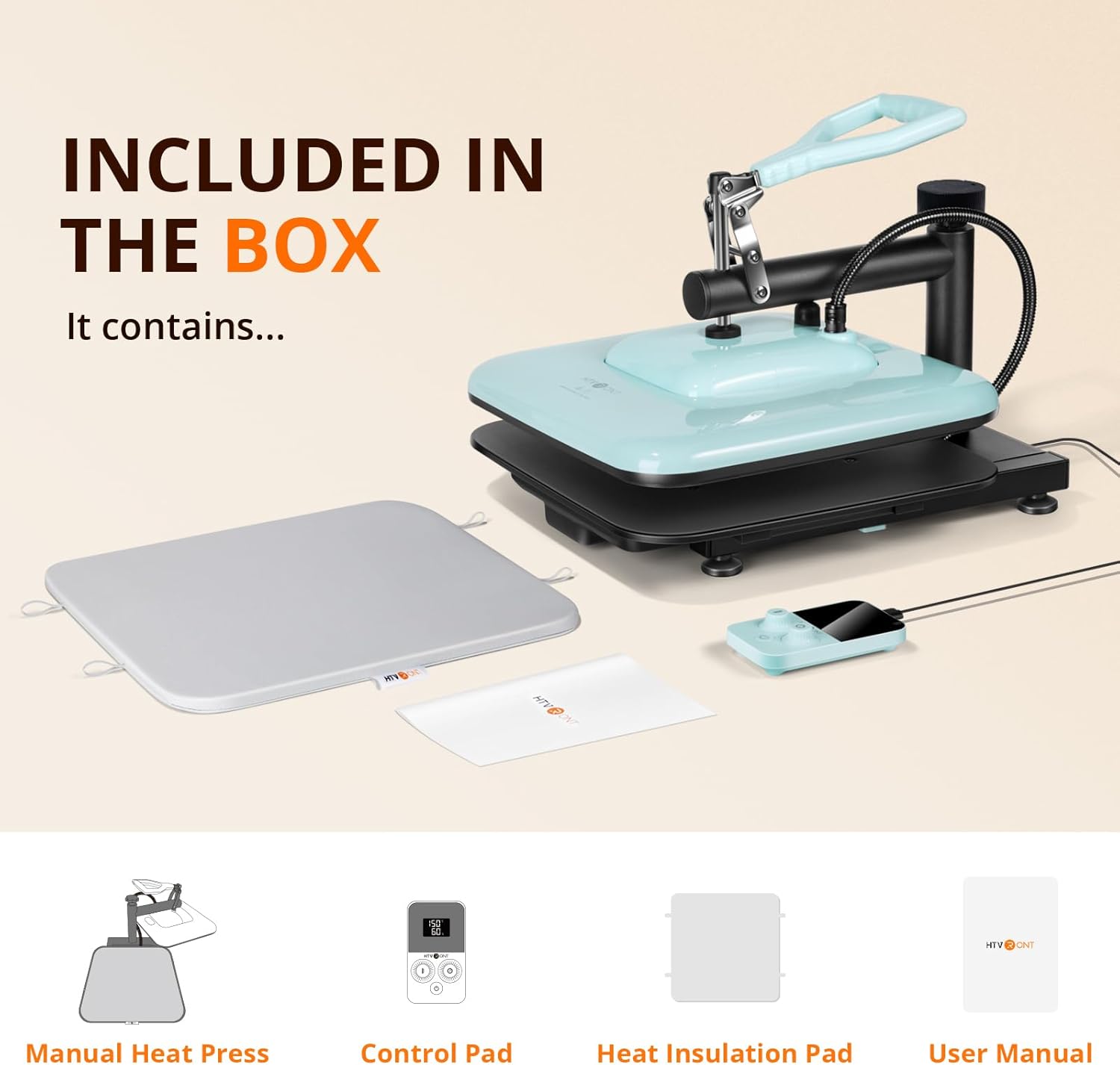
Image: An illustration showing the items included in the product packaging: the manual heat press unit, control pad, heat insulation pad, and user manual.
- HTVRONT Manual Heat Press x 1
- Panel de control x 1
- Heat Insulation Pad x 1
- Manual de usuario x 1
3. Configuración inicial
- Deshacer: Retire con cuidado todos los componentes del embalaje.
- Colocación: Place the heat press machine on a stable, heat-resistant surface in a well-ventilated area. Ensure there is enough space around the machine for the swing-away function.
- Connect Control Pad: Plug the control pad cable into the designated port on the heat press machine.
- Conexión de energía: Enchufe el cable de alimentación a una toma eléctrica de 110 V con conexión a tierra.
- Comprobación previa al uso: Antes del primer uso, asegúrese de que todas las piezas estén bien ensambladas y que no haya daños visibles.
4. Operación
4.1 Ajustes de temperatura y tiempo
The detached control pad allows for precise adjustment of temperature and time.

Image: The control pad displaying temperature and time settings, with indicators for bell reminder and temperature range.
- Encendido: Press the power button on the control pad to turn on the machine.
- Temperatura establecida: Use the temperature adjustment knob/buttons on the control pad to set the desired temperature. The machine supports a range of 104-410°F (40-210°C).
- Establecer hora: Use the time adjustment knob/buttons to set the desired pressing duration (0-999 seconds).
- Precalentamiento: The machine will begin to heat up once settings are applied. The 1500W dual-zone heating engine ensures rapid and even heat distribution. A bell reminder will sound when the set temperature is reached.
4.2 Ajuste de la presión
The pressure adjustment knob located on top of the heat press allows you to customize the pressure based on the thickness of your material.
- Aumentar la presión: Gire la perilla en el sentido de las agujas del reloj.
- Decrease Pressure: Gire la perilla en sentido antihorario.
- Adjust until the heat plate makes firm, even contact with your material.
4.3 The Pressing Process
Siga estos pasos para una transferencia de calor exitosa:

Image: A visual guide showing the four main steps of operation: 1. Prepare materials, 2. Set time and temperature on the control pad, 3. Adjust pressure, 4. Press the handle down to start the transfer.
- Prepárese: Place your material (e.g., T-shirt) and the transfer design onto the ironing board. Ensure the material is flat and free of wrinkles. You may use the included heat insulation pad.
- Colocar: Use the control pad to set the appropriate temperature and time for your specific transfer material (HTV, sublimation, etc.). Allow the machine to preheat until the set temperature is reached.
- Ajustar: Rotate the swivel heat plate 180 degrees to move it away from the ironing board. Adjust the pressure regulator knob to achieve the desired pressure for your material.
- Prensa: Once the machine is preheated and the pressure is set, swing the heat plate back over your material. Firmly press the handle down to engage the heat plate. The handle will self-lock during heating, allowing you to release it and perform other tasks.
- Cuenta regresiva: The timer on the control pad will begin counting down. A bell reminder will sound when the pressing cycle is complete.
- Finalizar: Lift the handle to release the pressure, then swing the heat plate away. Carefully remove your pressed item.
4.4 Automatic Shut-off Feature
The HTVRONT Heat Press Machine is equipped with an automatic shut-off feature. If the machine remains inactive for 15 minutes, it will automatically power down to conserve energy and enhance safety.
5. Mantenimiento
Un mantenimiento adecuado garantiza la longevidad y el rendimiento óptimo de su máquina de prensado térmico.
- Limpieza de la placa calefactora: Deje que la máquina se enfríe por completo. Utilice un paño suave y seco.amp cloth to wipe down the heat plate. For stubborn residue, use a non-abrasive cleaner specifically designed for heat press platens. Do not use harsh chemicals or abrasive materials.
- Limpieza del cuerpo: Limpie el exterior de la máquina con un paño suave y seco.
- Almacenamiento: Guarde la prensa térmica en un entorno seco y libre de polvo cuando no esté en uso.
- Controles periódicos: Inspeccione periódicamente el cable de alimentación y el enchufe para detectar cualquier signo de daño.
6. Solución de problemas
If you encounter issues with your HTVRONT Heat Press Machine, refer to the following common problems and solutions:
- La máquina no se enciende:
- Asegúrese de que el cable de alimentación esté enchufado de forma segura tanto a la máquina como a una toma de corriente eléctrica que funcione.
- Compruebe si el tomacorriente tiene energía enchufando otro dispositivo.
- Calentamiento desigual:
- While the machine is designed for even heat distribution, ensure the heat plate is clean and free of debris.
- Verify that the pressure is evenly applied across the entire platen. Adjust the pressure knob as needed.
- Timer Issues (e.g., not resetting or starting):
- Ensure the control pad cable is firmly connected.
- Try powering off the machine and restarting it.
- Refer to the specific instructions in the included user manual for detailed control pad operation.
- Transfer Not Adhering Properly:
- Check that the temperature and time settings are correct for your specific transfer material.
- Ensure sufficient and even pressure is applied.
- Verify that the material and transfer are properly prepared (e.g., pre-pressed fabric, correct peeling method).
For further assistance, please contact HTVRONT customer support.
7. Especificaciones técnicas
| Característica | Especificación |
|---|---|
| Número de modelo | SG-RYJ-0329-US-A |
| Volumentage | 110 voltios |
| Fuerza | 1500 W |
| Dimensiones de la placa calefactora | 15 x 15 pulgadas |
| Rango de temperatura | 104 - 410 °F (40 - 210 °C) |
| Intervalo de tiempo | 0 - 999 segundos |
| Dimensiones del producto | 14" de largo x 8" de ancho x 18" de alto |
| Peso del artículo | 20 libras |
| Apagado automático | Después de 15 minutos de inactividad |
8. Atención al cliente y garantía
For any questions, technical support, or warranty inquiries regarding your HTVRONT Heat Press Machine, please contact HTVRONT customer service through the official websitio o su plataforma de compra.
Conserve su comprobante de compra para reclamos de garantía.