
Introducción
Gracias por la compraasing the Sigma 50mm F2 DG Contemporary lens. This manual provides essential information for the safe and effective use of your new lens. Please read it thoroughly before using the product and keep it for future reference.
Precauciones de seguridad
- Do not look at the sun or other strong light sources through the lens, as this can cause permanent vision damage.
- Mantenga la lente alejada de la luz solar directa cuando no esté en uso para evitar riesgos de incendio.
- Avoid exposing the lens to extreme temperatures, humidity, or dust.
- No intente desmontar ni modificar la lente. Las reparaciones solo deben ser realizadas por personal de servicio autorizado.
- Mantener fuera del alcance de los niños.
Contenido del paquete
Verifique que todos los artículos estén presentes en su paquete:
- Sigma 50mm F2 DG Contemporary Lens
- Lens Hood (LH633-02S)
- Tapa de lente frontal
- Tapa de lente trasera
- Manual de instrucciones (este documento)
Partes de la lente
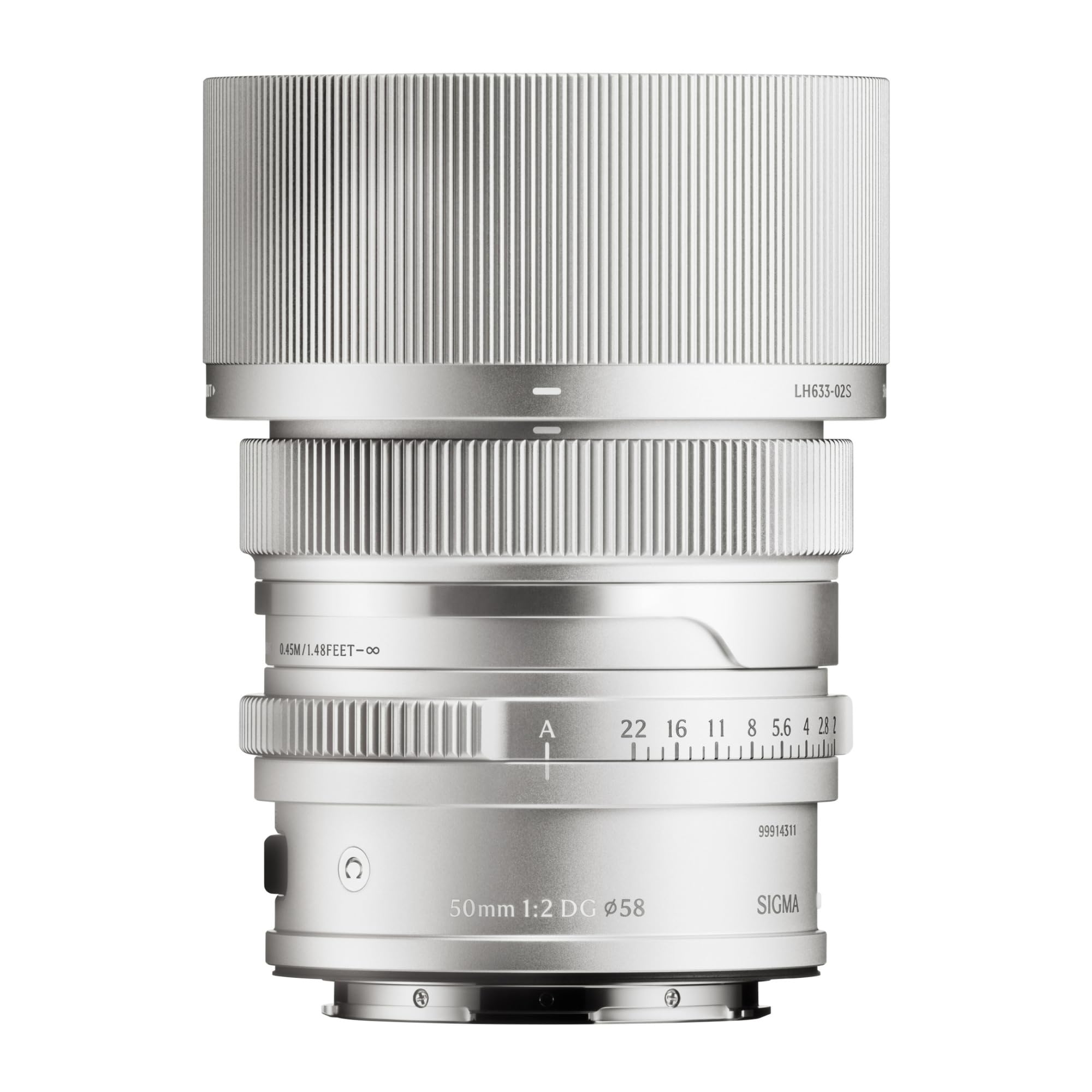
This image displays the Sigma 50mm F2 DG Contemporary lens, a prime lens designed for L-mount cameras. It features a sleek silver finish and a compact design, suitable for various photographic applications.
The Sigma 50mm F2 DG Contemporary lens features several key components:
- Anillo de enfoque: Se utiliza para enfocar manualmente.
- Anillo de apertura: Allows direct control over the lens aperture.
- Montura de lente: Connects the lens to the camera body (L-Mount).
- Lens Hood Attachment Point: Where the dedicated lens hood is secured.

The image shows the LH633-02S lens hood, a cylindrical accessory with a ribbed exterior, designed to attach to the Sigma 50mm F2 DG Contemporary lens. It helps to prevent stray light from entering the lens, reducing flare and ghosting, and offers protection to the front element.
Configuración
Colocación de la lente
- Asegúrese de que tanto la cámara como la lente estén apagadas.
- Retire la tapa trasera de la lente y la tapa del cuerpo de la cámara.
- Align the mounting index on the lens with the mounting index on the camera body.
- Inserte el objetivo en el soporte de la cámara y gírelo en sentido horario hasta que encaje. No fuerce el objetivo.
Attaching the Lens Hood (LH633-02S)
- Alinee el punto rojo del parasol con el punto rojo en la parte frontal del lente.
- Gire el parasol en el sentido de las agujas del reloj hasta que encaje firmemente en su posición.
- To remove, press the release button on the lens hood and rotate counter-clockwise.
Operante
Enfoque
Esta lente admite tanto el enfoque automático (AF) como el enfoque manual (MF).
- Autofoco: Set your camera's focus mode to AF. The lens will automatically focus when the shutter button is half-pressed.
- Enfoque manual: Set your camera's focus mode to MF. Rotate the focus ring on the lens to adjust focus manually. Use your camera's focus peaking or magnification features for precise focusing.
Control de apertura
The lens features an aperture ring for direct control over the aperture setting. You can also control the aperture through your camera body, depending on your camera's settings and mode.
Cámaras compatibles
This lens is designed for L-Mount cameras, including models such as Leica SL, Leica TL2, and Leica CL.
Mantenimiento
Limpieza de la lente
- Utilice un cepillo soplador para eliminar el polvo de la superficie de la lente.
- For smudges or fingerprints, use a clean, soft microfiber cloth specifically designed for optical lenses. Apply a small amount of lens cleaning solution to the cloth, not directly to the lens.
- Nunca utilice materiales abrasivos, solventes o productos químicos agresivos para limpiar la lente.
Almacenamiento
- Cuando no esté en uso, coloque las tapas de las lentes delantera y trasera.
- Guarde la lente en un lugar fresco y seco, alejado de la luz solar directa y de la humedad alta.
- Si lo va a almacenar durante un período prolongado, considere usar un desecante para evitar el crecimiento de moho.
Solución de problemas
- Lente no reconocida por la cámara: Ensure the lens is securely attached to the camera body. Power off and restart the camera. Check for any firmware updates for both the lens and camera.
- El enfoque automático no funciona: Verify the camera's focus mode is set to AF. Ensure there is sufficient light and contrast in the scene for the autofocus system to operate effectively.
- Las imágenes están borrosas: Check that the lens is properly focused. Ensure the shutter speed is fast enough to prevent camera shake, especially in low light. Clean the lens elements if smudges are present.
- Lens hood difficult to attach/remove: Ensure proper alignment of the red dots. Do not force the hood; it should click into place smoothly.
Presupuesto
| Nombre del modelo | 31S969 |
| Longitud focal | 50 mm |
| Apertura máxima | F2 |
| Apertura mínima | F2 |
| Tipo de lente | Lente principal |
| Montajes compatibles | Leica L |
| Tipo de enfoque | Enfoque automático |
| Estabilización de imagen | Sin estabilización de imagen |
| Nivel de resistencia al agua | No resistente al agua |
| Peso del artículo | 2 libras |
Garantía y soporte
Información de garantía
Este producto viene con un 9 año de garantía. Please retain your proof of purchase for warranty claims. The warranty covers manufacturing defects under normal use. It does not cover damage caused by misuse, accidents, unauthorized repairs, or normal wear and tear.
Atención al cliente
For technical assistance, service, or warranty inquiries, please contact Sigma customer support through their official website or the retailer where you purchased the product. Have your model number (31S969) and proof of purchase ready when contacting support.