
Introducción
The ATTACK SHARK X1 Superlight Wireless Gaming Mouse is engineered for high-performance gaming and versatile daily use. Featuring a PAW3395PRO gaming sensor, tri-mode connectivity (2.4G wireless, Bluetooth, and wired USB-C), and an innovative magnetic charging dock with RGB lighting, the X1 mouse provides precision, speed, and convenience. Its ultra-lightweight design and durable switches ensure comfort and longevity for extended use.
Contenido del paquete
- ATTACK SHARK X1 Superlight Wireless Gaming Mouse
- Base de carga magnética RGB
- Cable USB-C a USB-A
- 2.4GHz Wireless Receiver (Nano Dongle)
- Manual de usuario (este documento)

Image: The ATTACK SHARK X1 mouse shown alongside its magnetic charging dock.
Producto terminadoview
The X1 mouse features a lightweight ergonomic design with programmable buttons and a high-precision optical sensor. The accompanying magnetic charging dock provides convenient charging and also houses the 2.4GHz wireless receiver.
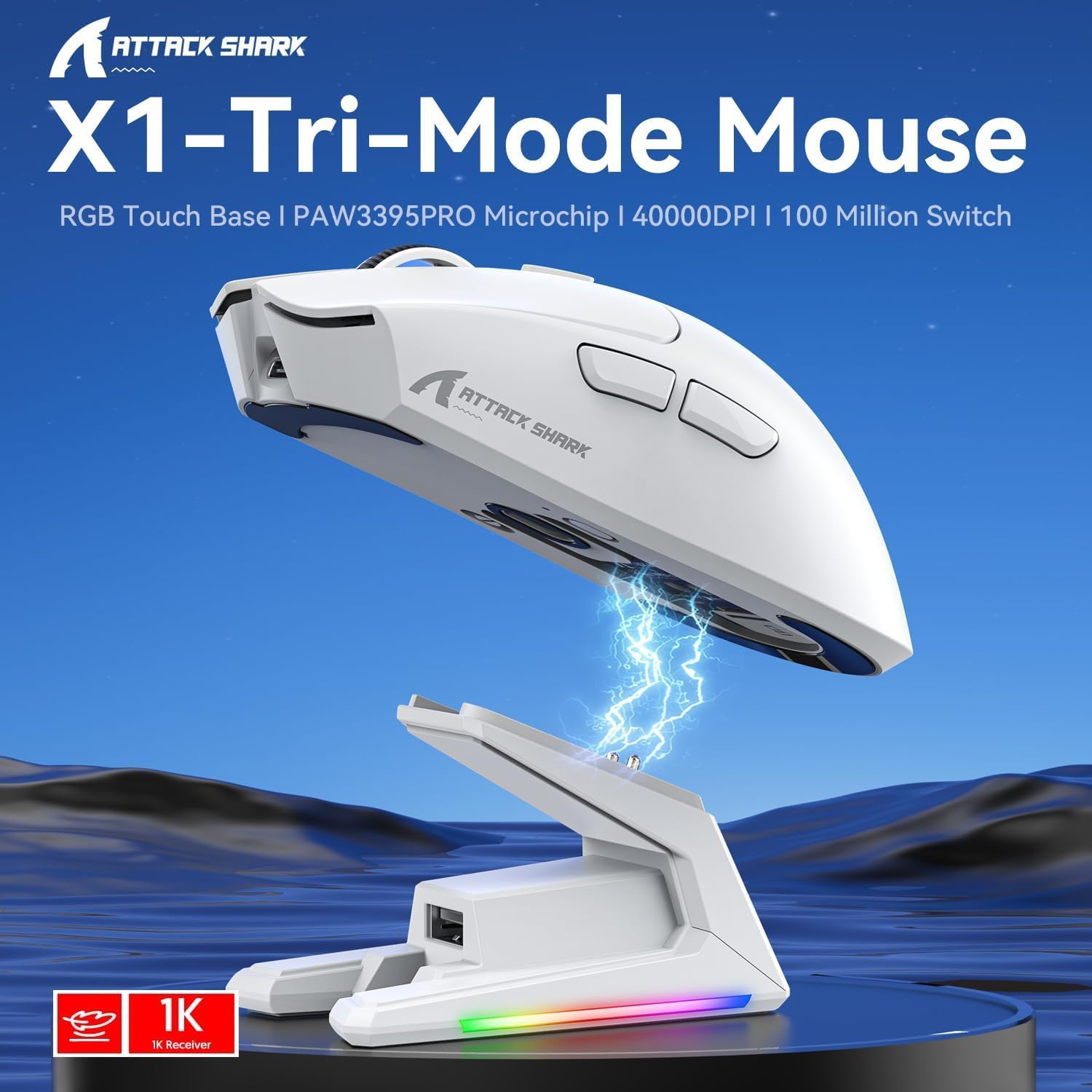
Imagen: Más alláview of the X1 Tri-Mode Mouse highlighting its key features.
Componentes del ratón:
- Botones de clic izquierdo/derecho: Standard mouse buttons with durable OMRON switches.
- Rueda de desplazamiento: Para la funcionalidad de desplazamiento vertical y clic central.
- Botón PPP: Located on top for quick sensitivity adjustments.
- Botones laterales: Two programmable buttons on the left side for forward/backward navigation or custom macros.
- Puerto USB-C: Para conexión por cable y carga.
- Interruptor de encendido/modo: Located on the bottom, allows switching between OFF, 2.4G, and Bluetooth modes.
- PAW3395PRO Sensor: High-performance optical sensor for precise tracking.
Charging Dock Components:
- Pines de carga magnéticos: Align with the mouse for effortless charging.
- Tira de iluminación RGB: Efectos de iluminación personalizables.
- Panel sensible al tacto: For controlling RGB lighting on the dock.
- Puerto USB-A: For connecting the 2.4GHz wireless receiver.
- Puerto de carga USB-C: For powering the dock.

Imagen: Primer plano view of the charging dock's USB data interface for the 2.4G receiver and the Type-C charging interface.
Configuración
1. Conexión por cable:
- Connect the USB-C end of the provided cable to the mouse's USB-C port.
- Conecte el extremo USB-A del cable a un puerto USB disponible en su computadora.
- Ensure the power/mode switch on the bottom of the mouse is set to the 'OFF' position. The mouse will function in wired mode and charge simultaneously.

Image: The X1 mouse connected to a laptop via its USB-C cable, demonstrating wired mode and charging capability.
2. Conexión inalámbrica de 2.4 GHz:
- Plug the 2.4GHz wireless receiver into an available USB-A port on your computer or into the USB-A port on the charging dock.
- Set the power/mode switch on the bottom of the mouse to the '2.4G' position.
- El ratón debería conectarse automáticamente al receptor.
3. Conexión Bluetooth:
- Set the power/mode switch on the bottom of the mouse to the 'BT' position.
- El mouse ingresará al modo de emparejamiento (la luz indicadora puede parpadear).
- En su computadora o dispositivo, navegue a la configuración de Bluetooth y busque nuevos dispositivos.
- Select 'ATTACK SHARK X1' (or similar name) from the list of available devices to pair. The mouse supports memory for up to 3 Bluetooth devices.
Instrucciones de funcionamiento
Ajuste de PPP:
The X1 mouse features a dedicated DPI button on its top surface. Press this button to cycle through the preset DPI levels. The mouse supports up to 40,000 DPI with 6 programmable sensitivity presets. The current DPI level may be indicated by an LED color change (refer to the Web Cloud Driver for specific indications).

Imagen: Detallada view of the PAW3395PRO gaming sensor, emphasizing its high precision.
Web Cloud Driver Software:
The ATTACK SHARK X1 utilizes an innovative web-based cloud driver for customization, eliminating the need for software installation. Access the driver through your web browser to configure advanced functions such as:
- Ajuste de DPI y pros personalizadosfiles
- Configuración de la tasa de sondeo
- Competitive mode activation
- Asignaciones de botones personalizados
- Macro recording and personalized key mapping
The open-source driver automatically identifies your computer system. Refer to the product packaging or official websitio para el específico URL Para acceder a la Web Controlador de nube.

Imagen: Captura de pantalla del X1 Web Cloud Driver interface, showing options for key settings, macros, and other functions.
RGB Lighting Customization (Dock):
The magnetic charging dock features an integrated touch-sensitive panel that allows you to customize its RGB lighting effects. Tap the panel to cycle through different lighting modes. Press and hold the panel to turn the RGB lighting on or off.
Carga y duración de la batería
The X1 mouse can be charged via the included USB-C cable or by placing it on the magnetic charging dock. The dock provides effortless charging; simply align the mouse with the charging pins for instant power-up. A full charge typically takes approximately 2 hours and provides up to 65 hours of continuous working time.

Image: The X1 mouse magnetically docked for charging, showcasing the RGB lighting of the dock.

Image: An illustration depicting the optimized battery life of the X1 mouse, indicating efficient power usage.
Mantenimiento
To ensure the longevity and optimal performance of your ATTACK SHARK X1 mouse and charging dock, follow these maintenance guidelines:
- Limpieza: Use a soft, dry cloth to wipe down the mouse and dock. For stubborn dirt, a slightly damp cloth can be used, but ensure no moisture enters the internal components or charging pins. Avoid harsh chemicals or abrasive materials.
- Cuidado del sensor: Keep the optical sensor on the bottom of the mouse clean and free of dust or debris to maintain accurate tracking.
- Almacenamiento: When not in use for extended periods, store the mouse and dock in a cool, dry place away from direct sunlight and extreme temperatures.
- Pines de carga: Periodically inspect the charging pins on the dock and the corresponding contacts on the mouse for any residue or corrosion. Clean gently with a cotton swab if necessary.
Solución de problemas
If you encounter issues with your ATTACK SHARK X1 mouse, refer to the following common troubleshooting steps:
- El ratón no responde:
- Asegúrese de que el ratón esté cargado.
- Check the power/mode switch on the bottom of the mouse is set to the correct connection mode (2.4G, BT, or OFF for wired).
- For 2.4G wireless, ensure the receiver is properly plugged into a USB port. Try a different USB port.
- Para Bluetooth, asegúrese de que esté activado en su dispositivo y que el ratón esté emparejado. Intente volver a emparejarlo.
- Try connecting the mouse via the USB-C cable to see if it functions in wired mode.
- Inconsistent Tracking or Cursor Lag:
- Limpie el sensor óptico en la parte inferior del mouse.
- Asegúrese de utilizar el ratón sobre una superficie adecuada (por ejemplo, un mouse pad).
- Compruebe si hay interferencias en el modo inalámbrico 2.4G (por ejemplo, otros dispositivos inalámbricos).
- Adjust DPI settings using the DPI button or Web Controlador de nube.
- Problemas de carga:
- Ensure the USB-C cable is securely connected to the charging dock and a power source.
- Verify the mouse is correctly seated on the magnetic charging dock, ensuring the pins make proper contact.
- Try charging directly via the USB-C cable connected to the mouse.
- Web Cloud Driver Not Accessible:
- Asegúrese de que su computadora tenga una conexión a Internet activa.
- Verificar el URL Para el Web Cloud Driver is entered correctly.
- Prueba una opción diferente web navegador.
Presupuesto
| Característica | Descripción |
|---|---|
| Modelo | X1 |
| Conectividad | Tri-Mode: 2.4G Wireless, Bluetooth 5.2, Wired USB-C |
| Sensor | PixArt PAW3395PRO Optical Gaming Sensor |
| Rango de DPI | Up to 40,000 DPI (6 programmable presets) |
| IPS | 650 IPS |
| Aceleración | 50G |
| Interruptores | OMRON Mechanical Switches (100 Million Clicks lifespan) |
| Peso | Aprox. 53 g (ultraligero) |
| Duración de la batería | Hasta 65 horas (uso continuo) |
| Cargando | Magnetic Charging Dock / USB-C Wired |
| Tasa de sondeo | 1000 Hz (respuesta de 1 ms) |
| Dimensiones (paquete) | 7.09 x 4.53 x 2.17 pulgadas |
| Peso del artículo (empaquetado) | 7.7 onzas |
Garantía y soporte
Para obtener información sobre la garantía y soporte técnico, consulte el sitio web oficial de ATTACK SHARK. webSitio web o contacte directamente con el servicio de atención al cliente. Conserve su recibo de compra como comprobante para cualquier reclamación de garantía.
Para obtener más ayuda, visite el ATTACK SHARK Store on Amazon.


