
1. Introducción
This manual provides detailed instructions for the proper use and maintenance of your Oakcastle HIFI500 Remote Control. This remote is designed as a replacement or spare for the Oakcastle HIFI500 audio system, ensuring seamless control over its functions. Please read this manual thoroughly before use to ensure optimal performance and longevity of your remote control.
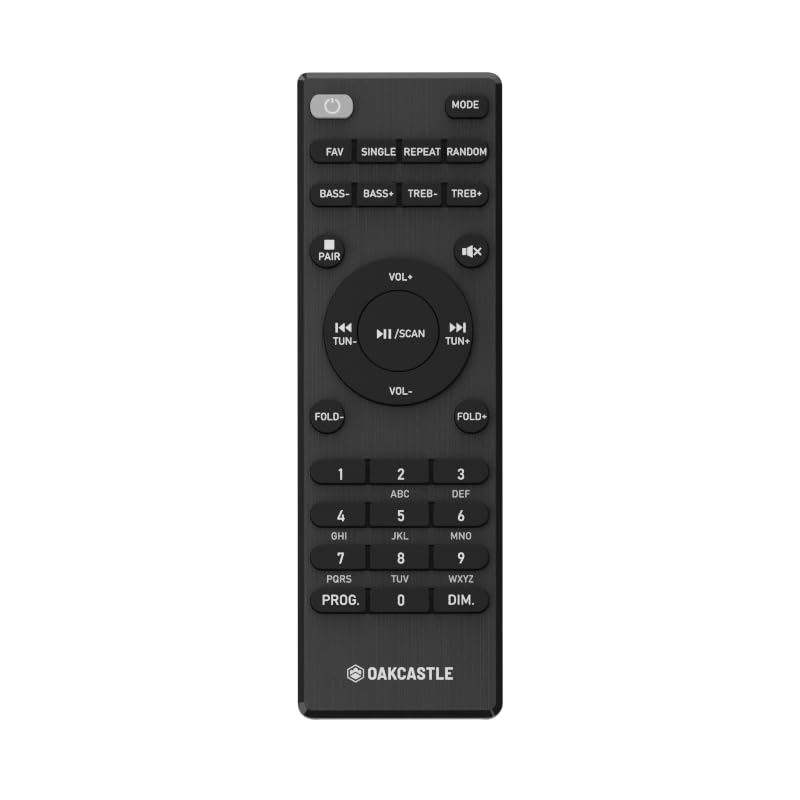
Figura 1.1: Frente view of the Oakcastle HIFI500 Remote Control. This image displays the compact design and button layout, including power, volume, source selection, and playback controls, typical for operating the HIFI500 audio system.
2. Configuración
2.1. Instalación de la batería
The Oakcastle HIFI500 Remote Control requires two AAA batteries (not included) for operation. Follow these steps to install the batteries:
- Ubique el compartimiento de la batería en la parte posterior del control remoto.
- Presione la pestaña y deslice la tapa de la batería hacia abajo para abrirla.
- Inserte dos pilas AAA, asegurándose de que los terminales positivo (+) y negativo (-) estén alineados correctamente con las marcas dentro del compartimiento.
- Deslice la tapa de la batería nuevamente en su lugar hasta que haga clic de forma segura.
Nota: Utilice siempre pilas nuevas y deseche las usadas de forma responsable. No mezcle pilas nuevas y viejas, ni pilas de distintos tipos.
2.2. Uso inicial
Once batteries are installed, the remote control is ready for use with your Oakcastle HIFI500 audio system. Point the remote directly at the infrared (IR) receiver on your HIFI500 system. No additional pairing is typically required for this replacement remote.
3. Operar el control remoto
The Oakcastle HIFI500 Remote Control provides full functionality for your HIFI500 audio system. Below is a general guide to common button functions:
- Botón de encendido (⏻): Turns the HIFI500 system on or off.
- Subir/bajar volumen (Vol+ / Vol-): Ajusta el nivel de salida de audio.
- Silencio (🔇): Silencia temporalmente la salida de audio.
- Source/Input (Fuente): Cycles through available audio inputs (e.g., CD, FM, Bluetooth, AUX).
- Controles de reproducción (▶ / ⏸ / ⏹ / ⏪ / ⏩): Controls media playback (Play, Pause, Stop, Rewind, Fast Forward) for compatible sources like CD or USB.
- Botones de navegacion (▲ / ▼ / ◀ / ▶): Used to navigate menus and selections on the HIFI500 system display.
- Botón OK/Enter: Confirma selecciones.
- Teclado numérico (0-9): For direct input of radio frequencies, track numbers, or other numerical data.
Refer to your Oakcastle HIFI500 audio system's main user manual for specific functions and advanced operations.
4. Mantenimiento
4.1. Limpieza
Para limpiar el control remoto, limpie suavemente la superficie con un paño suave y seco. Para la suciedad difícil, limpie ligeramenteampLimpie el paño con agua o un limpiador suave no abrasivo. Evite usar productos químicos agresivos, disolventes o materiales abrasivos, ya que pueden dañar el acabado o los componentes internos del control remoto.
4.2. Reemplazo de la batería
Replace batteries when the remote's response becomes sluggish or stops working. Follow the battery installation steps outlined in Section 2.1. Always replace both batteries simultaneously with new ones.
4.3. Almacenamiento
When not in use for extended periods, it is recommended to remove the batteries from the remote control to prevent leakage, which can cause damage. Store the remote in a cool, dry place away from direct sunlight and extreme temperatures.
5. Solución de problemas
If you encounter issues with your Oakcastle HIFI500 Remote Control, please refer to the following common problems and solutions:
- El control remoto no responde:
- Compruebe si las baterías están instaladas correctamente con la polaridad correcta.
- Reemplace las baterías por otras nuevas.
- Ensure there are no obstructions between the remote control and the HIFI500 system's IR receiver.
- Make sure you are within the effective range and pointing the remote directly at the HIFI500 system.
- Función intermitente:
- Esto suele indicar que la batería está baja. Reemplace las baterías.
- Ensure the remote's IR emitter is clean and free from dirt or smudges.
If the problem persists after trying these solutions, please contact Oakcastle customer support.
6. Especificaciones
| Característica | Especificación |
|---|---|
| Modelo | HIFI500 Remote Control |
| Marca | castillo de roble |
| Tecnología de conectividad | Infrarrojos (IR) |
| Fuente de poder | Pilas 2 x AAA (no incluidas) |
| Número máximo de dispositivos compatibles | 1 (Oakcastle HIFI500 Audio System) |
| Característica especial | Ligero |
| Peso del artículo | 2.82 onzas (aprox. 80 gramos) |
| Dimensiones del paquete | 8 x 3.2 x 2.5 pulgadas (aprox. 20.3 x 8.1 x 6.3 cm) |
| Fabricante | MAYORÍA |
7. Garantía y soporte
7.1. Información de garantía
This Oakcastle HIFI500 Remote Control is covered by a manufacturer's warranty. Please refer to the warranty card included with your original Oakcastle HIFI500 audio system or visit the official Oakcastle webConsulte el sitio web para conocer los términos y condiciones detallados de la garantía. Conserve su comprobante de compra para reclamar la garantía.
7.2. Atención al cliente
For technical assistance, troubleshooting beyond this manual, or warranty inquiries, please contact Oakcastle customer support. You can typically find contact information, including phone numbers, email addresses, and support portals, on the official Oakcastle websitio.
Please have your product model (HIFI500 Remote Control) and purchase details ready when contacting support.