
Lamicall STTP03
Manual del usuario del trípode flexible Lamicall
Model: STTP03
Producto terminadoview
The Lamicall Flexible Tripod is a versatile 3-in-1 integrated stand designed for smartphones, cameras, and GoPro devices. Its flexible legs allow for stable placement on various surfaces or wrapping around objects. The tripod features 360° horizontal and 135° vertical rotation for optimal angle adjustment and includes a wireless remote control for convenient remote shooting.
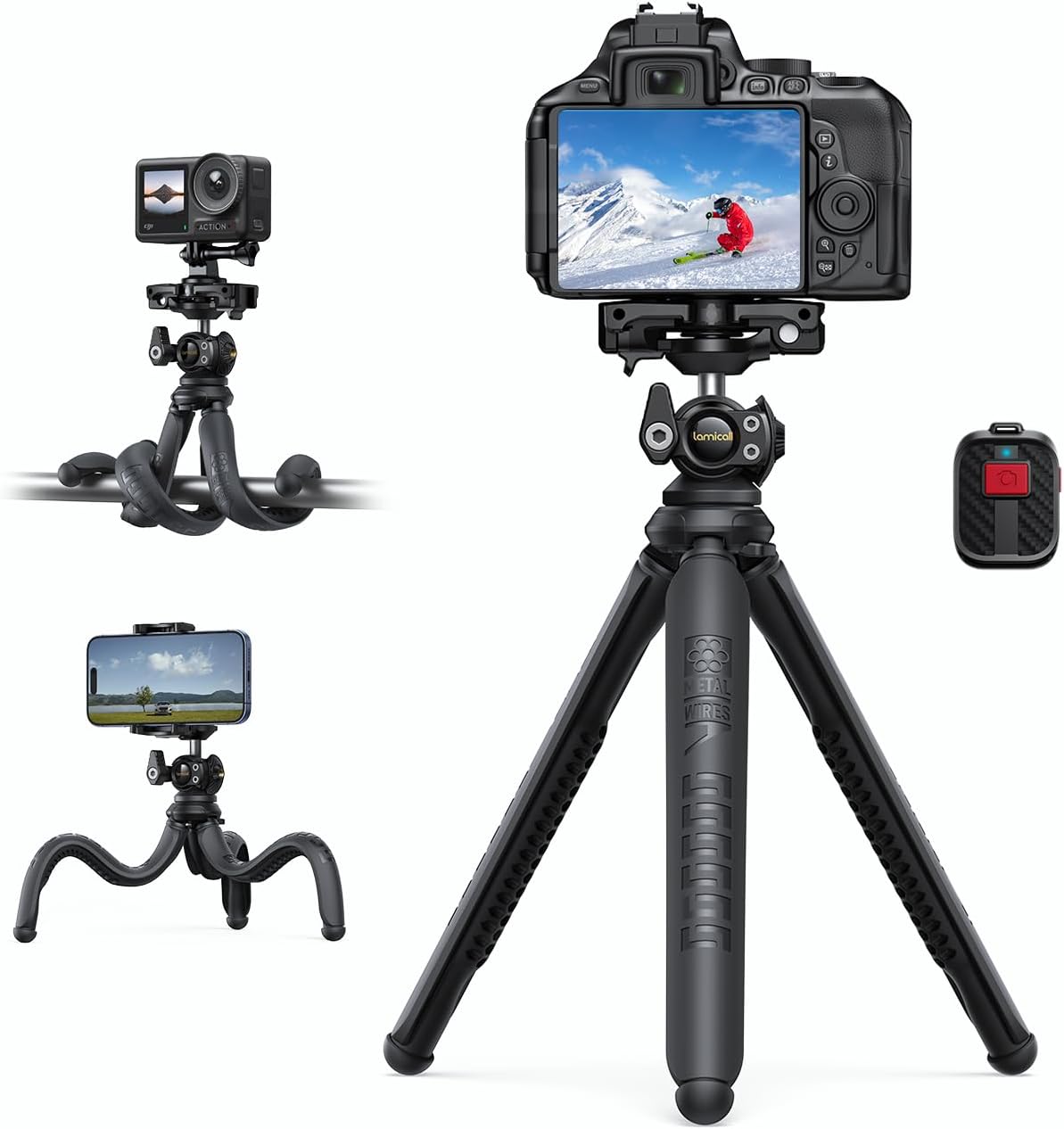
Figure 1: Lamicall Flexible Tripod showcasing its compatibility with cameras, smartphones, and GoPro devices, along with the included wireless remote.
This upgraded 2025 model incorporates a remote storage design, ensuring the wireless remote control is always at hand. Constructed with high-quality silicone and 8 twisted aluminum wires, it offers both durability and stability. Its lightweight and portable design makes it an ideal accessory for various activities, including video recording, selfies, live streaming, and outdoor adventures.
Contenido del paquete
Verifique que todos los artículos enumerados a continuación estén incluidos en su paquete:
- 1 x Flexible Phone Tripod
- 1 x Soporte para teléfono
- 1 adaptador GoPro
- 1 x control remoto inalámbrico
- 1 x Manual de usuario
Configuración
Conexión de su dispositivo
The Lamicall Flexible Tripod is designed for quick and secure attachment of various devices.
- Para cámaras: Locate the 1/4-inch screw on the tripod's mounting plate. Align your camera's tripod mount with this screw and rotate the camera clockwise until it is securely fastened. Ensure the screw is tightened sufficiently to hold the camera firmly.
- Para teléfonos inteligentes: Attach the provided phone holder to the tripod's 1/4-inch screw. Secure the phone holder by tightening the screw. Extend the phone holder's clamps and carefully insert your smartphone, ensuring it is centered and held firmly. The holder is compatible with 4-7 inch cell phones.
- Para GoPro: Attach the provided GoPro adapter to the tripod's 1/4-inch screw. Secure the GoPro adapter by tightening the screw. Then, attach your GoPro camera to the adapter using its standard mounting mechanism.

Figure 2: The tripod head with 1/4-inch screw for wide device compatibility.

Figure 3: The tripod's modular design allows for easy attachment of cameras, smartphones, and GoPro devices.
Pairing the Wireless Remote Control
The wireless remote control allows for convenient remote shooting up to 10 meters away.
- Ensure the remote control has a battery installed (1 AAA battery included).
- Turn on the remote control by sliding the power switch.
- En su teléfono inteligente, vaya a la configuración de Bluetooth y busque nuevos dispositivos.
- Select "AB Shutter3" (or similar name) from the list of available devices to pair.
- Once paired, you can use the remote to trigger your phone's camera shutter.

Figure 4: Using the wireless remote control for hands-free photography.
The remote control can be stored securely within the tripod's head for easy access and to prevent loss.

Figure 5: Remote storage design integrated into the tripod head.
Instrucciones de funcionamiento
Adjusting Angles and Positioning
The Lamicall Flexible Tripod offers extensive adjustability to capture your desired shots.
- Ball Joint Adjustment: The integrated ball joint allows for 360° horizontal rotation and 135° vertical tilt. Loosen the screw on the side of the ball joint to adjust the angle, then tighten it firmly to secure your device in position.
- Piernas flexibles: The tripod's legs are made of flexible, high-quality silicone with an aluminum inner core, allowing them to be bent and shaped. You can stand the tripod on flat or uneven surfaces, or wrap its legs around objects like railings, tree branches, or poles for unique perspectives and stable mounting.

Figure 6: Flexible legs allow for stable placement on various surfaces or wrapping around objects.

Figure 7: The flexible arm adapts for GoPro use, allowing creative positioning.
Mantenimiento
Proper care will extend the life of your Lamicall Flexible Tripod:
- Limpieza: Limpie el trípode con un paño suave.amp cloth to remove dust and dirt. Avoid using harsh chemicals or abrasive cleaners, as they may damage the silicone and aluminum materials.
- Almacenamiento: Store the tripod in a cool, dry place away from direct sunlight and extreme temperatures. Ensure the legs are not excessively bent or twisted during long-term storage to maintain their flexibility and integrity.
- Reemplazo de batería (control remoto): If the wireless remote control's performance degrades, replace the AAA battery. Refer to the remote's battery compartment for instructions on opening and replacing the battery.
Solución de problemas
If you encounter issues with your Lamicall Flexible Tripod, please refer to the following common solutions:
| Problema | Posible causa | Solución |
|---|---|---|
| El trípode es inestable. | Legs not properly positioned or tightened. Device not securely mounted. | Ensure the flexible legs are spread wide enough for a stable base. If wrapping, ensure they are tightly secured around the object. Verify that your device is firmly attached to the 1/4-inch screw or phone holder. |
| El control remoto inalámbrico no se conecta. | Remote battery low or dead. Bluetooth not enabled on device. Remote not paired or out of range. | Replace the AAA battery in the remote. Ensure Bluetooth is enabled on your smartphone. Re-pair the remote by going to Bluetooth settings and selecting "AB Shutter3". Ensure you are within 10 meters of the device. |
| El dispositivo se resbala del soporte del teléfono. | Phone not properly seated or holder not tightened. | Ensure your phone is centered and fully inserted into the phone holder's clamps. Verify that the phone holder is securely tightened to the tripod's 1/4-inch screw. |
Presupuesto
| Característica | Detalle |
|---|---|
| Número de modelo | STTP03 |
| Material | Soft Rubber + Aluminum |
| Dispositivos compatibles | Smartphones (4-7 inches, e.g., iPhone 11-16 series, Samsung Galaxy S21/S22, Google Pixel, One Plus), GoPro, Cameras with 1/4-inch tripod mount. |
| Rotación | 360 ° Horizontal, Vertical ° 135 |
| Características especiales | 3-in-1 Flexible Design, Wireless Remote Control, 360° Rotate Joint Ball, Portable and Lightweight, Easier Quick Install, Remote Storage Design. |
| Batería del control remoto | 1 x AAA (incluida) |
| Alcance del control remoto | Hasta 10 metros |
| Dimensiones del paquete | 28 x 8.3 x 5.4 cm |
| Peso | 400 gramos |
Información de garantía
For detailed warranty information regarding your Lamicall Flexible Tripod, please refer to the warranty card included in your product packaging or visit the official Lamicall webSitio. Conserve su recibo de compra como comprobante de compra para cualquier reclamación de garantía.
Atención al cliente
If you have any questions, concerns, or require assistance with your Lamicall Flexible Tripod, please contact Lamicall customer support through their official website or the contact information provided in your product documentation. For the most up-to-date support options, please visit the Tienda Lamicall en Amazon.
Ask a question about this manual
Ask about setup, troubleshooting, compatibility, parts, safety, or missing instructions. Manuals+ will review the question and use this page’s manual context to help answer it.