
1. Producto terminadoview
The zelotes C-12 Professional Wired Gaming Mouse is designed for high-performance gaming and office use. It features an ergonomic design, 12 programmable buttons, adjustable DPI settings, multi-modes RGB backlighting, and a customizable weight system.

Image 1.1: The zelotes C-12 Professional Wired Gaming Mouse, showcasing its ergonomic shape and customizable RGB lighting.
Contenido del paquete:
- 1 x zelotes C-12 Gaming Mouse
- 1 x Manual de instrucciones
- 1 CD de software
- 1 x Foot Pad Set
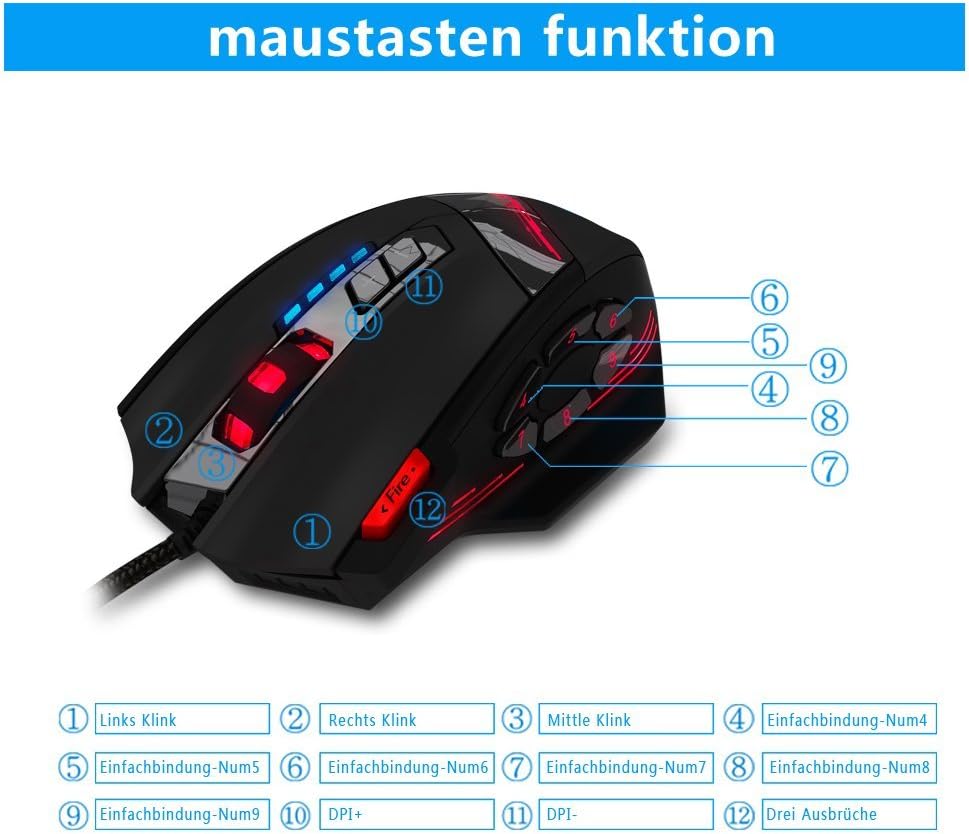
Image 1.2: The complete package contents of the zelotes C-12 Gaming Mouse.
2. Configuración
2.1 Conexión del ratón
Connect the USB cable of the zelotes C-12 Gaming Mouse to an available USB port on your computer. The mouse is plug-and-play for basic functionality.
2.2 Instalación del software (opcional)
For full customization of buttons, DPI, and lighting, install the provided software from the included CD. Insert the CD into your computer's optical drive and follow the on-screen instructions. If your computer does not have an optical drive, please visit the official zelotes website to download the latest software driver.
Note: The programming software is not fully compatible with Mac operating systems.
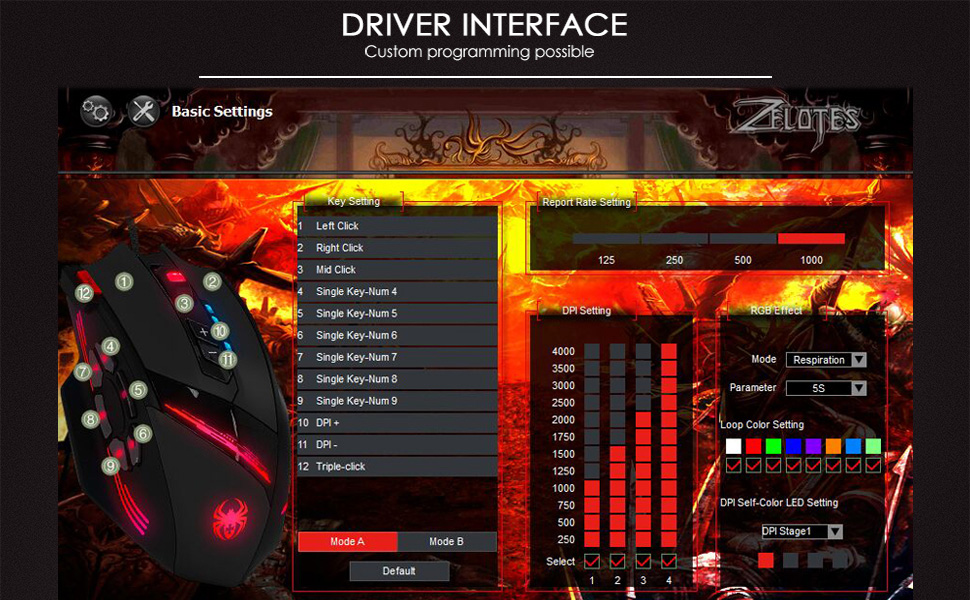
Image 2.1: The software interface for customizing the zelotes C-12 Gaming Mouse.
2.3 Weight Tuning
The mouse includes 8 removable weight blocks, each weighing 2.5 grams, located in a compartment on the underside of the mouse. To adjust the mouse's weight:
- Gire suavemente y retire la cubierta circular en la parte inferior del mouse.
- Add or remove the 2.5g weight blocks as desired to achieve your preferred mouse feel.
- Replace the circular cover by twisting it back into place.
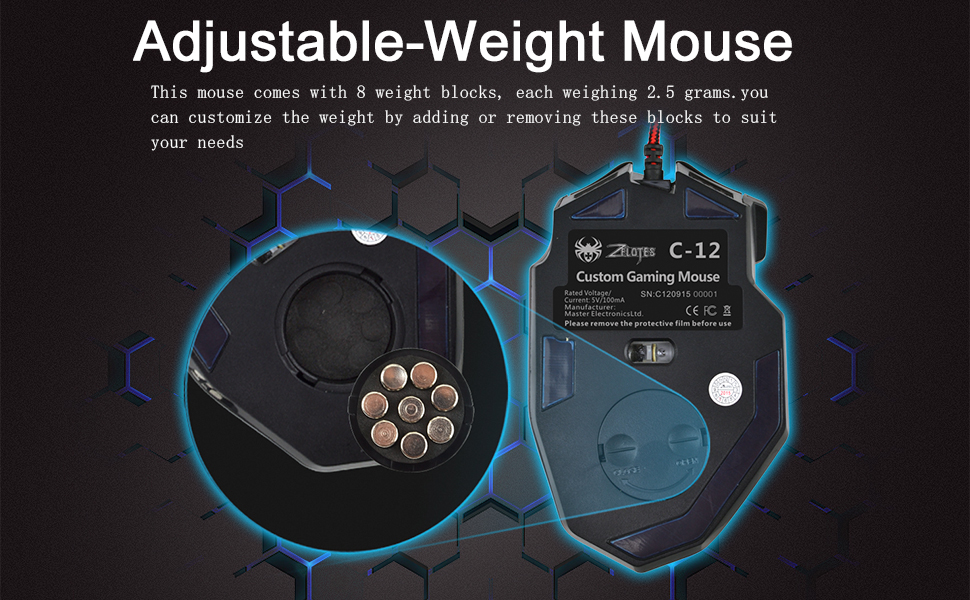
Image 2.2: Adjusting the weight of the zelotes C-12 mouse by adding or removing the 2.5g blocks.
Video 2.1: A demonstration of the weight tuning feature and programmable buttons on the zelotes C-12 Gaming Mouse.
3. Instrucciones de funcionamiento
3.1 Funciones de los botones
The zelotes C-12 mouse features 12 programmable buttons. The default functions are:
- Clic izquierdo (Botón 1)
- Clic derecho (Botón 2)
- Clic central/rueda de desplazamiento (Botón 3)
- Botones laterales (Buttons 4-9): Default to various functions, customizable via software.
- PPP+ (Button 10): Increases DPI sensitivity.
- DPI- (Button 11): Decreases DPI sensitivity.
- Botón de fuego (Button 12): Default to triple-click, customizable via software.

Image 3.1: Labeled diagram of the zelotes C-12 mouse buttons.
3.2 Ajuste de ppp
The mouse offers 4 default DPI levels: 1000/1500/2000/4000 DPI. You can cycle through these levels using the dedicated DPI+ and DPI- buttons. For finer control and to reach up to 8000 DPI, use the included software.
3.3 Iluminación RGB
The mouse features multi-modes RGB backlighting, including 7-color cycle breathing and monochromatic constant bright modes. Lighting effects can be customized through the software to match your preferences.
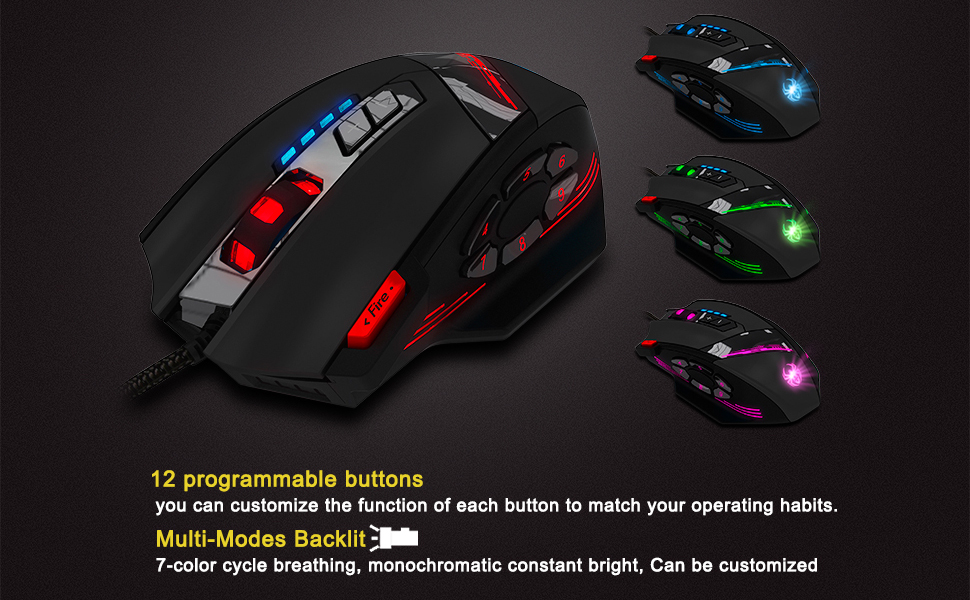
Image 3.2: The zelotes C-12 mouse showcasing its multi-color RGB lighting options.
3.4 Diseño ergonómico
The mouse is designed for comfort during extended use, featuring a sweat-resistant and anti-slip rubber surface. Its ergonomic shape helps prevent wrist fatigue.

Image 3.3: The ergonomic design of the zelotes C-12 mouse provides a comfortable grip.
4. Mantenimiento
To ensure the longevity and optimal performance of your zelotes C-12 Gaming Mouse, follow these maintenance guidelines:
- Limpieza: Utilice un paño suave y seco para limpiar la superficie del ratón. Para la suciedad difícil, limpie ligeramenteampLave el paño con agua o una solución limpiadora suave. Evite productos químicos agresivos o materiales abrasivos.
- Cuidado del sensor: Mantenga el sensor óptico de la parte inferior del ratón limpio y sin polvo ni residuos. Utilice un hisopo de algodón o aire comprimido si es necesario.
- Sistema de organización de cables: Evite dobleces bruscos o tirones excesivos del cable USB para prevenir daños.
- Almacenamiento: Cuando no esté en uso, guarde el mouse en un entorno limpio y seco, alejado de temperaturas extremas.
5. Solución de problemas
5.1 El ratón no responde
- Asegúrese de que el cable USB esté conectado de forma segura a su computadora.
- Intente conectar el mouse a un puerto USB diferente.
- Pruebe el mouse en otra computadora para descartar un problema específico de la computadora.
- Reinicie su computadora.
5.2 DPI or Button Settings Not Changing
- Ensure the zelotes C-12 software is correctly installed and running.
- Check if the settings are saved within the software after making changes.
- For Mac users, note that the programming software has limited compatibility. Basic DPI changes via mouse buttons should still function.
5.3 La iluminación RGB no funciona o es incorrecta
- Verify lighting settings within the zelotes C-12 software.
- Asegúrese de que el mouse esté conectado correctamente y reciba energía.
5.4 Mouse Movement Is Erratic
- Limpie el sensor óptico en la parte inferior del mouse.
- Asegúrese de usar el ratón sobre una superficie adecuada (por ejemplo, una alfombrilla). Evite superficies muy reflectantes o transparentes.
6. Especificaciones
| Característica | Descripción |
|---|---|
| Marca | zelotes |
| Nombre del modelo | C-12 |
| Tecnología de conectividad | USB con cable |
| Tecnología de detección de movimiento | Optical (A3050 Gaming Chip) |
| Configuración de DPI | 1000/1500/2000/4000 (Adjustable up to 8000 DPI via software) |
| Cantidad de botones | 12 botones programables |
| Ajuste de peso | 8 x 2.5g removable weights |
| Orientación de la mano | Diestro |
| Compatibilidad del sistema operativo | Win11, Win10, Win8, Win7, Mac OS (limited software compatibility for Mac) |
| Dimensiones (L x An x Al) | 130 mm x 81.5 mm x 39.8 mm |
| Tasa de sondeo | 125-1000 Hz |
| Longitud del cable | 1.8 m |
| Material | Plástico (acabado mate) |

Image 6.1: Detailed technical specifications and dimensions of the zelotes C-12 Gaming Mouse.
7. Información de garantía
The zelotes C-12 Professional Wired Gaming Mouse comes with a Garantía del fabricante de 1 años A partir de la fecha de compra. Esta garantía cubre defectos de materiales y mano de obra en condiciones normales de uso. No cubre daños causados por mal uso, accidentes, modificaciones no autorizadas ni causas externas.
Conserve su comprobante de compra para reclamos de garantía.
8. Soporte
For further assistance, technical support, or warranty inquiries, please refer to the contact information provided with your product packaging or visit the official zelotes websitio.