
Introducción
This manual provides comprehensive instructions for the setup, operation, and maintenance of your Alcatel-Lucent Enterprise ALE-30h Essential DeskPhone. Please read this manual carefully to ensure proper use and to maximize the performance of your device. This IP phone is designed for professional communication environments, offering reliable voice services and essential features.
Producto terminadoview
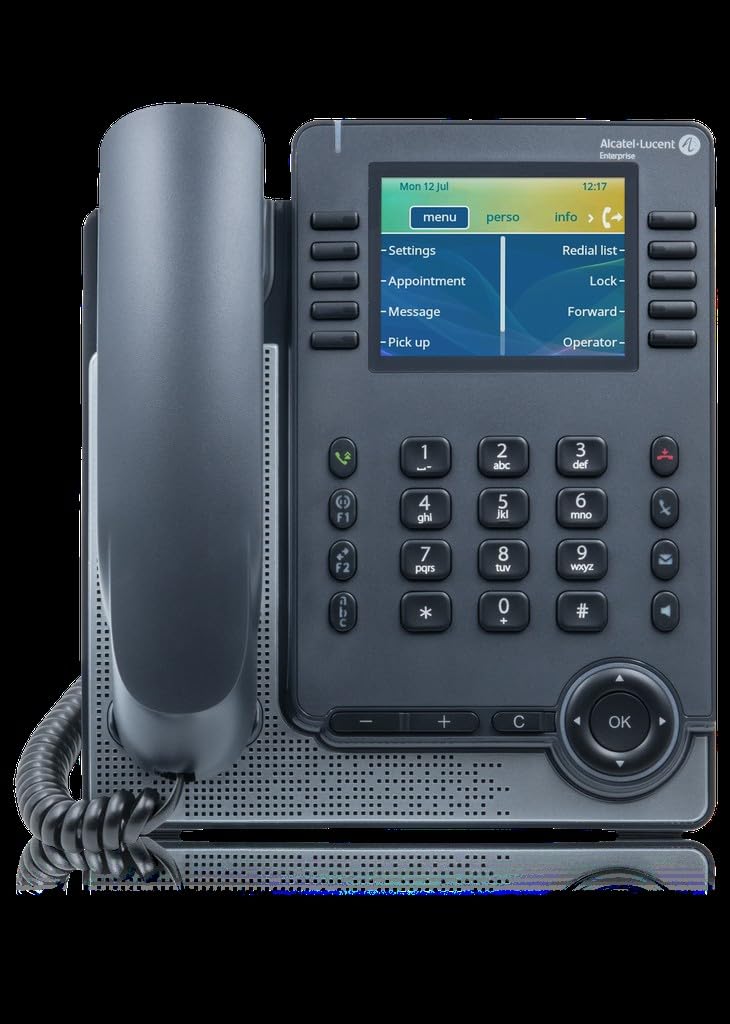
This image displays the Alcatel-Lucent Enterprise ALE-30h Essential DeskPhone. The phone is gray with a black handset on the left. The right side features a color LCD screen displaying 'Mon 12 Jul' and '12:17', along with menu options like 'Settings', 'Appointment', 'Message', and 'Pick up'. Below the screen is a standard telephone keypad with numbers 0-9, *, and #, along with function keys, navigation buttons, and volume controls. The phone has a sleek, modern design suitable for office environments.
The ALE-30h is an IP DeskPhone featuring a 3.5-inch LCD screen, a wired handset, and support for Power over Ethernet (PoE). It is designed for efficient communication with features such as caller identification and a speakerphone. The phone is suitable for both desk and wall mounting.
Componentes clave:
- Auricular: Wired handset for private conversations.
- Mostrar: 3.5-inch (8.89 cm) LCD screen with 240 x 320 pixels resolution.
- Teclado: Standard numeric keypad and function keys.
- Clúster de navegación: Botones para navegación y selección del menú.
- Altavoz: Integrated speaker for hands-free communication.
- Puertos: USB 2.0, USB Type-C, Ethernet LAN (RJ-45), RJ-9 ports for connectivity.
Configuración
Contenido del paquete:
- Alcatel-Lucent Enterprise ALE-30h DeskPhone unit
- Auricular con cable
- Cable del auricular
- Cable Ethernet
- Soporte de escritorio (si corresponde)
Instalación física:
- Montaje en escritorio: Attach the desk stand to the phone unit. Ensure it is securely fastened. Place the phone on a stable, flat surface.
- Montaje en pared: The phone supports wall mounting. Use appropriate screws and anchors (not included) to secure the phone to a wall. Refer to the mounting template (if provided) for precise hole placement.
- Conectar el teléfono: Plug one end of the coiled handset cord into the handset and the other end into the designated RJ-9 port on the phone base.
Network Connection and Power:
- Conexión Ethernet: Connect one end of the Ethernet cable to the LAN port (RJ-45) on the back of the phone and the other end to your network switch or router.
- Alimentación a través de Ethernet (PoE): If your network switch supports PoE, the phone will power on automatically once connected to the Ethernet cable. No separate power adapter is required.
- Arranque inicial: The phone will begin its boot-up sequence. This may take a few moments as it obtains an IP address and connects to your VoIP system.
Instrucciones de funcionamiento
Basic Call Functions:
- Haciendo una llamada:
- Levante el auricular o presione el Altavoz botón.
- Marque el número deseado usando el teclado.
- Presione el Marcar or OK button (if applicable) to initiate the call.
- Responder una llamada:
- Levante el auricular o presione el Altavoz Botón cuando suena el teléfono.
- Terminar una llamada:
- Coloque el auricular nuevamente en la base o presione el botón Altavoz botón para colgar.
- Ajuste del volumen: Utilice el Volumen +/- buttons located below the keypad to adjust the handset, speakerphone, or ringer volume during a call or when idle.
Funciones avanzadas:
- Identificador de llamadas: Incoming call information (number and name, if available) will be displayed on the screen.
- Rellamada Presione el Remarcar Botón para llamar al último número marcado.
- Silenciar: Presione el Silenciar Botón para silenciar el micrófono durante una llamada. Presiónelo de nuevo para reactivarlo.
- Navegación por el menú: Utilice el grupo de navegación (flechas arriba, abajo, izquierda, derecha y OK button) to browse through the phone's menu options displayed on the LCD screen.
- Claves suaves: The buttons directly below the screen (soft keys) change their function based on the current context displayed on the screen.
Mantenimiento
Regular maintenance ensures the longevity and optimal performance of your ALE-30h DeskPhone.
- Limpieza:
- Desconecte el teléfono de la corriente antes de limpiarlo.
- Use a soft, dry, lint-free cloth to wipe the phone's surface and screen.
- Para marcas difíciles, ligeramente dampen the cloth with water or a mild, non-abrasive cleaner. Do not spray liquids directly onto the phone.
- Avoid using harsh chemicals, solvents, or abrasive cleaners, as they can damage the phone's finish.
- Condiciones ambientales:
- Operate the phone within the specified temperature range of -5°C to 45°C (23°F to 113°F).
- Mantenga la humedad relativa entre 5% y 85% (sin condensación).
- Avoid exposing the phone to direct sunlight, excessive heat, or extreme cold.
- Keep the phone away from sources of moisture, dust, and corrosive liquids.
- Sistema de organización de cables: Ensure all cables (Ethernet, handset cord) are not kinked, pinched, or under excessive tension to prevent damage.
Solución de problemas
If you encounter issues with your ALE-30h DeskPhone, refer to the following common problems and solutions:
| Problema | Posible causa | Solución |
|---|---|---|
| El teléfono no se enciende. | No hay conexión PoE o cable Ethernet defectuoso. | Ensure the Ethernet cable is securely connected to a PoE-enabled port. Try a different Ethernet cable or port. |
| No hay tono de marcado. | Network connectivity issue or VoIP registration failure. | Check network cable. Verify network status on the phone's display. Contact your IT administrator to confirm VoIP service registration. |
| No puedo escuchar a la persona que llama / La persona que llama no puede escucharme. | Volume too low, mute activated, or faulty handset/speaker. | Adjust volume using +/- buttons. Check if the mute function is active. Ensure handset cord is properly connected. |
| La pantalla está en blanco o congelada. | Software glitch or power issue. | Disconnect and reconnect the Ethernet cable to restart the phone. If the problem persists, contact support. |
For issues not covered here, please contact your system administrator or Alcatel-Lucent Enterprise support.
Presupuesto
| Característica | Detalle |
|---|---|
| Tipo de producto | Teléfono IP |
| Color | Gris |
| Tipo de teléfono | Auricular con cable |
| Mostrar | LCD, 3.5 inches (8.89 cm) |
| Resolución de pantalla | 240 x 320 píxeles |
| Altavoz | Sí |
| Detección de voz | Sí |
| Puertos USB 2.0 | 1 |
| Puertos USB tipo C | 1 |
| Puertos LAN Ethernet (RJ-45) | 1 |
| Puertos RJ-9 | 2 |
| Extension Module Support | Sí |
| Ancho | 207 milímetros |
| Profundidad | 35 milímetros |
| Altura | 183 milímetros |
| Peso | 806 gramos (0.806 kilogramos) |
| Alimentación a través de Ethernet (PoE) | Sí |
| Consumo de energía típico | 1.2 W |
| Temperatura de funcionamiento | -5 a 45 °C (23 a 113 °F) |
| Humedad de funcionamiento | 5 - 85% (sin condensación) |
| Humedad de almacenamiento | -25 - 70% |
| Velocidades de datos de LAN Ethernet | 10, 100 Mbit/s (Fast Ethernet) |
| Bluetooth | No |
| Identificador de llamadas | Sí |
| Opciones de montaje | Desk / Wall Mount |
| IP Code (International Protection) | IP22 |
Garantía y soporte
Alcatel-Lucent Enterprise products are designed for reliability and performance. For specific warranty terms and conditions, please refer to the documentation provided with your purchase or visit the official Alcatel-Lucent Enterprise websitio.
Apoyo técnico: If you require technical assistance, please contact your authorized Alcatel-Lucent Enterprise reseller or your IT department. They can provide support for configuration, troubleshooting, and advanced features.
Repuestos y actualizaciones de software: Information regarding the availability of spare parts and guaranteed software updates is not directly provided in the product details. Please consult with your vendor or the manufacturer's official support channels for the most current information.
Para mayor información puede visitar la Alcatel Store on Amazon or the official Alcatel-Lucent Enterprise websitio.