

1. Introducción
This manual provides essential instructions for the safe and efficient use of your DCHK Haribo HBT-03 Wireless Earbuds. Please read this manual thoroughly before using the product and retain it for future reference.
Contenido del paquete:
- Haribo HBT-03 Wireless Earbuds (Left and Right)
- Estuche de carga con pantalla táctil LCD
- Cable de carga USB-C a USB-A
- Three (3) Pairs of Eartips (Small, Medium, Large)
- Manual de usuario (este documento)

Image 1.1: Haribo HBT-03 Wireless Earbuds and Charging Case. The image displays the white earbuds seated in their open charging case, which features an LCD screen displaying 'HARIBO' and 'Swipe to Unlock'. A red gummy bear charm is attached to the case.
2. Producto terminadoview
The DCHK Haribo HBT-03 Wireless Earbuds are designed for a high-quality audio experience with convenient features.
Características principales:
- Bluetooth 5.4: Proporciona conectividad inalámbrica estable y eficiente.
- LCD Touchscreen Case: Offers intuitive control over various functions directly from the charging case.
- Cancelación activa de ruido (ANC): Reduce el ruido ambiental para una experiencia auditiva inmersiva.
- Modo de transparencia: Le permite escuchar su entorno mientras escucha audio.
- Controladores dinámicos de 13 mm: Ofrece graves potentes y audio nítido.
- Resistencia al agua IPX4: Protege contra salpicaduras y sudor.
- Reproducción extendida: Hasta 12 horas de tiempo total de reproducción con el estuche de carga.

Image 2.1: Key features of the Haribo HBT-03 Earbuds. Icons illustrate wireless earbuds, pocket size, LCD display, Bluetooth 5.4, 12-hour play time, and 13mm driver.
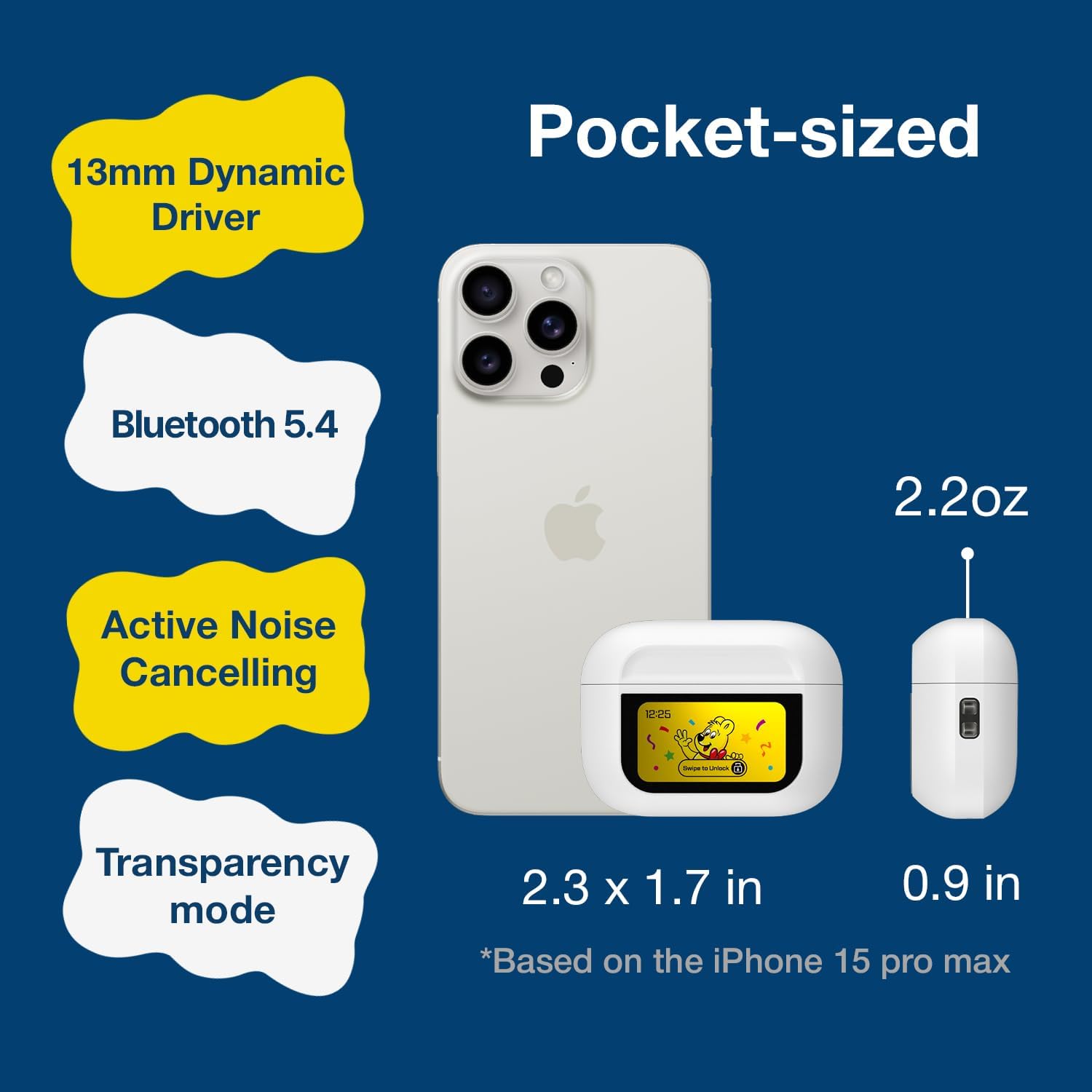
Image 2.2: The compact size of the Haribo HBT-03 Earbuds and case, shown next to a smartphone for scale. The case dimensions are approximately 2.3 x 1.7 inches, and the earbuds weigh 2.2 ounces.
3. Configuración
3.1 Carga de los auriculares y el estuche
- Coloque los auriculares en el estuche de carga. Asegúrese de que estén correctamente colocados.
- Conecte el extremo USB-C del cable de carga al puerto del estuche de carga.
- Conecte el extremo USB-A del cable de carga a una fuente de alimentación USB compatible (por ejemplo, adaptador de pared, puerto USB de computadora).
- The LCD screen on the case will display the charging status and battery levels.
A full charge for the case takes approximately 1.5 hours. The earbuds charge while inside the case.

Image 3.1: Charging information for the Haribo HBT-03 Earbuds. The image indicates a 1.5-hour charging time, 5 hours of single play time, and up to 12 hours of total play time with the charging case.
3.2 Emparejamiento con un dispositivo
- Asegúrese de que los auriculares estén cargados y colocados dentro del estuche de carga.
- Abre la tapa del estuche de carga. Los auriculares entrarán automáticamente en modo de emparejamiento.
- En su dispositivo (teléfono inteligente, tableta, computadora portátil), habilite Bluetooth.
- Buscar available Bluetooth devices and select "HBT-03" from the list.
- Una vez conectados, los auriculares indicarán que el emparejamiento fue exitoso y el dispositivo los mostrará como conectados.
The Bluetooth 5.4 technology provides an improved transmission range of up to 32 feet (10 meters).

Image 3.2: Bluetooth 5.4 connectivity features of the Haribo HBT-03 Earbuds, highlighting a 32ft improved transmission range, high-quality audio, optimized energy consumption, and extraordinary connection stability.
3.3 Ajuste de los auriculares
- Select the eartips that provide the most comfortable and secure fit for your ears. A proper seal is crucial for optimal sound quality and noise cancellation.
- Inserte suavemente cada auricular en el canal auditivo y gírelo ligeramente para asegurar un ajuste perfecto.

Image 3.3: Available eartip sizes (Small: 0.45in, Medium: 0.47in, Large: 0.51in) for the Haribo HBT-03 Earbuds, designed for a perfectly fitting and secure experience.
4. Operación
4.1 Controles táctiles de los auriculares
Los auriculares cuentan con áreas sensibles al tacto para controlar diversas funciones:
- Reproducir/Pausa: Un solo toque en cualquiera de los auriculares.
- Pista siguiente: Toque tres veces el auricular derecho.
- Pista anterior: Toque tres veces el auricular izquierdo.
- Sube el volumen: Swipe up on either earbud.
- Bajar volumen: Swipe down on either earbud.
- Responder/Finalizar llamada: Un solo toque en cualquiera de los auriculares.
- Rechazar llamada: Mantenga presionado cualquiera de los auriculares.
- Activate Voice Assistant (Siri, Bixby, Google Assistant): Mantenga pulsado el auricular izquierdo.
- Alternar ANC/Transparencia/Modo Normal: Mantenga presionado el auricular derecho.
- Modo de juego/Modo música: Toque cuádruple en cualquiera de los auriculares.
4.2 LCD Touchscreen Case Functions
The charging case features a full-color LCD touchscreen for advanced controls and settings. Swipe to unlock the screen and navigate through the options.

Imagen 4.1: Másview of the various functions available on the Haribo HBT-03 Earbuds' LCD touchscreen case. These include Battery Level Display, Change Song, Volume Control, Screen Brightness Adjustment, Equalizing (EQ modes), Like Button (for TikTok), Find My Earbuds, Remote Photo Capture, Set Current Time, Noise Reduction (ANC/Transparency), Flashlight, Screen Lock, Language Switch, Settings Menu (Power Off, Factory Reset), and Set Alarm.
Available functions on the LCD screen include:
- Pantalla de nivel de batería: Shows battery status of both earbuds and the case.
- Controles de reproducción de música: Reproducir, pausar y saltar pistas.
- Ajuste de volumen: Control audio output level.
- Manejo de llamadas: Responder, finalizar o rechazar llamadas.
- Noise Cancelling & Transparency: Cambiar entre los modos ANC, Transparencia y Normal.
- Modos de ecualización: Select from 5 adjustable EQ modes (Standard, Classic, Jazz, Rock, Popular).
- Control de cámara: Remotely trigger your smartphone camera.
- Cambio de idioma: Cambiar el idioma de la pantalla.
- Personalización del fondo de pantalla: Personalize the screen background.
- Ajuste del brillo de la pantalla: Modify display intensity.
- Encuentra mis auriculares: Ayuda a localizar los auriculares extraviados.
- Flash: Activa una pequeña luz en el estuche.
- Minutero: Establece un temporizador de cuenta regresiva.
- Menú de configuración: Access options like Power Off and Factory Reset.
4.3 Encendido y apagado
- Encendido: Abra la tapa del estuche de carga y los auriculares se encenderán automáticamente.
- Apagado: Place the earbuds back into the charging case and close the lid. They will automatically power off and begin charging. You can also power off via the LCD screen settings.
5. Mantenimiento
5.1 Limpieza
- Limpie periódicamente los auriculares y el estuche de carga con un paño suave, seco y sin pelusa.
- Retire las olivas y límpielas con agua y jabón suave si es necesario. Asegúrese de que estén completamente secas antes de volver a colocarlas.
- Utilice un hisopo de algodón para limpiar suavemente los contactos de carga de los auriculares y del interior del estuche.
- Evite utilizar materiales abrasivos, alcohol o limpiadores químicos.
5.2 Almacenamiento
- Cuando no los utilice, guarde los auriculares en su estuche de carga para protegerlos y mantenerlos cargados.
- Conservar el producto en un lugar fresco y seco, alejado de temperaturas extremas y de la luz solar directa.
5.3 Resistencia al agua (IPX4)
The earbuds are rated IPX4, meaning they are resistant to splashing water from any direction. This makes them suitable for workouts and light rain. They are no designed for submersion in water or exposure to pressurized water jets.
6. Solución de problemas
Si tiene problemas con sus auriculares, consulte los siguientes problemas y soluciones comunes:
| Problema | Posible solución |
|---|---|
| Los auriculares no se emparejan con el dispositivo |
|
| No hay sonido en uno o ambos auriculares |
|
| El estuche de carga no carga |
|
| Los controles táctiles no responden |
|
| LCD screen not responding |
|
7. Especificaciones
| Característica | Detalle |
|---|---|
| Nombre del modelo | HBT-03 |
| Versión de Bluetooth | 5.4 |
| Alcance de Bluetooth | Hasta 32.8 pies (10 metros) |
| Tamaño del controlador de audio | Controlador dinámico de 13 mm |
| Respuesta de frecuencia | 20 Hz - 20 kHz |
| Impedancia | 32 ohmios |
| Control de ruido | Cancelación activa de ruido (ANC) |
| Resistencia al agua | IPX4 |
| Duración de la batería del auricular | Approx. 4.5 - 8 hours (depending on usage) |
| Tiempo total de reproducción (con estuche) | Hasta 12 horas |
| Capacidad de la batería del estuche de carga | 300 mAh |
| Tiempo de carga (estuche) | Aproximadamente 1.5 horas |
| Puerto de carga | USB-C |
| Tipo de control | Control táctil (auriculares), pantalla táctil (estuche) |
| Material | Plástico ABS |
| Peso del artículo | 2.2 onzas (total) |
| Dimensiones de la caja | 2.4 x 0.95 x 1.8 pulgadas (aprox.) |
8. Información de seguridad
- No desmonte ni modifique el producto.
- Avoid exposing the product to extreme temperatures, direct sunlight, or open flames.
- Keep the product away from water and liquids, except for the IPX4-rated resistance to splashes.
- No utilice los auriculares a volúmenes excesivamente altos durante períodos prolongados para evitar daños auditivos.
- Mantener fuera del alcance de los niños y las mascotas.
- Deseche las baterías y los componentes electrónicos de forma responsable de acuerdo con las regulaciones locales.
9. Garantía y soporte
DCHK provides a limited warranty for this product. For specific warranty terms and conditions, please refer to the warranty card included in your package or contact DCHK customer support.
Atención al cliente:
If you have any questions, require technical assistance, or need to report an issue, please contact our customer support team through the retailer's platform or the official DCHK websitio.