
Sennheiser HD 505
Sennheiser HD 505 Wired Over-Ear Headphones
Manual de instrucciones
Introducción
The Sennheiser HD 505 headphones are designed to deliver an exceptional audio experience with transparent sound and controlled bass. Featuring an open-back design and enhanced comfort, these headphones are suitable for various applications including music listening, professional audio work, and gaming. This manual provides essential information for setting up, operating, maintaining, and troubleshooting your HD 505 headphones.
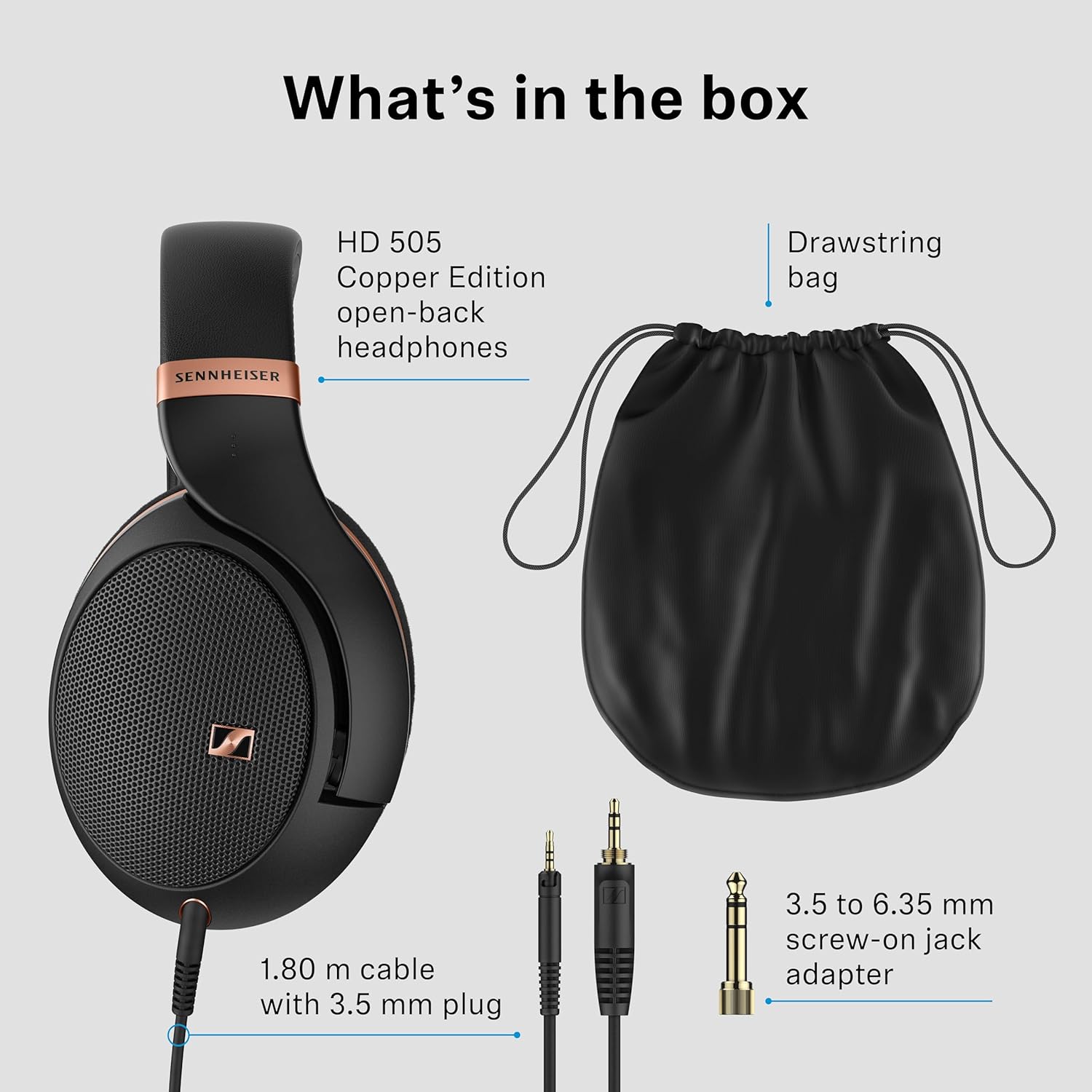
Contenido del paquete
Compruebe que todos los artículos enumerados a continuación estén presentes en su paquete:
- HD 505 Copper Edition Headphones
- 1.80 m cable with 3.5 mm jack plug
- 3.5 to 6.35 mm screw-on jack adapter
- Bolsa con cordón
- Guía de seguridad
Producto terminadoview
The Sennheiser HD 505 headphones are engineered for superior audio performance and user comfort. Key features include:
- Exceptional HD Sound: Advanced laminate diaphragm delivers crisp highs, clear mids, and controlled bass.
- Spacious Open-Back Design: Provides a natural, airy soundstage para una experiencia auditiva inmersiva.
- Audiophile-Quality Clarity: Transparent audio ensures every note is captured with precision.
- Comodidad durante todo el día: Lightweight headband with reduced clamping force and plush velour ear pads.
- Durable y versátil: Constructed with premium materials and includes a 1.8-meter detachable cable with a 3.5mm plug.


Configuración
1. Conexión del cable
- Locate the 3.5 mm jack input on the left earcup of your HD 505 headphones.
- Insert the smaller end of the 1.80 m audio cable into this input until it clicks securely.
- Connect the larger 3.5 mm jack plug at the other end of the cable to your audio source (e.g., laptop, mobile device, stereo system).
- If your audio source requires a larger connection, attach the provided 3.5 to 6.35 mm screw-on jack adapter to the 3.5 mm plug on the cable.
2. Ajustar el ajuste
- Coloque los auriculares en su cabeza, asegurándose de que los auriculares cubran completamente sus oídos.
- Adjust the headband by sliding the earcups up or down until the headphones fit comfortably and securely. The headband should rest gently on your head, and the ear pads should create a light seal around your ears without excessive pressure.
Instrucciones de funcionamiento
Uso básico
Once connected to your audio source, the HD 505 headphones are ready for use. Ensure your audio source's volume is set to a low level before placing the headphones on your ears to prevent sudden loud sounds.
Control de volumen
Volume is controlled directly from your connected audio device. The HD 505 features an inline remote on its cable for convenient control of playback and calls, depending on your device's compatibility.
Experiencia auditiva
The open-back design of the HD 505 headphones provides a wide and natural soundstage, enhancing the sense of space and realism in your audio. This design allows some ambient sound to enter, creating a more natural listening environment, ideal for home use or studio monitoring where situational awareness may be desired.
Mantenimiento
Limpieza
- Almohadillas para los oídos: The plush velour ear pads can be gently removed for cleaning. Hand wash with mild soap and water, then allow to air dry completely before reattaching.
- Venda: Wipe the headband with a soft, damp paño. Evite el uso de productos químicos agresivos.
- Auriculares: Use a dry, soft cloth to wipe the exterior of the earcups. Do not allow moisture to enter the speaker grilles.
Almacenamiento
When not in use, store your HD 505 headphones in the provided drawstring bag to protect them from dust and scratches. Store in a cool, dry place away from direct sunlight and extreme temperatures.
Cuidado de cables
The detachable cable is designed for durability. Avoid sharp bends or excessive pulling on the cable. If the cable becomes damaged, it can be replaced with a compatible HD 500 series cable.
Solución de problemas
| Problema | Posible causa | Solución |
|---|---|---|
| Sin sonido | Cable not properly connected; Audio source volume too low; Incorrect audio output selected on device. | Ensure cable is securely plugged into both headphones and audio source; Increase volume on audio source; Check device settings for correct audio output. |
| Poor sound quality (e.g., distorted, weak) | Loose cable connection; Low-quality audio source/file; Damaged cable. | Check and secure all cable connections; Try a different audio source or higher quality audio file; Replace the audio cable if damaged. |
| Los auriculares resultan incómodos | Improper fit; Ear pads worn out. | Adjust the headband and earcups for a comfortable fit; Consider replacing ear pads if they are flattened or damaged. |
Presupuesto
| Característica | Detalle |
|---|---|
| Nombre del modelo | HD 505 Copper Edition |
| Tecnología de conectividad | Cableado |
| Toma de auriculares | 3.5 mm Jack |
| Forma del auricular | Sobre la oreja |
| Característica especial | Open-back Design for Spatial Sound |
| Tipo de controlador de audio | Controlador dinámico |
| Material | Plástico |
| Peso del artículo | 558 gramos (1.23 libras) |
| Dimensiones del producto | 9.41 x 7.64 x 3.86 pulgadas |
| Dispositivos compatibles | Laptops, Mobile Devices, Stereo Systems |
| Soporta tecnología Bluetooth | No |
Garantía y soporte
For detailed warranty information and customer support, please refer to the official Sennheiser website or the warranty card included in your product packaging. Keep your proof of purchase for any warranty claims. Optional protection plans may be available from your retailer.
Ask a question about this manual
Ask about setup, troubleshooting, compatibility, parts, safety, or missing instructions. Manuals+ will review the question and use this page’s manual context to help answer it.