
Introducción
Thank you for choosing the Casio MWA-300H Series watch. This manual provides essential information regarding the setup, operation, and maintenance of your new timepiece. Please read this manual carefully to ensure proper use and to fully understand the features of your watch.
The Casio MWA-300H is an analog watch featuring a chronograph, 100-meter water resistance, and luminous hands for enhanced readability. It is designed for versatile wear, suitable for both daily use and recreational water activities.
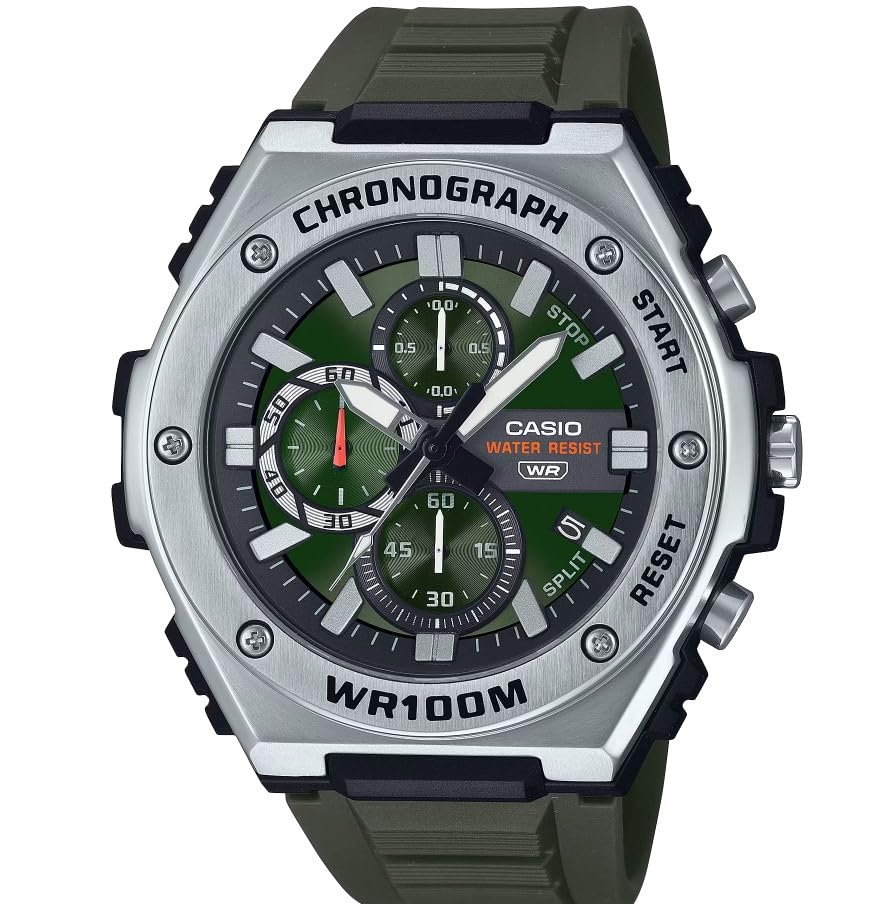
Imagen: Frente view of the Casio MWA-300H Series watch, highlighting its green dial, chronograph sub-dials, and black resin band.
Setup: Initial Settings
Ajuste de la hora
- Pull the crown out to the second click (time setting position). The second hand will stop.
- Rotate the crown to set the hour and minute hands. Ensure the AM/PM setting is correct if your watch has a 24-hour indicator or date changes at midnight.
- Vuelva a colocar la corona en su posición normal. El segundero reanudará su movimiento.
Fijando la fecha
- Pull the crown out to the first click (date setting position).
- Gire la corona para ajustar la fecha. Evite ajustar la fecha entre las 9:00 y las 1:00, ya que podría interferir con el mecanismo de cambio automático de fecha.
- Vuelva a colocar la corona en la posición normal.
Información de la batería
Your Casio MWA-300H watch is powered by 1 LR44 battery, which is included. The battery life is approximately 3 years. When the battery runs low, the watch may exhibit irregular movement or stop. It is recommended to have the battery replaced by a qualified watch technician to maintain water resistance.
Operating: Watch Functions
Uso del cronógrafo (cronómetro)
The chronograph function allows for precise timing of events. Your watch features a 1/10-second stopwatch that captures elapsed, split, and 1st/2nd place times across three dedicated sub-dials.
- Starting the Stopwatch: Press button A (typically the upper right button) to start the stopwatch.
- Stopping the Stopwatch: Press button A again to stop the stopwatch.
- Resetting the Stopwatch: After stopping, press button B (typically the lower right button) to reset the stopwatch hands to zero.
- Medición de tiempo fraccionado: While the stopwatch is running, press button B to measure split times. The stopwatch hands will momentarily stop to indicate the split time, then resume timing. Press button B again to release the split time and display the current elapsed time.
Note: Refer to the specific button layout on your watch for exact button assignments.
Water Resistance (100 Meters)
Your Casio MWA-300H watch is water resistant up to 100 meters (330 feet). This rating means the watch is suitable for swimming, showering, and recreational water activities. It is not suitable for diving or snorkeling where significant water pressure changes occur.
- No opere la corona ni los botones mientras el reloj esté mojado o sumergido.
- Después de la exposición al agua salada, enjuague el reloj con agua dulce y séquelo.
Manecillas y marcadores luminosos
The watch features luminous hands and markers that absorb light and glow in the dark, providing readability in low-light conditions. The intensity and duration of the glow depend on the amount and type of light exposure.
Mantenimiento
Cuidados generales
- Limpie el reloj periódicamente con un paño suave y seco para eliminar la suciedad y la humedad.
- Evite exponer el reloj a temperaturas extremas, luz solar directa durante períodos prolongados o campos magnéticos fuertes.
- Keep the watch away from solvents, detergents, perfumes, and cosmetics, as these can damage the resin materials.
Reemplazo de batería
When the battery needs replacement, it is highly recommended to take your watch to an authorized Casio service center or a reputable watch repair shop. This ensures that the watch is properly sealed and its water resistance is maintained after battery replacement.
Comprobaciones de resistencia al agua
To maintain the water resistance of your watch, it is advisable to have it inspected periodically (e.g., every 2-3 years) by an authorized service center, especially if it is frequently exposed to water.
Solución de problemas
| Problema | Posible causa | Solución |
|---|---|---|
| Watch hands do not move or move irregularly. | Batería baja. | Reemplace la batería. Consulte a un técnico de relojes profesional. |
| La hora es incorrecta | Time not set correctly; watch has stopped and restarted. | Restablezca la hora según las instrucciones de "Configuración de la hora". |
| La fecha cambia al mediodía en lugar de a medianoche. | La configuración AM/PM es incorrecta. | Adelantar la hora 12 horas. |
| Las manecillas del cronógrafo no se ponen a cero. | Chronograph hands misalignment. | Consult the full Casio module manual for chronograph hand adjustment procedures, or contact customer support. |
| Humedad dentro del reloj. | Crown or buttons operated underwater; seals compromised. | Lleve inmediatamente el reloj a un centro de servicio autorizado para su inspección y reparación para evitar daños mayores. |
Presupuesto
| Nombre del modelo | MWA-300H |
| Tipo de pantalla | Cosa análoga |
| Tipo de movimiento | Cuarzo |
| Profundidad de resistencia al agua | Medidores 100 (Pies 330) |
| Características adicionales | Chronograph, Date Display, Luminous Hands |
| Fuente de poder | Funciona con pilas (1 pilas LR44 incluidas) |
| Material de la caja | Resina |
| Material de la banda | Resina |
| Material de cristal | Resina |
| Diámetro de la caja | 50.9 milímetros |
| Grosor de la caja | 14.3 milímetros |
| Ancho de banda | 22 milímetros |
| Tipo de cierre | Hebilla |
Garantía y soporte
Garantía limitada
Your Casio MWA-300H watch comes with a limited warranty. Please refer to the warranty card included with your purchase for specific terms, conditions, and duration of coverage. The warranty typically covers manufacturing defects under normal use.
Atención al cliente
For further assistance, technical support, or warranty claims, please contact Casio customer service. You can find contact information on the official Casio websitio o en la documentación proporcionada con su reloj.
For more detailed information, including specific module operations or advanced settings, please visit the official Casio support website or refer to the full module manual for your watch.