
Introducción
The TECKNET TK-KB030 Wireless Ergonomic Keyboard is designed to provide a comfortable and efficient typing experience. Featuring a split layout, curved key arrangement, and an integrated wrist rest, this keyboard aims to reduce strain during extended use. It offers versatile connectivity options including 2.4GHz wireless and Bluetooth 5.0, allowing connection to multiple devices.
Contenido del paquete
Por favor, compruebe el contenido del paquete al desembalarlo:
- TECKNET Wireless Ergonomic Keyboard (TK-KB030)
- USB-A Receiver (for 2.4GHz connection)
- Cable de carga USB-C
- Manual de usuario
Características del producto
Ergonomic Key Layout
The keyboard features a split layout and a curved key arrangement designed to align with the natural arc of your fingers. This design promotes a neutral wrist posture and allows your hands to rest at shoulder-width distance, reducing lateral stretching and typing strain.
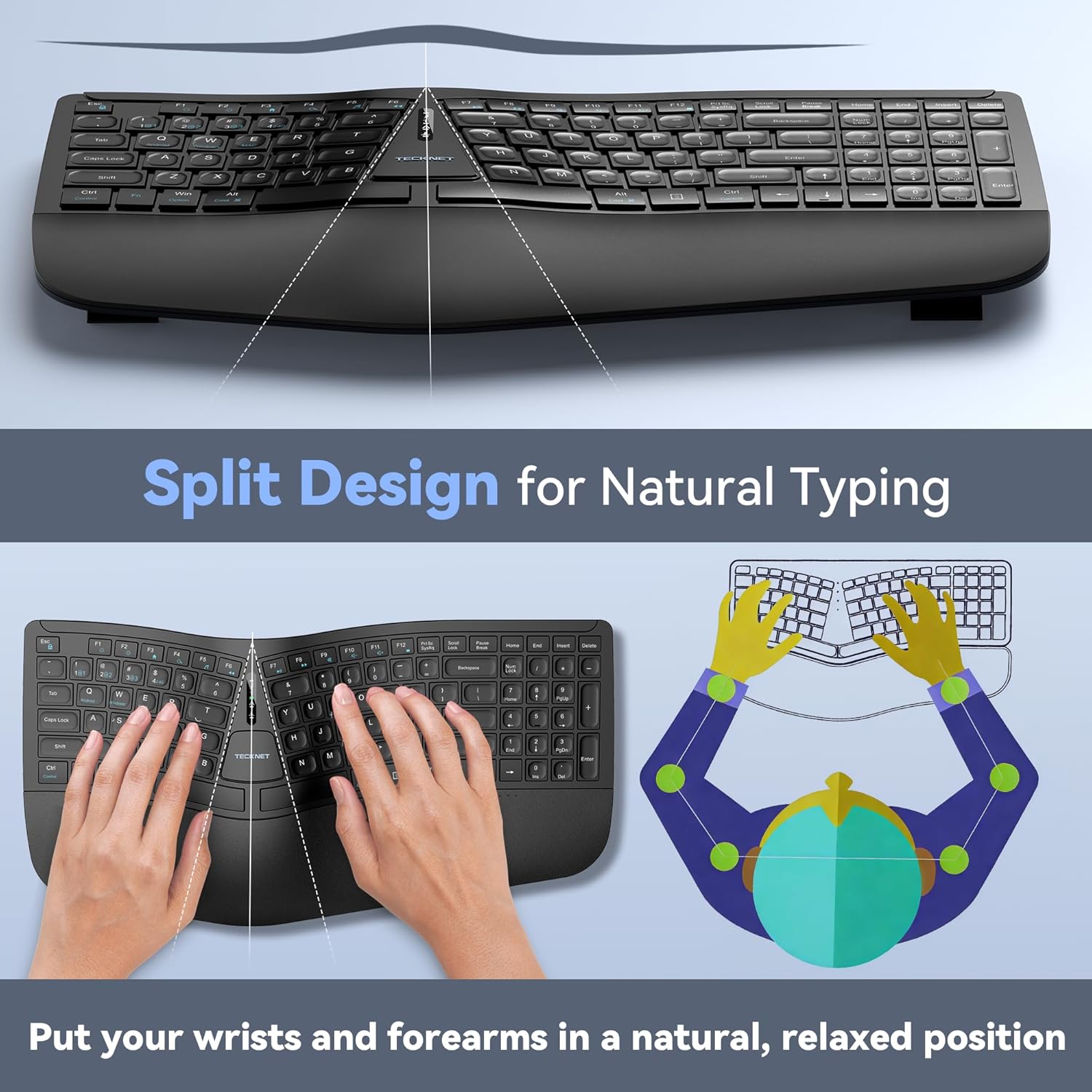
Image: The keyboard's split design, illustrating how it allows for natural hand and wrist positioning to reduce strain.
Integrated High-Density Memory Foam Wrist Rest
A built-in dual-density wrist rest provides support and comfort. The bottom layer offers stable support, while the top layer of slow-rebound memory foam conforms to your hands, distributing pressure evenly.
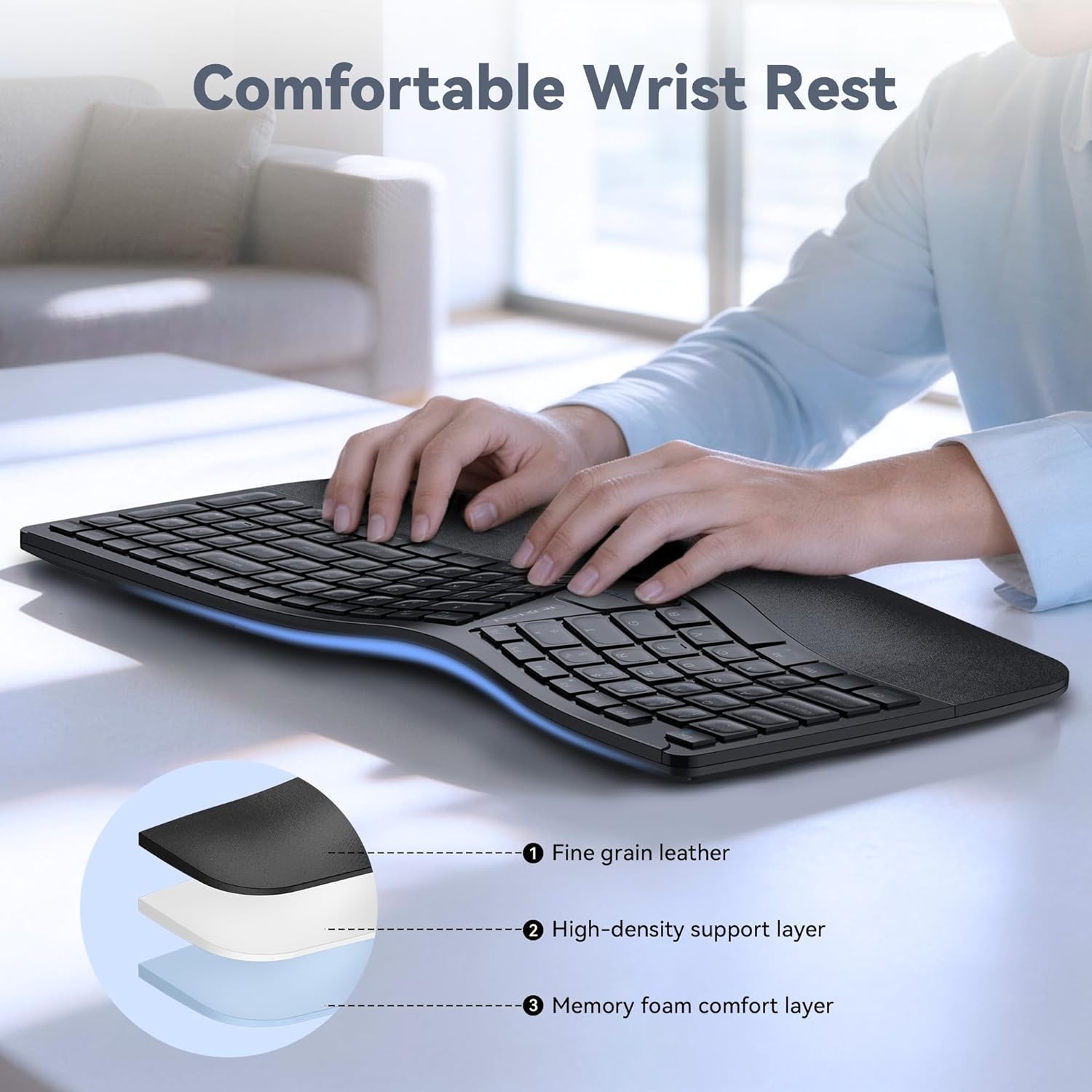
Image: Diagram showing the layers of the integrated wrist rest: fine grain leather, high-density support layer, and memory foam comfort layer.
Bluetooth + 2.4GHz Wireless Connectivity
The keyboard supports Bluetooth 5.0 with pairing memory for up to 3 devices and includes a USB wireless dongle for 2.4GHz connectivity. This allows connection to up to 4 devices (1 via 2.4GHz, 3 via Bluetooth) and seamless switching between them.
Batería de larga duración y carga rápida
Equipped with a 500mAh rechargeable lithium battery, the keyboard fully charges in approximately 4 hours and provides up to 200 hours of continuous use. The USB-C port supports simultaneous charging and use.
Ajuste multiángulo
The keyboard base features 4-stage adjustable feet, offering tilt options of 0°, 1.2°, 3°, and 6.2° to accommodate various working scenarios and personal preferences.
Configuración
Conexión inalámbrica 2.4GHz
- Locate the USB-A receiver, typically stored in a compartment on the keyboard.
- Conecte el receptor USB-A a un puerto USB disponible en su computadora.
- Encienda el teclado utilizando el interruptor de encendido (generalmente ubicado en la parte posterior o en el costado).
- The keyboard should automatically connect to your device. The 2.4G indicator light may illuminate briefly.
Conexión Bluetooth (BT1, BT2, BT3)
- Encienda el teclado.
- Mantenga pulsado el BT1, BT2, o BT3 key for 3-5 seconds until the corresponding Bluetooth indicator light flashes rapidly. This indicates the keyboard is in pairing mode.
- En su dispositivo (computadora, tableta, teléfono inteligente), vaya a la configuración de Bluetooth y busque nuevos dispositivos.
- Seleccione “Teclado TECKNET” o un nombre similar de la lista de dispositivos disponibles.
- Follow any on-screen prompts to complete the pairing process. The indicator light will stop flashing and remain solid for a few seconds upon successful connection.
- Repita estos pasos para BT2 y BT3 para emparejarlos con dispositivos adicionales.

Image: The keyboard connected to multiple devices (PC via 2.4G, tablet via BT1, laptop via BT2, smartphone via BT3), demonstrating its versatile connectivity.
Instrucciones de funcionamiento
Cambiar entre dispositivos conectados
To switch between connected devices, simply press the corresponding connectivity key: 2.4G, BT1, BT2, o BT3. The keyboard will switch to the selected device within a few seconds.
Cargando el teclado
When the battery is low, the battery indicator light will flash. Connect the supplied USB-C charging cable to the keyboard's USB-C port and the other end to a USB power source (e.g., computer USB port, wall adapter). The indicator light will show charging status and turn off when fully charged.
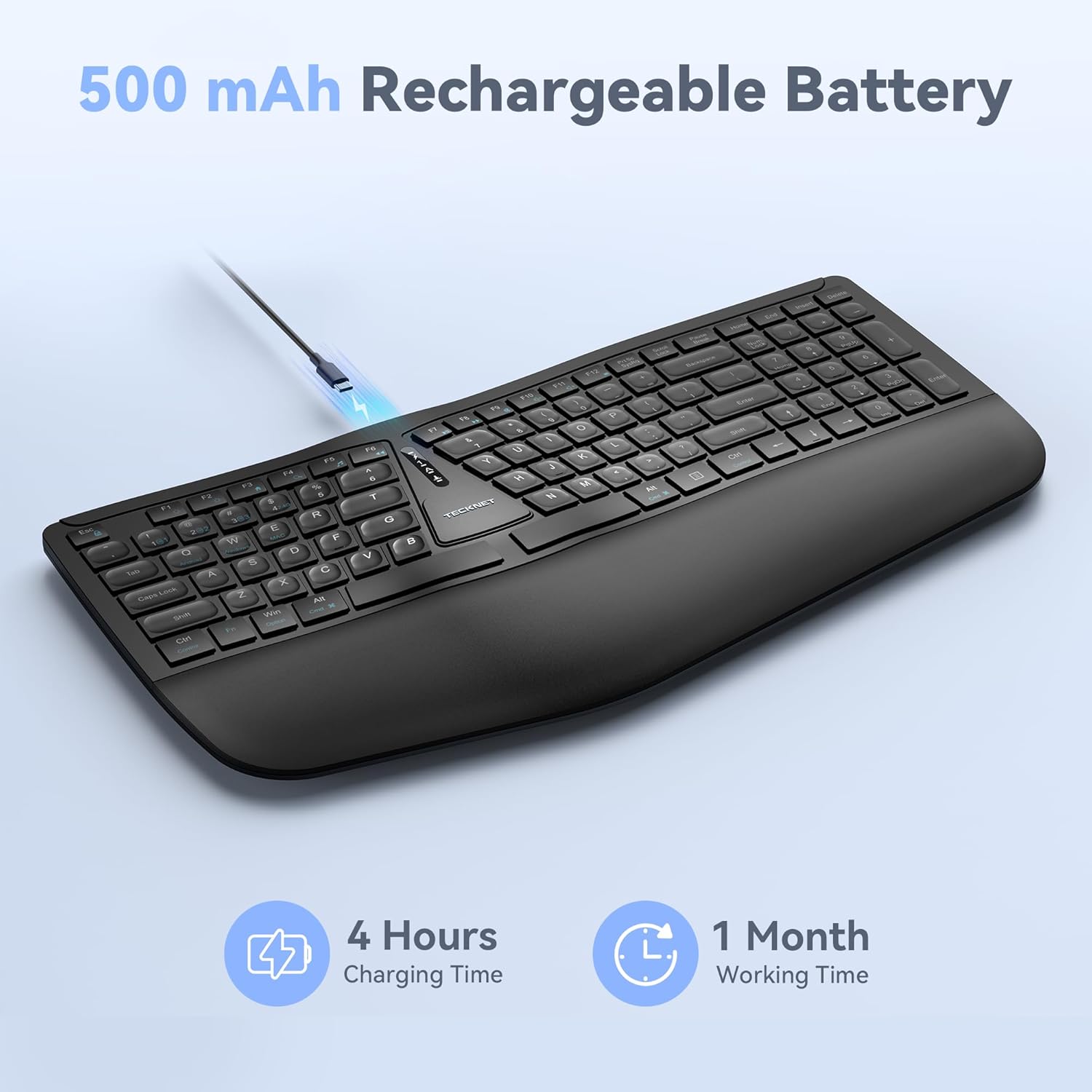
Image: The keyboard connected via a USB-C cable for charging, with an icon indicating 4 hours charging time for 1 month working time.
Adjusting Keyboard Tilt
The keyboard features adjustable feet on the underside. You can adjust the tilt to one of four positions: 0° (flat), 1.2° (backward tilt), 3° (rear stand open), or 6.2° (front tripod open). Experiment with different angles to find the most comfortable typing position for your setup.
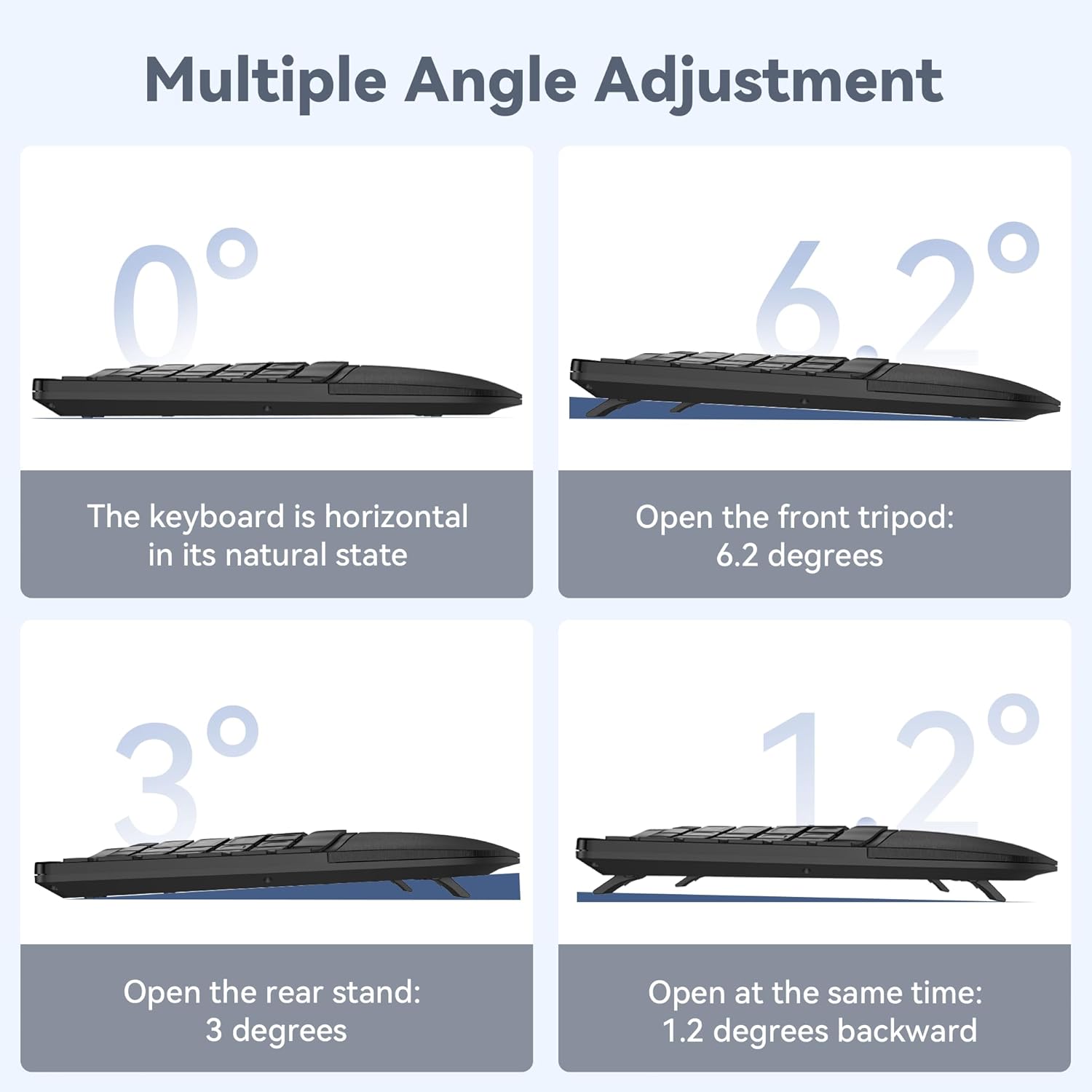
Image: Four diagrams illustrating the different tilt angles (0°, 1.2°, 3°, 6.2°) achievable with the keyboard's adjustable feet.
Mantenimiento
- Limpieza: Utilice un paño suave y seco.amp Paño para limpiar la superficie del teclado. Evite productos químicos agresivos o materiales abrasivos.
- Almacenamiento: Guarde el teclado en un lugar seco y fresco, alejado de la luz solar directa y de temperaturas extremas.
- Cuidado de la batería: Para prolongar la vida útil de la batería, evite descargar el teclado por completo con frecuencia. Cárguelo cuando aparezca el indicador de batería baja.
Solución de problemas
El teclado no se conecta
- Asegúrese de que el teclado esté encendido y completamente cargado.
- For 2.4GHz connection, verify the USB receiver is securely plugged into your device. Try a different USB port.
- For Bluetooth connection, ensure Bluetooth is enabled on your device and the keyboard is in pairing mode (flashing BT indicator). Remove previous pairings on your device and try pairing again.
- Intente reiniciar su computadora o dispositivo.
Las teclas no responden
- Verifique el nivel de la batería y cargue el teclado si es necesario.
- Ensure the keyboard is connected to the correct device (check the 2.4G/BT indicator).
- If specific keys are not working, gently clean around the keycaps to remove any debris.
Conexión intermitente o con retraso
- Acerque el teclado a su dispositivo para reducir la interferencia.
- Evite colocar el teclado cerca de otros dispositivos inalámbricos (por ejemplo, enrutadores Wi-Fi, teléfonos inalámbricos) que puedan causar interferencias.
- Asegúrese de que los controladores de su dispositivo estén actualizados.
Presupuesto
| Número de modelo | TK-KB030 |
| Tecnología de conectividad | Conexión inalámbrica de 2.4 GHz, Bluetooth 5.0 |
| Capacidad de la batería | Batería de litio de 500 mAh |
| Tiempo de carga | Aproximadamente 4 horas |
| Tiempo de uso continuo | Hasta 200 horas |
| Dimensiones del teclado (largo x ancho x alto) | 43.3 cm x 22.6 cm x 3 cm (17 pulgadas x 8.9 pulgadas x 1.2 pulgadas) |
| Peso del artículo | 790 g (1.7 libras) |
| Dispositivos compatibles | PC, Laptop, Tablet, Smartphone (Windows compatible) |
| Material | Plástico |

Image: Keyboard dimensions (length, width, height) and a hand size guide (S, M, L) with recommended keyboard size for M-L hands.
Garantía y soporte
The TECKNET Wireless Ergonomic Keyboard TK-KB030 comes with a Garantía sin preocupaciones de 36 meses. This warranty covers any issues encountered during normal use of the product.
For technical assistance, troubleshooting, or warranty claims, please contact TECKNET customer service. Refer to the contact information provided on the product packaging or the official TECKNET websitio para detalles de soporte.