
1. Introducción
The Vaydeer S5 Pro Mouse Jiggler is a device designed to prevent your computer from entering sleep mode or activating screen savers by simulating subtle mouse movements. It features app control, a timer function, and multiple movement modes, ensuring your system remains active without constant manual intervention. This device is plug-and-play, driver-free, and recognized by your computer as a standard mouse, making it undetectable by IT departments.
2. Información de seguridad
- No desmonte ni intente reparar el dispositivo.
- Mantenga el dispositivo alejado del agua, la humedad y las temperaturas extremas.
- Utilice únicamente el cable tipo C proporcionado para la conexión.
- Turn off the mouse jiggler when you need to use your physical mouse to avoid interference.
3. Contenido del paquete
Por favor revise el paquete para ver los siguientes artículos:
- Vaydeer S5 Pro Mouse Jiggler Device
- Cable USB tipo C
- USB-C to USB-A Adapter (may be included depending on package)
4. Producto terminadoview
The Vaydeer S5 Pro features a sleek metal design with an integrated LED display and control buttons for easy operation.
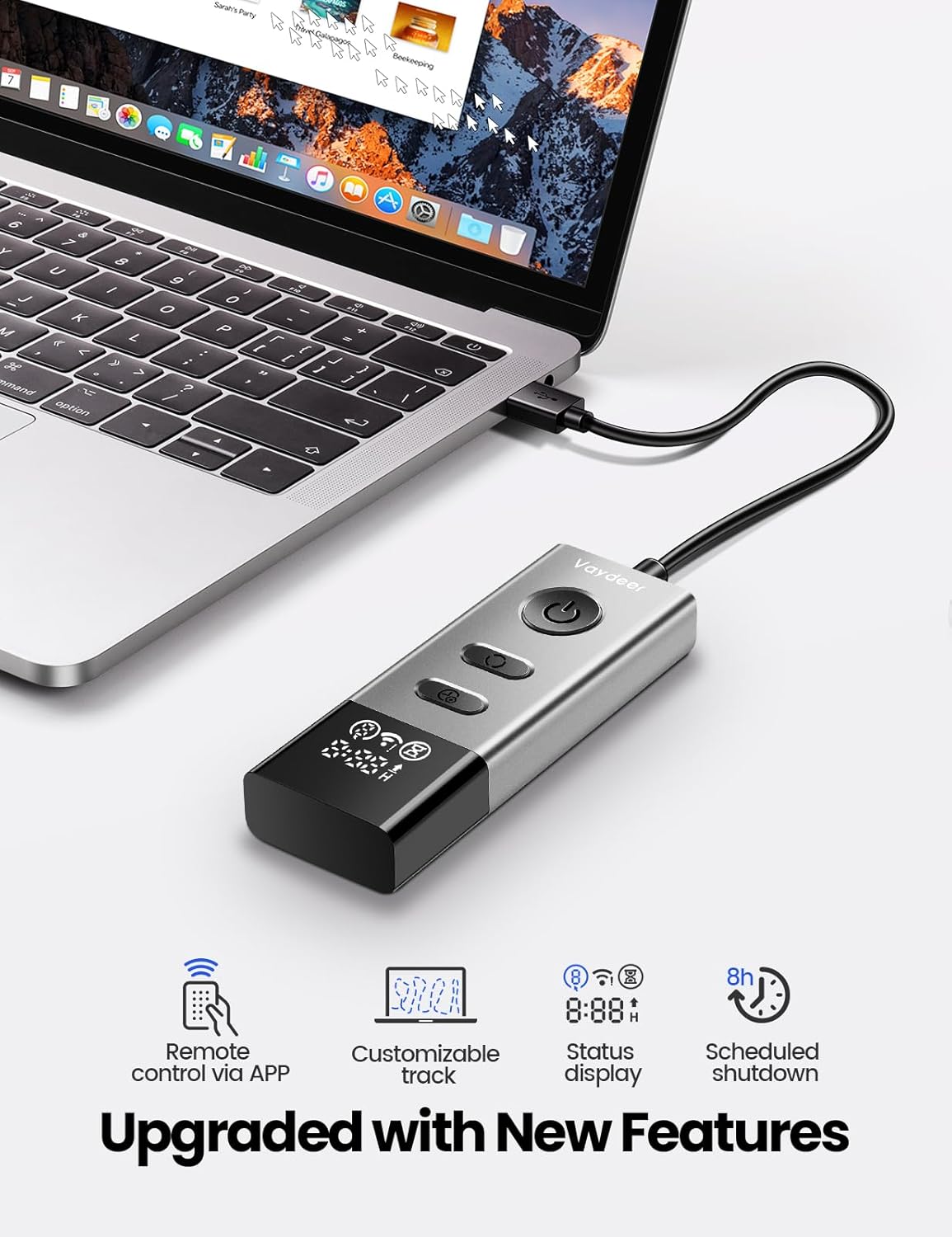
Figura 4.1: Vaydeer S5 Pro Mouse Jiggler connected to a laptop, highlighting its upgraded features including remote control, customizable track, status display, and scheduled shutdown.

Figura 4.2: Detallado view of the user-friendly LED status display on the Vaydeer S5 Pro Mouse Jiggler, indicating various operational statuses.
Componentes del dispositivo:
- Botón ON/OFF: Enciende o apaga el dispositivo.
- Mode/Timer Button: Cycles through movement modes and timer settings.
- Pantalla LED: Shows real-time settings, including Wi-Fi status, mouse track status, timer status, firmware update status, and timer countdown.
- Conector USB: Para conectar a su computadora.
5. Configuración
- Conectar el dispositivo: Plug the Vaydeer S5 Pro Mouse Jiggler into an available USB port on your computer using the provided Type-C cable. If your computer only has USB-C ports, use the included USB-C adapter.
- Encendido: Press the ON/OFF button on the device. The LED display will illuminate, and the device will begin operating.
- Funcionamiento sin conductor: The device is plug-and-play and does not require any software or driver installation. Your computer will recognize it as a standard mouse.

Figura 5.1: Connecting the Vaydeer S5 Pro Mouse Jiggler to a laptop for immediate use.
6. Instrucciones de funcionamiento
6.1 Funcionamiento básico
- Encender/Apagar: Press the dedicated ON/OFF switch on the device to start or stop the mouse jiggler function.
- Pantalla LED: The bright LED display shows the current operational status, including the active movement mode, timer settings, and connectivity status.
6.2 Modos de movimiento
The device offers multiple movement modes to simulate different mouse activities. Press the Mode/Timer button to cycle through these options:
- Large Scale Random Movement: Simulates broad, unpredictable cursor movements.
- Small Scale Random Movement: Simulates subtle, localized cursor movements.
- Jitter Mode: Provides very slight, almost imperceptible cursor movements.

Figura 6.1: The Vaydeer APP interface for selecting default movement tracks or creating custom ones.
6.3 Función de temporizador
The Vaydeer S5 Pro includes a timer function for scheduled operation. Press the Mode/Timer button (or a dedicated timer button if present) to set the desired running time. The device can be set to shut off automatically after 1-8 hours or run continuously.

Figura 6.2: Visual representation of the scheduled turn-off feature, allowing users to set the device to stop after a specified duration.
6.4 Control de aplicaciones
For enhanced control and customization, download the Vaydeer app. The app allows you to:
- ENCENDIDO/APAGADO remoto: Controlar el dispositivo de forma remota.
- Customize Pause Time: Adjust intervals between movements.
- Establecer tiempo de ejecución: Define how long the jiggler operates.
- Apagado programado: Program the device to turn off automatically after 1-8 hours (or continuously). The app supports 10-stage turn-off timers (1/2/3/4/5/6/7/8/9/10H).
- Customizable Tracks: Draw your own mouse movement patterns within the app.
- Actualizaciones de firmware: Check for and apply firmware updates.
- Change USB ID: The app allows changing the USB ID, which can be useful if IT departments attempt to block the device.

Figura 6.3: The Vaydeer app providing remote control capabilities for the mouse jiggler.
7. Mantenimiento
- Limpieza: Limpie el dispositivo con un paño suave y seco. Evite el uso de productos químicos agresivos o materiales abrasivos.
- Almacenamiento: Guarde el dispositivo en un lugar fresco y seco cuando no esté en uso.
- Cuidado de cables: Do not bend or crimp the USB cable excessively to prevent damage.
8. Solución de problemas
| Problema | Posible causa | Solución |
|---|---|---|
| Device not turning on / LED display off. | Not properly connected to USB port or insufficient power. | Ensure the USB cable is securely plugged into both the device and the computer. Try a different USB port. |
| Mouse cursor not moving. | Device is off, in a paused state, or a conflicting mouse is active. | Press the ON/OFF button to ensure the device is active. Check the LED display for status. Ensure your physical mouse is not being used simultaneously, as this can interfere. |
| Cannot use physical mouse while jiggler is active. | This is expected behavior. The jiggler simulates mouse input. | Turn off the Vaydeer S5 Pro Mouse Jiggler using its ON/OFF switch when you need to use your physical mouse. |
| La aplicación no se conecta al dispositivo. | Wi-Fi connectivity issues or incorrect app settings. | Ensure your device's Wi-Fi is enabled and connected to the same network as your smartphone. Check app permissions and restart the app if necessary. |
9. Especificaciones
| Característica | Detalle |
|---|---|
| Número de modelo | FM9048 |
| Conectividad | USB (Type-C cable included, USB-C to USB-A adapter may be included) |
| Compatibilidad del sistema operativo | Windows 7/8/10, iOS, Linux, Mac OS |
| Métodos de control | On-device buttons, Mobile App (Wi-Fi) |
| Características | LED Display, Multiple Movement Modes, Timer Function (1-8 hours), Customizable Tracks via App, Remote ON/OFF, Scheduled Shutdown, Changeable USB ID |
| Material | Metal |
| Peso | 1.23 onzas |
| Dimensiones | 4.65 x 2.13 x 0.67 pulgadas |
10. Garantía
Vaydeer provides a Garantía de 12 meses sin preocupaciones for this mouse jiggler. This warranty covers manufacturing defects and ensures product reliability under normal use. Please retain your proof of purchase for warranty claims.
11. Atención al cliente
For any questions, inquiries, or technical assistance regarding your Vaydeer S5 Pro Mouse Jiggler, please do not hesitate to contact our customer support team. We are committed to providing the best product and service.
Please refer to the contact information provided with your product packaging or visit the official Vaydeer websitio para detalles de soporte.