
1. Introducción
This manual provides detailed instructions for the setup, operation, maintenance, and troubleshooting of your ATTACK SHARK X66 Gasket Wireless Mechanical Keyboard. Please read this manual thoroughly before using the product to ensure optimal performance and longevity.

Imagen: de arriba hacia abajo view of the ATTACK SHARK X66 Gasket Wireless Mechanical Keyboard, showcasing su diseño compacto y diseño de teclas.
2. Producto terminadoview
2.1 Características principales
- Diseño compacto al 60%: Features 66 keys and a volume knob, optimizing desktop space while maintaining portability.
- Upgraded Gasket Mount: Incorporates 5 layers of sound insulation (PORON Sandwich Foam, Foamed IXPE Under Shaft Pads, PET Acoustic Premium Pads, Shaft Seat Sound Deadening Foam, Customized Bottom Foams) for reduced noise and a smooth typing experience.
- Conectividad de triple modo: Admite conexiones Bluetooth, inalámbricas de 2.4 GHz y con cable USB-C.
- Multi-Device Tasking: Three Bluetooth channels (FN+Q/FN+W/FN+E) for efficient switching between devices.
- Batería de larga duración: Equipped with a 3000mAh large-capacity rechargeable battery.
- Interruptores intercambiables en caliente: Full hot-swappable design compatible with 3-pin/5-pin switches, featuring pre-lubed Strawberry switches for a creamy sound and smooth keystroke.
- Retroiluminación RGB dinámica: Offers 9 backlight colors and 18 lighting effects with 16 million LED colors, customizable via software.
- Teclas duraderas: Features side-printed gradient PBT keycaps that are resistant to oiling, non-slip, and wear-resistant.

Imagen: Más alláview of the X66 keyboard highlighting key features such as RGB Backlight, Triple Mode Connectivity, Hot Swappable switches, PBT Keycaps, 60% Layout, 3000mAh Battery, and Gasket Structure.
2.2 Contenido del paquete
- ATTACK SHARK X66 Mechanical Keyboard
- USB-C Cable (1.5 meters)
- 2-in-1 Key Puller and Switch Puller
- Additional Strawberry Switches (2 pieces)
- Manual de usuario
3. Configuración
3.1 Modos de conectividad
The X66 keyboard supports three connection modes: 2.4GHz wireless, Bluetooth, and USB-C wired.

Image: Diagram illustrating the three connectivity modes: Bluetooth 5.0, 2.4GHz Wireless with a USB dongle, and Type-C Wired connection.
- Conexión inalámbrica de 2.4 GHz:
- Localice el receptor USB de 2.4 GHz.
- Conecte el receptor a un puerto USB disponible en su computadora.
- On the keyboard, slide the mode switch to the '2.4G' position. The keyboard will automatically connect.
- Conexión Bluetooth:
- En el teclado, deslice el interruptor de modo a la posición 'BT'.
- Para ingresar al modo de emparejamiento, mantenga presionado FN+Q, FN + W, o FN + E for 3-5 seconds until the corresponding key's backlight flashes rapidly.
- On your device (PC, Mac, Tablet), search for Bluetooth devices and select 'ATTACK SHARK X66' to pair.
- Once paired, the key's backlight will stop flashing and remain steadily lit. You can pair up to three Bluetooth devices and switch between them using FN + Q/W/E.
- Conexión por cable USB-C:
- Conecte el cable USB-C provisto al puerto USB-C del teclado.
- Conecte el otro extremo del cable a un puerto USB disponible en su computadora.
- El teclado cambiará automáticamente al modo cableado y comenzará a cargarse.
3.2 Cambio de sistema operativo
The keyboard features a dedicated switch for Windows and Mac operating systems.
- Locate the 'Win/Mac' switch on the side or back of the keyboard.
- Slide the switch to the appropriate operating system setting for optimal key mapping.
4. Instrucciones de funcionamiento
4.1 Funcionalidad de la perilla de volumen
The aluminum CNC metal knob provides convenient control over audio.
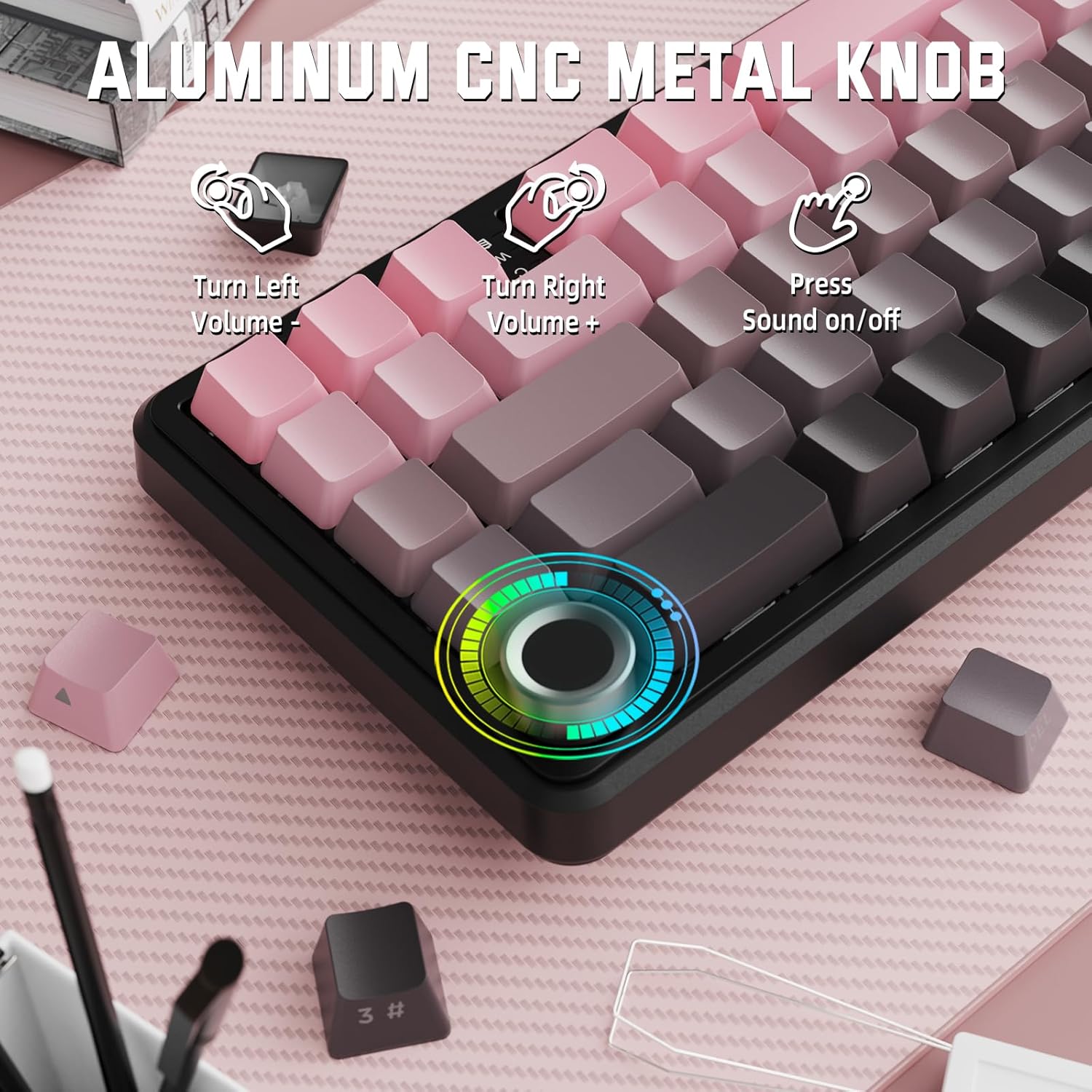
Image: Close-up of the volume knob with icons indicating its functions: Turn Left (Volume -), Turn Right (Volume +), Press (Sound on/off).
- Gire a la izquierda: Disminuir el volumen.
- Gire a la derecha: Aumentar el volumen.
- Prensa: Silenciar/Activar silencio de audio.
4.2 Combinaciones de teclas de función (tecla FN)
Due to the compact 60% layout, some functions are accessed via the FN key.
| Combinación | Función |
|---|---|
| FN + Q/W/E | Switch between Bluetooth devices 1, 2, and 3 |
| FN + Retroceso | Comprobar la capacidad de la batería |
| FN + 1-0 (fila superior) | F1-F10 functions (e.g., FN+1 for F1) |
| FN + -/= | F11/F12 functions |
| FN + \| | Borrar |
| FN+P | Imprimir pantalla |
| FN + [ { | Hogar |
| FN + ] } | Fin |
| FN + ; : | Página arriba |
| FN + ' " | Página abajo |
| FN + Teclas de flecha | Navigation (e.g., FN+Up Arrow for Page Up) |
5. Personalización
5.1 Configuración de retroiluminación RGB
The keyboard features dynamic RGB backlighting with multiple effects and colors.

Image: Visual representation of RGB backlight controls including turning on/off, changing lighting mode, speed, direction, brightness, and color, often in combination with the FN key.
- Turn on/off Lighting / Power Saving Mode: Specific key combination (refer to keyboard legends or software).
- Modo de iluminación: Recorre 18 efectos de iluminación.
- Velocidad de iluminación: Ajuste la velocidad de los efectos de iluminación dinámicos.
- Dirección de iluminación: Change the direction of certain lighting effects.
- Brillo de la iluminación: Ajuste la intensidad de la luz de fondo.
- Color de iluminación: Select from 9 preset backlight colors or customize via software.
5.2 Programación de software
For advanced customization of RGB modes, macros, and key remapping, dedicated software is available.
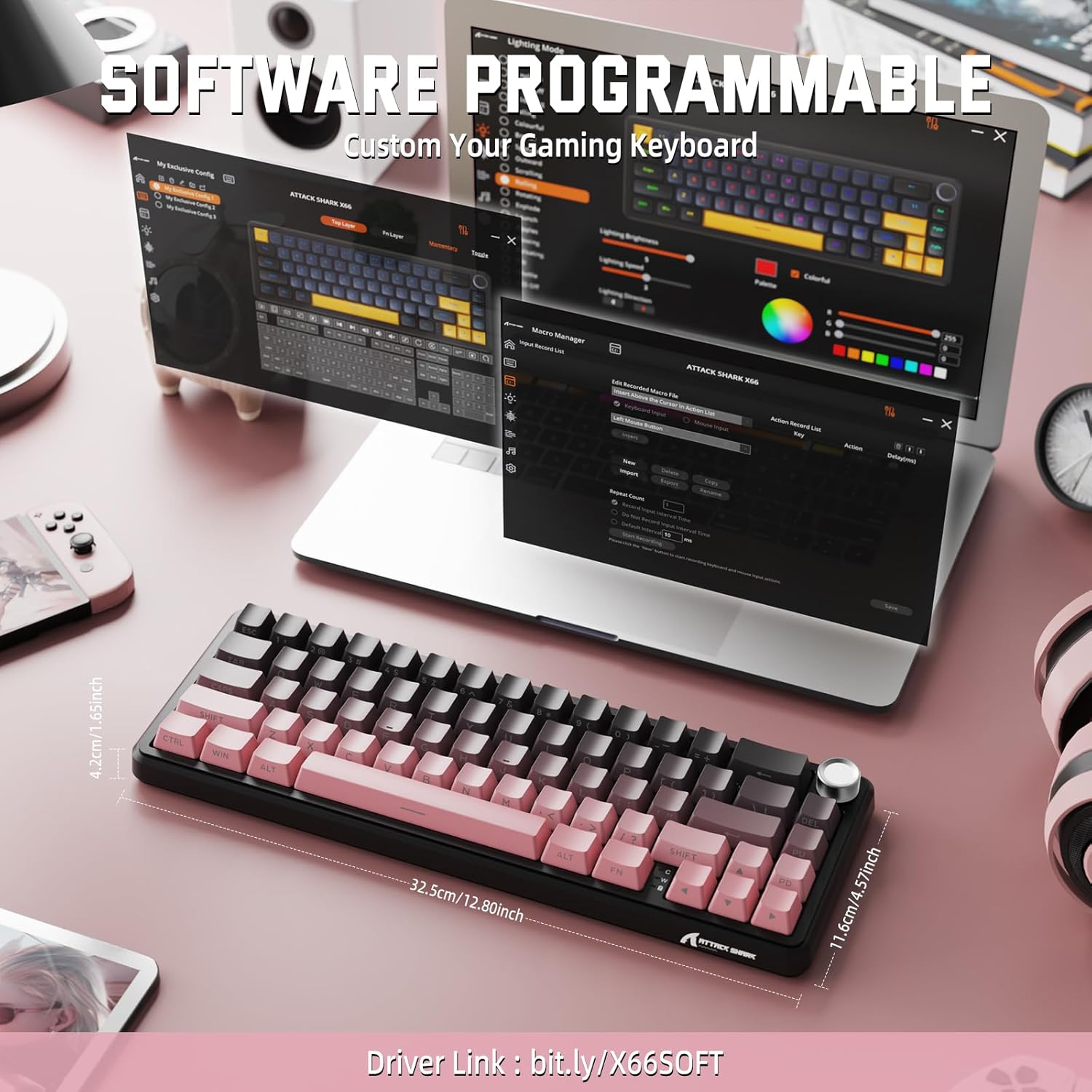
Image: Screenshot of the keyboard's software interface, showing options for custom key assignments, macro recording, and RGB lighting customization. A driver link is provided for download.
Descargue el software oficial del fabricante webSitio. El software le permite:
- Personaliza los colores y efectos de iluminación RGB.
- Macros de programa para secuencias de teclas complejas.
- Reasignar teclas individuales a diferentes funciones.
- Crea y guarda varios prosfiles para diferentes aplicaciones o juegos.
6. Mantenimiento
6.1 Limpieza del teclado
- Desconecte el teclado de todas las fuentes de alimentación antes de limpiarlo.
- Utilice un paño suave y sin pelusa ligeramente seco.ampLimpie con agua o una solución de limpieza suave las teclas y el chasis.
- Para eliminar el polvo y los residuos entre las teclas, utilice aire comprimido.
- Evite utilizar productos químicos agresivos, abrasivos o disolventes.
6.2 Hot Swappable Switch Replacement
The keyboard's hot-swappable design allows for easy switch replacement without soldering.

Image: Illustration showing how to remove and insert mechanical switches on the X66 keyboard, highlighting compatibility with 3-pin and 5-pin switches.
- Utilice el extractor de teclas provisto para quitar con cuidado la tecla deseada.
- Utilice el extractor de interruptores provisto para sujetar con cuidado los clips superior e inferior del interruptor y tirar de él hacia arriba.
- Alinee los pines del nuevo interruptor con los orificios de la placa de circuito impreso. Asegúrese de que los pines estén rectos para evitar que se doblen.
- Presione suavemente el nuevo interruptor en su lugar hasta que encaje firmemente.
- Vuelva a colocar la tecla.
6.3 Gestión de la batería
The keyboard is equipped with a 3000mAh rechargeable battery.

Image: Visual guide on how to check the battery capacity using FN + Backspace, showing different battery level indicators (30%, 50%, 100%) with corresponding key light patterns.
- Cargando: Connect the keyboard via the USB-C cable to a computer or a USB power adapter. The charging indicator will show the charging status.
- Comprobación del nivel de la batería: Prensa FN + Retroceso to display the current battery capacity via the key backlights.
- Duración de la batería: A full charge provides long-lasting usage, but actual duration varies based on RGB lighting usage and connection mode.
7. Solución de problemas
| Problema | Posible causa | Solución |
|---|---|---|
| Teclado no responde | Low battery, incorrect connection mode, driver issue. | Charge the keyboard. Ensure the mode switch is set correctly (2.4G, BT, or Wired). Reconnect the USB receiver/cable. Re-pair Bluetooth. Try a different USB port. |
| Conexión Bluetooth inestable | Interferencia, distancia, batería baja. | Ensure no strong interference sources nearby. Move closer to the device. Charge the keyboard. Re-pair the Bluetooth connection. |
| La conexión inalámbrica de 2.4 GHz no se conecta | Receiver not plugged in, incorrect mode, interference. | Ensure the 2.4GHz receiver is securely plugged in. Set the keyboard mode switch to '2.4G'. Try a different USB port for the receiver. |
| La iluminación RGB no funciona o es incorrecta | Lighting settings, software issue. | Check lighting control key combinations (FN + lighting keys). Ensure software is installed and updated. Reset lighting settings via software. |
| Teclas que no se registran o se escriben dos veces | Interruptor defectuoso, residuos debajo de la tecla. | Remove keycap and clean around the switch. If issue persists, replace the switch using the provided switch puller and spare switches. |
| La perilla de volumen no funciona | Conflicto de software, obstrucción física. | Ensure no software is overriding media controls. Check for any physical debris around the knob. Restart the computer. |
8. Especificaciones
| Característica | Detalle |
|---|---|
| Número de modelo | X66 |
| Disposición | 66 Keys, 60% Compact QWERTY |
| Conectividad | Bluetooth (5.0), 2.4GHz Wireless, USB-C Wired |
| Interruptores | Hot Swappable (3-pin/5-pin compatible), Pre-lubed Strawberry Mechanical Switches |
| Teclas | Side-printed Gradient PBT |
| Iluminar desde el fondo | RGB (16+ Million Colors, 9 preset colors, 18 effects) |
| Capacidad de la batería | 3000 mAh |
| Dispositivos compatibles | Windows, Mac OS, Laptop, PC, Tablet |
| Material | tereftalato de polibutileno, policarbonato |
| Peso del artículo | 2 libras (aprox. 0.91 kg) |
| Dimensiones del paquete | 14.02 x 6.54 x 2.05 pulgadas (aprox. 35.6 x 16.6 x 5.2 cm) |
| Fabricante | ATAQUE DE TIBURÓN |
9. Garantía y soporte
Para obtener información sobre la garantía y soporte técnico, consulte el sitio web oficial de ATTACK SHARK. webSitio web o contacte a su vendedor. Conserve el recibo de compra para reclamaciones de garantía.
Fabricante: ATAQUE DE TIBURÓN
Vendedor: MAGIC-REFINER US
10. Vídeo del producto
Vídeo: Un vídeo oficial del producto que muestraasing the features and design of the ATTACK SHARK X66 Gasket Wireless Mechanical Keyboard, including its compact size, RGB lighting, hot-swappable switches, and multi-mode connectivity. The video highlights the keyboard's aesthetic appeal and functional aspects.