
1. Introducción y másview
This manual provides essential information for the Waveshare 13.3-inch E Ink Spectra 6 (E6) Full Color E-Paper Display. This raw E-Ink display features a 1600×1200 resolution and utilizes a Serial Peripheral Interface (SPI) for communication. It is designed for applications requiring high contrast, high color saturation, and ultra-low power consumption, as it retains the last displayed content without continuous power.
2. Contenido del paquete
Verifique que todos los artículos enumerados a continuación estén incluidos en su paquete:
- 13.3inch e-Paper (E) x1

Figure 2.1: Package content showing the 13.3-inch e-Paper display.
3. Características principales
- Adopts E Ink Spectra 6 (E6) technology, featuring high contrast and high color saturation.
- No backlight required; the display retains its content indefinitely even when powered off.
- Ultra-low power consumption, with power primarily consumed only during display refreshes.
- Offers rich Wiki resources for development, including examples for Raspberry Pi, Arduino, ESP32, and STM32.
- Optional e-Paper Driver HAT available, supporting standard Raspberry Pi 40PIN GPIO header for Raspberry Pi series boards.
- HAT+ standard compliance improves interoperability and simplifies design and development.
- Adapting SPI interface for compatibility with various controller boards (Arduino, ESP32, STM32, Raspberry Pi).
- Vol a bordotage translator ensures compatibility with 3.3V / 5V MCUs.

Figura 3.1: Sobreview of the 13.3-inch full color e-Paper display and its features.
4. Especificaciones técnicas
| Parámetro | Valor | Parámetro | Valor |
|---|---|---|---|
| Vol de funcionamientotage | Raw display: 3.3V with Driver HAT: 3.3V/5V | Color de la pantalla | E6 full color (E Ink Spectra 6) |
| Interfaz | SPI de 3 cables, SPI de 4 cables | Escala gris | 2 |
| Dimensiones del contorno | Raw display: 284.70 × 208.80 × 0.85mm e-Paper driver HAT: 65.00 × 30.50mm | Tiempo de actualización completo | 19 segundos |
| Tamaño de la pantalla | 270.40 × 202.80 mm | Total Refresh Power | <0.5 W |
| Dot Pitch | 0.169 × 0.169 mm | Standby Current of Raw Display | <0.01 uA (casi nada) |
| Resolución | 1600 × 1200 píxeles | Viewángulo de ing | >170° |

Figure 4.1: Detailed specifications of the 13.3-inch e-Paper display.

Figure 4.2: Outline dimensions of the e-Paper display and the e-Paper Driver HAT.
5. E Ink Spectra 6 Technology
The E Ink Spectra 6 is a full-color e-paper technology that enhances the e-paper industry with superior color performance, high resolution, and high contrast. It utilizes red, yellow, and blue as primary colors, offering more possibilities for e-paper color display, resulting in clearer and brighter images.

Figure 5.1: Explanation of E Ink Spectra 6 technology.
This advanced performance includes a resolution of up to 200ppi, a wider operating temperature range, and faster screen refresh times. It is also more power-saving, aligning with ESG trends for energy efficiency and carbon reduction.
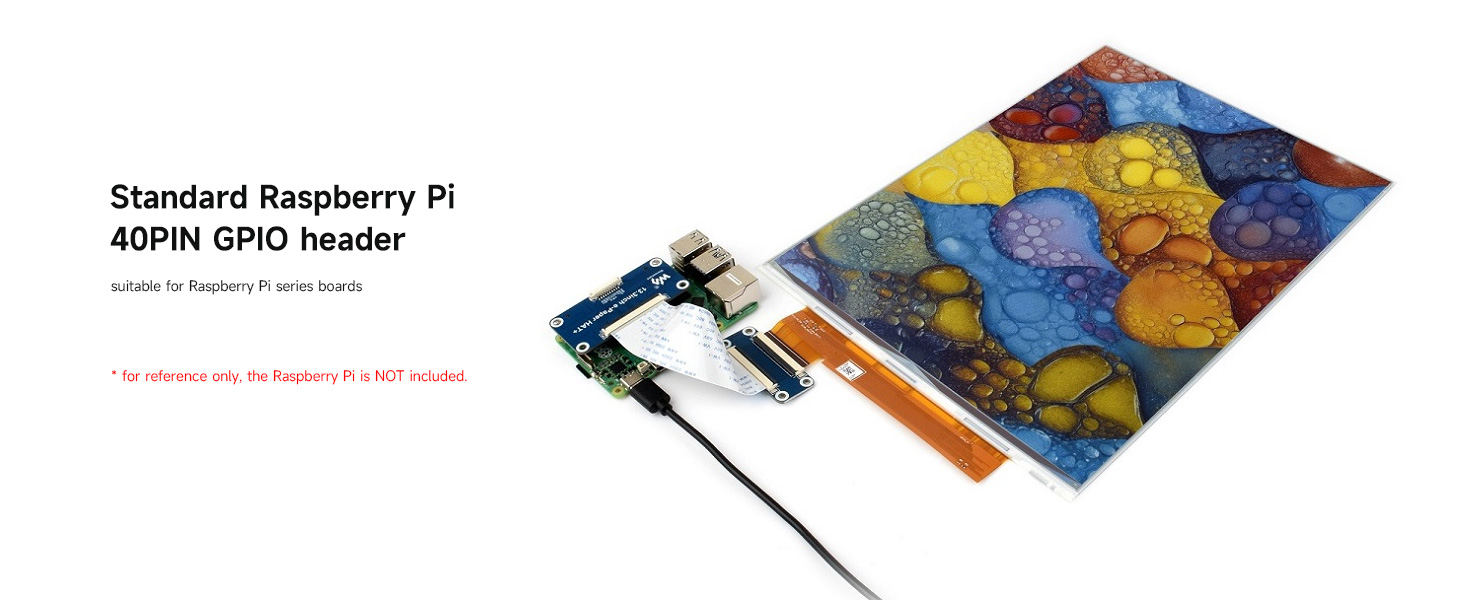
Figure 5.2: Evolution of E Ink Spectra technology.
6. Avanzartages and Applications of E Ink
E-paper displays utilize microcapsule electrophoretic technology for displaying content. Charged particles suspended in a clear fluid move to the sides of microcapsules when an electric field is applied, making the microcapsule visible by reflecting ambient light, similar to traditional printed paper. E-paper displays clearly show images and text under lamplight or natural light, require no backlight, and offer a nearly 180° viewing angle. This technology is commonly used in e-readers due to its paper-like effect.
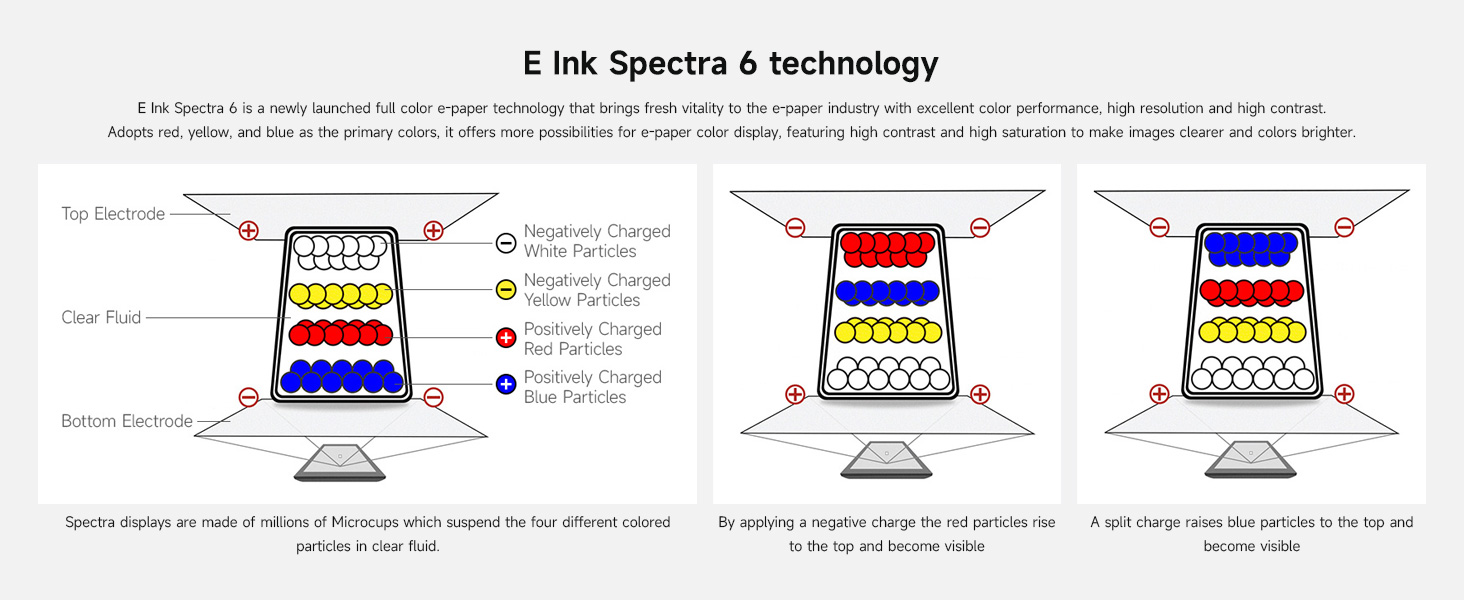
Figura 6.1: Advantages of E Ink and various application exampLes.
7. Configuración y conexión
7.1 Connecting to Raspberry Pi (with optional HAT)
If using the optional e-Paper Driver HAT, it connects directly to the standard Raspberry Pi 40PIN GPIO header. This setup is suitable for Raspberry Pi series boards. The HAT+ standard ensures improved interoperability and automatic detection by Raspberry Pi software/firmware, simplifying the development process.

Figure 7.1: Raspberry Pi GPIO header connection and example display content.
7.2 SPI Control Interface
The display features an onboard SPI control interface, making it compatible with various controller boards such as Arduino, ESP32, and STM32. The onboard voltage translator ensures compatibility with both 3.3V and 5V microcontrollers.

Figure 7.2: SPI control interface pinout for the e-Paper Driver HAT.
8. Operación
Operating the E Ink display primarily involves sending image data via the SPI interface to refresh the screen. Due to its bistable nature, the display will maintain the image without consuming power once refreshed. Power is only required during the refresh cycle. Refer to the provided Wiki resources for specific code examples and libraries for your chosen microcontroller platform.
9. Mantenimiento
To ensure the longevity and optimal performance of your E Ink display:
- Manejo: Handle the display with care, avoiding excessive pressure or bending, especially on the flexible FPC cable.
- Limpieza: Use a soft, dry, lint-free cloth to gently wipe the display surface. Avoid abrasive materials or chemical cleaners.
- Almacenamiento: Guarde la pantalla en un ambiente fresco y seco, alejado de la luz solar directa y de temperaturas extremas.
- Fuerza: Asegúrese de que el volumen de suministro de energía sea el adecuado.tage (3.3V or 5V depending on setup) to prevent damage.
10. Solución de problemas
If you encounter issues with your E Ink display, consider the following:
- La pantalla no se actualiza: Check power connections and ensure the SPI interface is correctly wired. Verify that your code is sending refresh commands.
- Partial Refresh Issues: Ensure your code is performing full refreshes when necessary, especially for color changes, as partial refreshes may not clear all previous content effectively.
- Colores incorrectos: Double-check your image data format and color palette settings in your software.
- Sin salida de pantalla: Confirm that the display's FPC cable is securely connected to the driver board/HAT. Verify the power supply is stable and within the specified voltage rango.
- Errores de software: Consult the Waveshare Wiki for updated libraries, example code, and community forums for common issues related to your specific microcontroller.
11. Soporte y recursos
Waveshare provides comprehensive Wiki resources to assist with the development and use of this e-Paper display. These resources include detailed documentation, circuit diagrams, example code, and data sheets. For further information or technical support, please refer to the official Waveshare websitio o comuníquese directamente con su equipo de soporte.
Recursos Wiki Oficiales: Please contact Waveshare for specific links and access to their Wiki documentation.


