
Introducción
This manual provides comprehensive instructions for the installation, operation, and maintenance of your Rimoody 4G+64G Car Radio. Designed specifically for Nissan Frontier and Xterra models from 2009 to 2012, this advanced car stereo features Android 13, wireless Carplay and Android Auto, GPS navigation, WiFi, Bluetooth, FM/RDS radio, EQ-32 sound adjustment, Steering Wheel Control (SWC) compatibility, and includes a backup camera for enhanced safety.

The Rimoody car stereo unit, featuring a 9-inch HD touchscreen, along with its essential accessories: a backup camera, GPS antenna, and a visual representation of its wireless Carplay and Android Auto capabilities.
Características principales:
- Sistema operativo: Android 13 with 4GB RAM + 64GB ROM for smooth performance.
- Mostrar: 9-inch HD touchscreen with 1280*720 resolution.
- Integración de teléfonos inteligentes: Wireless Carplay, Wireless Android Auto, and Mirror Link (iOS/Android).
- Navegación: Built-in GPS module supporting online and offline maps, voice guidance, and real-time traffic.
- Conectividad: Built-in WiFi for internet access and Bluetooth for calls and music streaming.
- Audio: FM/RDS radio and EQ-32 frequency adjustment for enhanced sound.
- Seguridad y comodidad: Supports reversing camera input and Steering Wheel Control (SWC) learning function.
- Mejora del sonido: AI DSP with eight mainstream sound effects (optional activation).
Configuración e instalación
Contenido del paquete:
Antes de comenzar la instalación, verifique que todos los componentes estén presentes en el paquete:

An illustration detailing the dimensions of the 9-inch head unit and a visual list of all included accessories, such as cables, antennas, and the backup camera.
- Unidad principal (pantalla de 9 pulgadas)
- Cable de alimentación
- Los cables RCA
- Cables USB
- Cable de entrada de cámara trasera
- Antena GPS
- Cámara de respaldo
- Micrófono (MIC)
- Soporte de montaje
- Manual de usuario (este documento)
Pasos de instalación:
- Preparación: Desconecte la batería del vehículo para evitar cortocircuitos eléctricos.
- Retire la unidad antigua: Carefully remove the existing car radio from the dashboard. Refer to your vehicle's specific service manual for detailed instructions on panel removal.
- Montaje: Attach the provided mounting brackets to the new Rimoody head unit.
- Conexiones de cableado:
- Conecte el mazo de cables de alimentación principal al cableado del vehículo.
- Conecte la antena GPS y colóquela para una recepción de señal óptima (por ejemplo, en el tablero).
- Conecte los cables USB para dispositivos externos.
- Connect the rear camera input cable and route it to the desired backup camera location.
- Connect the microphone for hands-free calling.
- Conecte cualquier cable RCA adicional para señal externa. amplifiers or video outputs if applicable.

A detailed diagram illustrating the various connection ports on the rear of the head unit, indicating where to connect the power cable, RCA cables, USB cables, rear camera input, and GPS antenna.
- Prueba de ajuste: Before fully securing, temporarily connect the battery and power on the unit to ensure basic functionality.
- Unidad segura: Carefully slide the unit into the dashboard opening and secure it with screws or clips.
- Reensamblar el tablero: Reattach any removed dashboard panels.
- Conexión final: Vuelva a conectar la batería del vehículo.

Visual comparison of the car's dashboard before and after the Rimoody car stereo installation, demonstrating the integrated appearance.
Instrucciones de funcionamiento
Carplay inalámbrico y Android Auto:
Connect your iPhone or Android phone wirelessly to access navigation, music, messages, and more directly on the car stereo's screen. Voice control is supported for hands-free operation.

Various screen displays showcasing the Carplay and Android Auto functionalities, including map navigation, music playback, and communication features.
The unit also supports Mirror Link via USB cable or WiFi, allowing you to mirror your phone's screen directly onto the stereo display.
Navegación GPS y WiFi:
Utilize the built-in GPS module for accurate navigation. The system supports both online and offline maps, providing voice guidance and real-time traffic information (when connected to the internet).
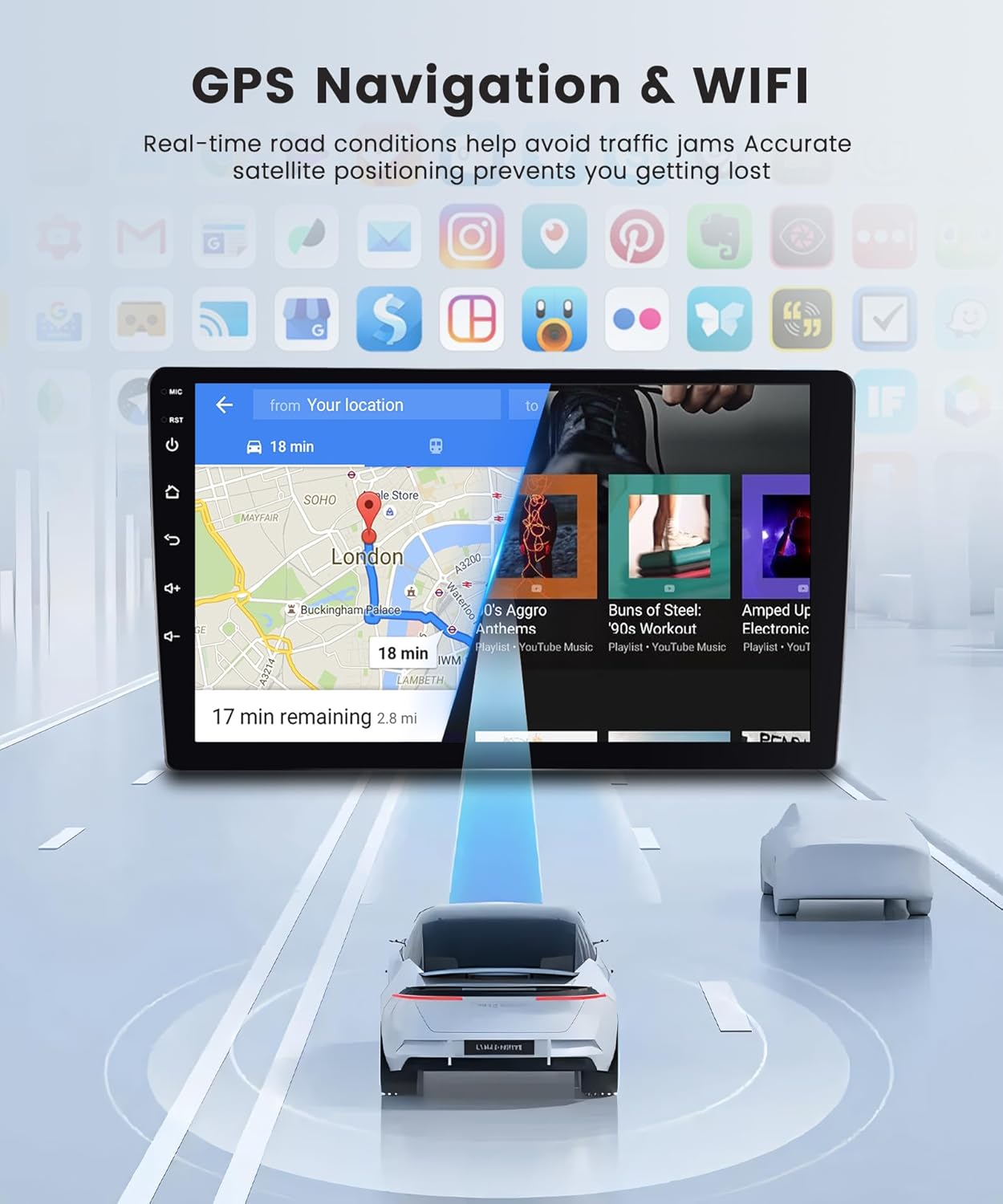
The car stereo screen displaying a navigation map with a highlighted route and estimated travel time, demonstrating its GPS capabilities.
Connect to the internet via WiFi hotspot or tethering from your smartphone to browse the web, transmitir contenido y descargar aplicaciones.
Conectividad Bluetooth:
Pair your smartphone or other Bluetooth-enabled devices to the car stereo for hands-free calling, wireless music streaming, and file transferir.
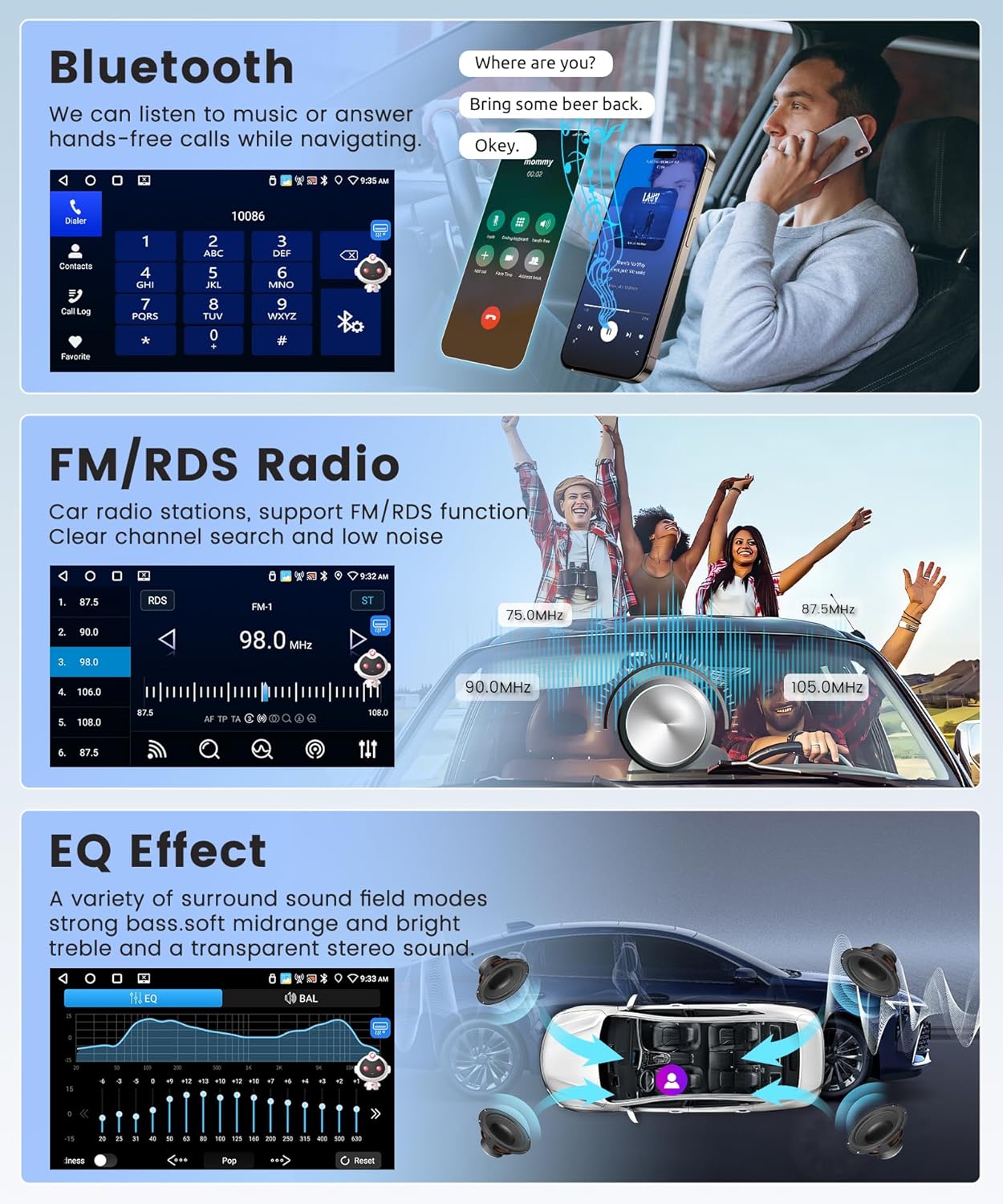
The car stereo displaying a phone dialer and a music playback screen, illustrating its Bluetooth call and audio streaming functions.
Radio FM/RDS:
Access various radio stations with clear sound quality. The FM/RDS function provides station information and enhances the listening experience.
The EQ-32 feature allows for detailed sound customization, providing a shocking surround panoramic sound experience for all music genres.
Reversing Camera and Steering Wheel Control (SWC):
The included reversing camera automatically displays the rear view on the screen when shifting into reverse gear, aiding in safe parking and obstacle avoidance. The unit supports learning functions for your original car's steering wheel buttons, allowing convenient control of stereo functions without taking your hands off the wheel.

A visual representation of the AHD rear camera, highlighting its key attributes, and a screenshot of the car stereo's interface for programming steering wheel controls.
Mantenimiento
Limpieza de la pantalla:
To clean the touchscreen display, use a soft, lint-free cloth. For stubborn smudges, slightly dampen the cloth with water or a screen-safe cleaning solution. Avoid abrasive materials or harsh chemicals that could damage the screen coating.
Actualizaciones de software:
Periodically check for software updates to ensure optimal performance and access to new features. Updates can typically be performed via WiFi connection directly from the unit's settings menu.
Solución de problemas
Consulte la siguiente tabla para conocer los problemas más comunes y sus posibles soluciones.
| Problema | Posible causa | Solución |
|---|---|---|
| La unidad no se enciende. | Conexión de alimentación suelta, fusible quemado, problema con la batería del vehículo. | Revise las conexiones del cable de alimentación. Inspeccione los fusibles del vehículo. Asegúrese de que la batería del vehículo esté cargada. |
| No hay sonido. | Volumen demasiado bajo, silencio activado, problema de cableado del altavoz, configuración de salida de audio incorrecta. | Sube el volumen. Comprueba si el sonido está activado. Verifica las conexiones de los altavoces. Ajusta la configuración de audio. |
| Señal GPS perdida o inexacta. | GPS antenna obstructed or improperly installed, unit in an area with poor satellite reception. | Ensure GPS antenna is clear of obstructions and properly connected. Move vehicle to an open area. |
| Problemas de conexión Bluetooth. | Dispositivo no en modo de emparejamiento, interferencia, procedimiento de emparejamiento incorrecto. | Ensure Bluetooth is enabled on both devices and in pairing mode. Delete previous pairings and re-pair. |
| La cámara de respaldo no se muestra. | Cable de la cámara suelto, cámara defectuosa, cable del disparador inverso no conectado. | Check camera video input and power connections. Verify reverse trigger wire connection. |
Si encuentra problemas que no aparecen aquí o necesita más ayuda, póngase en contacto con atención al cliente.
Presupuesto
| Característica | Detalle |
|---|---|
| Sistema operativo | Androide 13 |
| UPC | 4 núcleos |
| Memoria (RAM) | 4 GB |
| Almacenamiento (ROM) | 64 GB |
| Tamaño de la pantalla | 9 pulgadas |
| Resolución de pantalla | 1280*720 alta definición |
| Conectividad | Wi-Fi, Bluetooth, USB |
| Navegación | Built-in GPS Module, North America Map Type |
| Modo de salida de audio | Stereo, EQ-32 Adjustment, AI DSP |
| Componentes incluidos | Cámara de respaldo |
| Peso del artículo | 2.65 libras |
| Dimensiones del paquete | 11.02 x 9.45 x 4.72 pulgadas |
| Vehículos compatibles | Nissan Frontier Xterra 2009-2012 (SUV) |
Garantía y soporte
Garantía del fabricante:
This Rimoody car stereo unit is covered by a Garantía del fabricante de 2 años A partir de la fecha de compra. Esta garantía cubre defectos de materiales y mano de obra en condiciones normales de uso. Conserve su comprobante de compra para reclamaciones de garantía.
Política de devoluciones:
A Devolución gratuita durante 90 días for refund or exchange is offered from the date of purchase. Please refer to the retailer's return policy for specific conditions.
Atención al cliente:
Rimoody provides comprehensive customer support to assist you with any questions or issues. This includes:
- Respuesta rápida: Support inquiries are typically responded to within 24 hours.
- Guía de instalación profesional: Access to detailed installation manuals and videos.
- Soporte técnico de por vida: Dedicated technical support team available for the lifetime of the product.

Visual summary of Rimoody's customer support commitments: 24-hour response, professional guides, 90-day returns, and lifetime technical support.
For support, please visit the official Rimoody store or contact their customer service channels as provided with your product documentation.