
Introducción
Welcome to the user manual for your Cleer ARC 3 Sports Pro Open Ear Headphones. These headphones are designed for comfort and high-quality audio, featuring an open-ear design, advanced sound technologies, and health tracking capabilities. This manual provides essential information for setup, operation, maintenance, and troubleshooting to ensure optimal performance and longevity of your device.
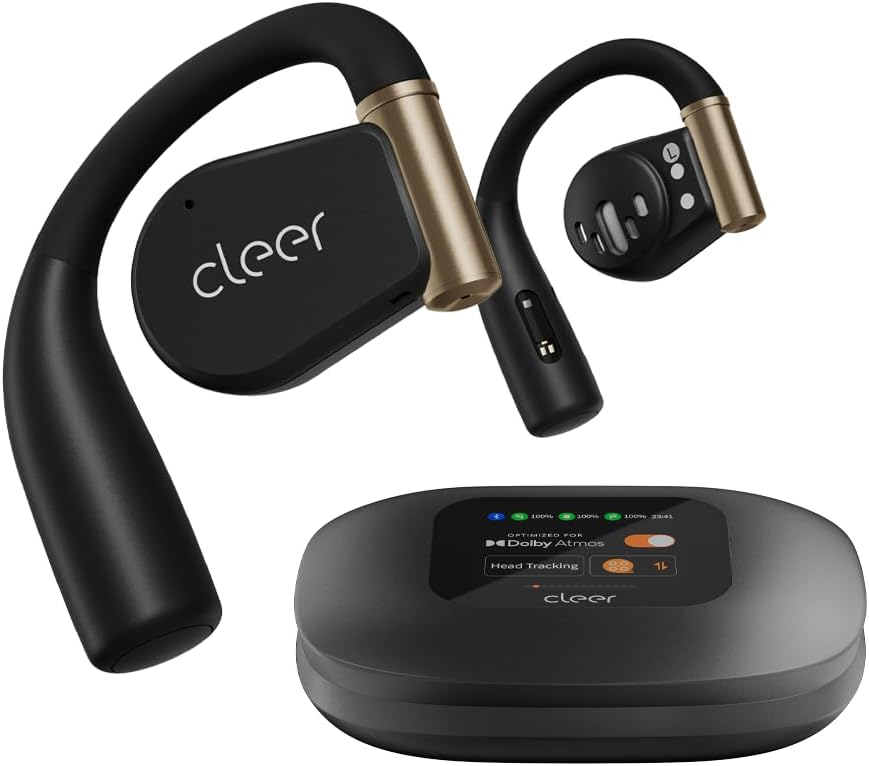
Image: Cleer ARC 3 Sports Pro headphones and their smart charging case.
Contenido del paquete
Antes de comenzar, asegúrese de que todos los artículos estén presentes en el paquete:
- Cleer ARC 3 Sports Pro Open Ear Headphones
- Estuche de carga
- Cable de carga (USB-C a USB-A)
- Manual de usuario
Configuración
1. Carga de los auriculares y el estuche
Before first use, fully charge your Cleer ARC 3 Sports Pro headphones and charging case. The charging case provides additional battery life for the headphones.
- Coloque los auriculares en el estuche de carga.
- Connect the USB-C end of the charging cable to the charging case and the USB-A end to a power adapter (not included) or a computer's USB port.
- The case's display will indicate charging status. A full charge takes approximately 2 hours.

Image: Visual representation of the 40-hour total battery life, including 8 hours from headphones and 32 hours from the charging case.
2. Emparejamiento inicial con un dispositivo
The Cleer ARC 3 Sports Pro headphones support Bluetooth 5.4 for stable connectivity and multi-point connection, allowing pairing with two devices simultaneously.
Option 1: First Pairing (Recommended)
- Remove the protective film from the headphones.
- Press and hold the Multi-Function Button (MFB) on both headphones for 2 seconds to enter pairing mode.
- On your device (smartphone, tablet, laptop), go to Bluetooth settings and select "Cleer ARC 3 Sports Pro" from the list of available devices.
Opción 2: Emparejamiento del panel táctil
- Toque el panel táctil de cualquiera de los auriculares 5 veces.
- Wait for the LED indicators to blink red and white, indicating pairing mode.
- On your device, select "Cleer ARC 3 Sports Pro" from the Bluetooth device list.
Opción 3: Emparejamiento del estuche de carga
- Coloque ambos auriculares en el estuche de carga y cierre la tapa.
- Open the charging case. On the case's display, navigate to the "Auxiliary" page and select "Pairing Mode."
- On your device, select "Cleer ARC 3 Sports Pro" from the Bluetooth device list.

Image: Step-by-step visual guide for three different pairing methods: first pairing, touch pad pairing, and charging case pairing.
3. Installing the Cleer+ App
For full functionality, including EQ settings, Dolby Sound Effects, and health tracking, download the Cleer+ app from your device's app store.
- Buscar "Cleer+" in your app store.
- Descargue e instale la aplicación.
- Open the app and follow the on-screen instructions to connect your ARC 3 Sports Pro headphones.

Image: A user interacting with the Cleer+ app on a smartphone, demonstrating personalized workout plan creation based on real-time data.
Instrucciones de funcionamiento
1. Uso de los auriculares
The ARC 3 Sports Pro features an adjustable, soft ear hook design for a secure and comfortable fit during various activities.
- Coloque suavemente el gancho para la oreja sobre su oreja.
- Adjust the earbud speaker to rest comfortably near your ear canal without entering it.
- Ensure a snug fit for optimal sound and heart rate tracking.

Image: A woman wearing the Cleer ARC 3 Sports Pro headphones, illustrating the open-ear design and comfortable, flexible ear hooks.
2. Controles
The headphones offer multiple control methods for convenience.
Touch Controls (on headphones)
The touch pads on each earbud allow for various functions:
- Reproducir/Pausa: Solo toque.
- Pista siguiente: Toque dos veces el auricular derecho.
- Pista anterior: Toque dos veces el auricular izquierdo.
- Responder/Finalizar llamada: Un solo toque durante una llamada entrante.
- Rechazar llamada: Mantenga presionado durante 2 segundos durante una llamada entrante.
- Activar asistente de voz: Toque tres veces.

Image: A diagram showing a finger tapping the earbud's touch surface, indicating touch control functionality.
Control de volumen
Adjust volume using one of the following methods:
- Por teléfono: Adjust volume directly on your connected mobile device.
- A través del estuche de carga: Use the intuitive FHD display on the charging case to access volume controls.
- A través del panel táctil: Double tap and hold the second tap on the left earbud to decrease volume, or on the right earbud to increase volume.
- Mediante control de voz: Use voice commands like "Volume up" or "Volume down" when connected.

Image: Visual guide demonstrating four different methods for adjusting volume on the Cleer ARC 3 Sports Pro headphones.
Smart Motion Control (for Calls)
Enable motion controls via the Cleer+ App for hands-free call management.
- Abra la aplicación Cleer+.
- Tap [Motion Control] on the ARC 3 main page.
- Toggle the button to turn on/off [Call Control].
- Recoger llamada: Asiente con la cabeza dos veces.
- Colgar/Rechazar llamada: Mueva la cabeza dos veces.

Image: Instructions for activating and using smart motion controls for answering and rejecting calls through head gestures.
3. Funciones de audio
The ARC 3 Sports Pro headphones offer advanced audio technologies for an immersive listening experience.
- Dolby Atmos & Snapdragon Sound: Experience crystal clear spatial audio with 16.2mm drivers. Optimized for Dolby Atmos head tracking.
- Control de volumen automático: Automatically adjusts audio levels based on your surroundings for consistent listening.
- Calidad de llamada clara: Features crystal clear voice capture and noise-cancelling microphones for calls.
Controlling Dolby Audio
You can enable or disable Dolby Audio through the following methods:
- A través de la aplicación Cleer+: Abra la aplicación Cleer+ y active la configuración Dolby Audio en la página principal.
- A través del estuche de carga: On the charging case's touch screen, locate the Dolby Audio interface and toggle the [OPTIMIZED FOR Dolby Atmos] button.
- A través del panel táctil: Tap and hold the touch pad of either headphone for more than 2 seconds.

Image: Visual instructions for enabling or disabling Dolby Audio using the Cleer+ app, the charging case display, or the headphone touch pads.
4. Seguimiento de la salud
The ARC 3 Sports Pro headphones include heart rate and blood oxygen detection, which can be tracked in real-time during workouts or daily activities via the Cleer+ App.
- Ensure the headphones are properly worn for accurate readings.
- Open the Cleer+ App to view your health metrics and create personalized workout plans.

Image: A man outdoors, demonstrating the use of the Cleer+ app for accurate workout heart rate tracking.
Mantenimiento
1. Limpieza
La limpieza regular ayuda a mantener el rendimiento y la higiene de sus auriculares.
- Limpie los auriculares y el estuche de carga con un paño suave, seco y que no suelte pelusa.
- Avoid using abrasive materials, solvents, or cleaning sprays.
- The charging case features UV-C light sterilization for the earbuds when placed inside. Ensure the case is closed for this function.

Image: A diagram illustrating the UV-C sterilization process within the charging case for the earbuds.
2. Resistencia al agua (IPX7)
The ARC 3 Sports Pro headphones are IPX7 waterproof, meaning they can withstand immersion in up to 1 meter of water for 30 minutes. This makes them resistant to sweat, rain, and accidental splashes.
- No sumerja intencionalmente el estuche de carga, ya que no es resistente al agua.
- After exposure to water, ensure the headphones are completely dry before placing them back in the charging case to prevent damage.

Image: A woman exercising, demonstrating the IPX7 sweat-resistant capability of the headphones for uninterrupted use during intense workouts.
Solución de problemas
If you encounter issues with your Cleer ARC 3 Sports Pro headphones, refer to the following common solutions:
| Problema | Posible solución |
|---|---|
| Los auriculares no se emparejan |
|
| Sin sonido o volumen bajo |
|
| Mala calidad de sonido |
|
| Los auriculares no se cargan |
|
| Heart rate tracking inaccurate |
|
Presupuesto
| Característica | Detalle |
|---|---|
| Nombre del modelo | Cleer Audio ARC 3 Sports Pro |
| Tecnología de conectividad | Bluetooth, inalámbrico |
| Versión de Bluetooth | 5.4 |
| Colocación de orejas | Oído abierto |
| Forma del auricular | Gancho |
| Tipo de controlador de audio | Controlador dinámico (16.2 mm) |
| Rango de frecuencia | 20 Hz - 20,000 Hz |
| Duración de la batería (auriculares) | 8 horas (una sola carga) |
| Duración de la batería (con estuche) | Up to 40 Hours total (8 hrs + 32 hrs from case) |
| Tiempo de carga | 2 horas |
| Nivel de resistencia al agua | IPX7 (resistente al agua) |
| Tipo de control | Touch Control, Volume Control, App Control, Voice Control |
| Seguimiento de la salud | Heart Rate, Blood Oxygen Detection |
| Peso del artículo (auriculares) | 12 gramos (por auricular) |
| Peso del estuche de carga | 130 gramos |
| Material | Metal, plástico, silicona |
| Dispositivos compatibles | Celulares, computadoras de escritorio, portátiles, tabletas |
Garantía y soporte
Información de garantía
Cleer products are designed and manufactured to the highest quality standards. For specific warranty details, including coverage period and terms, please refer to the warranty card included with your product or visit the official Cleer webSitio. Conserve su comprobante de compra para reclamaciones de garantía.
Atención al cliente
If you require further assistance or have questions not covered in this manual, please contact Cleer customer support:
- Soporte en línea: Visit the official Cleer webSitio para preguntas frecuentes, artículos de soporte y formularios de contacto.
- Soporte por correo electrónico: Refer to your product packaging or the Cleer websitio para obtener la dirección de correo electrónico de soporte adecuada.
- Soporte telefónico: Check the Cleer webSitio para números de soporte telefónico regional.
When contacting support, please have your product model number (ARC 3 Sports Pro) and proof of purchase readily available.