
SuntekCam WiFi940
Manual del usuario de la cámara de seguimiento WiFi SuntekCam
Model: WiFi940
Introducción
Thank you for choosing the SuntekCam WiFi Trail Camera. This manual provides detailed instructions for setting up, operating, and maintaining your camera. Designed for wildlife observation, scouting, and security, this camera features 4K video, 36MP images, no-glow night vision, and convenient WiFi/Bluetooth connectivity. Please read this manual thoroughly before use to ensure optimal performance and longevity of your device.
Producto terminadoview
Contenido del paquete
- SuntekCam WiFi Trail Camera (Model: WiFi940)
- Correa de montaje
- Manual de usuario (este documento)
Características principales
- Imágenes de alta resolución: Captures Ultra HD 4K/30fps video and 36-megapixel still images.
- Advanced Video Encoding: Utilizes H.264 technology for efficient video streaming and storage.
- Batería recargable integrada: Features a built-in 10000mAh lithium battery, eliminating the need for disposable AA batteries.
- Diseño duradero e impermeable: Tightly sealed body with silicone ensures excellent waterproof performance for outdoor use.
- Visión nocturna sin brillo: Equipped with 56 built-in 940nm lightless infrared LEDs and adaptive lighting for clear night captures without disturbing wildlife. Provides up to 100 feet (30 meters) of night vision range.
- Velocidad de disparo rápida: Achieves a 0.2-second trigger speed to capture fast-moving subjects.
- Conectividad inalámbrica: Built-in Bluetooth and WiFi modules allow remote connection to a free mobile application (effective range 0-15 meters) for photo/video viewAjuste de configuración y navegación.
- Modos de disparo versátiles: Supports timed shots, interval shots, and real-time online viewEn.
- Data Security & Information Display: Features password protection and displays date, time, and temperature on captures.
- Soporte de alimentación externa: Compatible with 12V/1.5A external power sources, including solar panels.
Componentes de la cámara

Figura 1: Frente view of the SuntekCam WiFi Trail Camera, highlighting its 4K Ultra HD capability, 36MP resolution, waterproof design, and integrated 10000mAh rechargeable battery. A deer image on a smartphone screen illustrates remote viewEn.
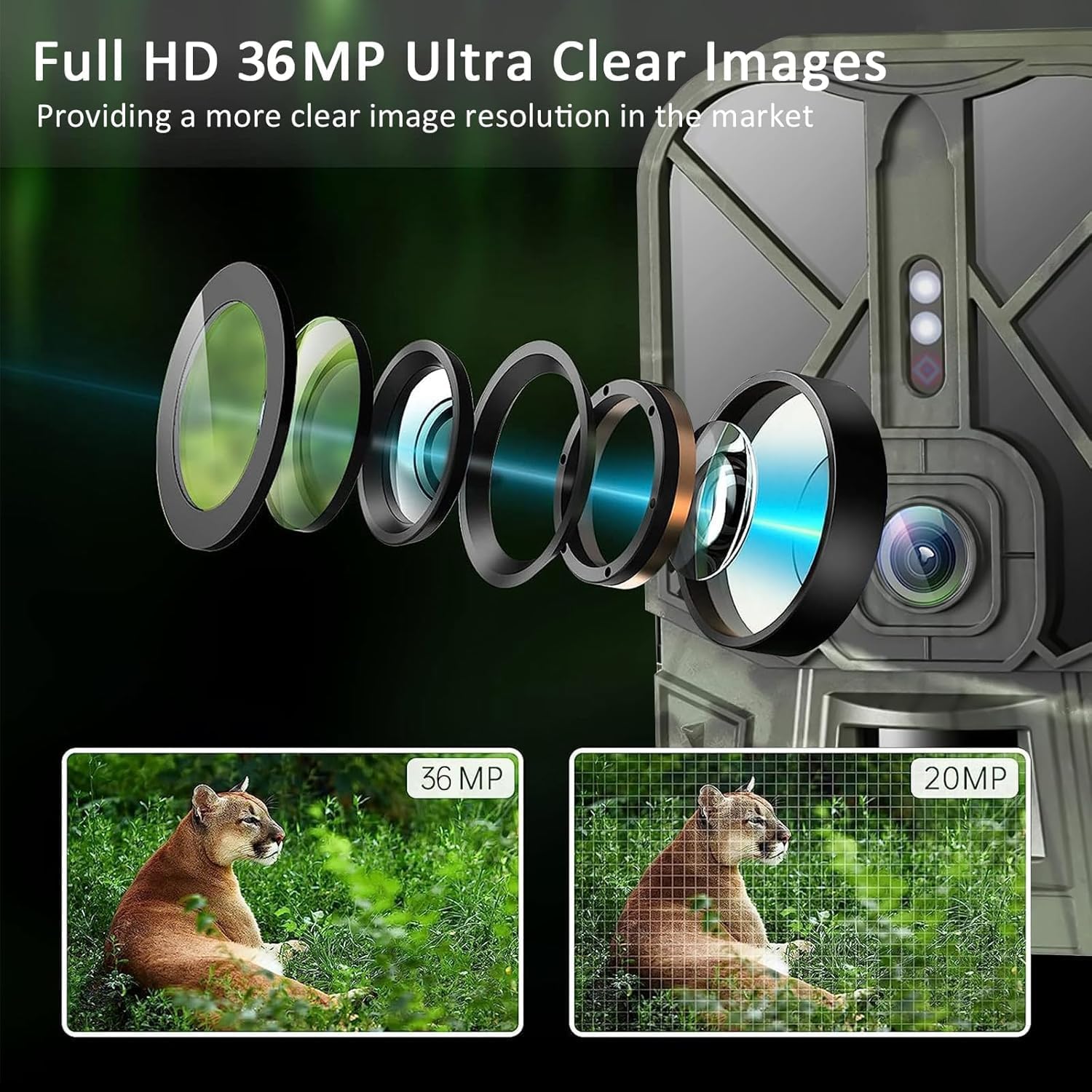
Figura 2: Illustration of the camera's optical lens system and a visual comparison demonstrating the superior clarity of 36MP images compared to 20MP images.
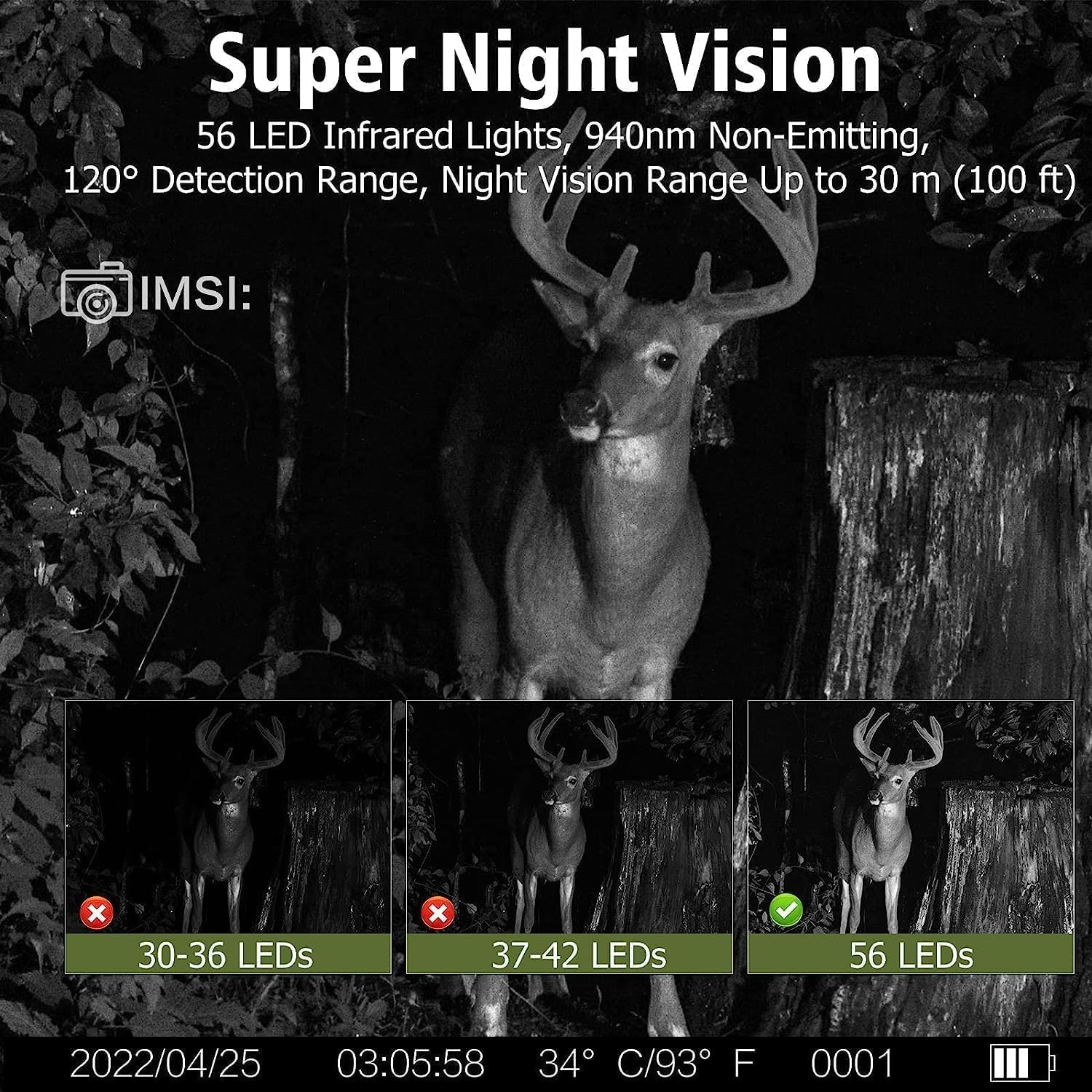
Figura 3: Depiction of the camera's Super Night Vision, featuring 56 non-emitting 940nm infrared LEDs, a 120° detection range, and an effective night vision range of up to 100 feet (30 meters).
Configuración
1. Charging the Built-in Battery
The camera comes with a built-in 10000mAh rechargeable lithium battery. Before first use, ensure the battery is fully charged. Connect the camera to a standard USB power adapter (not included) using a compatible USB cable. The charging indicator will show the charging status. A full charge provides extended operational time.

Figura 4: Visual comparison highlighting the benefits of the camera's built-in 10000mAh rechargeable lithium battery over traditional AA battery setups, emphasizing longer battery life and environmental benefits.
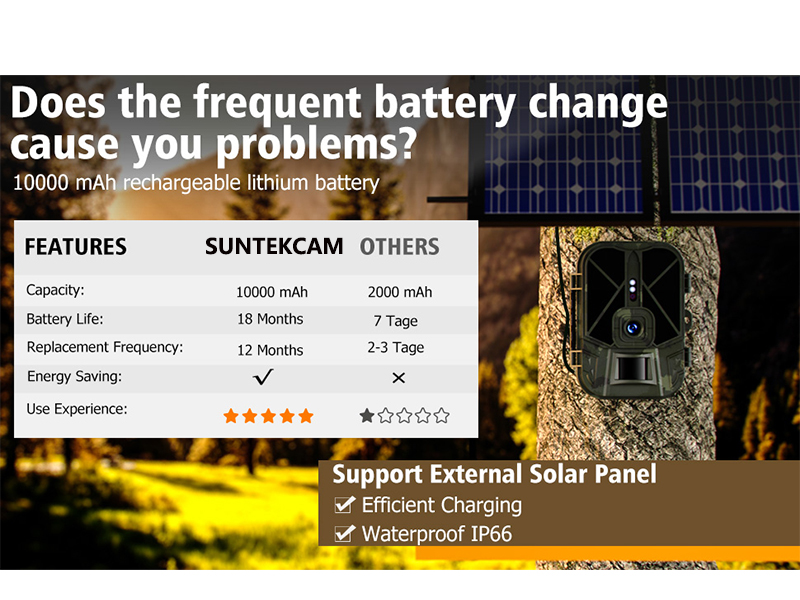
Figura 5: A table comparing the features of the SuntekCam's 10000mAh battery (18 months battery life, 12 months replacement frequency) against typical alternatives (2000mAh, 7 days battery life, 2-3 days replacement frequency). Also indicates support for external solar panels for efficient charging and IP66 waterproof rating.
2. Inserción de una tarjeta Micro SD
A Micro SD card (not included) is required to store photos and videos. The camera supports cards up to a certain capacity (check product specifications for maximum supported size, typically 32GB or 64GB). Insert the Micro SD card into the designated slot with the gold contacts facing the correct direction until it clicks into place. Ensure the camera is powered off before inserting or removing the card.
3. Montaje de la cámara
Use the provided mounting strap to secure the camera to a tree or pole. Ensure the camera is positioned at an appropriate height and angle to capture the desired area. For optimal motion detection, avoid placing the camera directly facing the sun or in areas with excessive moving foliage.
4. App Installation and Wireless Connection
The camera can be controlled and accessed wirelessly via a dedicated mobile application. Follow these steps to connect your smartphone:
- Descargar la aplicación: Scan the QR codes below or search for "WiFiCameraSum" (for iOS) or "WifiCamera" (for Android) in your app store.

Figura 6: Image showing the camera connected to a smartphone via WiFi, with QR codes for downloading the "WiFiCameraSum" app for iOS (Enlace de la App Store) and "WifiCamera" app for Android (Enlace de Google Play).
- Enable Location, Bluetooth, and WiFi: On your phone, ensure location services, Bluetooth, and WiFi are enabled.
- Conectar a través de Bluetooth: Open the app. Click the Bluetooth icon and select "GCBT40" to establish a Bluetooth connection.
- Conectarse vía WiFi: Once connected via Bluetooth, click the WiFi icon in the app and select "CAM-XXX" (where XXX is your camera's unique identifier).
- Introducir contraseña: Enter the default password "12345678" to connect successfully.
Nota importante: The effective range for WiFi connection is approximately 0-15 meters. In 'ON' mode, the camera's WiFi will automatically disconnect to conserve power and prevent detection.
Instrucciones de funcionamiento
1. Encendido/Apagado y Selección de Modo
Locate the power switch on the camera. Switch it to the 'ON' position to power on the camera. The camera will enter monitoring mode. To power off, switch it to the 'OFF' position.
2. Captura de imágenes y vídeos
In monitoring mode, the camera will automatically capture images or videos when motion is detected within its sensor range. The 0.2-second fast trigger speed ensures quick capture of subjects.

Figura 7: Illustration of the camera's 0.2-second fast trigger speed, demonstrating its ability to capture clear images of rapidly moving subjects.
You can adjust settings such as photo resolution (36MP), video resolution (4K), and capture mode (photo, video, photo+video) via the mobile application.
3. Operación de visión nocturna
The camera automatically switches to night vision mode in low-light conditions. The 56 built-in 940nm infrared LEDs provide illumination without a visible glow, making the camera stealthy. Adaptive lighting technology prevents overexposure or underexposure, ensuring clear night captures up to 100 feet.
4. Advanced Settings via App
Through the mobile application, you can configure various advanced settings:
- Timed Shots: Set specific time periods for the camera to be active.
- Interval Shots: Define the time interval between consecutive captures.
- Sensibilidad: Adjust the motion sensor sensitivity (e.g., to 'High' if the camera is not taking pictures).
- Protección con contraseña: Set a password to protect your camera's settings and data.
- Date/Time/Temperature Stamp: Enable or disable the display of this information on captured media.
- En línea Viewing & Playback: View captured photos and videos directly on your phone via the app without downloading.
Mantenimiento
Limpieza
To ensure clear images and proper operation, regularly clean the camera lens and PIR sensor window. Use a soft, lint-free cloth. For stubborn dirt, slightly dampLave el paño con agua. No utilice productos químicos agresivos ni materiales abrasivos.
Almacenamiento
When not in use for extended periods, store the camera in a cool, dry place away from direct sunlight and extreme temperatures. Ensure the battery is partially charged (around 50%) before storage to prolong its lifespan.
Solución de problemas
- La cámara no toma fotografías:
Check if the camera is in 'ON' mode. Ensure the Micro SD card is properly inserted and has sufficient free space. Adjust the motion sensor sensitivity to 'High' via the mobile application.
- Mala calidad de imagen/vídeo:
Clean the camera lens. Ensure there are no obstructions in front of the lens or PIR sensor. Check lighting conditions; for night captures, ensure subjects are within the 100ft night vision range.
- WiFi/Bluetooth connection issues:
Ensure your phone's location services, Bluetooth, and WiFi are enabled. Make sure you are within the effective range (0-15 meters) of the camera. Restart both the camera and your phone. Verify the correct app is installed and the password "12345678" is entered correctly.
- La batería no retiene la carga:
Asegúrese de que el cable de carga y el adaptador funcionen correctamente. Si el problema persiste, contacte con atención al cliente.
Presupuesto
| Característica | Detalle |
|---|---|
| Nombre del modelo | WiFi940 |
| Resolución de captura de video | 4K (Ultra HD) |
| Resolución de la imagen | 36 megapíxeles |
| Velocidad de disparo | 0.2 segundos |
| Rango de visión nocturna | Hasta 100 pies (30 metros) |
| LED infrarrojos | 56 pcs 940nm (No-Glow) |
| Tipo de batería | Batería de litio recargable incorporada de 10000 mAh |
| Conectividad | Wi-Fi, Bluetooth (inalámbrico) |
| Compatibilidad de aplicaciones | Teléfono inteligente (iOS/Android) |
| Clasificación de impermeabilidad | Excellent (designed for outdoor wind and rain) |
| External Power Support | 12 V/1.5 A |
| Dimensiones (L x An x Al) | 10 x 2 x 2.7 pulgadas |
| Peso del artículo | 2.09 libras |
| Tipo de montaje | Montaje de poste |
| Componentes incluidos | Correa |
Garantía y soporte
For warranty information and technical support, please refer to the product packaging or contact SuntekCam customer service directly. Keep your purchase receipt as proof of purchase for any warranty claims.