
Nokia FastMile 5G Gateway 3.2
Manual del usuario del Nokia FastMile 5G Gateway 3.2
Model: FastMile 5G Gateway 3.2 (5G16-12W-A-cr)
Introducción
The Nokia FastMile 5G Gateway 3.2 is an advanced wireless router designed to provide high-speed internet connectivity by converting 5G, 4G, and LTE wireless signals into a reliable Wi-Fi 6 (802.11ax) connection. This manual provides essential information for setting up, operating, maintaining, and troubleshooting your device to ensure optimal performance.
Contenido del paquete
Antes de comenzar, verifique que todos los artículos estén presentes en su paquete:
- Nokia FastMile 5G Gateway 3.2 Unit
- Adaptador de corriente
- Cable Ethernet
- Guía de inicio rápido (si está incluida)
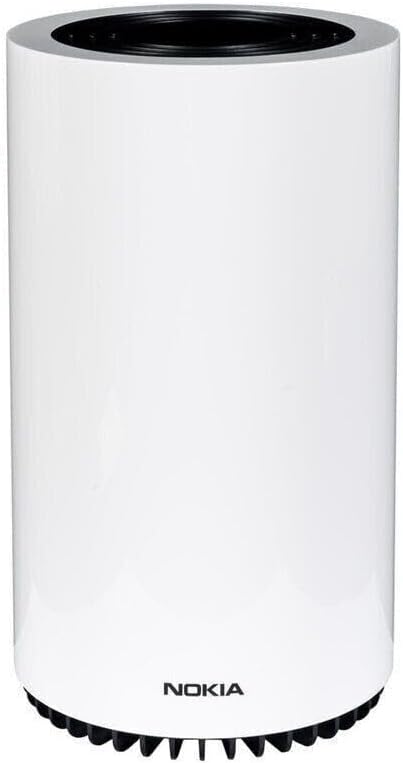
Image: The Nokia FastMile 5G Gateway 3.2 unit, a white cylindrical device.
Configuración
1. Ubicación física
For optimal performance, place the Nokia FastMile 5G Gateway 3.2 in an open area, away from obstructions, and ideally near a window to improve 5G/4G signal reception. Avoid placing it near large metal objects, concrete walls, or other electronic devices that may cause interference.
2. Inserción de la tarjeta SIM
- Localice la ranura para tarjeta SIM en el dispositivo.
- Insert your activated Nano-SIM card into the slot with the gold contacts facing down and the notched corner aligned correctly. Push until it clicks into place.
3. Conexión de alimentación
- Connect the provided power adapter to the power port on the back of the Gateway.
- Conecte el otro extremo del adaptador de corriente a un tomacorriente de pared.
- The device will power on automatically. Wait for the indicator lights on the top of the device to stabilize.
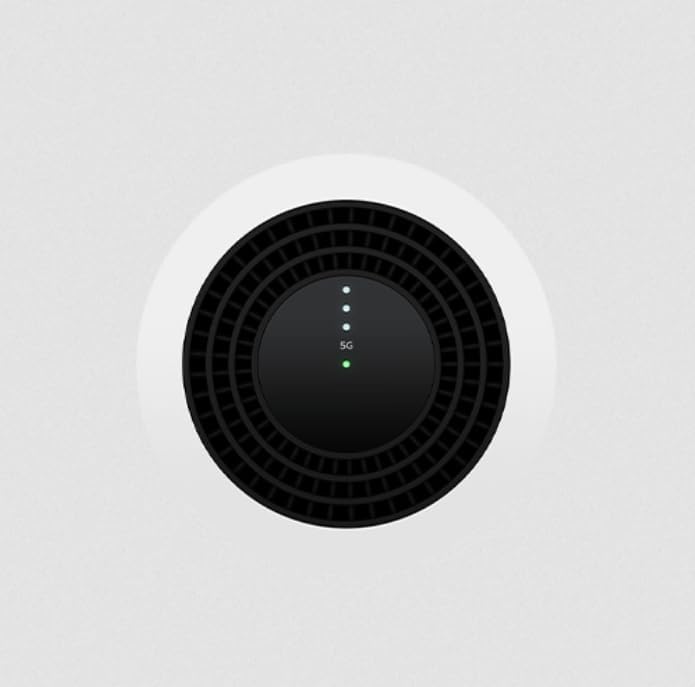
Imagen: Arriba view of the Nokia FastMile 5G Gateway 3.2, showing the circular vent and LED indicator lights for status and signal strength.
4. Initial Configuration (APN Settings)
In some cases, you may need to manually configure the Access Point Name (APN) settings to match your mobile network provider. This can typically be done via the device's web interfaz o una aplicación móvil dedicada.
- Connect a computer or mobile device to the Gateway's Wi-Fi network (SSID and password are usually found on a sticker on the device).
- Abrir una web browser and enter the Gateway's default IP address (e.g., 192.168.1.1) to access the web interfaz.
- Log in using the default credentials (refer to the device sticker or quick start guide).
- Navigate to the network settings or mobile network section to find APN configuration.
- Enter the correct APN for your carrier. If unsure, contact your mobile network provider or search online for "[Your Carrier Name] APN settings".
Operando la puerta de enlace
Conectar dispositivos
The Gateway supports both Wi-Fi and wired Ethernet connections.
- Conexión Wi-Fi: On your device (smartphone, laptop, tablet), search for available Wi-Fi networks. Select the SSID broadcasted by your Nokia Gateway and enter the Wi-Fi password.
- Conexión Ethernet: Use the provided Ethernet cable to connect devices like computers, smart TVs, or gaming consoles to the LAN ports on the back of the Gateway. The device has two Ethernet ports, one dedicated LAN and one configurable as WAN/LAN.
Comprensión de las luces indicadoras
The LEDs on the top of the Gateway provide status information:
- LED de encendido: Indica el estado de energía.
- LED de intensidad de la señal: Multiple LEDs typically indicate the strength of the 5G/4G signal. More lit LEDs usually mean a stronger signal.
- LED de estado de la red: Indicates connectivity to the mobile network and internet.
Refer to the full user manual (if available from Nokia) for a detailed explanation of each LED's behavior (e.g., solid, blinking, color variations).
Funciones avanzadas
The Nokia FastMile 5G Gateway 3.2 offers various advanced features accessible through its web interface or companion mobile app:
- Firewall Configuration: Manage network security rules, including explicit firewalling.
- DMZ Configuration: Set up a Demilitarized Zone for specific devices.
- Configuración de Wi-Fi: Customize Wi-Fi network names (SSIDs), passwords, security protocols, and channel settings.
- Controles parentales: Administrar el acceso a Internet para los dispositivos conectados.
- Monitoreo de red: View connected devices, data usage, and network status.
Mantenimiento
Limpieza del dispositivo
To maintain optimal performance and appearance, regularly clean the exterior of the Gateway with a soft, dry, lint-free cloth. Do not use liquid cleaners or aerosol sprays directly on the device.
Actualizaciones de firmware
Nokia may release firmware updates to improve performance, add features, or address security vulnerabilities. It is recommended to keep your Gateway's firmware up to date. Check the device's web interface for available updates or enable automatic updates if the option is provided.
Consideraciones de potencia
While the device does not have an internal battery, connecting it to an Uninterruptible Power Supply (UPS) can provide continuous operation during brief power interruptions, ensuring uninterrupted internet connectivity.
Solución de problemas
| Problema | Posible causa | Solución |
|---|---|---|
| Sin conexión a Internet | Incorrect APN settings; Poor 5G/4G signal; SIM card issue; Network outage. |
|
| Velocidad de Internet lenta | Weak signal; Network congestion; Too many connected devices; Device interference. |
|
| El Wi-Fi se desconecta con frecuencia | Wi-Fi channel interference; Distance from Gateway; Firmware issue. |
|
Reinicio del dispositivo
If you encounter persistent issues, you may perform a factory reset. Locate the reset button (often a small pinhole) on the device. Use a paperclip to press and hold the button for approximately 10-15 seconds until the lights indicate a reset. Advertencia: A factory reset will erase all custom settings and restore the device to its default configuration.
Presupuesto
| Marca | Nokia |
| Nombre del modelo | FastMile 5G Gateway 3.2 |
| Número de modelo | 5G16-12W-A-cr |
| Tecnología de conectividad | 5G, 4G, LTE |
| Estándar Wi-Fi | Wi-Fi 6 (802.11ax) |
| Número de puertos | 2 (Ethernet) |
| Componentes incluidos | Power Adapter, Ethernet Cable |
| Características especiales | Seguridad en Internet |
| Color | Blanco |
| Dimensiones del paquete | 31.7 x 18.1 x 17 cm |
| Peso del artículo | 1.61 kilogramos |
| Código Postal | 703670756399 |
Garantía y soporte
This Nokia FastMile 5G Gateway 3.2 is a renewed product. Please refer to the specific warranty terms provided by the seller (Amazon Renewed) at the time of purchase. For technical support, troubleshooting beyond this manual, or warranty claims, please contact the seller or Nokia customer support channels as indicated in your purchase documentation.
For general information and support resources, you may visit the official Nokia support website or the Amazon Renewed support page.