
1. Introducción
This manual provides detailed instructions for the installation, operation, and maintenance of your SCS Sentinel HCN0082 Outdoor Programmable Electronic Timer Plug. This device is designed to automate the switching ON and OFF of electrical appliances, helping to manage energy consumption efficiently. Please read this manual thoroughly before using the product to ensure safe and correct operation.
Información de seguridad
- Ensure the timer is correctly installed and connected to a suitable power source (230V).
- No exceda la capacidad de carga máxima de 16 A o 3600 W.
- This product is designed for outdoor use but should be protected from direct heavy rain or immersion in water.
- No abra ni intente reparar el dispositivo usted mismo. Encargue cualquier servicio técnico a personal cualificado.
- Mantener fuera del alcance de los niños.
2. Producto terminadoview
The SCS Sentinel HCN0082 is an electronic timer plug featuring a clear digital display and intuitive buttons for programming. It is housed in a robust plastic casing suitable for outdoor environments.
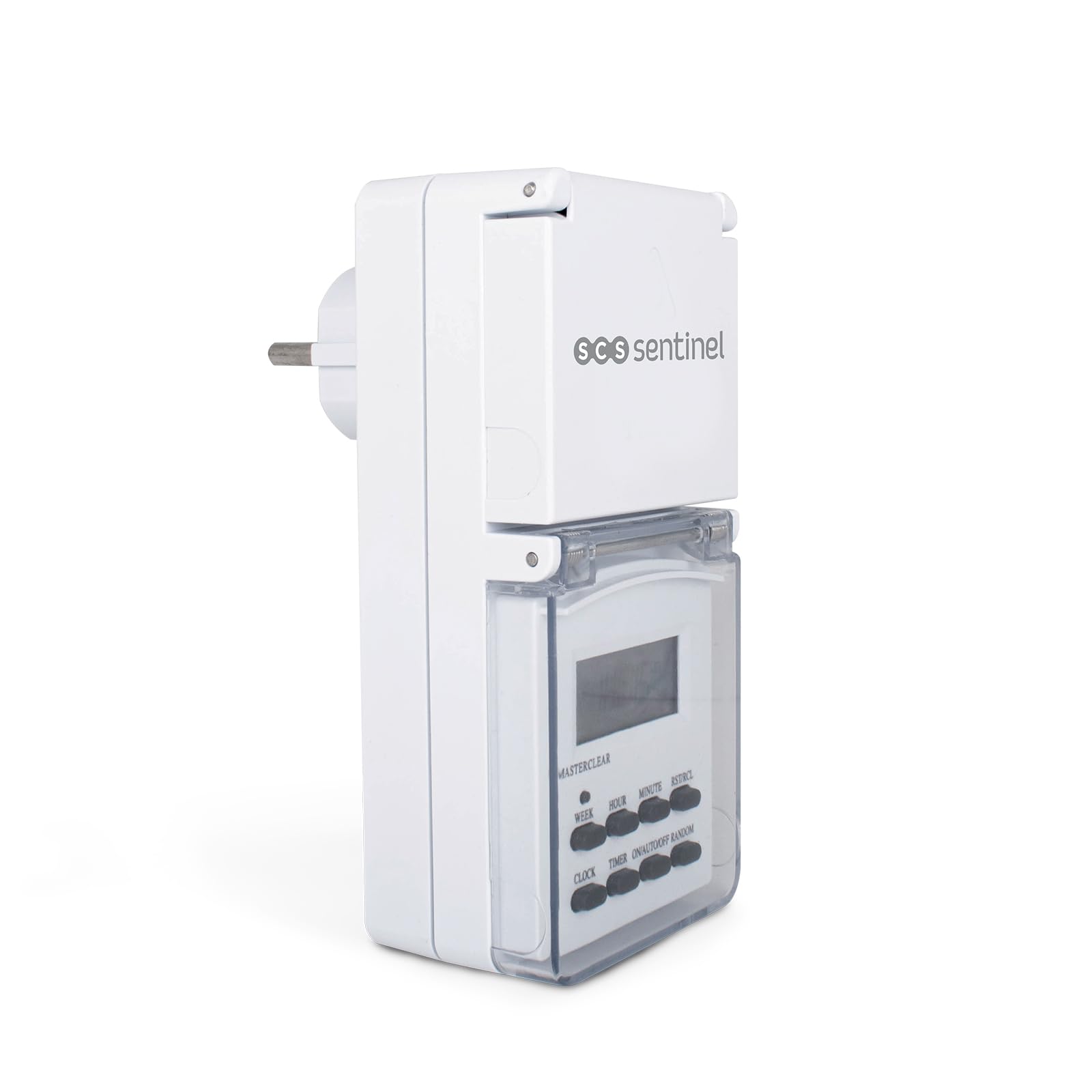
Figura 2.1: Frente view of the SCS Sentinel HCN0082 timer plug, showing the digital display and control buttons. The protective cover is closed.
Componentes y controles
- Pantalla digital: Muestra la hora actual, el día y el estado de la programación.
- Botones:
- SEMANA: Selecciona el(los) día(s) de la semana para la programación.
- HORA: Ajusta la hora.
- MINUTO: Ajusta los minutos.
- RST/RCL: Reset/Recall button.
- RELOJ: Ingresa al modo de ajuste del reloj.
- MINUTERO: Ingresa al modo de configuración del programa.
- ENCENDIDO/AUTOMÁTICO/APAGADO: Selecciona el modo de funcionamiento (Siempre encendido, Automático, Siempre apagado).
- ALEATORIO: Activates/deactivates random function.
- Cubierta protectora: A hinged cover protects the display and buttons from outdoor elements.
- Enchufe: The output socket for connecting an appliance.
- Enchufar: The input plug for connecting to a power outlet.

Figura 2.2: Lado view of the timer plug, illustrating the protective cover for the output socket in an open position, revealing the socket.

Figura 2.3: Atrás view of the timer plug, showing the input plug designed for connection to a wall outlet.
3. Configuración
3.1 Carga inicial y reinicio
- Before first use, plug the timer into a live electrical outlet for at least 14 hours to charge the internal battery. This battery maintains your settings during power outages o cuando el temporizador está desconectado.
- Después de cargar, use un objeto puntiagudo (como la punta de un bolígrafo) para presionar el PRIMERO/RCL button to clear all previous settings and reset the unit. The display will show "0:00".
3.2 Configuración de la hora y el día actuales
- Mantenga pulsado el RELOJ botón.
- Mientras sostenía RELOJ, presione el SEMANA Presione el botón repetidamente hasta que se muestre el día correcto de la semana.
- Mientras sostenía RELOJ, presione el HORA button repeatedly until the correct hour is displayed.
- Mientras sostenía RELOJ, presione el MINUTO Presione el botón repetidamente hasta que se muestre el minuto correcto.
- Liberar el RELOJ Botón. La hora y el día actuales ya están configurados.
4. Instrucciones de funcionamiento
The timer allows for up to 7 programmable ON/OFF cycles per day, with various day combinations.

Figura 4.1: The timer plug displayed alongside its instruction manual, illustrating the compact design and the detailed guide for programming.
4.1 Programación de ciclos de encendido y apagado
- Presione el MINUTERO button once. The display will show "1 ON" (first ON program).
- Prensa SEMANA Para seleccionar los días que desee para este programa. Las opciones incluyen días individuales, días laborables, fines de semana o todos los días.
- Prensa HORA to set the desired hour for the "ON" time.
- Prensa MINUTO to set the desired minute for the "ON" time.
- Prensa MINUTERO again. The display will show "1 OFF" (first OFF program).
- Repeat steps 2-4 to set the desired day(s), hour, and minute for the "OFF" time.
- Continuar presionando MINUTERO to cycle through and set up to 7 ON/OFF programs. Each program requires both an ON and an OFF setting.
- Después de configurar todos los programas deseados, presione el botón RELOJ Botón para volver a la visualización de la hora actual.
4.2 Anulación manual (ENCENDIDO/AUTOMÁTICO/APAGADO)
Presione el ENCENDIDO/AUTO/APAGADO Botón para recorrer los modos de funcionamiento:
- EN: El aparato conectado permanecerá encendido continuamente, anulando todos los programas.
- COCHE: The timer will operate according to the programmed ON/OFF cycles. This is the standard operating mode.
- OFF: El aparato conectado permanecerá apagado continuamente, anulando todos los programas.
4.3 Función aleatoria
The random function can be used to simulate presence by turning the connected appliance ON and OFF at irregular intervals within a set period.
- Presione el ALEATORIO button. The display will show "R" or "RANDOM" to indicate activation.
- When activated, the timer will turn ON and OFF randomly between 6 PM and 6 AM, with delays ranging from 10 to 31 minutes.
- Prensa ALEATORIO de nuevo para desactivar esta función.
4.4 12/24 Hour Mode
To switch between 12-hour (AM/PM) and 24-hour time display:
- Mantenga pulsado el RELOJ botón, luego presione el MINUTERO button. The display will toggle between 12-hour and 24-hour format.
4.5 Summer Time Adjustment
To adjust for daylight saving time (summer time):
- Mantenga pulsado el RELOJ botón, luego presione el ENCENDIDO/AUTO/APAGADO button simultaneously. The display will show "S" and the time will advance by one hour.
- Repeat the action to revert to standard time.
5. Mantenimiento
5.1 Limpieza
- Desenchufe siempre el temporizador de la toma de corriente antes de limpiarlo.
- Limpie el exterior con un paño suave y seco.amp Paño. No utilice limpiadores abrasivos, disolventes ni sumerja el dispositivo en agua.
- Ensure the protective covers for the display and socket are clean and free of debris to maintain their sealing properties.
5.2 Almacenamiento
- Cuando no utilice el temporizador durante períodos prolongados, guárdelo en un lugar fresco y seco, alejado de la luz solar directa y de temperaturas extremas.
- It is recommended to fully charge the internal battery periodically if stored for a long time to maintain its lifespan.
6. Solución de problemas
| Problema | Posible causa | Solución |
|---|---|---|
| La pantalla está en blanco o tenue. | La batería interna está baja o agotada. | Conecte el temporizador a una toma de corriente activa durante al menos 14 horas para cargar la batería. |
| El aparato no se enciende ni se apaga según lo programado. |
|
|
| Timer settings are lost after unplugging. | Internal battery is not holding charge. | Ensure initial charging was sufficient. If the problem persists, the internal battery may need replacement (contact support). |
| Los botones no responden. | Temporary software glitch or unit freeze. | Presione el PRIMERO/RCL button to perform a full reset. You will need to re-program all settings. |
7. Especificaciones
| Número de modelo | HCN0082 |
| Marca | Centinela del SCS |
| Volumentage | 230V (Standard European) |
| Carga máxima | 16A / 3600W |
| Material | Plástico |
| Dimensiones (L x An x Al) | 16.5 x 16 x 7.5 cm |
| Peso | 200 gramos |
| Número de programas | 7 ON/OFF cycles per day |
| Entorno de uso | Outdoor (with protective cover) |
8. Garantía y soporte
8.1 Información de garantía
The SCS Sentinel HCN0082 Outdoor Programmable Electronic Timer Plug comes with a 2 año de garantía, ensuring the reliability of this innovative technical product. This warranty covers manufacturing defects and ensures the product is easy to install and use as intended.

Figura 8.1: Product packaging for the SCS Sentinel HCN0082, indicating key features including a 2-year warranty and suitability for outdoor use.
8.2 Atención al cliente
For any questions, technical assistance, or warranty claims, please contact SCS Sentinel customer support. Refer to the product packaging or the official SCS Sentinel websitio para detalles de contacto.
Conserve su comprobante de compra para fines de garantía.