
eppfun AK3040Pro
Manual de instrucciones del adaptador USB C Bluetooth de eppfun
Modelo: AK3040Pro
Producto terminadoview
The eppfun AK3040Pro is a versatile USB-C Bluetooth 5.2 audio adapter designed to provide wireless audio connectivity for various devices. It features low-latency audio transmission, a bundled analog microphone for voice chat, and broad compatibility with gaming consoles and computers.
- APTX-Adaptive Technology: Minimizes audio delay to approximately 60ms for synchronized audio and video, ideal for gaming and media consumption.
- Bluetooth 5.2 avanzado: Offers enhanced stability, faster speeds, and extended range compared to older Bluetooth versions.
- Comunicación inalámbrica: Includes a mini analog microphone for clear voice chat.
- Conectar y usar: Simple setup without the need for driver installation.
- Compatibilidad con códecs de audio: Supports aptxX-LL, SBC, Aptx, Aptx adaptive, and Aptx-HD. Note that your headphones must also support the same standard for optimal performance.
- Amplia compatibilidad: Compatible with PS4/5, Windows 8/10/11, Nintendo Switch OS, Linux OS, and Mac OS.
Contenido de la caja
Al abrir el paquete, encontrará los siguientes elementos:
- 1 x eppfun AK3040Pro USB C Bluetooth Adapter
- 1 x Analog Microphone
- 1 x Manual de instrucciones
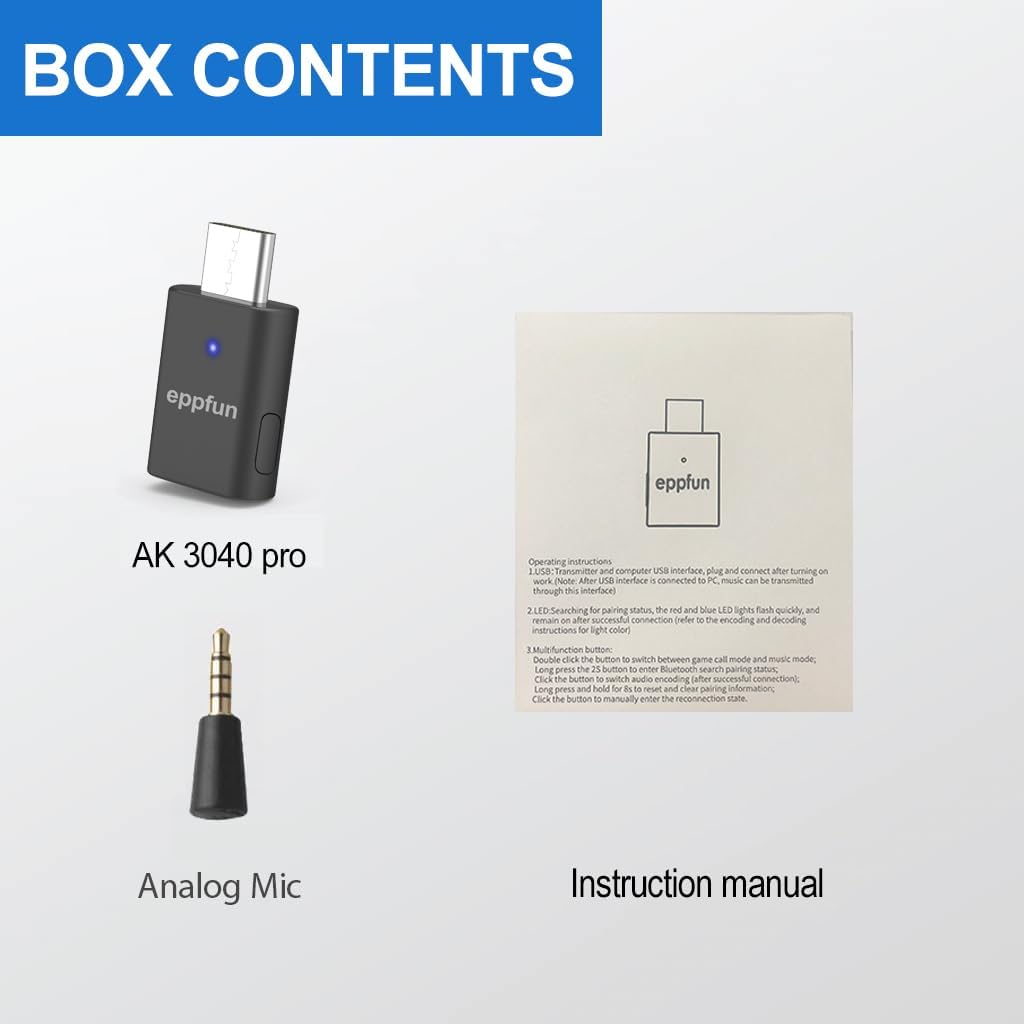
Image: Contents of the eppfun AK3040Pro package, including the adapter, microphone, and manual.
Guía de configuración
The eppfun AK3040Pro is designed for easy setup, requiring no driver installation for most compatible devices.
Conexión inicial y emparejamiento
Inserte el adaptador: Plug the eppfun AK3040Pro USB-C Bluetooth adapter into an available USB 2.0/3.0 port on your device (e.g., PS5, Nintendo Switch, PC, Mac).

Image: The eppfun AK3040Pro USB C Bluetooth Adapter.
Modo de emparejamiento automático: For the first time use, the LED indicator on the adapter will automatically flash red and blue, indicating it has entered pairing mode.
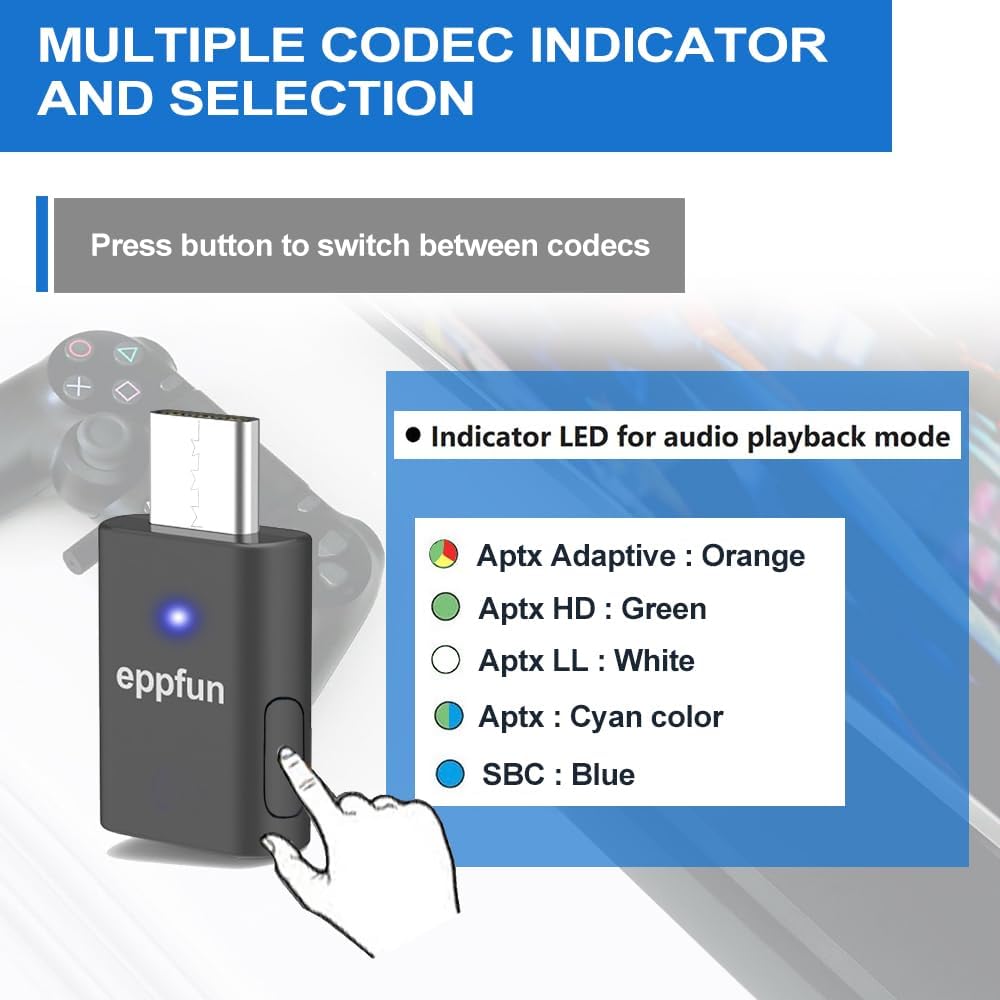
Image: The eppfun AK3040Pro adapter connected to a laptop, illustrating its plug-and-play functionality.
Emparejar con su dispositivo de audio: Put your Bluetooth headphones or speaker into their pairing mode. The adapter will automatically connect to your device. Once successfully paired, the LED indicator will remain steadily lit.

Image: The eppfun AK3040Pro adapter connected to a PS5, demonstrating its use as a gaming companion.
Connect the Analog Microphone: If you intend to use voice chat, plug the included mini analog microphone into the 3.5mm jack on your controller (e.g., PS5 controller) or directly into the adapter if it has a dedicated port for it.

Image: Multi-device compatibility diagram for the eppfun AK3040Pro, highlighting its use with audio devices and various platforms.
Instrucciones de funcionamiento
Selección de códec
The AK3040Pro supports multiple audio codecs. You can switch between them by pressing the button on the adapter. The LED indicator color will change to reflect the active codec:
- Aptx Adaptativo: LED naranja
- Aptx HD: LED verde
- Aptx LL: LED blanco
- Aptx: Cyan color LED
- SBC: LED azul

Image: Codec indicator and selection guide for the eppfun AK3040Pro, showing how to switch codecs via the button.

Image: The eppfun AK3040Pro adapter connected to a PS5, demonstrating its use as a gaming companion.
Duplex Mode (Game Call + Music)
When using the adapter with PS4 or PS5, it may automatically switch to "Duplex mode" for game calls and music. In this mode, the audio quality might decrease, potentially with some sizzling noise.
To switch back to music-only mode (if not needed for calls), double-click the button on the adapter.

Image: The eppfun AK3040Pro adapter connected to a Nintendo Switch, enabling wireless audio for gaming.
Mantenimiento
To ensure the longevity and optimal performance of your eppfun AK3040Pro adapter, please follow these simple maintenance guidelines:
- Limpieza: Use a soft, dry cloth to wipe the adapter. Avoid using liquid cleaners or abrasive materials.
- Almacenamiento: Guarde el adaptador en un lugar fresco y seco, alejado de la luz solar directa y de temperaturas extremas.
- Manejo: Handle the adapter gently. Avoid dropping it or subjecting it to strong impacts.
- Cuidado del puerto: Ensure the USB-C port and the 3.5mm jack (if used for the mic) are free from dust and debris.
Solución de problemas
If you encounter issues with your eppfun AK3040Pro, please refer to the following common solutions:
- Cannot Pair or Connect:
If your headphones have been previously connected to other Bluetooth devices, their internal Bluetooth connection information might not be automatically cleared. To resolve this, you need to reset your headphones and clear any previous pairing information before attempting to match them with the AK3040Pro. This is especially common with high-end Bluetooth earphones like Apple or Beat earphones.
- Poor or Intermittent Sound Quality:
The sound quality can be affected by the audio decoding codec in use. If you experience poor or intermittent sound, try switching the audio decoding codec by pressing the button on the adapter. Ensure your headphones also support the selected codec for optimal performance. The product supports APTX/APTX LL/SBC/APTX HD/APTX adaptive.
- Duplex Mode Audio Issues (PS4/PS5):
When connected to PS4 or PS5, the adapter may automatically enter Duplex mode (game call + music), which can result in decreased music quality or sizzling noise. To return to music-only mode, double-click the button on the adapter.
Image: Troubleshooting tips for common issues like pairing and sound quality.
Presupuesto
| Característica | Detalle |
|---|---|
| Marca | diversión epp |
| Número de modelo | AK3040Pro |
| Interfaz de hardware | USB tipo C |
| Protocolo de enlace de datos | Bluetooth, USB |
| Versión de Bluetooth | 5.2 |
| Códecs de audio compatibles | aptxX-LL, SBC, Aptx, Aptx adaptive, Aptx-HD |
| Dispositivos compatibles | Desktop, Game Console, Headphone, Smartphone, Windows, Mac OS, PS4, PS5, Nintendo Switch, Linux |
| Peso del artículo | 0.32 onzas (aprox. 9 gramos) |
| Dimensiones del paquete | 4.84 x 3.58 x 0.67 pulgadas |
Garantía y soporte
eppfun is committed to providing high-quality audio and video products. If you encounter any issues that cannot be resolved using the troubleshooting guide, or if you have questions regarding product quality or infringement, please contact our customer service.
For further assistance, you can visit our official websitio o contáctenos por correo electrónico:
- Websitio: www.eppfun.com
- Correo electrónico: service@eppfun.com
Este dispositivo cumple con la Parte 15 de las Normas de la FCC. Su funcionamiento está sujeto a las dos condiciones siguientes: (1) Este dispositivo no puede causar interferencias perjudiciales y (2) Este dispositivo debe aceptar cualquier interferencia que reciba, incluidas las interferencias que puedan causar un funcionamiento no deseado.
©2024 All rights reserved. eppfun and the eppfun logo are trademarks of ChangSheng. Made in China.