
1. Introducción
The HoneyGuaridan Automatic Cat Feeder (Model S303D) is designed to provide convenient and consistent feeding for up to two cats. Featuring 2.4GHz Wi-Fi connectivity, app control, dual power supply options, and a fresh-keeping system, this smart feeder ensures your pets are fed according to a customized schedule, even when you're away.
2. Componentes del producto
Carefully unpack all items and ensure all components are present:
- Unidad de alimentación principal
- Contenedor de almacenamiento de alimentos
- Tapa con compartimento desecante
- Cuencos de acero inoxidable (2)
- Bowl Holders/Base
- Type C Power Adapter and Cable
- Bolsa desecante
- Wall Hook (for optional wall mounting)
- Manual de usuario (este documento)
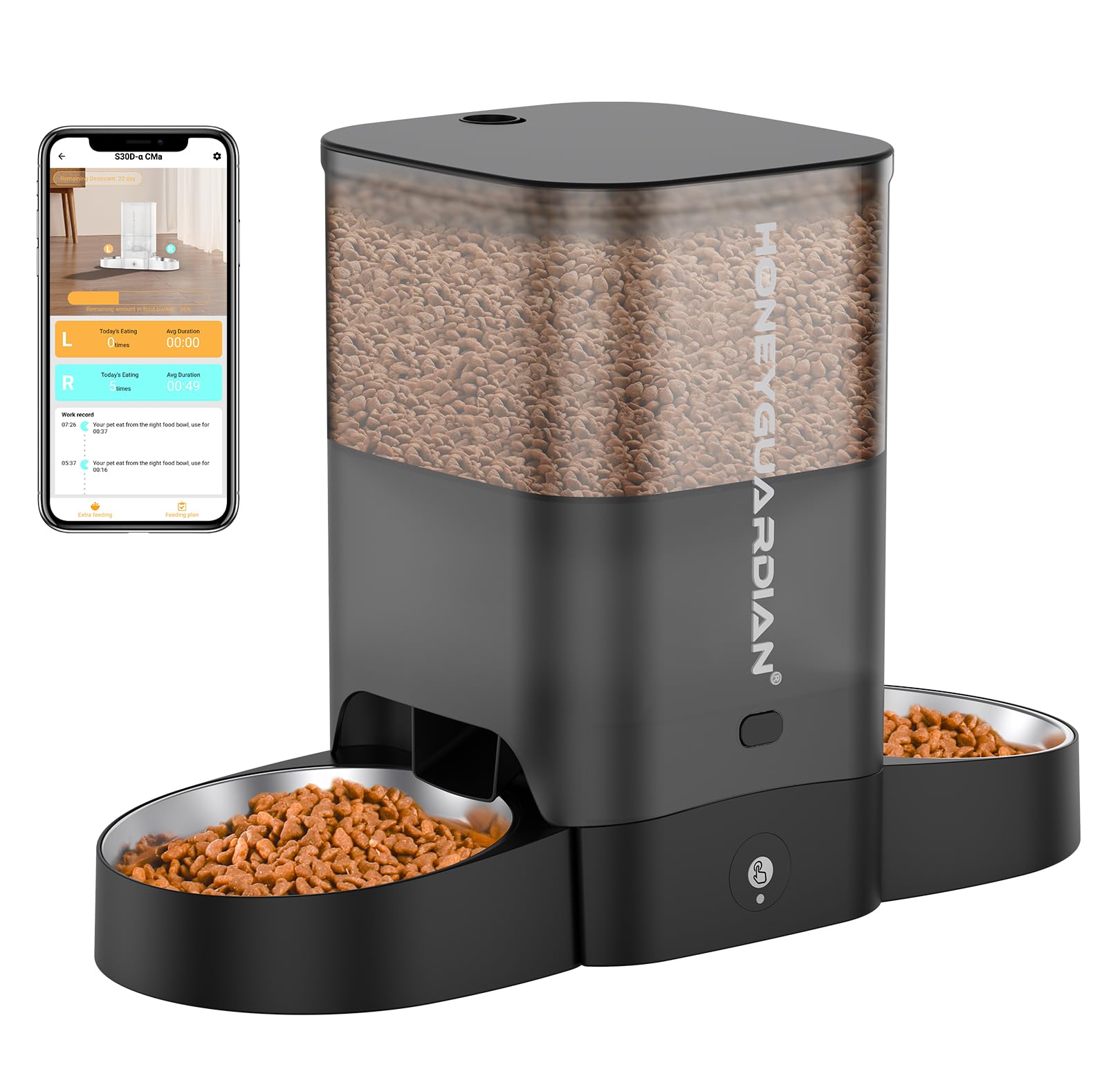
Imagen 2.1: Másview of the HoneyGuaridan Automatic Cat Feeder with two cats.
3. Instrucciones de configuración
3.1 Asamblea
- Instalar baterías (opcional): Open the battery compartment on the bottom of the main feeder unit. Insert 3 D-cell batteries (not included) for backup power.
- Conecte la electricidad: Plug the Type C power cable into the feeder and the adapter into a wall outlet.
- Colocar los soportes para cuencos: Slide the two bowl holders onto the metal rods extending from the main feeder unit.
- Place Stainless Steel Bowls: Insert the stainless steel bowls into the bowl holders.
- Instalar la bolsa desecante: Open the lid of the food container. Place the desiccant bag into its designated compartment on the underside of the lid. Close the lid securely.
- Llene el recipiente de alimentos: Pour dry pet food into the food storage container. Ensure the kibble size is between 2-15mm to prevent clogging.
Video 3.1: Visual guide for assembling the pet feeder components, including battery installation, power connection, and bowl setup.
3.2 App Download & Wi-Fi Connection
The HoneyGuaridan feeder connects to the "HGsmart" app for remote control and scheduling. The feeder only supports 2.4GHz Wi-Fi networks.
- Descargar la aplicación: Scan the QR codes below or search for "HGsmart" in your device's app store.
- Enable Wi-Fi Pairing Mode: Long press the reset button on the feeder for 3 seconds until the Wi-Fi indicator light starts to flash blue.
- Agregar dispositivo en la aplicación: Open the HGsmart app. Click "Add Device" or the "+" icon. The app should detect the feeder.
- Ingrese las credenciales de Wi-Fi: Seleccione su red Wi-Fi de 2.4 GHz e ingrese la contraseña.
- Conexión completa: Follow the on-screen prompts to complete the connection. The Wi-Fi indicator light on the feeder will turn solid blue once connected.
- Set Food Capacity: In the app, navigate to the device settings and set the current food capacity (e.g., 100% after filling).

Image 3.2: QR codes for downloading the HGsmart app. Android users can find the app aquí, and iOS users aquí.
Video 3.3: Detailed steps on how to connect the feeder to your 2.4GHz Wi-Fi network using the HGsmart app.
4. Instrucciones de funcionamiento
4.1 Control de aplicaciones
The HGsmart app provides comprehensive control over your feeder:
- Alimentación manual: Dispense food instantly by selecting the desired portion size (1-5 portions) and tapping the "Feed" button.
- Establecer horario de alimentación: Create a customized feeding plan with up to 6 meals per day. For each meal, you can specify the time and the number of portions (0-24 portions, approximately 6g per portion).
- Record Meal Calls: Record a 10-second voice message that will play during feeding times to call your pets.
- View Registros de alimentación: Access a history of all dispensed meals to monitor your pet's eating habits.
- Función de alimentación lenta: Enable this feature in the app settings to dispense food in smaller increments over a longer period, promoting healthier eating habits.
- comida cortatage Recordatorio: Receive app notifications when the food level in the container is low.
- Compartir dispositivo: Share control of the feeder with other family members through the app.

Image 4.1: The HGsmart app allows for convenient scheduling and manual feeding.

Imagen 4.2: View detailed feeding records within the app.

Image 4.3: Reference table for setting appropriate portion sizes.
4.2 Manual Feed (Device Button)
To manually dispense food directly from the feeder, press the manual feed button located on the front panel. Each press will dispense one portion of food into each bowl.
Video 4.4: Demonstrates the manual feed function and voice recording feature of the feeder.
5. Mantenimiento
5.1 Limpieza
La limpieza periódica garantiza la higiene y el correcto funcionamiento del comedero:
- Disassemble the food container, lid, and stainless steel bowls.
- Lave estas piezas desmontables con agua y jabón suave. Enjuáguelas bien y séquelas completamente antes de volver a montarlas.
- Importante: The main feeder base, which contains electronic components, is NOT washable. Wipe it clean with a damp Sólo tela.

Image 5.1: The removable parts of the feeder are easy to disassemble and clean.
5.2 Reemplazo del desecante
To maintain food freshness, replace the desiccant bag approximately once a month. You can reset the desiccant expiry date within the HGsmart app.
6. Solución de problemas
If you encounter issues with your HoneyGuaridan Automatic Cat Feeder, consider the following:
- El comedero no dispensa comida: Check if the food container is empty. Ensure the feeder is powered on and connected to Wi-Fi. Verify that the kibble size is within the recommended 2-15mm range.
- La aplicación no se conecta al alimentador: Ensure your smartphone is connected to a 2.4GHz Wi-Fi network. Confirm the feeder's Wi-Fi indicator is flashing blue during pairing mode. Try resetting the feeder's Wi-Fi connection by long-pressing the reset button.
- Comida no fresca: Ensure the lid is securely closed and the desiccant bag is replaced regularly (monthly).
- Apagado automáticotage: If using batteries, the feeder will continue to operate on its programmed schedule. Ensure batteries are installed and charged.
7. Especificaciones
- Número de modelo: S303D
- Capacidad: 3.5 litros
- Dimensiones: 17.78 x 25.4 x 20.32 cm
- Peso: 1.77 kilogramos
- Material: Polyethylene Terephthalate, Stainless Steel
- Conectividad: Wi-Fi de 2.4 GHz (no compatible con 5 GHz)
- Fuente de alimentación: Type C Adapter (included), 3 D-cell Batteries (not included, for backup)
- Tamaño de croquetas recomendado: 2-15 milímetros
8. Garantía y soporte
For warranty information, technical support, or any product-related inquiries, please refer to the contact details provided on the product packaging or the official HoneyGuaridan websitio. Guarde su recibo de compra para reclamos de garantía.