
1. Introducción
This manual provides detailed instructions for the installation, setup, and operation of your LETLINK 1CH 7-32V Smart WiFi Wireless Relay Switch Module. This device allows you to remotely control connected appliances or devices via the Tuya Smart Life app, and integrate with voice assistants like Amazon Alexa and Google Home. Please read this manual thoroughly before use to ensure proper functionality and safety.
2. Producto terminadoview
2.1 Contenido del paquete
- 1 x Jog Inching Self-locking WiFi Wireless Smart Home Switch
2.2 Componentes del producto

Frente view of the LETLINK 1CH 7-32V Smart WiFi Wireless Relay Switch Module, showing its compact design and branding.

Diagram showing the external features of the relay module, including the Reset/RF pairing button, manual button control, USB 5V input, and output terminals (NO, COM, NC) with example wiring for a load and DC 7V~32V input.
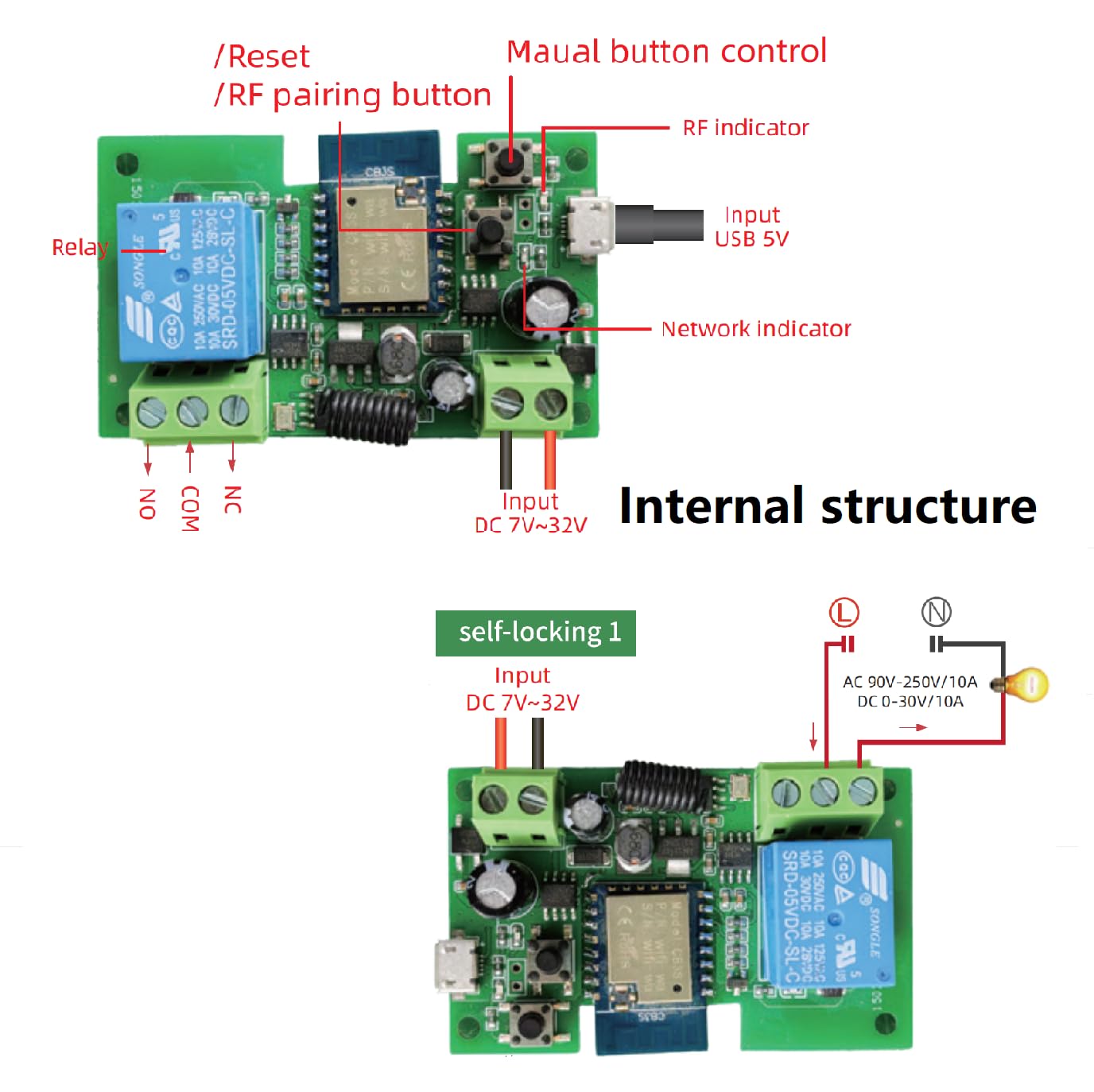
Top image shows the internal circuit board with components labeled, including the relay, network indicator, RF indicator, and input for USB 5V and DC 7V~32V. The bottom image illustrates a self-locking wiring configuration for a load with DC 7V~32V input.
2.3 Características principales
- Mando a distancia: Control devices via the Smart Life/Tuya app from anywhere.
- Control de voz: Compatible con Amazon Alexa y Google Home para funcionamiento manos libres.
- Entrada de energía flexible: Supports USB 5V or AC/DC 7-32V power supply.
- Múltiples modos de funcionamiento: Supports inching (momentary) and self-locking (latching) modes.
- Funcionalidad de radiofrecuencia: Includes an extra 433MHz RF function for additional control options.
- Programación y temporizadores: Set countdown, sunrise/sunset, loop timers, and create smart scenes.
- Compartir dispositivo: Comparte el control con miembros de la familia a través de la aplicación.
- Control de Bluetooth: Easy initial setup via Bluetooth for quick pairing.
3. Especificaciones

Image displaying the LETLINK module alongside its key technical parameters.
| Especificación | Valor |
|---|---|
| Número de modelo | 1CH 7-32V |
| Vol de entradatage | CA/CC 7-32 V o USB 5 V |
| Corriente maxima | 10A |
| Máxima potencia | 2200 W |
| Estándar Wi-Fi | Wi-Fi 2.4 GHz b/g/n + Bluetooth |
| Radio Frequency | 433 MHz |
| Tipo de contacto | Normalmente abierto (NO) |
| Tipo de montaje | Módulo independiente |
| Dimensiones del producto | 2.84 x 1.78 x 1.15 pulgadas |
| Peso | 1.6 onzas |
| Fabricante | Baolan electronic Technology Co., LTD |
4. Configuración
4.1 Instrucciones de cableado
Nota importante de seguridad: All wiring should be performed by a qualified electrician or individual with electrical knowledge. Ensure power is disconnected before performing any wiring to prevent electric shock. The relay acts as a switch and does not provide voltage output; the power supply input (AC/DC) is solely for the module's operation.
Diagrama de cableado general
This diagram illustrates the connection points: Input for DC 7V~32V (or USB 5V), and output terminals NO (Normally Open), COM (Common), NC (Normally Closed) for connecting your load.
Wiring for Electric Motor Lock

Detailed wiring diagram demonstrating how to connect the relay module to an electric motor lock. Ensure your lock has K-, K+, GND, and +12V ports. K+ must be connected to the 12V port.
Cableado Examples (Correct/Incorrect)

Esta imagen proporciona ejemplosamples of correct wiring for different load types and an external button, alongside an example of incorrect wiring where the load is improperly connected.
4.2 Emparejamiento y conexión de aplicaciones
The LETLINK module uses the Tuya Smart Life app for remote control. Ensure your router supports 2.4GHz Wi-Fi, as the module does not support 5GHz. If your router has dual bands with the same SSID, temporarily disable the 5GHz band during pairing.
- Descargar aplicación: Descarga la aplicación 'Smart Life' o 'Tuya Smart' desde la tienda de aplicaciones de tu dispositivo móvil (iOS o Android).
- Encendido: Connect the relay module to its power supply (USB 5V or AC/DC 7-32V). The indicator light should flash quickly, indicating it's in quick pairing mode.
- Abre la app: Launch the Smart Life app and ensure your phone is connected to the same 2.4GHz Wi-Fi network.
- Agregar dispositivo: Tap the '+' icon in the top right corner of the app. The app should automatically discover the device via Bluetooth. Tap to add it.
- Ingresar contraseña de Wi-Fi: Confirm your Wi-Fi network (2.4GHz) and enter the correct password.
- Emparejamiento completo: Follow the on-screen prompts to complete the pairing process. The indicator light will stop flashing once connected.
Solución de problemas de emparejamiento: If the device does not enter quick pairing mode or fails to connect, long-press the pairing button on the module until the light flashes slowly. Then, try configuring it using the 'Compatible Mode' option in the app.
5. Instrucciones de funcionamiento
Modos de funcionamiento de 5.1
The module supports two primary operating modes:
- Inching (Momentary) Mode: In this mode, the relay will turn on for a set duration (e.g., 1 second) and then automatically turn off, or vice-versa. This is ideal for applications requiring a brief pulse, such as opening a garage door or activating an electric lock.
- Self-locking (Latching) Mode: In this mode, the relay acts as a traditional on/off switch. Once activated, it remains in that state until manually switched off. This is suitable for controlling lights or other appliances that need to stay on or off for extended periods.
5.2 Smart Life App Functions

Screenshots of the Smart Life app interface, showing various control and setting options for the relay module.
Once connected, the Smart Life app provides comprehensive control over your relay module:
- Encendido/apagado remoto: Controle los dispositivos conectados desde cualquier lugar con conexión a Internet.
- Horarios: Set countdown timers, one-time schedules, or recurring loop timers for automated operation.
- Compartir dispositivo: Grant access to other family members to control the device.
- Gestión de grupos: Group multiple smart devices for simultaneous control.
- Creación de escena: Create custom automation scenarios based on conditions like time, weather, or other smart devices.
- Ajuste de modo: Easily switch between inching and self-locking modes within the app settings.
5.3 Control de voz
The LETLINK module is compatible with Amazon Alexa and Google Home. After linking your Smart Life account to your voice assistant app, you can use voice commands to control your connected devices. Exampellos:
- "Alexa, enciende la luz del garaje".
- "Hey Google, turn off the living room fan."
6. Aplicaciones
6.1 Inching (Momentary) Mode Applications

Illustration of the relay module wired for access control, demonstrating its use in inching mode to momentarily activate a door lock or gate, controlled remotely by a user.

Esta imagen muestra examples of Inching mode applications including door security, gate door control, and garage door control.
6.2 Self-Locking (Latching) Mode Applications
This image also illustrates Self-lock mode applications such as lighting control, TV power supply, and ice box control.
7. Solución de problemas
- El dispositivo no se empareja:
- Ensure your Wi-Fi network is 2.4GHz. The module does not support 5GHz.
- If your router has dual bands (2.4GHz and 5GHz) with the same name (SSID), temporarily disable the 5GHz band during pairing.
- Make sure your phone is connected to the same 2.4GHz Wi-Fi network as the device.
- Place the module close to your Wi-Fi router during the pairing process.
- If quick pairing fails, long-press the pairing button on the module until the indicator light flashes slowly, then try 'Compatible Mode' in the app.
- Dispositivo sin conexión en la aplicación:
- Check the module's power supply and Wi-Fi connection.
- Ensure your Wi-Fi router is working correctly and has internet access.
- Restart the module by disconnecting and reconnecting its power.
- El control de voz no funciona:
- Verifique que su cuenta Smart Life esté vinculada correctamente a su aplicación Alexa o Google Home.
- Ensure the device is named clearly in the Smart Life app and that the name is recognized by your voice assistant.
- Comprueba tu conexión a Internet.
8. Información de seguridad
- Always disconnect power before installing, wiring, or performing maintenance on the module.
- No exponga el módulo a la humedad, temperaturas extremas o luz solar directa.
- Asegúrese de que todas las conexiones del cableado estén seguras y correctamente aisladas.
- Do not exceed the maximum current (10A) or power (2200W) ratings of the relay.
- Este dispositivo está diseñado únicamente para uso en interiores.
- Mantener fuera del alcance de los niños.
9. Garantía y soporte
This LETLINK product is manufactured by Baolan electronic Technology Co., LTD. For technical support or warranty inquiries, please refer to the contact information provided with your purchase or visit the official LETLINK support channels. Please retain your proof of purchase for warranty claims.