
Rimoody B0DD2VWYN2
Rimoody Android Car Radio Stereo User Manual
Model: B0DD2VWYN2
For Nissan Frontier Xterra 2009-2012
1. Producto terminadoview
This manual provides detailed instructions for the installation, operation, and maintenance of your Rimoody 4+64G Android Car Radio Stereo. This unit is specifically designed for Nissan Frontier 2009 2010 2011 2012 and Nissan Xterra 2009 2010 2011 2012 models, offering advanced features such as wireless Carplay, Android Auto, Bluetooth, GPS navigation, and a 9-inch touchscreen display.
Before installation, please verify the compatibility with your vehicle by checking the year, dimensions, and shape of your car's center console. For any questions, refer to the support section or contact customer service.

Figure 1.1: Rimoody Android Car Radio Stereo and accessories.
2. Lista de empaque
Please check the contents of your package against the list below to ensure all components are present:
- Unidad de radio para coche
- Cámara de respaldo
- Cable de alimentación
- Manual de instrucciones
- Antena GPS
- Cable RCA
- Cable USB
- Cable de entrada de cámara trasera
- micrófono
- Cable USB original
- Herramienta de instalación
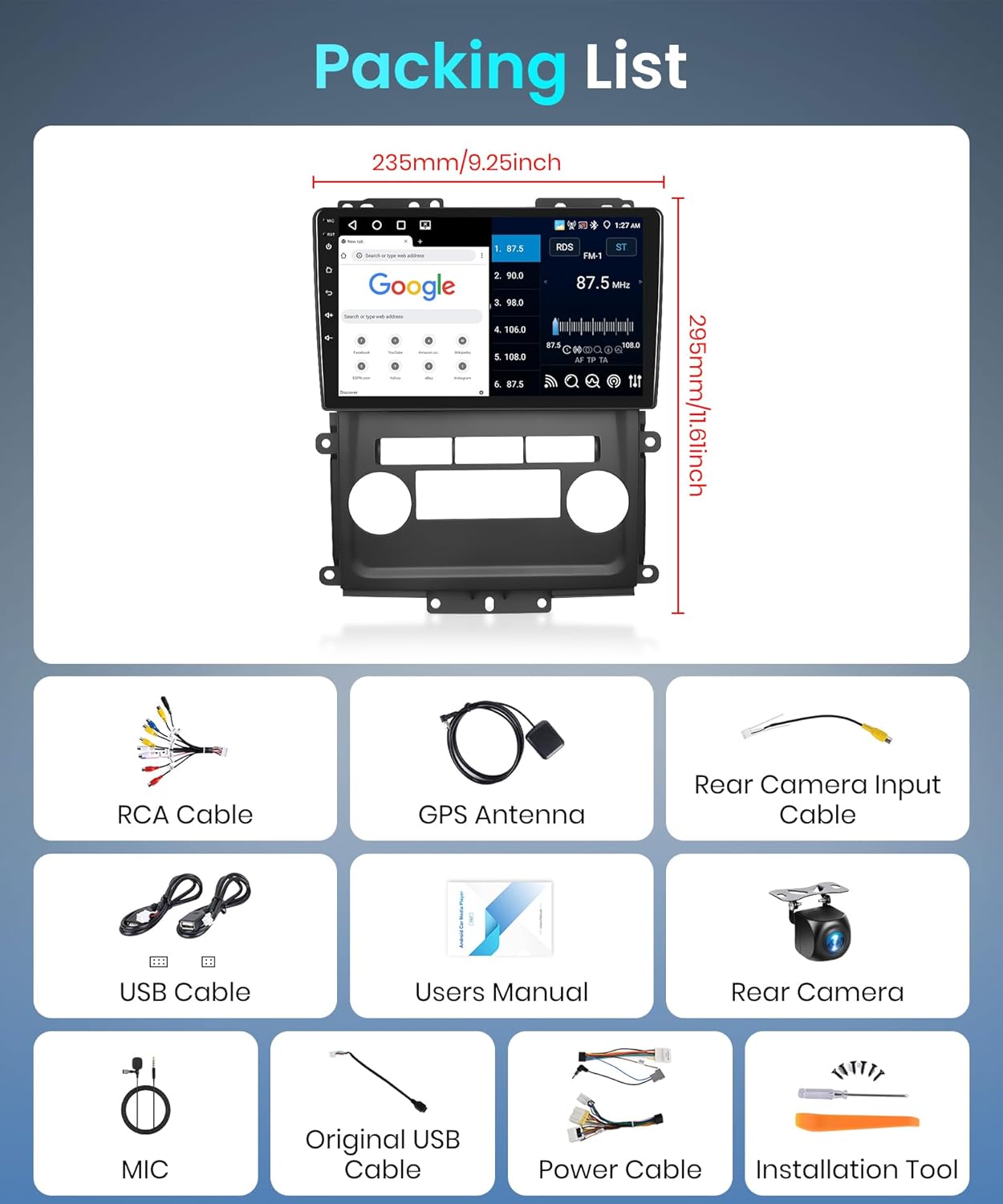
Figura 2.1: Contenido del paquete del producto.
3. Guía de instalación
This section provides general guidance for installing the Rimoody Android Car Radio Stereo. Professional installation is recommended. Ensure the vehicle's power is disconnected before beginning installation.
3.1 Comprobación de compatibilidad
The unit is compatible with Nissan Frontier and Xterra models from 2009 to 2012. Before installation, compare the dimensions and shape of your vehicle's center console with the provided images to confirm fitment.

Figura 3.1: Comparación visual del tablero antes y después de la instalación.
3.2 conexiones de cableado
Connect the provided power cable, RCA cable, USB cables, GPS antenna, and rear camera input cable to the corresponding ports on the car radio unit and your vehicle's wiring harness. Refer to the wiring diagram in the included instruction manual for specific connections.
3.3 Montaje de la unidad
Carefully mount the car radio unit into the dashboard opening. Ensure all cables are properly routed and secured to prevent pinching or damage. Secure the unit using the appropriate mounting brackets and screws.
Note: Some vehicles may require minor modifications to the dashboard or brackets for optimal fitment. If you encounter difficulties, consult a professional installer.
4. Instrucciones de funcionamiento
4.1 Encendido inicial y configuración
After installation, reconnect the vehicle's power. The unit will boot up automatically. Follow the on-screen prompts for initial setup, including language selection and time zone settings.
4.2 Carplay inalámbrico y Android Auto
The unit supports wireless Carplay and Android Auto for seamless smartphone integration. To connect:
- Asegúrese de que Bluetooth y Wi-Fi estén habilitados en su teléfono inteligente.
- On the car stereo, navigate to the "ApplePlay" (for Carplay) or "Android Auto" application.
- On your phone, search for and pair with the car stereo's Bluetooth device (e.g., "RK332612D727").
- Confirme el código de emparejamiento en ambos dispositivos.
- Una vez emparejado, Carplay o Android Auto se iniciarán automáticamente.
Video 4.1: Demonstration of Wireless Carplay and Android Auto connection.

Figura 4.2: Interfaces inalámbricas Carplay, Android Auto y Mirror Link.
4.3 Conectividad Bluetooth
Conecte su teléfono inteligente a través de Bluetooth para realizar llamadas con manos libres, sincronizar la agenda telefónica y transmitir música.
- Vaya a la configuración de Bluetooth en el estéreo del automóvil.
- Habilite Bluetooth en su teléfono y busque dispositivos disponibles.
- Select the car stereo's Bluetooth name (e.g., "RK332612D727") from your phone's list.
- Confirmar emparejamiento.

Figure 4.3: Bluetooth connection and audio settings.
Radio FM/RDS 4.4
Access the FM/RDS Radio application to listen to local radio stations. You can scan for stations, save favorites, and view Información RDS (si está disponible).
Figura 4.4: Interfaz de radio FM/RDS.
4.5 Navegación GPS y Wi-Fi
The unit features a dual navigation system supporting both offline and online maps. Connect to Wi-Fi via a hotspot or tethering to access online maps, download apps, and browse the internet.
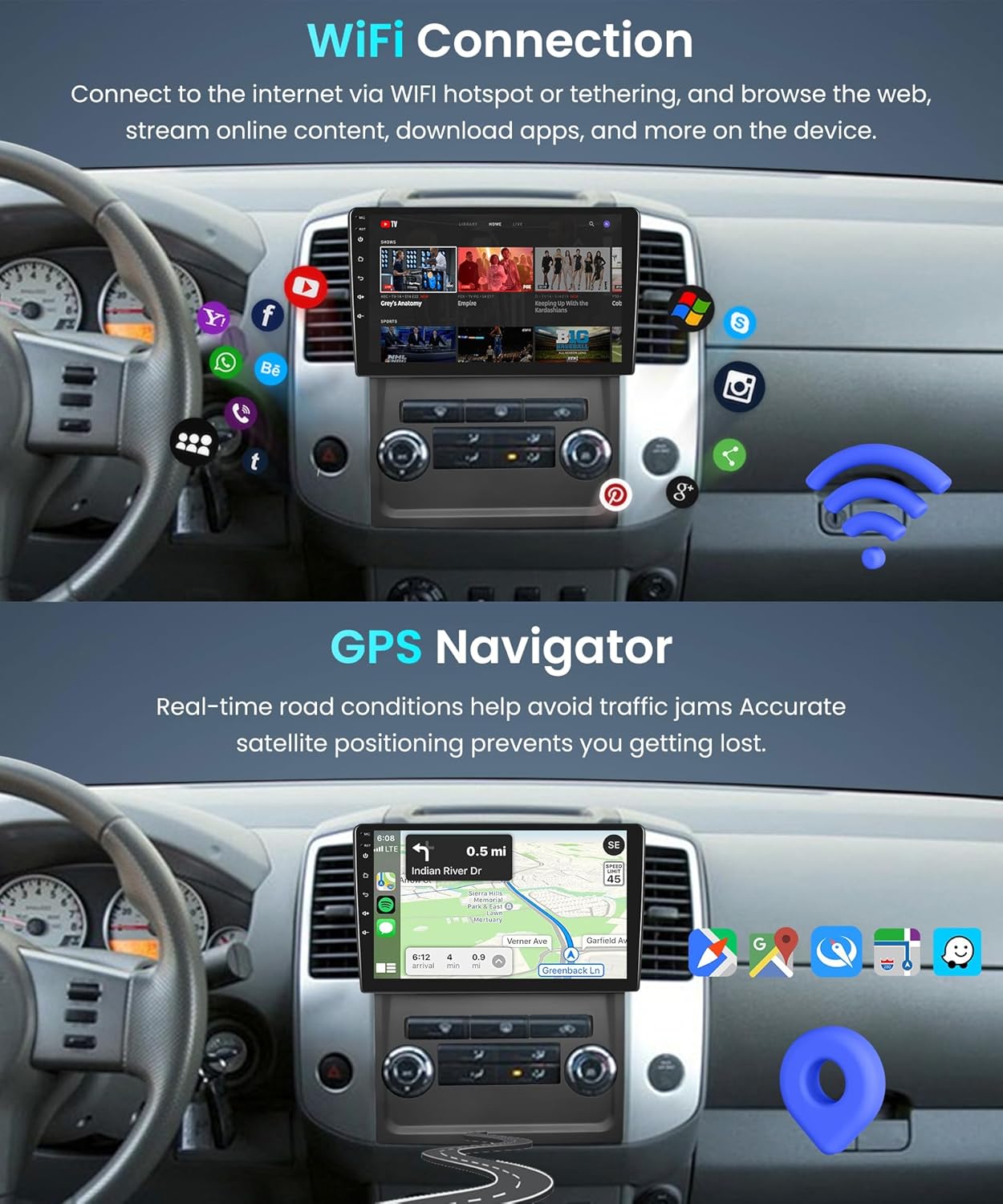
Figure 4.5: Wi-Fi connectivity and GPS navigation.
Cámara de respaldo AHD de 4.6 pulgadas
Cuando el vehículo se pone en marcha atrás, la pantalla cambiará automáticamente a la cámara de respaldo. view, providing a clear image of the rear surroundings to assist with safe parking and obstacle avoidance.

Figura 4.6: Cámara de respaldo view.
4.7 Control del volante (SWC)
If your vehicle supports steering wheel controls, you can configure them to operate various functions of the car stereo, such as volume adjustment, track skipping, and mode switching. Refer to the unit's settings for SWC calibration.
Figura 4.7: Interfaz de control del volante.
5. Mantenimiento
To ensure the longevity and optimal performance of your Rimoody Android Car Radio Stereo, follow these maintenance guidelines:
- Limpieza: Use a soft, dry cloth to clean the touchscreen and unit exterior. Avoid abrasive cleaners or solvents that may damage the surface.
- Actualizaciones de software: Verifique periódicamente si hay actualizaciones de software a través de la configuración de la unidad o del fabricante. websitio para garantizar que tenga las últimas funciones y correcciones de errores.
- Condiciones ambientales: Evite exponer la unidad a temperaturas extremas, luz solar directa durante períodos prolongados o humedad excesiva.
- Conexiones de cable: Asegúrese de que todos los cables estén bien conectados y sin daños. Las conexiones sueltas pueden provocar problemas intermitentes.
6. Solución de problemas
Esta sección aborda problemas comunes que pueden surgir con el estéreo de su auto. Para problemas más complejos, contacte con atención al cliente.
| Problema | Posible causa | Solución |
|---|---|---|
| La unidad no se enciende. | Conexión de alimentación suelta, fusible quemado, problema con la batería del vehículo. | Revise las conexiones del cable de alimentación. Inspeccione los fusibles del vehículo. Asegúrese de que la batería del coche esté cargada. |
| No hay sonido de los altavoces. | Volume too low, mute enabled, incorrect wiring, speaker issues. | Increase volume. Check mute setting. Verify speaker wiring. Test speakers. |
| Carplay/Android Auto inalámbrico no se conecta. | Bluetooth/Wi-Fi desactivado, emparejamiento incorrecto, problema de software del teléfono. | Ensure Bluetooth and Wi-Fi are on. Delete paired Bluetooth device on phone and stereo, then re-pair. Restart phone and stereo. |
| Señal GPS débil o inexacta. | GPS antenna obstruction, poor satellite visibility. | Ensure GPS antenna is mounted in a clear location. Move to an open area. |
| La cámara de respaldo no se muestra. | Incorrect camera wiring, camera malfunction, reverse signal issue. | Check camera input cable connection. Verify reverse signal wire. Test camera. |
7. Especificaciones
Key technical specifications for the Rimoody Android Car Radio Stereo:
- Modelo: B0DD2VWYN2
- Sistema operativo: Android (4+64G configuration)
- Tamaño de pantalla: 9 pulgadas
- Tipo de Pantalla Táctil: Capacitivo
- Capacidad de almacenamiento de memoria: 64 GB
- Tecnología de conectividad: Bluetooth, wifi
- Características especiales: Wireless Carplay, Android Auto, Mirror Link, FM/RDS Radio, GPS Navigation, DSP, AHD Backup Camera, Steering Wheel Control
- Peso del artículo: 1.98 libras
- Dimensiones del paquete: 9.84 x 7.87 x 3.54 pulgadas
- País natal: Porcelana
8. Garantía y soporte
Rimoody se compromete a brindar un excelente servicio al cliente y soporte de productos.
- Garantía: 2 años de garantía del fabricante.
- Política de reemplazo: Reemplazo gratuito durante 12 meses.
- Garantía de devolución de dinero: Garantía de devolución de dinero de 30 días.
- Apoyo técnico: Soporte técnico de por vida disponible.
- Tiempo de respuesta: Customer inquiries are typically handled within 24 hours.
If you have any questions regarding installation, operation, or require technical assistance, please contact Rimoody customer service via email. Contact information can be found in the original product packaging or on the official Rimoody websitio.
Ask a question about this manual
Ask about setup, troubleshooting, compatibility, parts, safety, or missing instructions. Manuals+ will review the question and use this page’s manual context to help answer it.