
1. Introducción
This manual provides detailed instructions for the safe and proper installation, operation, and maintenance of your USX STAR SAS202 Ceiling TV Mount. Please read this manual thoroughly before installation and retain it for future reference. This mount is designed to securely hold televisions ranging from 26 to 65 inches, with a maximum weight capacity of 110 lbs, and VESA patterns from 50x50mm to 400x400mm.
2. Información de seguridad
- ADVERTENCIA: Do not mount this product on drywall alone. It must be mounted to a solid structural support such as wood studs, concrete, or brick.
- Asegúrese de que la superficie de montaje pueda soportar de forma segura el peso combinado del soporte y el televisor.
- Always use the provided hardware. If you are unsure about any part of the installation, consult a qualified professional.
- Mantenga a los niños y a las mascotas alejados durante la instalación.
- No exceda la capacidad máxima de peso de 110 libras (50 kg).
- Verify your TV's VESA pattern and screen size are compatible with the mount before proceeding.
3. Contenido del paquete
Please check to ensure all components are present and undamaged. If any parts are missing or defective, contact customer support immediately.
- Montaje de placa de techo
- ajustable entre polos
- Placa de soporte de TV
- Vertical TV Brackets (2x)
- Mounting Hardware Kit (screws, washers, spacers, anchors for various ceiling types)
- Llave Allen
4. Especificaciones
| Característica | Especificación |
|---|---|
| Número de modelo | SAS202 |
| Compatibilidad de tamaño de pantalla | 26" a 65" |
| Capacidad de peso | Hasta 110 libras (50 kg) |
| Compatibilidad VESA | Mínimo 50x50 mm, máximo 400x400 mm |
| Ajuste de altura | 21.14" a 29.02" (5 configuraciones de altura) |
| Ángulo de inclinación | Up to 15 degrees down |
| Ángulo de giro | 360 degrees (full rotation) |
| Lámpara de techo giratoria | Up to 90 degrees for sloped ceilings |
| Material | Metal |
| Color | Negro |
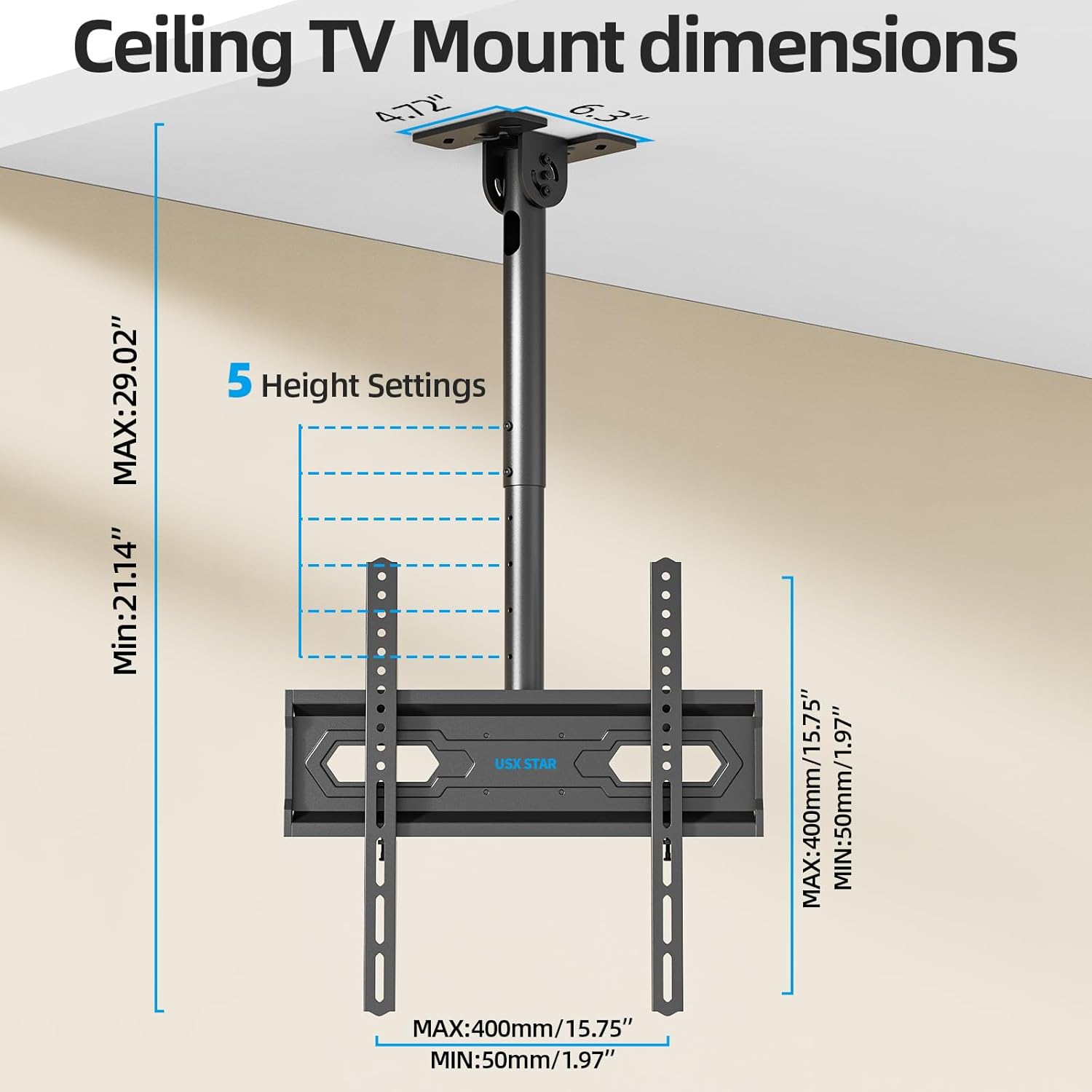
Image: Wide Compatibility Overview
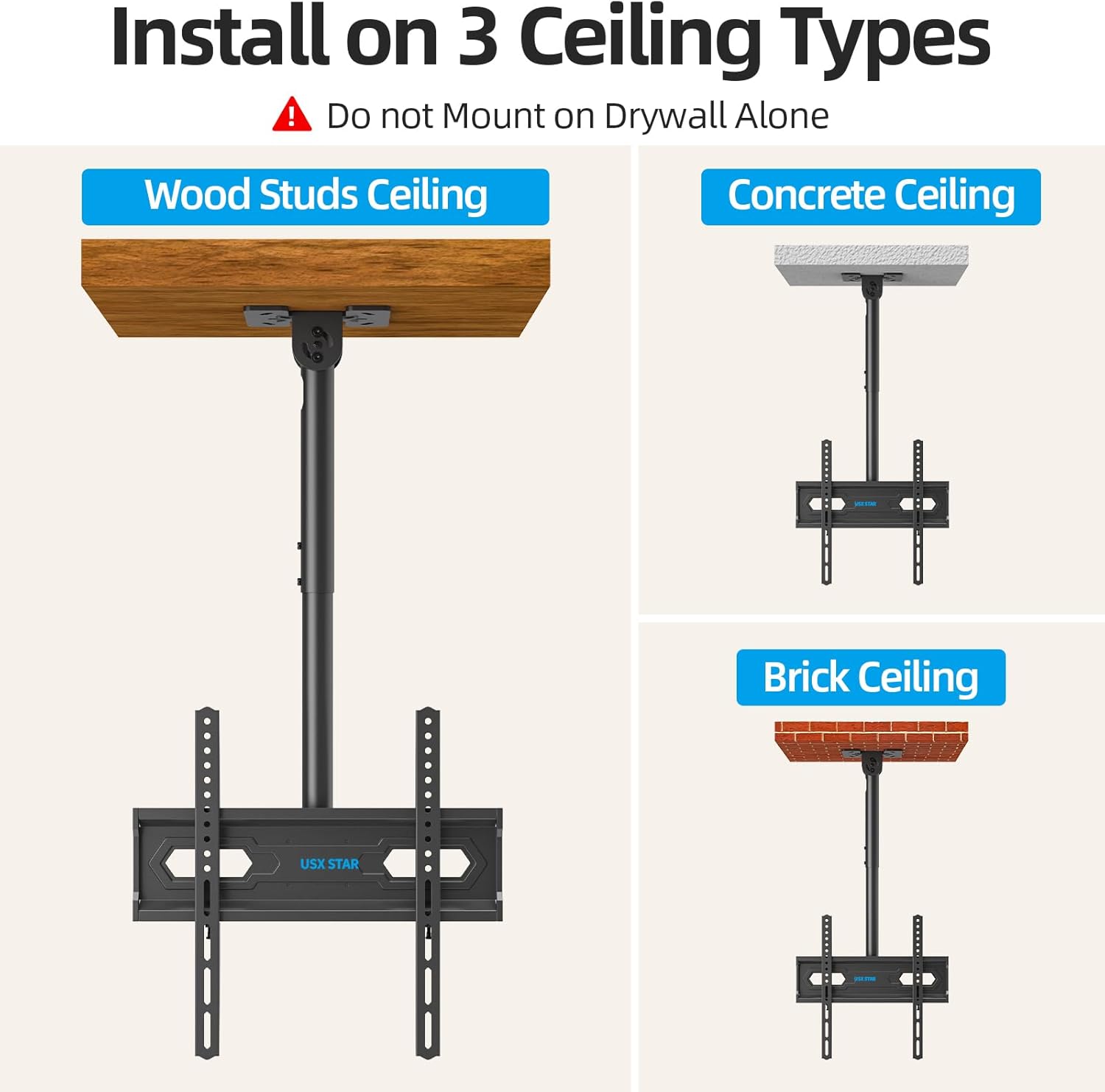
Image: Ceiling TV Mount Dimensions
5. Configuración e instalación
5.1 Lista de verificación previa a la instalación
- Verify your TV's screen size (26-65 inches), weight (under 110 lbs), and VESA mounting pattern (50x50mm to 400x400mm).
- Identify your ceiling type: wood studs, concrete, or brick. Do not install on drywall alone.
- Gather necessary tools: drill, stud finder (for wood studs), level, screwdriver, pencil, measuring tape.
5.2 Montaje de la placa de techo
- Determine the desired location for your TV mount. Use a stud finder to locate wood studs if applicable.
- Position the ceiling plate against the ceiling and mark the drill holes. Ensure it is level.
- Drill pilot holes according to the marked positions and your ceiling type (wood, concrete, or brick).
- Secure the ceiling plate using the appropriate screws and anchors from the hardware kit. Ensure it is firmly attached.
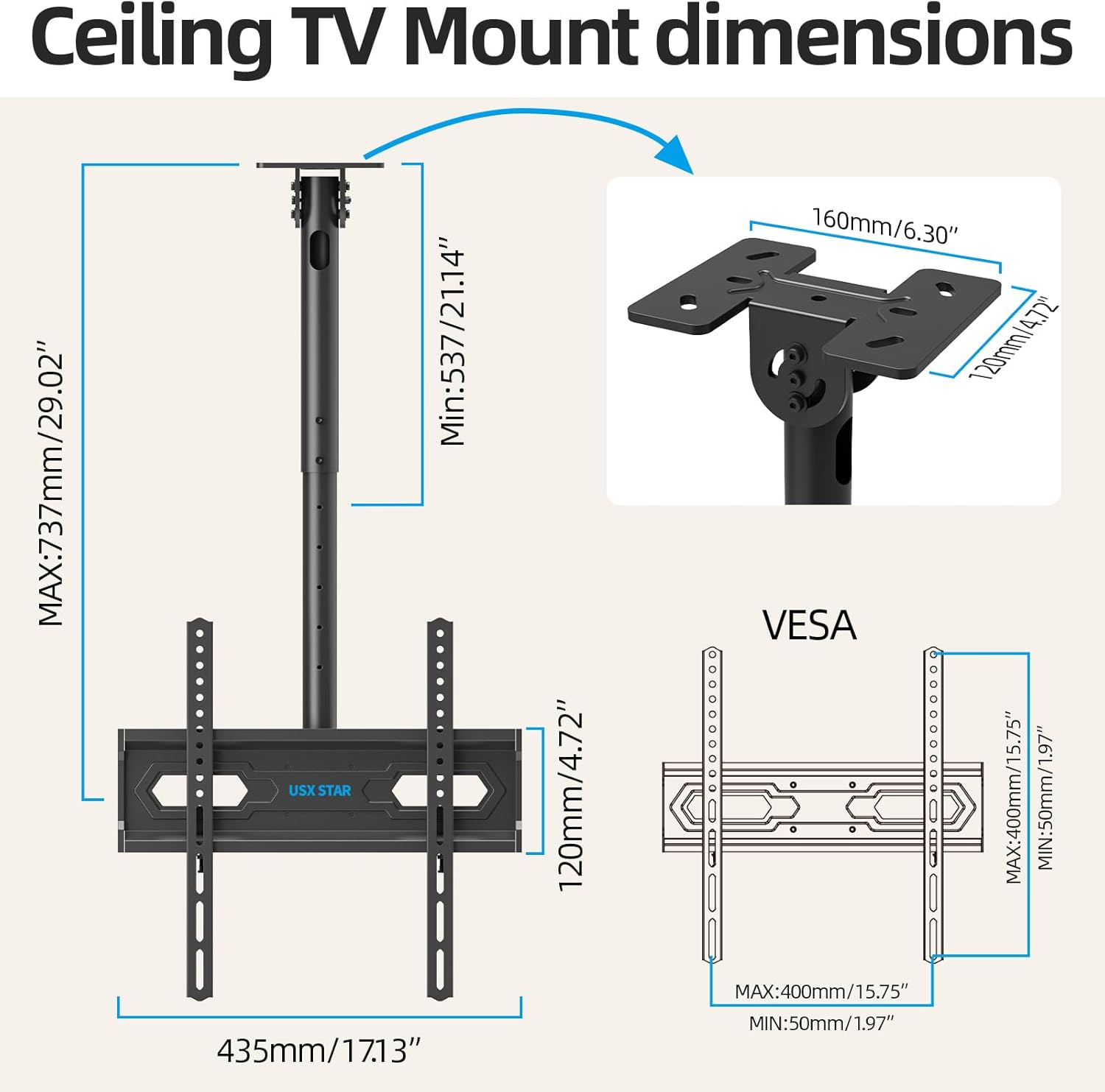
Image: Installation on Various Ceiling Types
5.3 Fijación de los soportes del televisor
- Coloque el televisor boca abajo sobre una superficie suave y limpia para evitar rayones.
- Attach the two vertical TV brackets to the back of your television using the appropriate screws, washers, and spacers from the hardware kit. Ensure the brackets are centered and securely fastened to the TV's VESA holes.
5.4 Colgar el televisor
- With assistance, carefully lift the television and hook the vertical TV brackets onto the TV bracket plate of the ceiling mount.
- Secure the TV to the mount by tightening the safety screws or locking mechanisms on the vertical brackets.
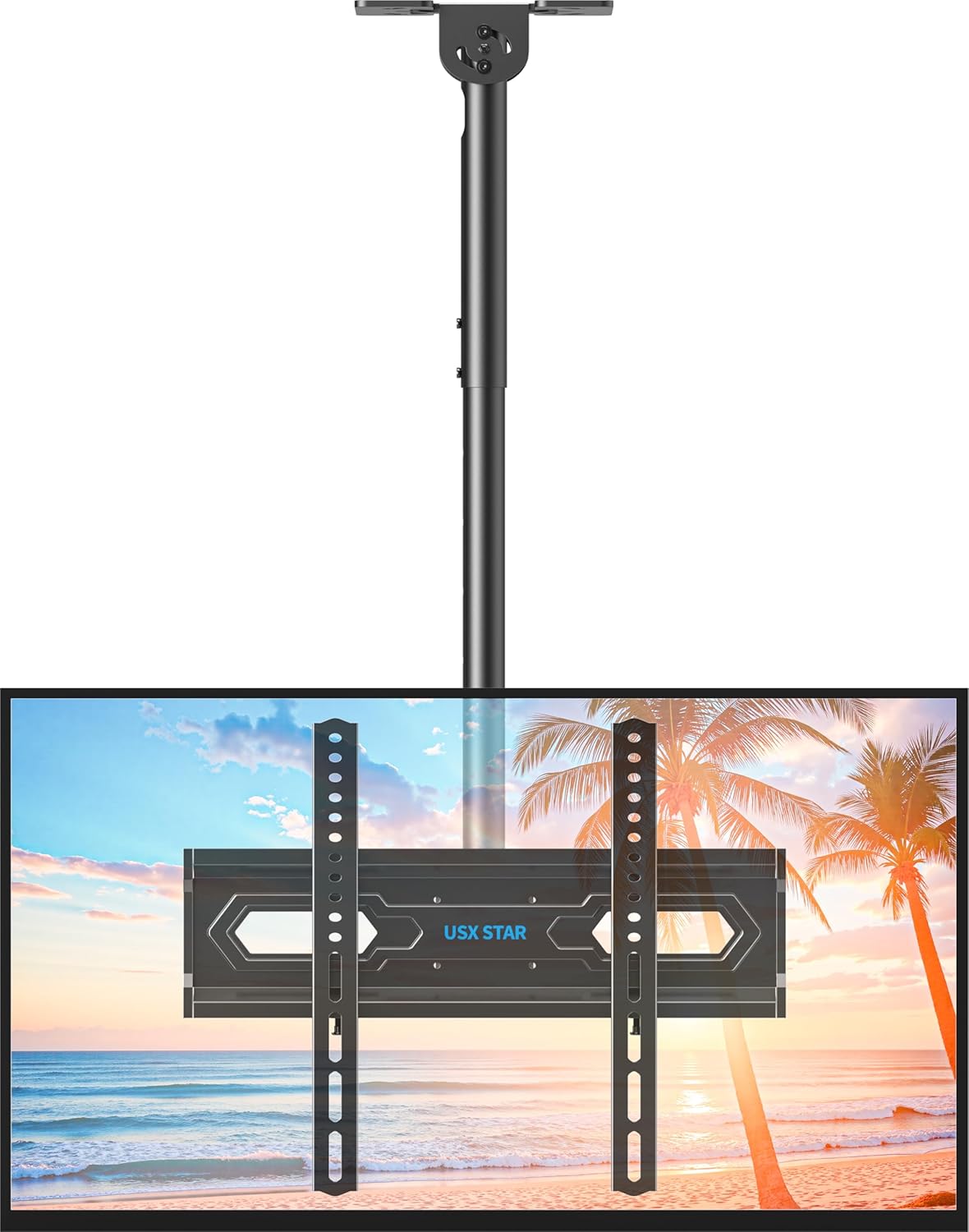
Image: Assembled Ceiling TV Mount with Television
6. Operación y ajustes
The USX STAR SAS202 mount offers multiple adjustment options for optimal viewEn.
6.1 Ajuste de altura
- The mount features 5 height settings, allowing adjustment from 21.14 inches to 29.02 inches.
- To adjust the height, loosen the locking mechanism on the pole, slide the TV to the desired height, and re-tighten securely.
6.2 Ajuste de inclinación
- The TV can be tilted down by up to 15 degrees to reduce glare and achieve a comfortable viewángulo de ing.
- Use the provided Allen key to loosen the tilt adjustment screws, set the desired tilt, and then re-tighten the screws firmly.
6.3 Giro y rotación
- The mount allows for a full 360-degree rotation of the TV, enabling viewdesde varias posiciones en la habitación.
- Additionally, the base of the mount can swivel up to 90 degrees, making it suitable for installation on angled or sloped ceilings.
- To adjust swivel, loosen the handle on the mount, rotate the TV to the desired angle, and re-tighten the handle.
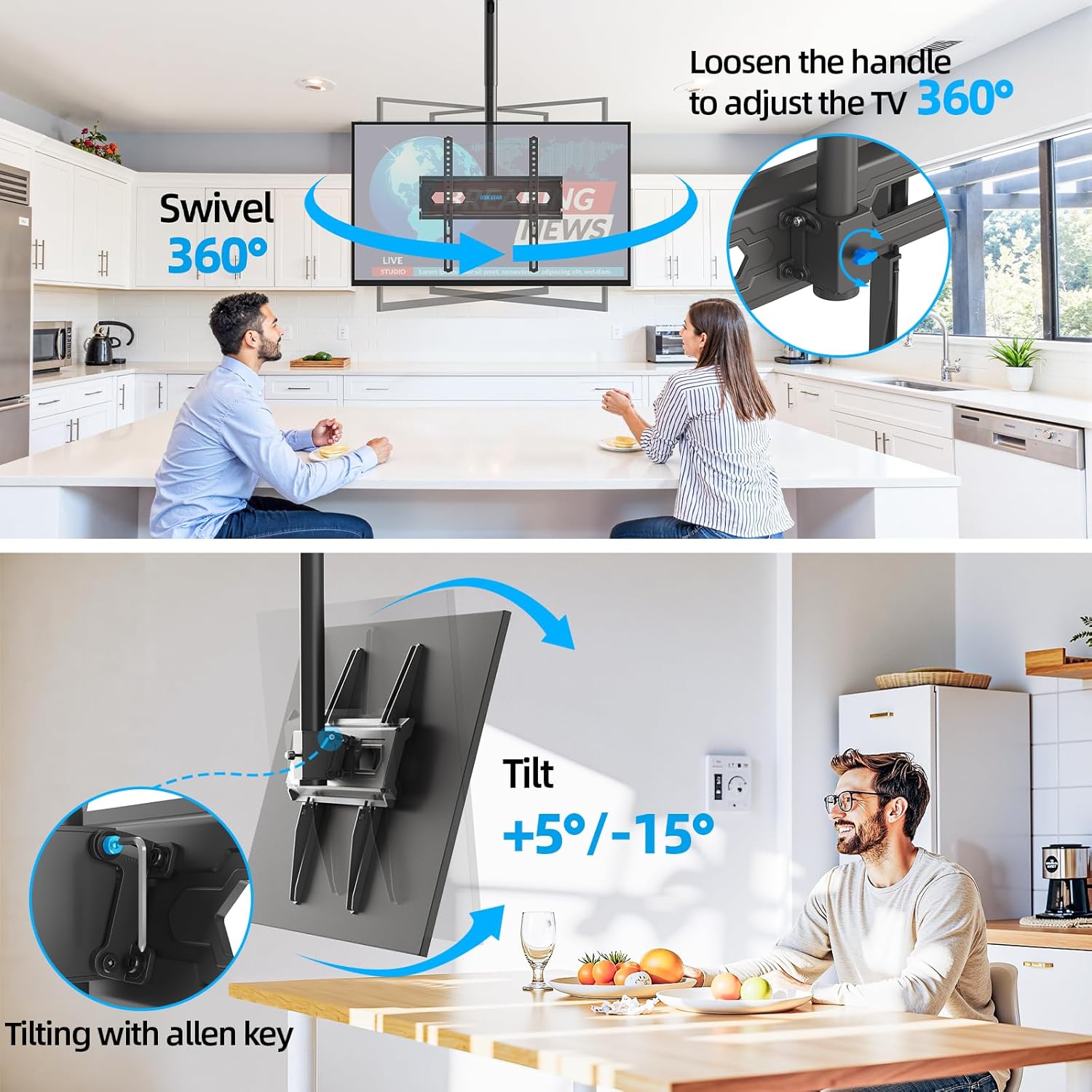
Image: Swivel and Tilt Adjustments

Image: Leveling and Sloped Ceiling Adaptability
7. Mantenimiento
- Revise periódicamente todos los tornillos y conexiones para asegurarse de que permanezcan ajustados y seguros.
- Limpie el soporte con un paño suave y seco. Evite el uso de limpiadores abrasivos o disolventes.
- Ensure cables are properly managed through the cable management holes to prevent strain or damage.
8. Solución de problemas
- El televisor no está nivelado: Check the leveling screws on the TV bracket plate and adjust as needed. Ensure the ceiling plate was installed level.
- El monte se siente suelto: Re-check all mounting screws on the ceiling plate and TV brackets. Ensure they are tightened securely. Do not overtighten.
- Dificultad para ajustar la inclinación/giro: Loosen the adjustment screws/handles slightly before attempting to move the TV, then re-tighten once the desired position is achieved.
9. Garantía y soporte
USX STAR products are backed by a warranty. For specific warranty details, product support, or assistance with installation, please refer to the warranty card included with your product or visit the official USX STAR website. Our US-based customer service team is available to provide quick responses and support tailored to your needs.
Thank you for choosing USX STAR.