
SPC Discovery 2 ME
SPC Discovery 2 ME Smartphone User Manual
Modelo: 25246256D
1. Introducción
This manual provides essential information for the safe and efficient use of your SPC Discovery 2 ME smartphone. Please read this guide thoroughly before operating the device to ensure proper functionality and to prevent damage.
2. Información de seguridad
- Seguridad de la batería: Do not disassemble, puncture, or modify the battery. Use only approved chargers and cables. Avoid extreme temperatures.
- Resistencia al agua: Este dispositivo no es resistente al agua. Evite la exposición a líquidos.
- Protección auditiva: Evite escuchar música a niveles altos de volumen durante períodos prolongados para evitar daños auditivos.
- Seguridad en la conducción: Do not use your phone while driving. Follow local laws and regulations regarding mobile device use.
- Dispositivos médicos: Maintain a safe distance between the phone and medical implants like pacemakers. Consult your physician and medical device manufacturer for specific guidelines.
- Desecho: Dispose of the device and battery responsibly according to local regulations. Do not dispose of with household waste.
3. Contenido del paquete
Verifique que todos los artículos estén presentes en el paquete de su producto:
- SPC Discovery 2 ME Smartphone
- Cable USB-C a USB-C
- Herramienta de expulsión de SIM
- Guía de inicio rápido (si corresponde)
Note: A power adapter is not included and must be purchased separately. For optimal charging, use an 18W USB Power Delivery (PD) compatible charger.
4. Disposición del dispositivo
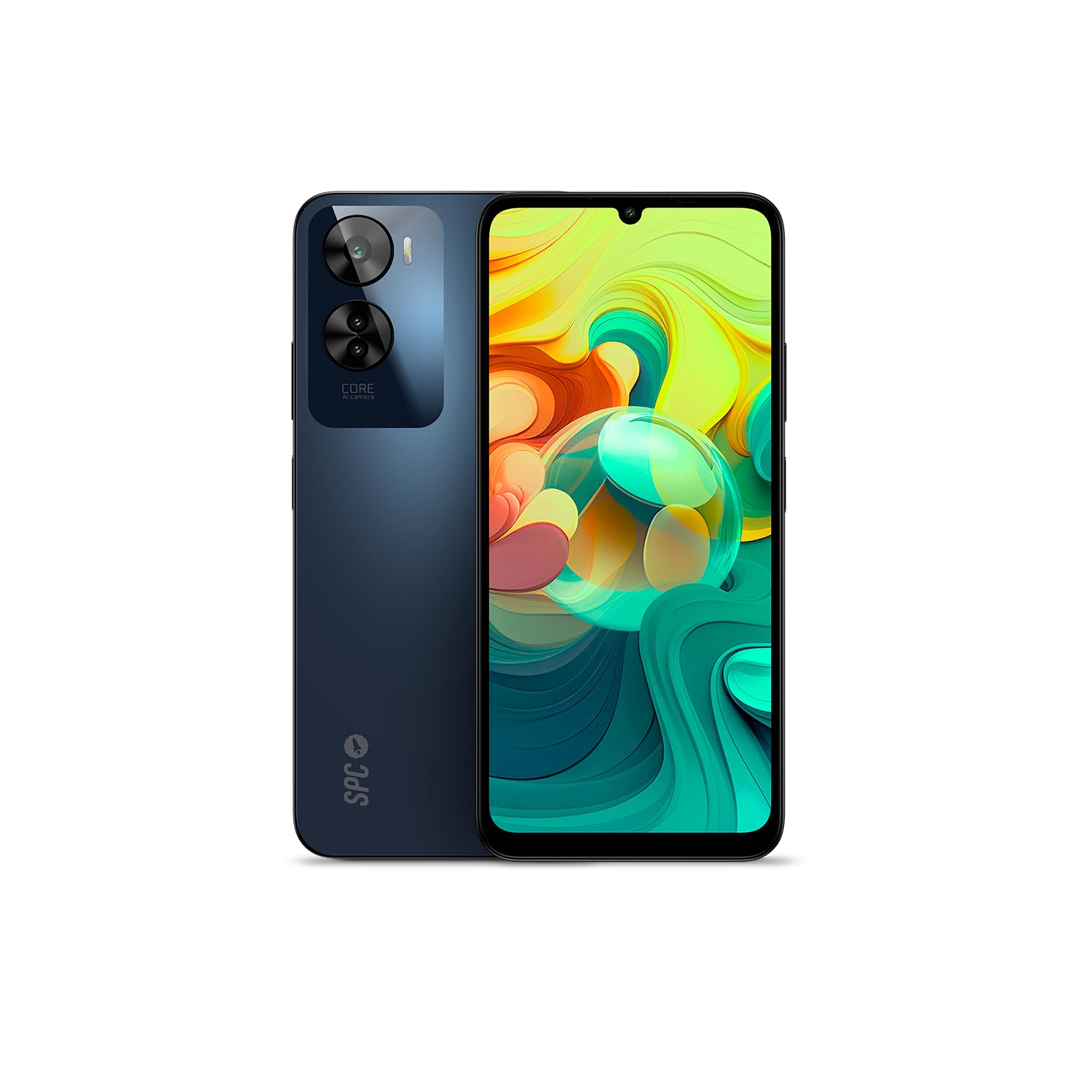
Figura 4.1: Frente view of the SPC Discovery 2 ME, showing the display and front camera.

Figura 4.2: Atrás view of the SPC Discovery 2 ME, highlighting the triple camera module and fingerprint sensor.

Figura 4.3: Angular view of the SPC Discovery 2 ME, showing both front and back, and side buttons.
- Cámara frontal: Ubicado en la parte superior central de la pantalla.
- Mostrar: Pantalla IPS InCell HD+ de 6.75 pulgadas.
- Botones de volumen: En el lado derecho del dispositivo.
- Botón de encendido/sensor de huellas dactilares: On the right side, below the volume buttons.
- Puerto USB-C: En la parte inferior para cargar y transferir datos.
- Conector de audio de 3.5 mm: Para auriculares.
- Bandeja para tarjeta SIM/MicroSD: En el lado izquierdo del dispositivo.
- Cámara trasera triple: Ubicado en la parte superior izquierda del panel posterior.
5. Configuración
5.1. Inserción de tarjetas SIM y MicroSD
- Localice la bandeja de la tarjeta SIM/MicroSD en el lado izquierdo del teléfono.
- Insert the SIM ejector tool into the small hole on the tray and press firmly until the tray pops out.
- Place your Nano-SIM card(s) and/or MicroSD card into the designated slots on the tray. Ensure the gold contacts face downwards. The device supports dual SIM and MicroSD expansion up to 512GB.
- Vuelva a insertar con cuidado la bandeja en el teléfono hasta que encaje en su lugar.
5.2. Encendido inicial y configuración básica
- Press and hold the Power button on the right side of the device until the SPC logo appears.
- Siga las instrucciones en pantalla para completar la configuración inicial:
- Seleccione su idioma
- Conectarse a una red Wi-Fi.
- Review y acepta los términos y condiciones.
- Inicia sesión con tu cuenta de Google o crea una nueva.
- Set up screen lock (PIN, pattern, password) and biometric security (fingerprint, facial recognition).
6. Instrucciones de funcionamiento
6.1. Navegación básica
- Gestos táctiles: Toque para seleccionar, deslice para desplazarse, pellizque para hacer zoom.
- Pantalla de inicio: Acceda a aplicaciones, widgets y notificaciones.
- Panel de notificación: Deslice hacia abajo desde la parte superior de la pantalla para view notificaciones y configuraciones rápidas.
- Cajón de aplicaciones: Deslice el dedo hacia arriba desde la parte inferior de la pantalla para acceder a todas las aplicaciones instaladas.
6.2. Realizar llamadas y enviar mensajes
- Llamadas: Abra la aplicación "Teléfono", ingrese el número y toque el ícono de llamada.
- Mensajes: Abra la aplicación "Mensajes", toque el ícono de mensaje nuevo, ingrese el destinatario y su mensaje.
- Doble SIM: If using two SIM cards, you can select which SIM to use for calls or messages from the respective app settings.
6.3. Uso de la cámara
The SPC Discovery 2 ME features a triple AI camera system, including a 50MP main sensor.
- Abra la aplicación "Cámara".
- Seleccione el modo deseado (Foto, Vídeo, Retrato, Macro, etc.).
- Toque el botón del obturador para capturar una imagen o iniciar/detener la grabación de un video.
- Use the AI scene detection for optimized settings.
- For close-up shots, switch to Macro mode.
6.4. NFC para pagos sin contacto
Your device supports NFC (Near Field Communication) for secure contactless payments.
- Asegúrese de que NFC esté habilitado en la configuración de su teléfono (Configuración > Dispositivos conectados > Preferencias de conexión > NFC).
- Set up your preferred payment app (e.g., Google Pay) and add your credit/debit cards.
- To make a payment, unlock your phone and hold the back of the device near the contactless payment terminal.
6.5. Biometric Unlock
The device offers both fingerprint and facial recognition for secure unlocking.
- Sensor de huellas dactilares: Located on the side power button. Register your fingerprints via Settings > Security & privacy > Device unlock > Fingerprint unlock.
- Reconocimiento facial: Register your face via Settings > Security & privacy > Device unlock > Face unlock. Ensure good lighting when setting up and using this feature.
6.6. Gestión de la batería
The 5000 mAh battery provides extended usage. For optimal battery life:
- Charge your device using the provided USB-C cable and an 18W PD compatible charger.
- Evite descargar completamente la batería con frecuencia.
- Habilite el modo de ahorro de batería cuando la batería esté baja.
- Cierre las aplicaciones no utilizadas que se ejecutan en segundo plano.
7. Mantenimiento
- Limpieza: Utilice un paño suave y sin pelusa para limpiar la pantalla y el cuerpo. Evite materiales abrasivos o productos químicos agresivos.
- Actualizaciones de software: Regularly check for and install system updates (Settings > System > System update) to ensure optimal performance and security. The device runs on Android 14.
- Almacenamiento: Administre su almacenamiento interno de 256 GB eliminando regularmente el almacenamiento innecesario files or moving them to the expandable MicroSD card (up to 512GB).
8. Solución de problemas
| Asunto | Posible solución |
|---|---|
| El dispositivo no se enciende. | Asegúrese de que la batería esté cargada. Conecte el dispositivo a un cargador durante al menos 15 minutos y luego vuelva a intentar encenderlo. |
| La batería se agota rápidamente. | Reduce screen brightness, close background apps, disable unused features like GPS or Bluetooth, or enable battery saver mode. |
| Las aplicaciones fallan o se congelan. | Clear the app's cache (Settings > Apps > [App Name] > Storage & cache > Clear cache). If the issue persists, restart the device. |
| No se puede conectar al wifi. | Reinicia el router y el teléfono. Olvídate de la red y vuelve a conectarte. Asegúrate de que el wifi esté activado en tu dispositivo. |
| El sensor de huellas dactilares no funciona. | Asegúrate de que tu dedo esté limpio y seco. Vuelve a registrar tus huellas en la configuración. |
9. Especificaciones
| Característica | Detalle |
|---|---|
| Nombre del modelo | Discovery 2 ME |
| Número de modelo | 25246256D |
| Sistema operativo | Androide 14 |
| Tamaño de la pantalla | 6.75 pulgadas |
| Resolución de pantalla | 1600 x 720 (HD+) |
| Frecuencia de actualización | 90 Hz |
| Velocidad de la CPU | 1.6 GHz (octa-core) |
| RAM | 6 GB (expandable up to 14 GB virtual RAM) |
| Almacenamiento interno | 256 GB |
| Almacenamiento expandible | MicroSD hasta 512 GB |
| Resolución de la cámara trasera | 50 Megapixels (Main) |
| Capacidad de la batería | 5000 mAh (iones de litio) |
| Cargando | 18W Fast Charge (USB PD) |
| Conectividad | 4G, Bluetooth, Wi-Fi, NFC |
| Puertos | USB tipo C, conector de 3.5 mm |
| Características especiales | Dual SIM, Integrated GPS, Expandable Memory, USB OTG Support, Biometric Unlock (Fingerprint, Facial Recognition) |
10. Garantía y soporte
Your SPC Discovery 2 ME smartphone is covered by a standard manufacturer's warranty. For detailed warranty terms and conditions, please refer to the warranty card included in your package or visit the official SPC websitio.
For technical support, troubleshooting assistance, or service requests, please contact SPC customer support through their official channels. Contact information can typically be found on the SPC websitio o en la guía de inicio rápido.
Ask a question about this manual
Ask about setup, troubleshooting, compatibility, parts, safety, or missing instructions. Manuals+ will review the question and use this page’s manual context to help answer it.