
1. Introducción
Thank you for choosing the KONFULON High Capacity Power Bank, Model A45Q. This portable power bank is designed to provide reliable and fast charging for a wide range of electronic devices, making it an ideal companion for travel, outdoor activities, and daily use. This manual will guide you through the features, setup, operation, and maintenance of your new power bank to ensure optimal performance and longevity.
2. Producto terminadoview
The KONFULON A45Q Power Bank combines high capacity with versatile charging options and practical features.
Características principales:
- Alta capacidad: 100000mAh / 370Wh for extended power supply.
- Carga rápida: Supports Android 22.5W fast charging and iPhone PD 20W fast charging.
- Salidas múltiples: Equipped with 7 output ports (2x Type-C PD 20W, 1x USB1 22.5W Max, 4x USB2-USB4 DC 5V/3A, 1x DC 5V 3A) to charge multiple devices simultaneously.
- Múltiples entradas: Features 3 input ports (2x Type-C DC 18W, 1x DC 12V/1.5A) for flexible recharging options, including solar panel compatibility.
- Luz LED integrada: Super bright LED light with SOS function for emergency and outdoor lighting.
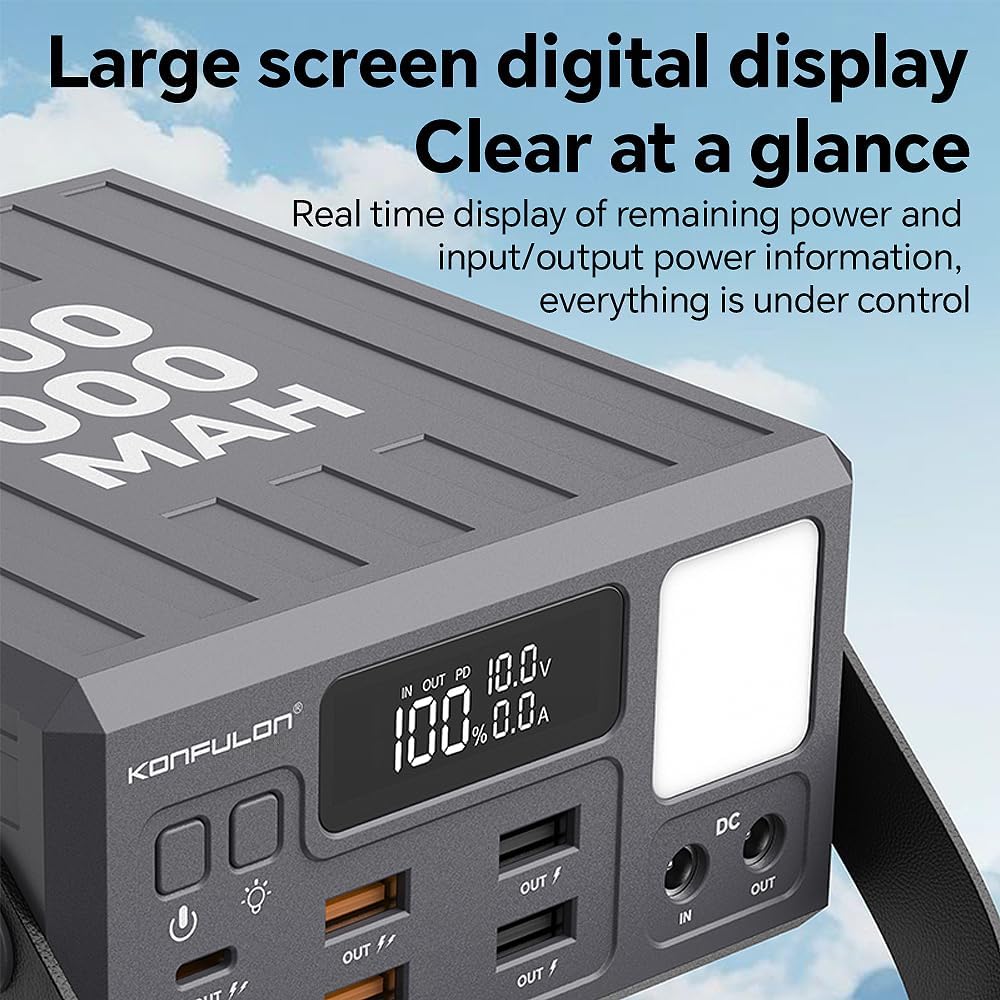
- Pantalla LCD precisa: Digital display shows remaining power percentage and real-time input/output information.
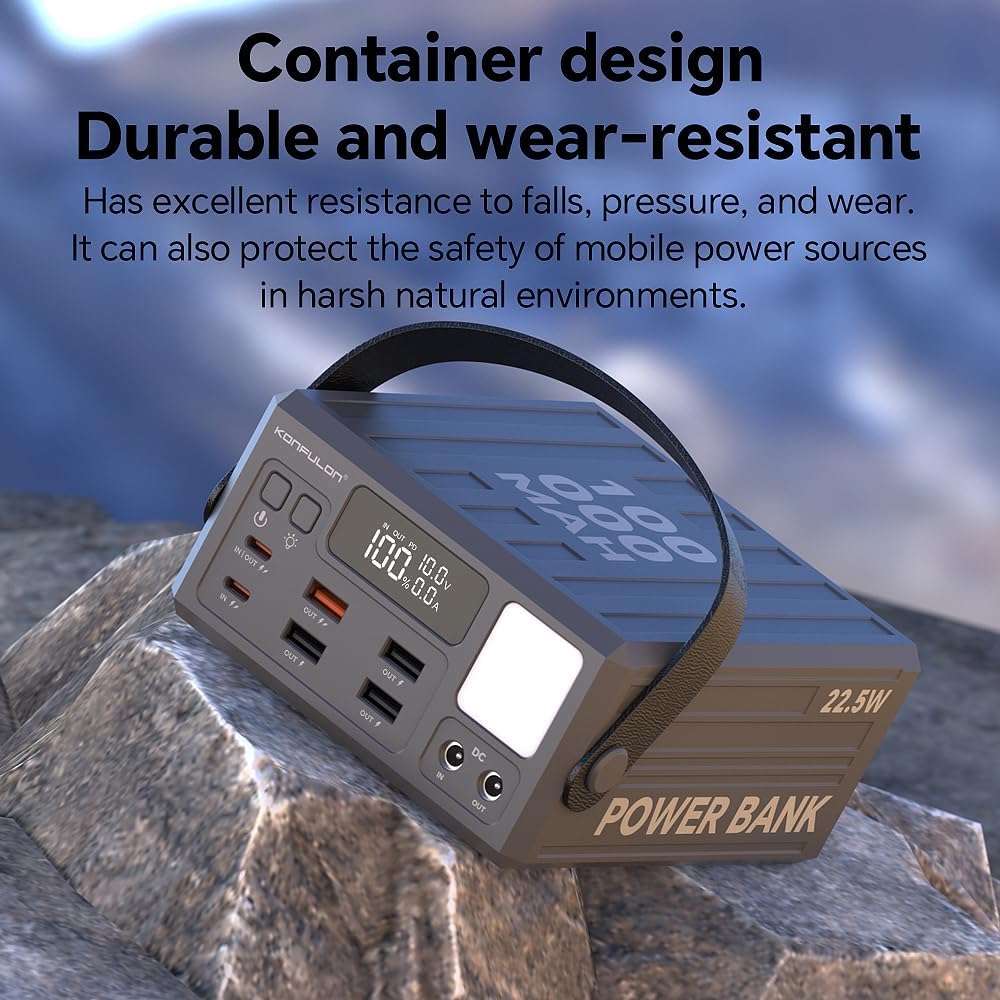
- Diseño portátil: Includes a durable leather handle for easy transport.
- Características de seguridad: Built-in intelligent safety system protects against over-heat, over-charge, over-current, over-discharge, and short-circuit.
Componentes del producto:

The power bank features a robust design with clearly labeled ports and an intuitive LCD screen for monitoring. The integrated handle enhances portability.

3. Especificaciones
| Tipo de batería | Polímero de litio |
| Capacidad | 100000 mAh/370 Wh |
| Output 1 (Type-C) | Fuente de alimentación de 20 W (5 V/3 A, 9 V/2.25 A, 12 V/1.67 A) |
| Output 2 (Type-C) | Fuente de alimentación de 20 W (5 V/3 A, 9 V/2.25 A, 12 V/1.67 A) |
| Output 3 (USB1) | 22.5W Max |
| Output 4-7 (USB2-USB4) | CC 5 V/3 A |
| Salida (DC) | CC 5 V/3 A |
| Input 1 (Type-C) | DC 18W (5V/3A, 9V/2A, 12V/1.5A) |
| Input 2 (Type-C) | DC 18W (5V/3A, 9V/2A, 12V/1.5A) |
| Input 3 (DC) | DC 12V/1.5A (for solar charging) |
| Tiempo de carga | 18-20 Hours (using standard 18W input) |
| Dimensiones | 152.5 x 138 x 69 mm (largo x ancho x alto) |
| Peso | 2.2 kg (4.8 libras) |
| Número de modelo | A45Q |
4. Configuración
Antes del primer uso, se recomienda cargar completamente su banco de energía.
- Desempaquetado: Carefully remove the power bank and any included accessories from the packaging.
- Carga inicial: Connect the power bank to a suitable power source using one of the input ports (Type-C or DC). For optimal charging speed, use an 18W or higher power adapter (not included). The LCD display will show the charging progress. A full charge may take 18-20 hours.
- Battery Calibration (Recommended): For the first few cycles, fully charge the power bank to 100% and then discharge it completely. This helps calibrate the internal Battery Management System (BMS) for accurate power readings.
5. Instrucciones de funcionamiento
5.1. Cargando el banco de poder
To recharge your KONFULON Power Bank:
- Connect a compatible charging cable to one of the input ports (Type-C or DC IN) on the power bank.
- Connect the other end of the cable to a power adapter or a solar panel (for DC input).
- La pantalla LCD mostrará el volumen de entrada.tage/current and the battery percentage increasing.
5.2. Carga de sus dispositivos
The power bank can charge up to 7 devices simultaneously:
- Encender: Press the power button once to activate the power bank and view la pantalla LCD.
- Conectar dispositivos: Use appropriate USB cables to connect your devices to the available output ports (Type-C, USB1, USB2-USB4, or DC OUT).
- Carga rápida: For devices supporting PD 20W or 22.5W fast charging, use the corresponding Type-C or USB1 ports with compatible cables.
- Escucha: La pantalla LCD mostrará el volumen de salida.tage/current for active ports.
- Apagado automático: The power bank features an auto shut-off function to conserve power when no devices are connected or when devices are fully charged.

5.3. LED Light and SOS Function
The integrated LED light is useful for various situations:
- Activar luz: Press and hold the dedicated light button (usually next to the power button) for a few seconds to turn on the LED light.
- Modos de ciclo: Short press the light button to cycle through different brightness levels (Dim, Brighter, Brightest) and the SOS flashing mode.
- Apagar: Mantenga presionado el botón de luz nuevamente para apagar la luz LED.
5.4. Vídeo del producto
6. Mantenimiento
- Almacenamiento: Guarde el banco de energía en un lugar fresco y seco, alejado de la luz solar directa y de temperaturas extremas.
- Limpieza: Utilice un paño suave y seco para limpiar el exterior de la batería externa. No utilice productos químicos agresivos ni materiales abrasivos.
- Uso regular: Para mantener la salud de la batería, es recomendable cargar y descargar completamente el banco de energía al menos una vez cada tres meses si no se usa regularmente.
- Evite las gotas: While designed with a durable casing, avoid dropping the power bank to prevent internal damage.
7. Solución de problemas
Si tiene problemas con su banco de energía, consulte las siguientes soluciones comunes:
- El dispositivo no se carga:
- Ensure the power bank is sufficiently charged (check LCD display).
- Verifique que el cable de carga esté conectado de forma segura tanto al banco de energía como a su dispositivo.
- Pruebe con un cable o puerto de carga diferente en el banco de energía.
- Confirme que su dispositivo sea compatible con las especificaciones de salida del banco de energía.
- El banco de energía no se carga:
- Ensure the charging adapter and cable are functioning correctly and are securely connected.
- Use an appropriate power adapter (e.g., 18W for faster charging).
- Check if the power source (wall outlet, solar panel) is active.
- La pantalla LCD no funciona:
- Presione el botón de encendido una vez para activar la pantalla.
- If the issue persists, the battery might be completely depleted. Try charging the power bank.
- La luz LED no funciona:
- Press and hold the light button for a few seconds to activate.
- Asegúrese de que el banco de energía tenga suficiente carga.
8. Garantía y soporte
For warranty information and customer support, please refer to the documentation included with your purchase or contact KONFULON customer service directly. Keep your proof of purchase for warranty claims.