
1. Introducción
This manual provides detailed instructions for the safe and efficient operation of your JORLAI T316 Portable Suitcase Turntable. Please read this manual thoroughly before using the product and retain it for future reference.
2. Información de seguridad
- No exponga la unidad a la lluvia ni a la humedad.
- No desmonte la unidad. Solicite el mantenimiento a personal cualificado.
- Mantenga la unidad alejada de la luz solar directa, fuentes de calor y campos magnéticos fuertes.
- Asegúrese de que haya una ventilación adecuada; no bloquee las aberturas de ventilación.
- Utilice únicamente el adaptador de corriente suministrado con la unidad.
- Evite colocar objetos pesados sobre la unidad.
3. Producto terminadoview
Familiarize yourself with the components of your JORLAI T316 turntable.

Figure 3.1: Product Details. This image highlights key components including the 45 RPM Adaptor, Tone Arm, Ruby Stylus, Tone Arm Lifter, Auto Stop Switch, Speed Selector, 3.5mm Headphone Jack, Bluetooth Switch, Battery Indicator, Bluetooth Indicator, Power Indicator, and Volume Control.
- Adaptador de 45 RPM: Se utiliza para reproducir discos de 7 pulgadas con un orificio central grande.
- Brazo fonocaptor: Holds the stylus and tracks the grooves of the record.
- Ruby Stylus: The needle that reads the record's grooves.
- Elevador de brazo fonocaptor: Raises and lowers the tone arm gently onto the record.
- Interruptor de parada automática: Enables or disables automatic stopping of the turntable when a record finishes.
- Selector de velocidad: Permite la selección de velocidades de reproducción de 33⅓, 45 o 78 RPM.
- Toma de auriculares de 3.5 mm: Para escuchar en privado con auriculares.
- Interruptor Bluetooth: Activa el modo de emparejamiento Bluetooth.
- Indicador de batería: Muestra el estado actual de la batería.
- Indicador de Bluetooth: Se ilumina cuando Bluetooth está activo y emparejado.
- Indicador de encendido: Muestra si la unidad está encendida.
- Control de volumen: Ajusta el nivel de salida de audio.

Figura 3.2: Conexiones del panel trasero. This image displays the Aux In, Power Interface, and RCA Line Out ports.
- Entrada auxiliar: Conecte dispositivos de audio externos mediante un cable de 3.5 mm.
- Interfaz de energía: Connect the power adapter for charging and operation.
- Salida de línea RCA: Conéctese a altavoces externos o a un ampLificador para salida de audio mejorada.
4. Configuración
- Desembalaje: Carefully remove the turntable from its packaging. Retain all packaging materials for future transport or storage.
- Conexión de energía: Connect the supplied power adapter to the "Power Interface" port on the rear of the turntable and plug it into a wall outlet. The unit has a built-in rechargeable battery, allowing for portable use once charged.
- Colocación: Place the turntable on a stable, level surface away from direct sunlight, heat, and excessive dust.
- Preparación del brazo fonocaptor: Gently unlock the tone arm clip. Remove the protective stylus cap from the stylus.
5. Instrucciones de funcionamiento
5.1 Reproducción de un disco de vinilo
- Encendido: Turn the "Volume Control" knob clockwise to power on the unit. The Power Indicator light will illuminate.
- Seleccionar velocidad: Set the "Speed Selector" to the appropriate speed (33⅓, 45, or 78 RPM) for your record. Use the 45 RPM adaptor for 7-inch singles if needed.
- Registro de lugar: Coloque con cuidado el disco de vinilo sobre el plato giratorio.
- Parada automática (opcional): If you want the turntable to stop automatically at the end of the record, ensure the "Auto Stop Switch" is in the ON position.
- Posición del brazo fonocaptor: Gently lift the tone arm using the "Tone Arm Lifter". Move the tone arm over the desired track of the record.
- Brazo inferior: Slowly lower the tone arm onto the record using the "Tone Arm Lifter". The record will begin to play.
- Ajustar el volumen: Adjust the volume using the "Volume Control" knob.
- Finalizar reproducción: When the record finishes (or manually), lift the tone arm, return it to its rest, and secure it with the tone arm clip. Turn the "Volume Control" knob counter-clockwise to power off the unit.
Video 5.1: JORLAI 3 Speed Vinyl Record Player with BT Built in Battery. This video demonstrates the basic operation of the turntable, including placing a record, adjusting the tone arm, and controlling playback.
Video 5.2: Record Player with Bluetooth Built in Battery. Este vídeo ofrece una rápida explicaciónview of the record player's features, including its Bluetooth connectivity and built-in battery for portability.
5.2 Funcionamiento de Bluetooth
- Activar Bluetooth: Turn the "Volume Control" knob clockwise to power on the unit. Slide the "Bluetooth Switch" to the BT position. The Bluetooth Indicator light will flash, indicating pairing mode.
- Emparejar dispositivo: On your Bluetooth-enabled device (smartphone, tablet, etc.), search for "JORLAI" in the Bluetooth settings and select it to pair. Once connected, the Bluetooth Indicator light will stop flashing and remain solid.
- Reproducir audio: You can now play audio from your device through the turntable's built-in speakers. Adjust volume using both your device's volume control and the turntable's "Volume Control" knob.

Figure 5.1: Bluetooth Input. This image illustrates how the turntable can connect wirelessly to a Bluetooth device to play music.
5.3 External Audio Connection (AUX IN / RCA OUT)
- ENTRADA AUX: Connect external audio sources (e.g., MP3 player) to the "Aux In" port using a 3.5mm audio cable.
- Salida de línea RCA: For enhanced sound, connect the "RCA Line Out" ports to external speakers or an amplifier using RCA cables. Ensure correct left (white) and right (red) channel connections.
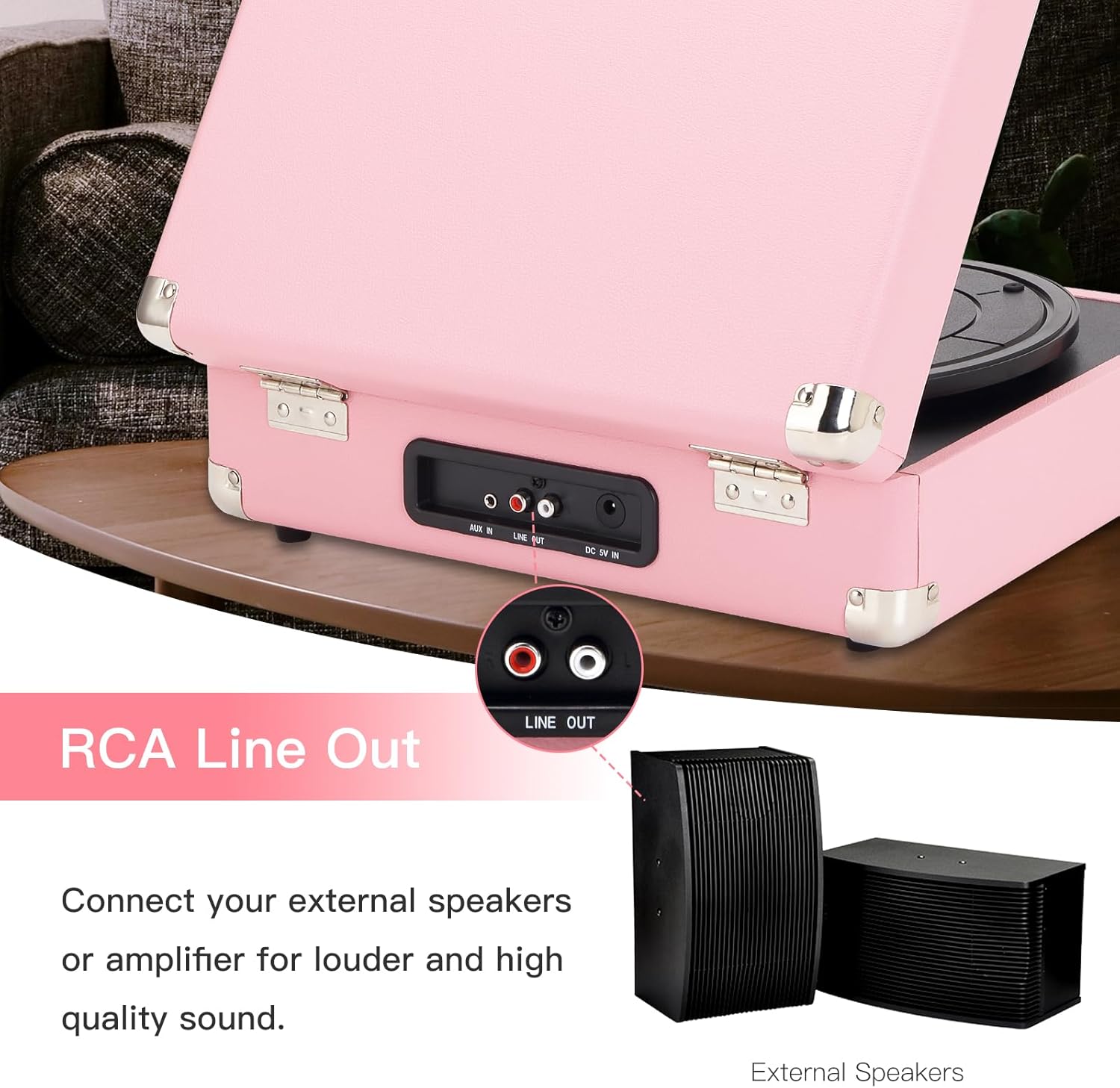
Figure 5.2: RCA Line Out. This image shows the RCA Line Out ports and how to connect external speakers for louder and higher quality sound.
6. Mantenimiento
- Limpieza del lápiz óptico: Utilice un cepillo suave para limpiar con cuidado el lápiz, cepillándolo desde atrás hacia adelante.
- Limpieza de la unidad: Limpie la superficie del plato giratorio con un paño suave y seco. No utilice limpiadores abrasivos ni disolventes.
- Cuidado de registros: Mantenga los discos limpios y sin polvo. Guárdelos verticalmente en sus fundas para evitar que se deformen.
- Almacenamiento: When not in use, close the lid and secure the tone arm clip. Store in a cool, dry place.
7. Solución de problemas
| Problema | Posible causa | Solución |
|---|---|---|
| Sin poder | Power adapter not connected; Battery drained. | Ensure power adapter is securely connected. Charge the battery. |
| No hay sonido de los altavoces | Volume too low; Incorrect mode selected; External speakers not connected properly. | Increase volume. Ensure correct mode (PH for vinyl, BT for Bluetooth). Check external speaker connections if applicable. |
| La grabación salta o suena distorsionada | Record is dirty or scratched; Stylus is worn or dirty; Turntable not level. | Clean the record. Clean or replace the stylus. Ensure turntable is on a stable, level surface. |
| Bluetooth no emparejado | Bluetooth switch not in BT position; Device too far; Interference. | Ensure Bluetooth switch is in BT position. Move device closer to turntable. Avoid other wireless devices. |
8. Especificaciones
| Marca | jorlai |
| Nombre del modelo | T316 |
| Velocidad máxima de rotación | 78 RPM |
| Material | Plástico |
| Peso del artículo | 6.55 libras |
| Color | Pink Silver |
| Dispositivos compatibles | Auriculares, Altavoz |
| Tipo de motor | Accionado por cinturón |
| Fuente de poder | Funciona con pilas |
| Dimensiones del artículo (largo x ancho x alto) | 14" de largo x 11" de ancho x 5" de alto |
9. Garantía y soporte
JORLAI is committed to providing excellent quality products. If you have any questions or encounter issues with your T316 turntable, please contact JORLAI customer support for assistance. Refer to the product packaging or the official JORLAI webSitio para obtener detalles específicos de la garantía e información de contacto.
Para obtener más ayuda, visite el sitio web JORLAI Store on Amazon.