
1. Introducción
Thank you for choosing the Lafocuse Digital Alarm Clock, Model ZH0141B. This device is designed to provide clear time display, alarm functions, and additional features such as temperature and date display. Please read this manual carefully to ensure proper setup and operation.
The Lafocuse Digital Alarm Clock (Model ZH0141B) features a large 5.7-inch LED display, showing time, temperature, date, and day of the week. It supports up to three alarms with a snooze function, offers 25 alarm sounds, and 3 levels of adjustable brightness. The clock can be powered by its rechargeable battery or via a USB-C cable, and includes two USB output ports for charging other devices. It also features intelligent voice-activated display control for energy saving.
2. Producto terminadoview
Familiarize yourself with the components and features of your alarm clock.

Figura 1: Encimaview of the Lafocuse Digital Alarm Clock and its key features.

Figura 2: Button and Port Layout.
Contenido del paquete:
- 1 x Lafocuse Digital Alarm Clock
- Cable de carga 1 x USB tipo C
- 1 x Manual de usuario (este documento)
3. Configuración
3.1 Encendido del dispositivo
El despertador se puede alimentar de dos maneras:
- Batería recargable: The clock includes a built-in 18650 (1800mAh) rechargeable battery. When powered by battery, the display will turn off after 15 seconds of inactivity to conserve energy. It can be reactivated by sound (voice control).
- Cable USB tipo C: Connect the provided USB Type-C cable to the Type-C Input port (11 in Figure 2) on the back of the clock and plug the other end into a 5V/2A USB power adapter (not included). When connected via USB, the display will remain continuously on.
Se recomienda cargar completamente el dispositivo antes del primer uso.

Figura 3: Powering the device and using USB output ports.
4. Instrucciones de funcionamiento
4.1 Configuración de hora y fecha
- Mantenga pulsado el COLOCAR button (2 in Figure 2) for 3 seconds to enter time setting mode. The hour digits will flash.
- Utilice el +/Music button (3 in Figure 2) or -/Volume button (4 in Figure 2) to adjust the hour.
- Prensa COLOCAR de nuevo para confirmar la hora y pasar al ajuste de minutos. Ajuste los minutos usando +/Music or -/Volume.
- Continuar presionando COLOCAR para recorrer y configurar el año, mes y día.
- Después de configurar el día, presione COLOCAR one last time to exit time and date setting.
- Para cambiar entre el formato de 12 horas y 24 horas, presione brevemente la tecla COLOCAR Botón cuando no esté en modo de configuración.
- To switch between Celsius and Fahrenheit temperature display, short press the -/Volume Botón cuando no esté en modo de configuración.

Figura 4: Multifunctional display showing time, temperature, and date.
4.2 Configuración de alarmas
The clock supports up to three independent alarms (Alarm 1, Alarm 2, Alarm 3).
- Presione el Alarma-1 button (7 in Figure 2), Alarma-2 button (6 in Figure 2), or Alarma-3 button (5 in Figure 2) to select the alarm you wish to set. The alarm icon will appear on the display.
- Press and hold the selected alarm button for 3 seconds. The hour digits will flash.
- Utilice el +/Music or -/Volume Botones para ajustar la hora.
- Press the alarm button again to confirm the hour and move to minute setting. Adjust minutes using +/Music or -/Volume.
- Press the alarm button one last time to confirm and exit alarm setting.
- To enable or disable an alarm, short press its corresponding alarm button. The alarm icon will appear (enabled) or disappear (disabled).
Alarm Sound and Volume:
- The clock offers 25 different alarm sounds. When setting an alarm, after setting the minutes, you can press the alarm button again to cycle through the alarm sounds using +/Music or -/Volume.
- There are 3 levels of alarm volume. Adjust the volume using the -/Volume button during alarm sound selection or when an alarm is actively sounding.
4.3 Función de repetición
Cuando suene una alarma, toque el LUZ DE SNOOZE area (1 in Figure 2) on the top of the clock to activate the snooze function. The alarm will pause for 5 minutes and then sound again.

Figura 5: Activando la función de repetición.
4.4 Ajuste del brillo
The display brightness can be adjusted manually or automatically.
- Ajuste manual: Presione brevemente el LUZ DE SNOOZE button (1 in Figure 2) when the alarm is not sounding to cycle through 3 brightness levels (High, Medium, Low).
- Ajuste automático: The clock can automatically adjust its brightness based on ambient light conditions. This feature is typically enabled by default. Refer to the full manual for specific instructions on enabling/disabling auto-brightness if needed.

Figura 6: Display brightness levels.
4.5 Voice Control (Battery Mode Only)
When the clock is powered by its internal battery, the display will automatically turn off after 15 seconds of inactivity to save power. To reactivate the display, make a sound louder than 60dB (e.g., clap your hands, tap the clock, or speak loudly).
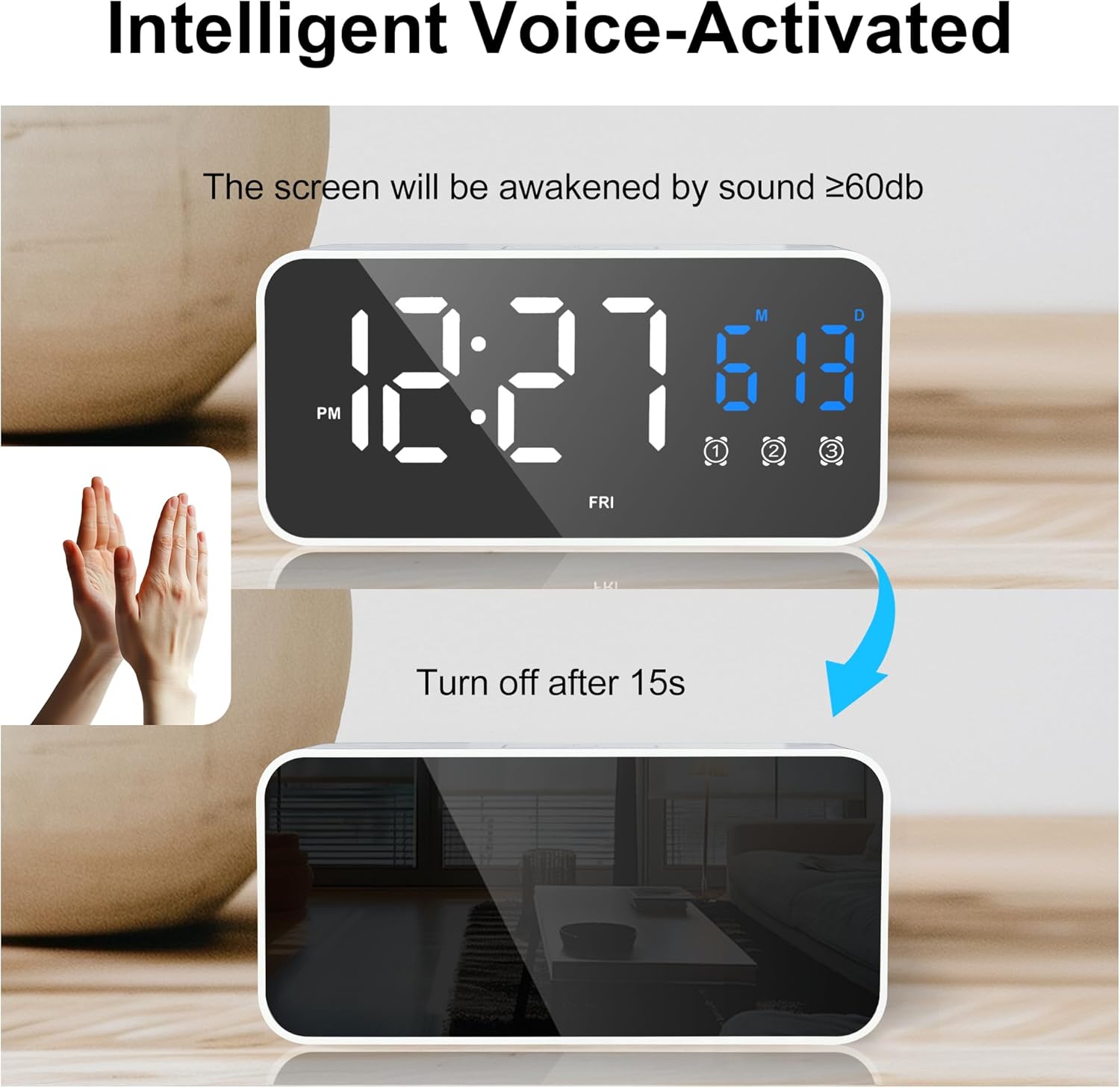
Figura 7: Voice-activated display control.
4.6 puertos de carga USB
The alarm clock is equipped with two USB output ports (9 and 10 in Figure 2) that can be used to charge other devices, such as smartphones. These ports are active only when the alarm clock is connected to a power source via its USB-C input cable.
5. Mantenimiento
5.1 Limpieza
Para limpiar el reloj, frote suavemente la superficie con un paño suave y seco. No utilice limpiadores abrasivos, disolventes ni aerosoles químicos, ya que pueden dañar el acabado o los componentes internos.
5.2 Consideraciones ambientales
Keep the digital alarm clock away from humid environments and high temperatures to prevent damage and ensure optimal performance.
6. Solución de problemas
- La pantalla está en blanco o no responde:
- Ensure the clock is sufficiently charged or connected to a power source via the USB-C cable.
- If in battery mode, make a sound (e.g., clap) to activate the voice control display.
- La alarma no suena:
- Check if the alarm is enabled (the alarm icon should be visible on the display).
- Verifique que la hora de la alarma esté configurada correctamente.
- Ensure the alarm volume is not set to the lowest level.
- USB output ports are not charging devices:
- The clock must be connected to a wall adapter via its USB-C input cable for the USB output ports to function.
- Ensure the charging cable for your device is properly connected to the clock's USB output port.
- Lectura de temperatura incorrecta:
- Ensure the clock is not placed near heat sources or in direct sunlight, which can affect temperature accuracy.
- Switch between Celsius and Fahrenheit using the -/Volume button to ensure the desired unit is displayed.
7. Especificaciones
| Marca | Lafocuse |
| Número de modelo | ZH0141B |
| Color | Blanco |
| Dimensiones (L x An x Al) | 13.9 x 3.81 x 6.6 cm (5.5 x 1.5 x 2.6 pulgadas) |
| Peso | 220 gramos (0.48 lbs) |
| Material | Plástico |
| Tipo de pantalla | LED digitales |
| Características especiales | Date and Temperature Display, Snooze, Triple Alarm, Voice Control, USB Charging Ports |
| Fuente de poder | Rechargeable Battery (1800mAh 18650 Lithium-ion), USB-C |
| Batería | 1 batería de iones de litio (incluida) |
8. Garantía y soporte
This product comes with a standard manufacturer's warranty. For specific warranty details, please refer to the packaging or contact your retailer. For technical support or further assistance, please reach out to the seller or manufacturer through the platform where the product was purchased.