
Angrox NS-RCFNA-21-Upgrade
Angrox Universal TV Remote Control Instruction Manual
Model: NS-RCFNA-21-Upgrade
Brand: Angrox
1. Introduction
Thank you for choosing the Angrox Universal TV Remote Control. This remote is designed to simplify your entertainment experience by providing a single control solution for a wide range of smart TVs. It offers seamless compatibility and intuitive operation, making it an ideal replacement for lost or broken original remotes.

Figure 1.1: Front view of the Angrox Universal TV Remote Control.
2. Safety Information
- Keep batteries out of reach of children. If swallowed, seek immediate medical attention.
- Do not mix old and new batteries, or different types of batteries.
- Remove batteries if the remote will not be used for an extended period to prevent leakage.
- Avoid exposing the remote to direct sunlight, heat sources, or excessive moisture.
- Do not attempt to disassemble or modify the remote control.
3. Package Contents
The package should contain the following items:
- 1 x Angrox Universal TV Remote Control
- 1 x Instruction Manual (this document)
Note: 2 AAA batteries are required for operation and are not included in the package.
4. Parts and Features
Familiarize yourself with the buttons and functions of your new remote control.
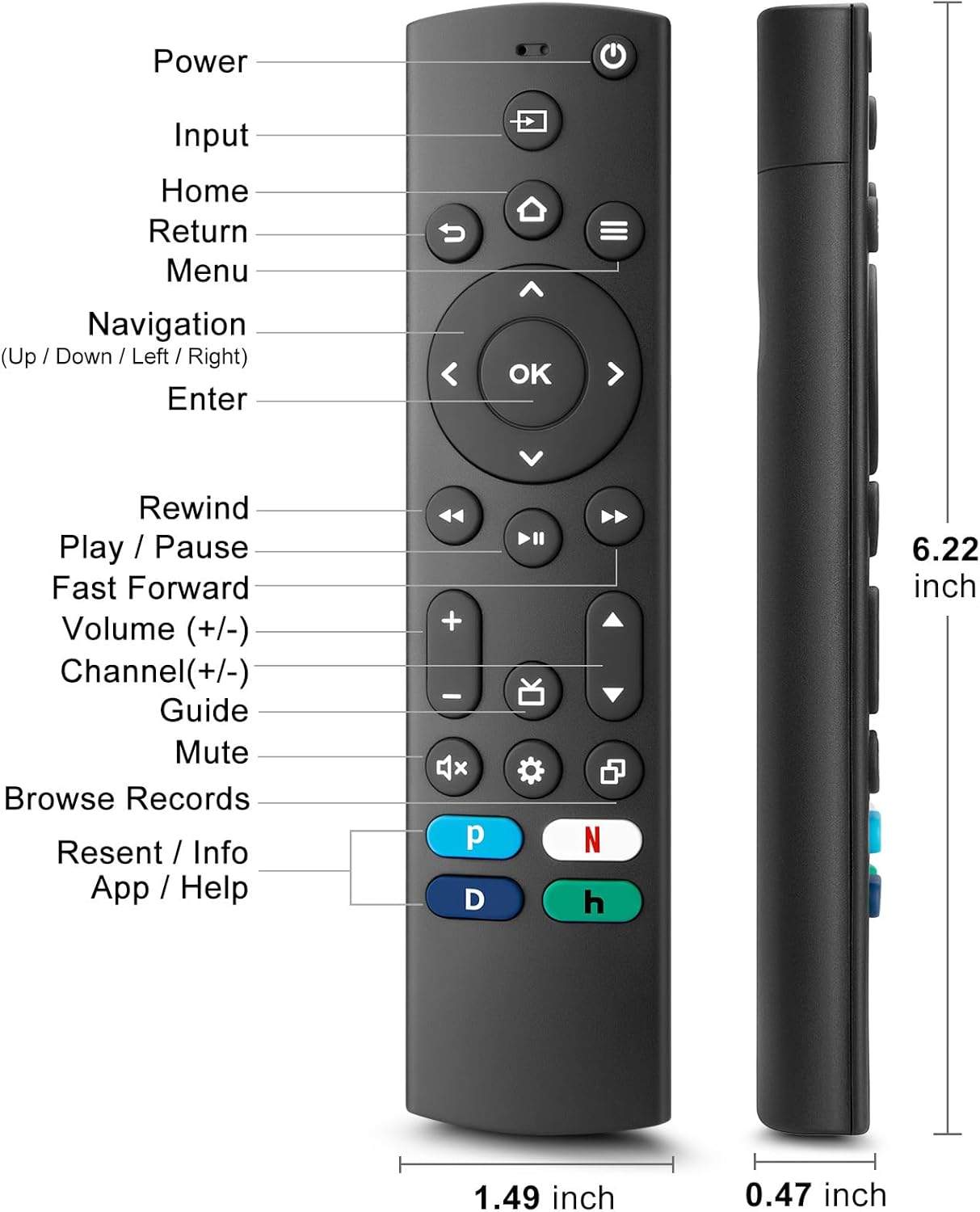
Figure 4.1: Labeled buttons and dimensions of the remote control.
- Power Button: Turns the TV on or off.
- Input Button: Selects input source (HDMI, AV, etc.).
- Home Button: Returns to the TV's home screen.
- Navigation Pad (Up/Down/Left/Right) & OK Button: For menu navigation and selection.
- Return Button: Goes back to the previous screen.
- Menu Button: Accesses TV settings or options menu.
- Rewind/Play/Pause/Fast Forward Buttons: Media playback controls.
- Volume Up/Down: Adjusts the TV volume.
- Channel Up/Down: Changes TV channels.
- Mute Button: Mutes or unmutes the TV sound.
- Settings Button: Accesses quick settings.
- Dedicated Hotkeys (Netflix, P-Video, Disney+, Hulu): Direct access to popular streaming services.
This remote control utilizes infrared (IR) technology for stable performance and a fast response time of 0.2 seconds, with a control range of up to 40 feet. Please note that this remote does NOT support voice search functions.

Figure 4.2: Remote's stable performance and precise control features.

Figure 4.3: This remote does not include voice search functionality.
5. Setup
5.1. Battery Installation
- Open the battery compartment cover on the back of the remote control.
- Insert two (2) AAA batteries, ensuring the positive (+) and negative (-) terminals align with the markings inside the compartment.
- Close the battery compartment cover securely.
5.2. Initial Pairing and TV Compatibility
This universal remote is designed for easy setup with most major TV brands. Simply press and hold two specific buttons simultaneously to pair it with your TV.

Figure 5.1: Easy 2-button setup for various TV brands.
| TV Brand | Button Combination (Press & Hold) | Notes |
|---|---|---|
| Insignia TV | OK + Home Button | |
| Toshiba TV | OK + Home Button | |
| Roku TV | OK + Up Arrow | |
| Hisense TV | OK + Down Arrow | Hulu not supported |
| TCL TV | OK + Right Arrow | Hulu not supported |
| Samsung TV | OK + Return Button | |
| Vizio TV | OK + Menu Button | |
| LG TV | OK + Rewind Button | Hulu not supported |
| Philips TV | OK + Play/Pause Button | Prime Video, Disney+, Hulu not supported |
| Sony TV | OK + Fast Forward Button | Hulu not supported |
Once the remote is paired, it should function immediately. No further programming is typically required.
5.3. Compatibility Notes
This remote is designed to be a universal replacement for many TV models, including specific Insignia and Toshiba smart TV remotes (e.g., NS-RCFNA-21, NS-RCFNA-19, CT-95018, CT-RC1US-21, CT-RC1US-19). However, it is important to note that it may not be compatible with all specific original remote models or streaming devices, particularly those with unique pairing methods or voice control features.

Figure 5.2: Examples of remote controls and devices that are NOT compatible with this universal remote.

Figure 5.3: This remote is not compatible with TV Cube or TV Stick streaming devices.
For optimal performance, ensure your TV's infrared receiver is unobstructed.
Video 5.1: An official product video demonstrating the features and ease of use of the Angrox Universal TV Remote. This video highlights the remote's compatibility and quick access buttons for streaming services.
6. Operating the Remote
Once paired, the Angrox Universal TV Remote operates like a standard TV remote. Point the remote directly at your TV's infrared receiver for best results.
6.1. Basic Functions
- Power: Press the Power button once to turn the TV on or off.
- Volume: Use the Volume Up (+) and Volume Down (-) buttons to adjust the sound level.
- Channel: Use the Channel Up (▲) and Channel Down (▼) buttons to change channels.
- Navigation: Use the Up, Down, Left, Right arrows to navigate through menus and options. Press OK to confirm a selection.
- Home: Press the Home button to return to the main smart TV interface.
- Return: Press the Return button to go back to the previous screen or menu.
6.2. Dedicated Hotkeys
The remote features dedicated hotkeys for quick access to popular streaming platforms:
- Netflix: Instantly launch the Netflix application.
- P-Video (Prime Video): Instantly launch the Prime Video application.
- Disney+: Instantly launch the Disney+ application.
- Hulu: Instantly launch the Hulu application.

Figure 6.1: Quick access to streaming services with dedicated hotkeys.
7. Maintenance
- Cleaning: Wipe the remote with a soft, dry cloth. Do not use abrasive cleaners or solvents.
- Battery Replacement: Replace batteries when the remote's response becomes sluggish or it stops functioning. Always replace both batteries at the same time.
- Storage: Store the remote in a cool, dry place away from direct sunlight and extreme temperatures.
8. Troubleshooting
| Problem | Possible Cause | Solution |
|---|---|---|
| Remote not responding to TV. | Low or dead batteries. Incorrect pairing. Obstruction between remote and TV. | Replace batteries with new AAA batteries. Re-attempt pairing using the correct button combination for your TV brand (refer to Section 5.2). Ensure no objects are blocking the TV's IR receiver. |
| Specific hotkey (e.g., Hulu) not working. | TV brand incompatibility with specific hotkey functions. | Some TV brands (e.g., Hisense, TCL, LG, Philips, Sony) may not support all dedicated hotkeys. This is a limitation of the TV's software, not the remote. You may need to navigate to these apps manually. |
| No voice control functionality. | This remote does not support voice commands. | The Angrox Universal TV Remote Control is designed for infrared (IR) control and does not include a microphone for voice search. This is an intended feature. |
| Remote feels unresponsive or delayed. | Weak batteries. Remote too far from TV. | Replace batteries. Ensure you are within the effective range (up to 40 feet) and pointing directly at the TV. |
9. Specifications
| Feature | Detail |
|---|---|
| Model Number | NS-RCFNA-21-Upgrade |
| Brand | Angrox |
| Dimensions (L x W x H) | 6.22 x 1.49 x 0.47 inches |
| Item Weight | 1.76 ounces |
| Power Source | 2 x AAA Batteries (not included) |
| Material | High-quality ABS and Silicone |
| Control Technology | Infrared (IR) |
| Response Time | 0.2 seconds |
| Control Range | Up to 40 feet |
| Special Features | Universal, Ergonomic, Lightweight, Pre-Programmed, No Programming Required (for most TVs) |
| Color | Black |
| Compatible Devices | Television (Insignia, Toshiba, Pioneer, Samsung, TCL, LG, Hisense, Vizio, Sony, Philips, Roku TVs) |
10. Warranty and Support
Angrox products are manufactured with high-quality materials and undergo strict quality control. For information regarding warranty coverage, returns, or technical support, please refer to the product listing page on Amazon or contact Angrox customer service directly through the Amazon platform.
You can visit the official Angrox store on Amazon for more information and contact options: Angrox Store
Ask a question about this manual
Ask about setup, troubleshooting, compatibility, parts, safety, or missing instructions. Manuals+ will review the question and use this page’s manual context to help answer it.