
1. Introducción
Thank you for choosing the TD Systems 24-inch Smart TV. This television combines a compact design with advanced smart features, powered by Google TV and Android 11. It offers a high-definition viewing experience, integrated digital tuners, and a wide range of connectivity options to enhance your entertainment.
This manual provides essential information for setting up, operating, and maintaining your new television. Please read it thoroughly before use to ensure proper functionality and safety.
2. Información de seguridad
Observe siempre las siguientes precauciones de seguridad para evitar descargas eléctricas, incendios o daños al dispositivo:
- No exponga el televisor a la lluvia o la humedad.
- No bloquee las aberturas de ventilación.
- Asegúrese de que el cable de alimentación no quede pellizcado ni pisado.
- Desconecte el enchufe de alimentación durante tormentas eléctricas o cuando no vaya a utilizarlo durante períodos prolongados.
- Deje todo servicio a personal de servicio calificado.
- Mantenga las pilas fuera del alcance de los niños.
3. Contenido del paquete
Verifique que todos los elementos estén presentes en la caja:
- TD Systems 24-inch Smart TV
- Mando a distancia
- 2 pilas AAA (para control remoto)
- 2 x Legs (Left, Right)
- Manual de usuario (este documento)

Image: The TD Systems 24-inch Smart TV, showcasing its sleek design and included stand.
4. Configuración
4.1 Fijación del soporte
- Coloque con cuidado el televisor con la pantalla hacia abajo sobre una superficie suave y plana para evitar rayones.
- Identify the left and right legs.
- Align each leg with the corresponding screw holes on the bottom of the TV.
- Secure each leg using the provided screws. Do not overtighten.
4.2 Conexión de la alimentación
Conecte el cable de alimentación a la entrada de corriente del televisor y luego a una toma de corriente. Asegúrese de que la toma de corriente sea fácilmente accesible.
4.3 Encendido inicial
Press the power button on the TV or the remote control. Follow the on-screen instructions to complete the initial setup, including language selection, network connection, and channel scanning.

Image: The 24-inch TD Systems Smart TV seamlessly integrated into a modern kitchen environment, demonstrating its compact size and versatile placement options.

Image: Detailed dimensions of the TD Systems 24-inch Smart TV, including width, height, and depth, useful for planning placement.
5. Instrucciones de funcionamiento
5.1 control remoto sobreview
El control remoto incluido le permite navegar por las funciones del televisor. Inserte las 2 pilas AAA en el control remoto, asegurándose de que la polaridad sea correcta.

Image: The remote control for the TD Systems Smart TV, highlighting the dedicated buttons for popular streaming services and the voice assistant.
5.2 Funciones básicas
- Fuerza: Presione el Fuerza Botón para encender o apagar el televisor.
- Volumen: Utilice el Volumen +/- Botones para ajustar el nivel de sonido.
- Canal: Utilice el Canal +/- Botones para cambiar de canal.
- Aporte: Presione el Aporte button to select different input sources (HDMI, AV, etc.).
- Navegación: Utilice las direcciones Flecha botones y OK Botón para navegar por los menús.
6. Conectividad
Your TD Systems Smart TV offers a variety of ports for connecting external devices:
- HDMI (x2): Para conectar dispositivos de alta definición como reproductores de Blu-ray, consolas de juegos o decodificadores.
- USB: Para conectar dispositivos de almacenamiento USB para reproducir medios files.
- AV Composite Input: Para conectar dispositivos más antiguos mediante cables RCA.
- Salida de auriculares: Para conectar auriculares o altavoces externos.
- Salida de audio digital óptica: Para conectar a una barra de sonido o un sistema de cine en casa para obtener audio de alta calidad.
- Puerto CI+: For inserting a Conditional Access Module (CAM) to access encrypted channels.
- Ethernet (RJ45): Para una conexión a Internet por cable.
- Wifi: Para conexión inalámbrica a Internet.
- Bluetooth: Para conectar accesorios inalámbricos como auriculares o altavoces.

Image: A visual representation of the various input and output ports available on the TD Systems Smart TV, including HDMI, USB, DVB-T2/C/S2, AV, Optical, and Headphone Jack.
7. Funciones de Smart TV
Your TD Systems Smart TV runs on Android 11 with Google TV, providing a personalized and intuitive user experience.
7.1 Interfaz de Google TV
Google TV organizes your favorite content from various streaming services into one central hub. It offers personalized recommendations based on your viewhábitos alimenticios.

Image: The vibrant Google TV interface displayed on the TD Systems Smart TV, showing various streaming app icons and content recommendations.
7.2 Aplicaciones compatibles
Access a wide range of popular streaming applications directly from your TV, including:
- YouTube
- Netflix
- Disney+
- HBO máx.
- Vídeo principal
You can download thousands of additional applications from the Google Play Store.

Image: The Google TV ecosystem on the TD Systems Smart TV, illustrating access to over 5000 apps via Google Play, including popular streaming services.
7.3 Control por voz con el Asistente de Google
Usa tu voz para controlar el televisor, buscar contenido, obtener respuestas y administrar dispositivos inteligentes del hogar. Simplemente presiona el botón del Asistente de Google en tu control remoto y di tu comando.

Image: The TD Systems remote control with a microphone icon and sound waves, demonstrating the voice control capability powered by Google Assistant.
7.4 Chromecast integrado
Easily cast movies, shows, photos, and more from your phone, tablet, or laptop directly to your TV screen using the built-in Chromecast feature.
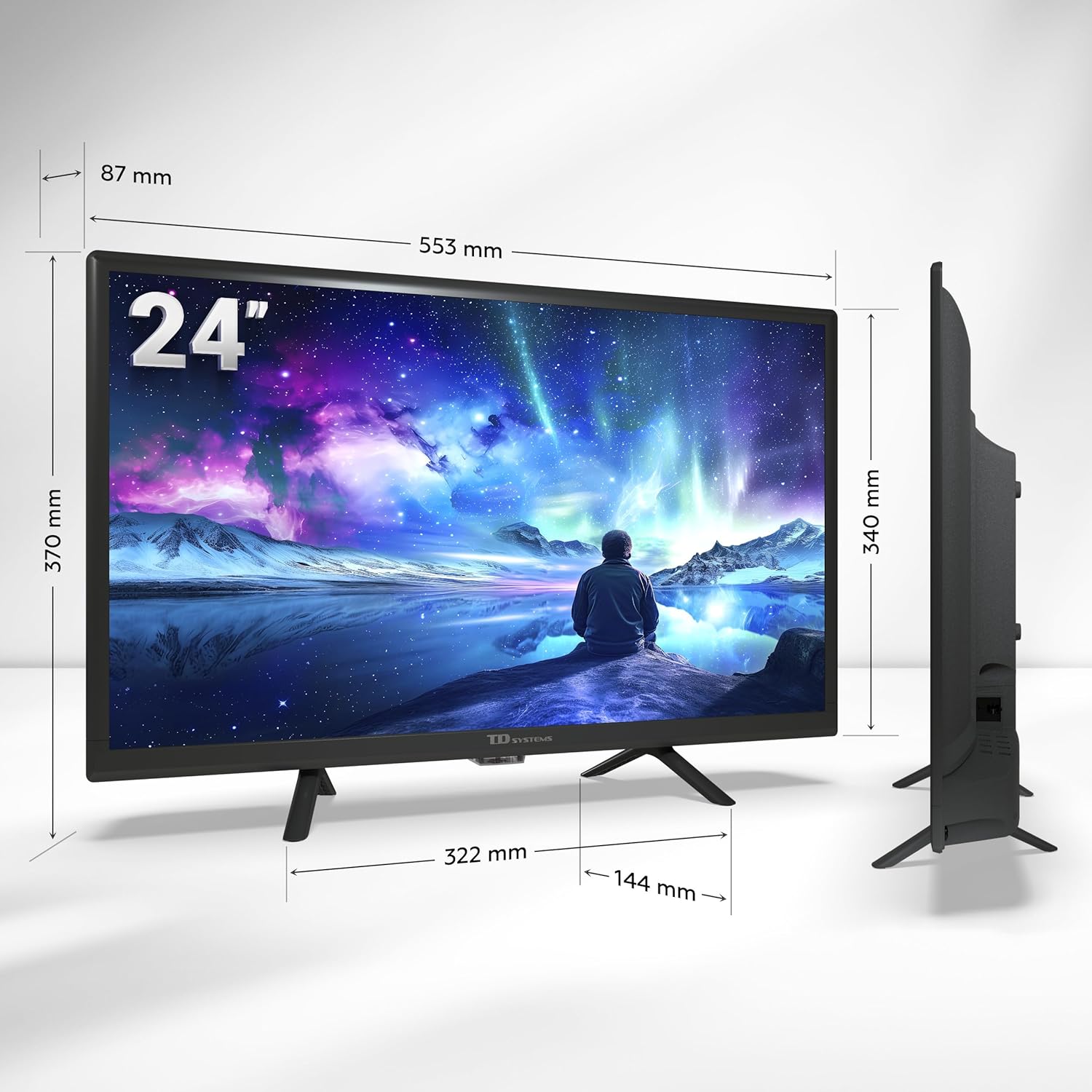
Image: A smartphone displaying content being wirelessly cast to the TD Systems Smart TV, illustrating the Chromecast built-in functionality.
8. Mantenimiento
Proper care ensures the longevity of your TV:
- Limpieza de pantalla: Limpie suavemente la pantalla con un paño suave que no deje pelusa. Para manchas difíciles, utilice una solución de limpieza específica para pantallas y aplíquela al paño, no directamente sobre la pantalla.
- Limpieza de gabinetes: Limpie el mueble del televisor con un paño suave y seco. No utilice limpiadores abrasivos ni disolventes.
- Ventilación: Asegúrese de que las aberturas de ventilación en la parte posterior del televisor no estén bloqueadas para evitar el sobrecalentamiento.
- Cable de alimentación: Revise periódicamente el cable de alimentación para detectar posibles daños.
9. Solución de problemas
Si tiene problemas con su televisor, consulte los siguientes problemas y soluciones comunes:
| Problema | Posible causa | Solución |
|---|---|---|
| Sin poder | Cable de alimentación desconectado; no hay corriente en el tomacorriente. | Verifique la conexión del cable de alimentación; pruebe la toma de corriente con otro dispositivo. |
| No hay imagen, pero hay sonido | Fuente de entrada incorrecta seleccionada; problema con el dispositivo externo. | Presione el Aporte button to select the correct source; check external device connection. |
| No hay sonido, pero hay imagen | Volumen silenciado o demasiado bajo; problema con el sistema de audio externo. | Active el volumen o aumente el nivel; verifique las conexiones a los dispositivos de audio externos. |
| No se puede conectar al Wi-Fi | Contraseña incorrecta; problema con el enrutador; el televisor está demasiado lejos del enrutador. | Vuelva a ingresar la contraseña; reinicie el enrutador; acerque el televisor al enrutador o use Ethernet. |
| El control remoto no funciona | Pilas agotadas o insertadas incorrectamente; obstrucción. | Reemplace las baterías; asegúrese de que la polaridad sea correcta; elimine las obstrucciones entre el control remoto y el televisor. |
Si el problema persiste después de probar estas soluciones, comuníquese con el servicio de atención al cliente.
10. Especificaciones
| Característica | Descripción |
|---|---|
| Marca | Sistemas TD |
| Número de modelo | PRIME24C19GLE |
| Tamaño de pantalla | 24 pulgadas (60 cm) |
| Tecnología de visualización | CONDUJO |
| Resolución | 1366 x 768 píxeles (HD) |
| Frecuencia de actualización | 60 Hz |
| Sistema operativo | Android TV (Android 11) with Google TV |
| Audio | Dolby Digital Plus |
| Sintonizadores | DVB-T2/C/S2 (Digital Terrestrial, Cable, Satellite) |
| Conectividad | 2x HDMI, 1x USB, AV Composite, Headphone Out, Optical Digital Audio Out, CI+, Ethernet (RJ45), Wi-Fi, Bluetooth |
| Características especiales | Google Assistant (Voice Control), Chromecast Built-in, Access to Google Play Store |
| Power Consumption (Energy Efficiency) | Clase E |
| Componentes incluidos | TV, Remote Control, 2x AAA Batteries, 2x Legs |
11. Garantía y soporte
11.1 Garantía del fabricante
This TD Systems Smart TV comes with a Garantía del fabricante de 24 meses A partir de la fecha de compra. Esta garantía cubre defectos de materiales y mano de obra en condiciones normales de uso. Conserve su comprobante de compra para reclamaciones de garantía.
11.2 Atención al cliente
TD Systems is committed to providing high-quality products and exceptional customer service. If you have any questions, require technical assistance, or need to report an issue, please contact our support team. Your satisfaction is our priority.
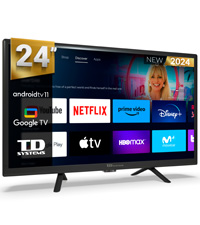
Image: A customer service representative, symbolizing the dedicated support available for TD Systems products.