
1. Introducción
Thank you for choosing the Generic T1000 Ultra Smartwatch. This manual provides essential information for setting up, operating, and maintaining your device. Please read it carefully before use to ensure optimal performance and longevity of your smartwatch.
2. Información de seguridad
- No intente desmontar, reparar ni modificar el dispositivo. Esto podría anular la garantía y causar daños.
- Mantenga el dispositivo alejado de temperaturas extremas, luz solar directa y humedad alta.
- Evite exponer el dispositivo a impactos fuertes o caídas.
- Utilice únicamente los accesorios de carga proporcionados o aprobados.
- Consulte con un profesional médico antes de comenzar cualquier nuevo régimen de ejercicios, especialmente si tiene problemas de salud preexistentes.
- This device is not a medical instrument and should not be used for diagnostic or treatment purposes.
3. Contenido del paquete
Asegúrese de que todos los artículos estén presentes en el paquete:
- Generic T1000 Ultra Smartwatch
- Wireless Charging Cable/Base
- Manual de usuario (este documento)
4. Producto terminadoview
The Generic T1000 Ultra Smartwatch features a modern square design with a touchscreen display, offering various smart functionalities including Bluetooth calls, NFC, fitness tracking, and built-in GPS.

Figure 4.1: Generic T1000 Ultra Smartwatch packaging, displaying the watch face on the box.

Figure 4.2: Generic T1000 Ultra Smartwatch and its wireless charging cable as found inside the product box.
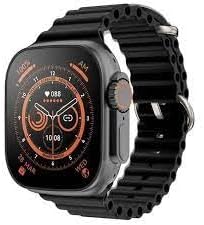
Figura 4.3: Frente view of the Generic T1000 Ultra Smartwatch displaying a digital watch face.
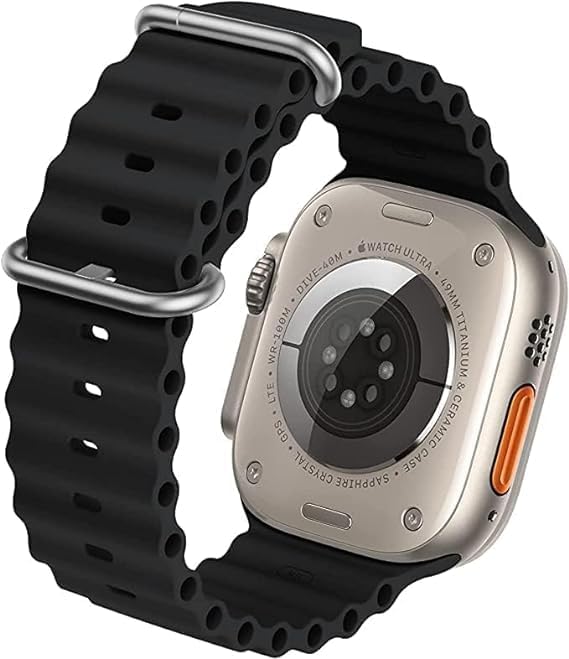
Figura 4.4: Posterior view of the Generic T1000 Ultra Smartwatch, showing the heart rate sensors and charging contacts.
5. Configuración
5.1. Carga del reloj inteligente
Before first use, fully charge your smartwatch. Place the watch on the provided wireless charging base. Ensure the charging contacts on the back of the watch align with the charger. The screen will indicate charging status. A full charge typically takes 2-3 hours.
5.2. Encendido y apagado
- Para encender: Mantenga presionado el botón lateral hasta que la pantalla se ilumine.
- Para apagar: Mantenga presionado el botón lateral, luego seleccione “Apagar” en la pantalla.
5.3. Instalación de la aplicación
To unlock full functionality, download the companion app on your smartphone. Scan the QR code in the watch's settings or search for the app name (usually found in the watch's 'About' section or quick start guide) in your phone's app store (Google Play Store for Android, Apple App Store for iOS).
5.4. Emparejamiento con teléfono inteligente
- Asegúrese de que Bluetooth esté habilitado en su teléfono inteligente.
- Abra la aplicación complementaria en su teléfono inteligente y siga las instrucciones en pantalla para agregar un nuevo dispositivo.
- On your smartwatch, navigate to the Bluetooth settings or pairing mode.
- Seleccione su reloj inteligente de la lista de dispositivos disponibles en la aplicación.
- Confirme la solicitud de emparejamiento tanto en su teléfono inteligente como en su reloj inteligente.
6. Instrucciones de funcionamiento
6.1. Navegación básica
- Pantalla táctil: Desliza el dedo hacia la izquierda/derecha, arriba/abajo para navegar por los menús y las pantallas. Toca para seleccionar.
- Botón lateral: Pulsa para volver a la pantalla de inicio o reactivar el dispositivo. Mantén pulsado para acceder a las opciones de energía.
6.2. Llamadas Bluetooth
Once paired, you can make and receive calls directly from your smartwatch. Access the dialer or call log from the main menu. Ensure your watch is within Bluetooth range of your phone for call functionality.
6.3. Notificaciones
Enable app notifications in the companion app on your smartphone. Your smartwatch will display incoming calls, messages, and app alerts. Swipe down from the top of the watch face to view su centro de notificaciones.
6.4. Seguimiento de la actividad física
The smartwatch includes a pedometer and optical heart rate sensor. Access the fitness tracking features through the dedicated app icons. Data will sync with the companion app on your smartphone for detailed analysis.
6.5. Funcionalidad NFC
The smartwatch supports NFC (Near Field Communication). Refer to the specific instructions within the watch's settings or companion app for details on how to use NFC features, such as mobile payments or access control, if supported by your region and service providers.
6.6. GPS
The built-in GPS allows for accurate tracking of outdoor activities without needing your phone. Ensure GPS is enabled in the watch settings for activities like running or cycling.
7. Mantenimiento
7.1. Limpieza
Wipe the smartwatch and band regularly with a soft, damp cloth. Avoid using harsh chemicals or abrasive materials, which can damage the device. Ensure the watch is dry before charging.
7.2. Resistencia al agua
The T1000 Ultra Smartwatch is water-resistant up to 50 meters. This means it can be used for shallow-water activities like swimming. However, it is not suitable for diving, high-speed water sports, or exposure to hot water/steam (e.g., showers, saunas). Water resistance is not a permanent condition and may decrease over time.
8. Solución de problemas
- El reloj no enciende: Asegúrese de que el reloj esté completamente cargado. Conéctelo al cargador y espere unos minutos antes de volver a encenderlo.
- No se puede emparejar con el teléfono: Check if Bluetooth is enabled on both devices. Ensure the watch is in pairing mode and within range. Try restarting both the watch and phone.
- Datos de fitness inexactos: Ensure the watch is worn snugly on your wrist. Calibrate the pedometer in the companion app if available.
- Las notificaciones no aparecen: Verify that notifications are enabled in both your phone's settings and the smartwatch's companion app. Ensure the watch is connected via Bluetooth.
- Problemas de carga: Check the charging cable and adapter for damage. Ensure the watch is correctly placed on the wireless charging base.
9. Especificaciones
| Característica | Detalle |
|---|---|
| Nombre de marca | Genérico |
| Nombre del modelo | T1000 Ultra |
| Número de modelo | T1000 |
| Sistema operativo | Sistema operativo del reloj inteligente |
| Características especiales | Smart, Wireless, Wireless Charging, Bluetooth |
| Tecnología de conectividad | NFC, Bluetooth |
| Estándar de comunicación inalámbrica | Bluetooth |
| GPS | GPS incorporado |
| Forma del artículo | Cuadrado |
| Estilo | Moderno |
| Color | Negro |
| Tipo de material de la banda | Resina |
| Tipo de material de la caja | Plástico |
| Nivel de resistencia al agua | Resistente al agua |
| Profundidad de resistencia al agua | 50 metros |
| Entrada de interfaz humana | Pantalla táctil |
| Tipo de cierre | Hebilla |
| Aplicación compatible | Rastreador de actividad física |
| Satellite Navigation System Support | Sistema de posicionamiento global (GPS) |
| Tipo de controlador | Control táctil |
| Tipo de medidor | Sensor óptico de frecuencia cardíaca |
| Tipo de cierre | Hebilla |
| Proveedor de servicios inalámbricos | Desbloqueado |
| Connectivity Feature | Bluetooth, NFC |
| Tamaño de la tarjeta SIM | SIM electrónica |
| Dispositivos compatibles | Teléfono inteligente |
| Modelos de teléfonos compatibles | Compatible con teléfonos inteligentes Android e iOS |
| Público objetivo | Adults (Unisex) |
| Descripción del rango de edad | Adulto |
| Wearable Computer Type | Reloj inteligente |
| Tipo de pantalla | OLED or LCD |
| Maximum Screen Brightness | 500 nits |
| Tipo de garantía | Limitado |
10. Garantía y soporte
The Generic T1000 Ultra Smartwatch comes with a limited warranty. Please refer to the warranty card included in your package for specific terms and conditions. For technical support, troubleshooting assistance, or warranty claims, please contact the retailer or manufacturer's customer service through the contact information provided with your purchase.