
1. Introducción
This manual provides comprehensive instructions for the installation, operation, and maintenance of your Hodozzy 8Core+64G Android Car Radio. Please read this manual thoroughly before using the device to ensure proper functionality and safety. Keep this manual for future reference.
2. Características del productoview
The Hodozzy 8Core+64G Android Car Radio is designed to enhance your in-car entertainment and navigation experience. Key features include:
- Rendimiento alto: Powered by an 8-core processor with 4GB RAM and 64GB ROM for smooth operation.
- Amplia compatibilidad: Specifically designed for Ford Escape 2007-2012, Ford Kuga 2007-2012, and Mazda Tribute 2007-2012.
- Conectividad inalámbrica: Supports Wireless CarPlay and Android Auto via Bluetooth for seamless smartphone integration.
- Navegación: Built-in GPS receiver with support for online and offline maps, voice guidance, and real-time traffic information.
- Multimedia: 9-inch IPS touchscreen display, WiFi connectivity for online content, Bluetooth for hands-free calling and audio streaming, FM/RDS radio, and a 32-band Digital Signal Processor (DSP) for enhanced audio.
- Características de seguridad: Steering wheel control compatibility and support for rearview cámaras.

This image illustrates the internal architecture of the car radio, highlighting its 8-core processor, 4GB RAM, and 64GB internal storage. It also shows a comparison of software operation speed, car radio storage, performance, and stability against other systems, indicating superior performance.

This image highlights the 9-inch IPS touchscreen display, demonstrating various user interface (UI) themes and wallpaper options. It emphasizes the visual customization available to the user.
3. Guía de instalación
Se recomienda la instalación profesional de esta radio. Asegúrese de que el vehículo esté desconectado de la alimentación antes de comenzar la instalación.
3.1. Contenido del paquete
Verifique que todos los componentes estén presentes antes de la instalación:

The image provides a detailed packing list, showing all included components such as power cables, RCA cables, rear camera input cable, GPS antenna, USB cable, radio antenna, user manual, microphone, camera, accessories, Canbus, and installation tools. It also includes dimensional drawings of the head unit and frame.
3.2. Conexiones de cableado
Connect the specialized cables according to your vehicle's wiring diagram. The system is designed for plug-and-play installation for compatible models.
- Cable de energía: Conectarse a la fuente de alimentación del vehículo.
- Cables RCA: Para entrada/salida de audio/video.
- Antena GPS: Móntelo en un lugar despejado. view del cielo.
- Cables USB: For external storage or device charging.
- Antena de radio: Conectarse a la antena del vehículo.
- Cable de entrada de cámara trasera: Para conectar la cámara de respaldo.

This image shows various components and functionalities: a specialized wiring harness for installation, an illustration of steering wheel controls, a view from a backup camera with parking guidelines, and a high-definition AHD camera for enhanced rear visibility.
3.3. Montaje de la unidad
Secure the car radio into the dashboard opening using the provided mounting brackets and screws. Ensure a snug fit and proper alignment.

This image provides a visual comparison of a car's dashboard, showing the original setup on the right and the upgraded appearance after installing the Hodozzy car radio on the left.
4. Instrucciones de funcionamiento
4.1. Funcionamiento básico e interfaz de usuario
The 9-inch IPS touchscreen provides a clear and responsive interface. Navigate through menus by tapping and swiping. The system offers 59 customizable user interface options and a selection of wallpapers to personalize your display.

This image showcases the diverse range of customizable desktop themes and wallpapers available on the car radio, allowing users to personalize their interface.
4.2. CarPlay y Android Auto inalámbricos
Connect your smartphone wirelessly via Bluetooth to access CarPlay or Android Auto. This allows for voice control, navigation, messaging, and app access directly from the car radio display.
- Conexión: Enable Bluetooth on your smartphone and pair it with the car radio. Follow the on-screen prompts to activate CarPlay or Android Auto.
- Enlace espejo: Extend your smartphone's screen to the car radio display for viewcontenido.
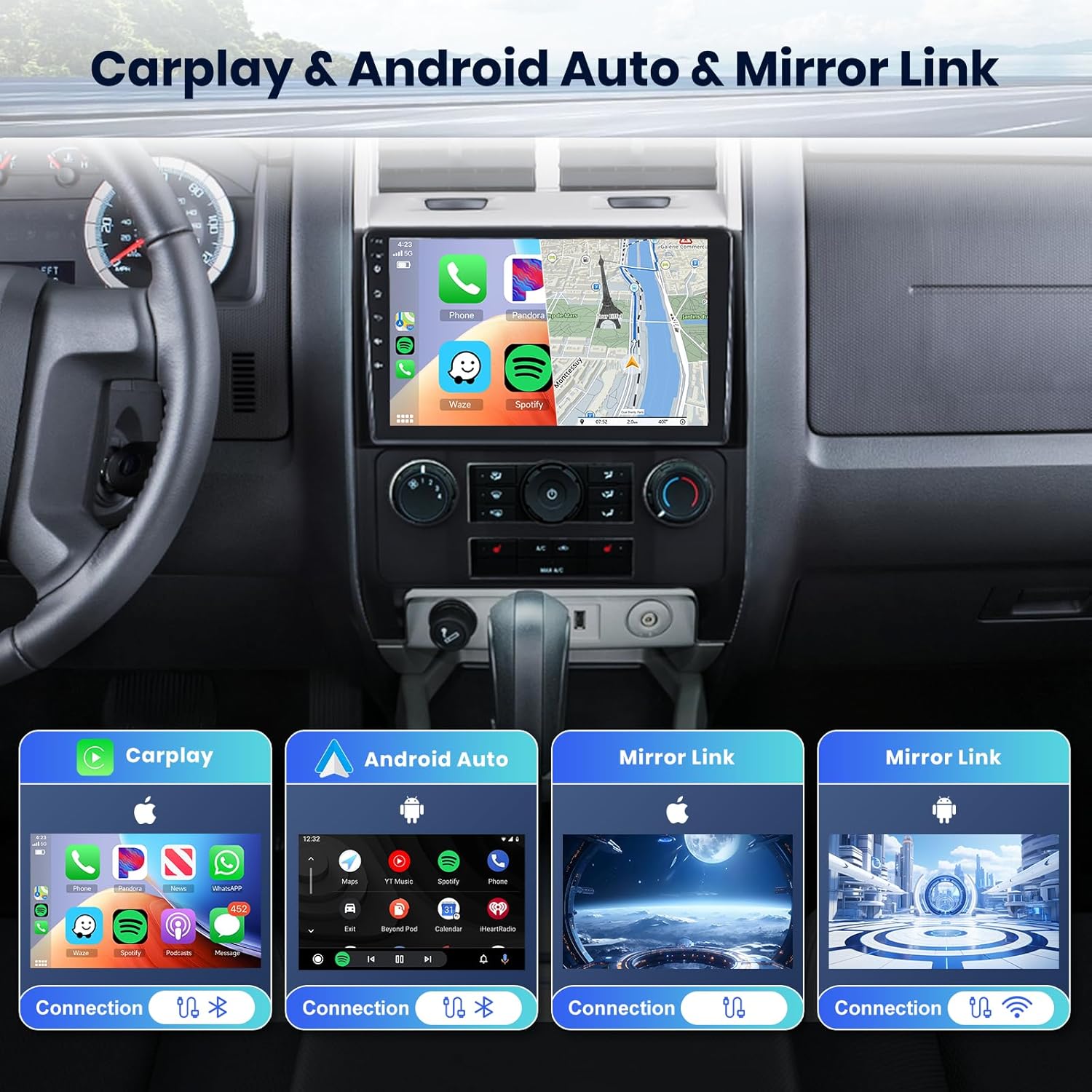
The image displays the car radio's screen integrated into a vehicle dashboard, showcasing the interfaces for Wireless CarPlay, Android Auto, and Mirror Link. Separate icons below detail the connection methods for each feature, emphasizing seamless smartphone integration.

This image shows the car radio screen displaying both Apple CarPlay and Android Auto interfaces, illustrating the seamless integration of smartphone functionalities.
This video demonstrates the functionality of the 8-core car radio, including CarPlay and Android Auto connection processes. It showcases music playback, navigation, video playback, and hands-free calling through these integrated systems.
4.3. Navegación GPS y WiFi
The unit includes a GPS receiver for navigation. Pre-installed offline maps are available, and you can download additional maps or use online navigation via WiFi or hotspot connection.
- Mapas en línea/fuera de línea: Access navigation with voice guidance and real-time traffic updates.
- Conectividad WiFi: Connect to a WiFi network or mobile hotspot to browse the internet and download applications from the app store.

This image illustrates the GPS navigation feature, showing detailed map views for both online and offline use, with a car icon indicating current position.

The image demonstrates the car radio's WiFi connectivity, showing options for online video and music streaming, as well as access to app stores.
4.4. Bluetooth y radio FM/RDS y DSP
Utilize Bluetooth for hands-free calls and wireless audio streaming. The FM radio provides high-quality stereo sound with automatic channel searching and RDS functionality. The integrated 32-band DSP allows for precise audio customization.

This image presents three key audio features: a Bluetooth hands-free calling interface, the FM radio display with RDS functionality, and a detailed 32-band Digital Signal Processor (DSP) equalizer for advanced audio tuning.
4.5. Control del volante (SWC)
The car radio supports existing steering wheel controls, allowing you to manage basic functions such as volume, mode switching, and music selection without taking your hands off the wheel.

The image depicts a steering wheel with control buttons, alongside the car radio screen showing how these buttons can be mapped to control functions like volume adjustment, song switching, and answering calls.
4.6. Trasero View Cámara
Cuando está conectado, la parte traseraview camera automatically displays a clear video feed on the touchscreen when the vehicle is in reverse, making parking and reversing safer.

This image shows the car radio screen displaying a clear rear view from the backup camera, complete with dynamic parking guidelines to assist with reversing.
5. Solución de problemas
Si tiene problemas con la radio de su automóvil, consulte los siguientes problemas y soluciones comunes:
- Sin energía: Revise todas las conexiones eléctricas y la caja de fusibles del vehículo. Asegúrese de que el encendido esté activado.
- Sin sonido: Verifique las conexiones de los altavoces, la configuración del volumen y la selección de la fuente de audio. Compruebe la configuración del DSP.
- Pérdida de señal GPS: Asegúrese de que la antena GPS esté conectada correctamente y tenga un espacio libre view del cielo.
- Problemas de conexión Bluetooth: Asegúrate de que el Bluetooth esté activado tanto en la radio del coche como en tu smartphone. Intenta desvincular y volver a vincular los dispositivos.
- La pantalla táctil no responde: Intente reiniciar la unidad. Si el problema persiste, contacte con el servicio de asistencia.
- El sistema se congela: Perform a soft reset by pressing the reset button (if available) or disconnecting and reconnecting power.
6. Especificaciones
| Característica | Especificación |
|---|---|
| Peso del artículo | 3.69 libras |
| Dimensiones del producto | 9 x 9 x 9 pulgadas |
| Número de modelo del artículo | A7370A3453 |
| Tamaño de la pantalla | 9 pulgadas |
| Comando de voz | Botones, micrófono, pantalla táctil |
| Marca | hodozzy |
| Nombre del modelo | 4G+64G 8 núcleos |
| Tipo de servicio del vehículo | Auto |
| Característica especial | Android Auto, Apple Carplay, Bluetooth, GPS Navigation |
| Tecnología de conectividad | Bluetooth, USB, Wi-Fi |
| Tipo de mapa | Mundial |
| Modo de salida de audio | Digital |
| Tipo de montaje | Montaje en tablero de instrumentos |
7. Garantía y soporte
This product comes with a 2-year warranty. For technical assistance, troubleshooting, or warranty claims, please contact Hodozzy customer support.
Correo electrónico de atención al cliente: hodozzyofficial@163.com
Please provide your model number (A7370A3453) and a detailed description of the issue when contacting support.