
Introducción
Thank you for choosing the Thunderobot K87 Wired Mechanical Keyboard. This manual provides essential information for the proper setup, operation, maintenance, and troubleshooting of your new keyboard. Please read this manual thoroughly before using the product to ensure optimal performance and longevity.

Figura 1: Angulado view of the Thunderobot K87 Mechanical Keyboard.
Configuración
Contenido del paquete
Antes de continuar, verifique que su paquete contenga los siguientes elementos:
- Teclado mecánico con cable Thunderobot K87
- Cable USB
- Manual de usuario (este documento)
Conexión del teclado
- Unpack the Thunderobot K87 keyboard and the included USB cable.
- Connect the USB-C end of the cable to the port located on the keyboard.
- Conecte el extremo USB-A del cable a un puerto USB disponible en su computadora.
- El sistema operativo reconocerá automáticamente el teclado. Normalmente no se requieren controladores adicionales para su funcionalidad básica.

Figura 2: Abajo view of the keyboard, illustrating adjustable feet and cable management options.
Instrucciones de funcionamiento
Funciones básicas
The Thunderobot K87 is a standard 87-key (TKL) layout mechanical keyboard. Simply plug it into your computer, and it is ready for typing. The keyboard features Red mechanical switches, known for their linear feel and quiet operation, making them suitable for both typing and gaming.
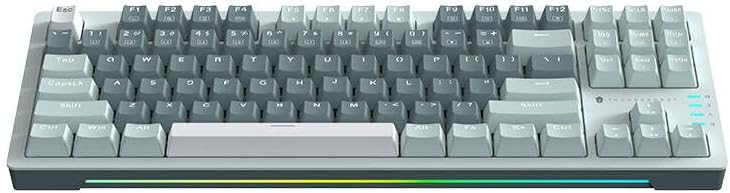
Figura 3: De arriba hacia abajo view of the Thunderobot K87 keyboard layout.
Teclas multimedia y de función
The keyboard includes a Function (Fn) key, typically located near the right Alt key. This key, when pressed in combination with the F1-F12 keys, activates various multimedia and system functions. Refer to the keycap legends for specific functions.
- Fn + F1-F12: Typically control media playback, volume, and other system shortcuts.
- Fn + tecla de Windows: Bloquea/desbloquea la tecla de Windows para evitar pulsaciones accidentales durante el juego.
Control de retroiluminación
The Thunderobot K87 keyboard features customizable RGB backlighting. Specific key combinations allow you to change lighting modes, brightness, and speed. Consult the keyboard's keycap legends or the manufacturer's website for detailed instructions on lighting customization.

Figura 4: Frente view showing the RGB lighting strip.

Figura 5: Perfil lateralfile view demonstrating keycap height and keyboard angle.
Mantenimiento
Limpieza del teclado
La limpieza regular ayuda a mantener la apariencia y la funcionalidad del teclado.
- Desconectar: Desconecte siempre el teclado del ordenador antes de limpiarlo.
- Eliminación de polvo: Utilice una lata de aire comprimido para soplar el polvo y los residuos de entre las teclas.
- Limpieza de superficies: Limpie suavemente las teclas y la superficie del teclado con un paño suave y sin pelusa.ampLimpie con agua o una solución limpiadora suave y no abrasiva. Evite la humedad excesiva.
- Evitar: Do not use harsh chemicals, solvents, or abrasive materials, as these can damage the keyboard's finish or keycap legends.
Almacenamiento
When not in use for extended periods, store the keyboard in a dry, cool place away from direct sunlight and extreme temperatures. Consider covering it to prevent dust accumulation.
Solución de problemas
If you encounter issues with your Thunderobot K87 keyboard, please refer to the following common solutions:
| Problema | Posible causa | Solución |
|---|---|---|
| Teclado no responde | Conexión USB suelta, puerto USB defectuoso, problema con el controlador. | Asegúrese de que el cable USB esté bien conectado. Pruebe con otro puerto USB en su computadora. Reinicie la computadora. |
| Teclas específicas que no funcionan | Escombros debajo de la tecla, mal funcionamiento del interruptor. | Use compressed air to clear debris. If the issue persists, contact customer support. |
| La retroiluminación no funciona o es incorrecta | Lighting mode disabled, software conflict. | Check keyboard's lighting control key combinations (Fn + specific keys). Ensure no conflicting software is running. |
| Retraso en la entrada del teclado | USB port issues, system performance. | Try a different USB port. Close unnecessary background applications. |
If the problem persists after trying these solutions, please contact Thunderobot customer support for further assistance.
Presupuesto
| Característica | Detalle |
|---|---|
| Número de modelo | JM03NQ002 |
| Marca | Thunderobot |
| Conectividad | Cableado (USB) |
| Tipo de interruptor | Interruptores mecánicos rojos |
| Disposición | 87-key (Tenkeyless) |
| Contraluz | RGB |
| Fabricante | Thunderobot |
| ASIN | B0CWS77B83 |
| Garantía | 2 years manufacturer |
Información de garantía
The Thunderobot K87 Wired Mechanical Keyboard (Model JM03NQ002) comes with a Garantía del fabricante de 2 años from the date of purchase. This warranty covers defects in materials and workmanship under normal use. It does not cover damage caused by accident, misuse, abuse, neglect, unauthorized modification, or improper installation.
To claim warranty service, please retain your proof of purchase. For detailed warranty terms and conditions, or to initiate a warranty claim, please contact Thunderobot customer support.
Apoyo
For technical assistance, product inquiries, or warranty claims, please visit the official Thunderobot website or contact their customer support team. Please have your product model number (JM03NQ002) and proof of purchase ready when seeking support.
Official Thunderobot Websitio: www.thunderobot.com (Tenga en cuenta: esto es un marcador de posición) URL ya que no hay soporte específico URL was provided in the product data. Refer to your product packaging or official Thunderobot documentation for the correct support contact information.)