
Cubot X1
Manual de usuario del reloj inteligente CUBOT X1
Modelo: X1
Marca: CUBOT
Introducción
The CUBOT X1 Smartwatch is a robust and versatile device designed to enhance your daily life with advanced health monitoring, extensive sport tracking, and smart connectivity features. This manual provides detailed instructions to help you set up, operate, maintain, and troubleshoot your new smartwatch, ensuring you get the most out of its capabilities.

The CUBOT X1 Smartwatch, showcasing its durable design and water resistance.
Características principales
- Excelente duración de la batería: Equipped with a 480mAh polymer battery, offering up to 100 days standby (low power mode) and 20-30 days of normal daily use.
- Pantalla AMOLED HD de 2.13": A full-touch, high-definition AMOLED screen with 410xRGBx502 resolution, resistant to scratches and wear.
- Más de 100 modos de deporte: Comprehensive tracking for various activities including walking, outdoor running, cycling, rugby, mountaineering, and more.
- Vigilancia Integral de la Salud: Features a VC30F heart rate sensor and MSP860 micropressure sensor for real-time heart rate, blood oxygen saturation, and blood pressure monitoring. Includes sleep tracking and female health data recording.
- Rugged and Highly Water-Resistant: IP68 rating with 20 meters (2 ATM) water resistance, designed to be shockproof, drop-resistant, and heat-resistant.
- Smart Notifications and Bluetooth Calls: Connects to your mobile app via Bluetooth to receive incoming calls, text messages, and social media notifications (Facebook, Instagram, Twitter). Allows convenient answering or rejecting of calls directly from the watch.
- Brújula incorporada: Provides accurate navigation guidance for outdoor activities.
Guía de configuración
1. Desempaquetado y carga inicial
Upon receiving your CUBOT X1 Smartwatch, carefully unbox all components. Before first use, ensure the device is fully charged. Connect the magnetic charging cable to the charging port on the back of the watch and plug the USB end into a compatible power adapter (not included) or a computer USB port. The watch display will indicate charging status.

The CUBOT X1 Smartwatch connected to its magnetic charging cable, illustrating its long battery life capabilities.
2. Instalación y emparejamiento de la aplicación
To unlock the full potential of your CUBOT X1 Smartwatch, download the official companion app on your smartphone. Buscar the app name (usually mentioned in the quick start guide or on the watch screen during initial setup) in your device's app store (Google Play Store for Android, Apple App Store for iOS). Once installed, open the app and follow the on-screen instructions to create an account or log in. Enable Bluetooth on your smartphone and within the app, search for your CUBOT X1. Select your watch from the list of available devices to initiate the pairing process. Confirm the pairing request on both your watch and smartphone.

Connecting the CUBOT X1 Smartwatch via Bluetooth to receive notifications from various applications.
Instrucciones de funcionamiento
Navegando por la interfaz
The CUBOT X1 features a responsive full-touch AMOLED display. Swipe left, right, up, or down to navigate through different menus and functions. The watch also has physical buttons on the side: a 'Power' button and a 'Menu' button. The 'Power' button typically turns the screen on/off or acts as a back button, while the 'Menu' button provides quick access to the main application list or specific functions depending on the context.
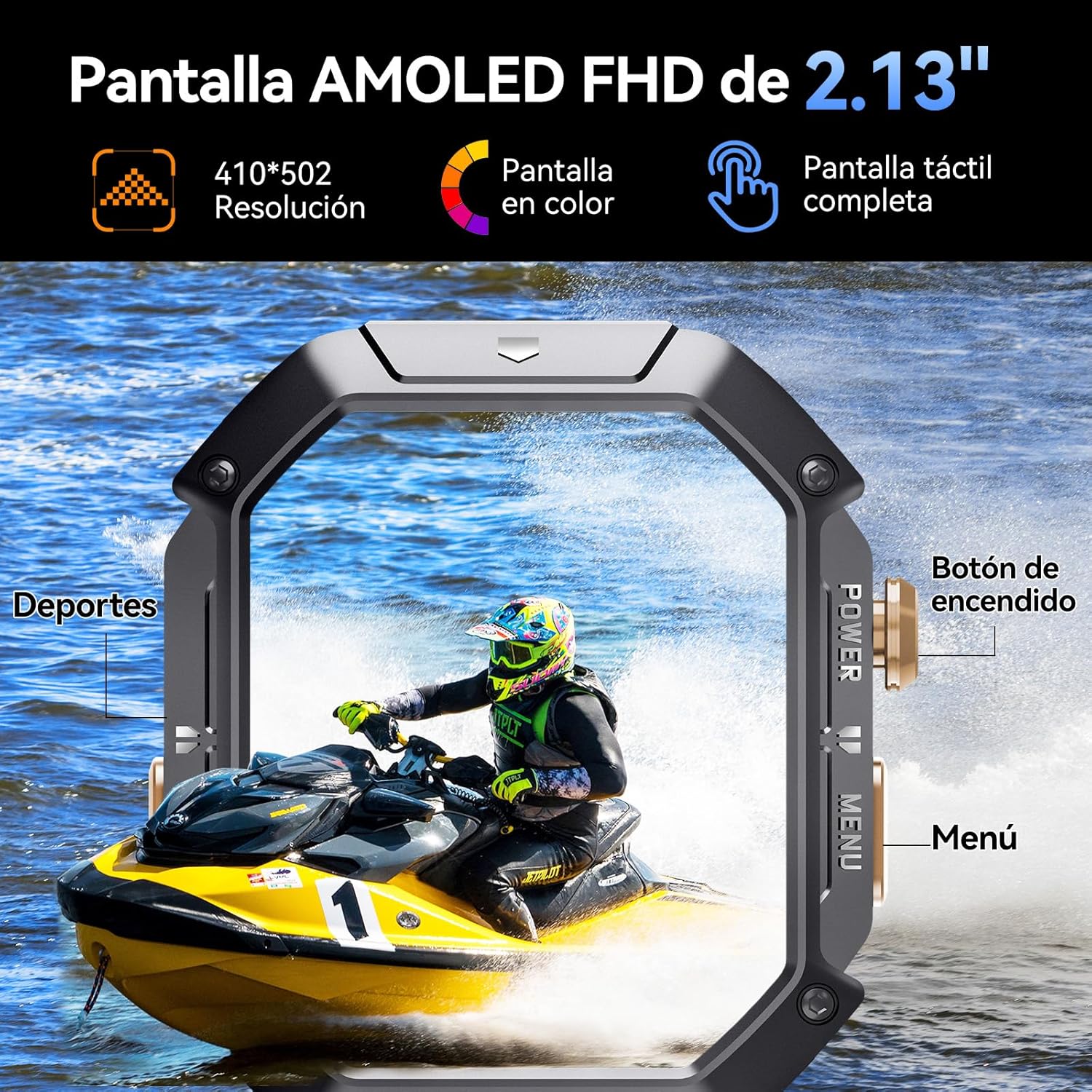
Detallado view of the CUBOT X1 Smartwatch display and its physical buttons for navigation.
Vigilancia de la salud
The CUBOT X1 provides comprehensive health data. To access health monitoring features, navigate to the respective sections on your watch or through the companion app. Ensure the watch is worn snugly on your wrist for accurate readings.
- Frecuencia cardíaca: Monitorización continua de la frecuencia cardíaca durante 24 horas. View Datos en tiempo real y tendencias históricas.
- Oxígeno en sangre (SpO2): Optical sensor for tracking blood oxygen saturation levels.
- Presión arterial: Provides precise blood pressure monitoring and detection.
- Seguimiento del sueño: Monitors deep sleep, light sleep, and REM sleep to help improve sleep habits.
- Salud Femenina: Records and predicts various stages of the menstrual cycle.
- Entrenamiento de respiración: Guides you through breathing exercises to reduce stress.

Encimaview of the 24-hour health monitoring features available on the CUBOT X1 Smartwatch.
Modos deportivos
The CUBOT X1 offers over 100 built-in sport modes. To select a sport mode, navigate to the 'Sport' section on your watch. Choose your desired activity, and the watch will begin tracking relevant metrics such as steps, distance, calories burned, and heart rate. Exercise data is recorded to help you train scientifically.

The CUBOT X1 Smartwatch supports over 100 sport modes for comprehensive daily exercise tracking.
Notificaciones y Llamadas
Once paired with your smartphone via Bluetooth, the CUBOT X1 can display incoming call alerts, text messages, and notifications from various social media applications. You can conveniently answer or reject calls directly from your watch. Ensure app permissions are granted on your smartphone for notifications to appear on the watch.
Personalización
Personalize your CUBOT X1 Smartwatch by changing the watch face. The watch comes with multiple built-in dial backgrounds and menu icon designs. You can also customize the screen with your preferred images through the companion app.

Customize your CUBOT X1 Smartwatch with multiple built-in and personalized watch faces.
Otras funciones
- Navegación con brújula: Provides precise position and direction guidance, ideal for outdoor enthusiasts.
- Pronóstico del tiempo: Syncs with your phone's Bluetooth to display real-time weather information.
- Control de cámara: Remotely control your smartphone's camera to take photos directly from your smartwatch.
Mantenimiento
Limpieza
To maintain the appearance and functionality of your CUBOT X1, regularly clean the watch body and strap. Use a soft, lint-free cloth to wipe away dust and smudges. For stubborn dirt, slightly dampen the cloth with water. Avoid using harsh chemicals or abrasive materials, as these can damage the watch's finish or sensors.
Resistencia al agua
The CUBOT X1 Smartwatch boasts an IP68 rating and 2 ATM water resistance, allowing it to withstand submersion up to 20 meters. This makes it suitable for swimming and various water activities. However, it is not recommended for diving or high-pressure water activities. After exposure to saltwater, rinse the watch with fresh water and dry it thoroughly to prevent corrosion.

The CUBOT X1 Smartwatch is designed for durability with 20-meter water resistance and robust construction.
Cuidado de la batería
To maximize the lifespan of your smartwatch battery, avoid extreme temperatures. Charge the device using only the provided magnetic charging cable. While the watch has excellent battery life, it is advisable to charge it before the battery level drops too low, and avoid leaving it fully discharged for extended periods.
Solución de problemas
| Problema | Solución |
|---|---|
| El dispositivo no enciende | Ensure the battery is charged. Connect the watch to the charger for at least 30 minutes. If it still doesn't turn on, perform a forced restart (refer to quick start guide for specific button combinations). |
| El Bluetooth no se conecta | Ensure Bluetooth is enabled on both the watch and your smartphone. Restart both devices. Forget the device in your phone's Bluetooth settings and try pairing again through the app. Make sure the watch is within range of your phone. |
| Datos de salud inexactos | Asegúrese de que el reloj esté bien ajustado a su muñeca, ni demasiado apretado ni demasiado suelto. Limpie los sensores de la parte trasera del reloj. Evite movimientos excesivos durante las mediciones. |
| Las notificaciones no aparecen | Check if the watch is properly connected via Bluetooth. Verify that notification permissions are enabled for the companion app and individual applications on your smartphone. Ensure 'Do Not Disturb' mode is off on both devices. |
| La pantalla no responde | Reinicia el reloj. Si el problema persiste, asegúrate de que la pantalla esté limpia y seca. |
Presupuesto
| Característica | Detalle |
|---|---|
| Modelo | X1 |
| Mostrar | 2.13" HD AMOLED (410xRGBx502 resolution) |
| Capacidad de la batería | 480 mAh |
| Duración de la batería (uso típico) | 20-30 días |
| Duración de la batería (en espera) | Hasta 100 días |
| Resistencia al agua | IP68, 20 meters (2 ATM) |
| Conectividad | Bluetooth |
| Dispositivos compatibles | Teléfono inteligente, tableta |
| Sistema operativo | Android Wear (compatible con Android/iOS) |
| Sensores | Heart Rate (VC30F), Micropressure (MSP860) |
| Dimensiones | 16.2 x 13.1 x 2.3 cm; 150 g |
Garantía y soporte
The CUBOT X1 Smartwatch comes with a standard manufacturer's warranty. Please refer to the warranty card included in your product packaging for specific terms and conditions, including warranty duration and coverage details. Keep your proof of purchase for warranty claims.
For technical support, troubleshooting assistance beyond this manual, or warranty inquiries, please visit the official CUBOT webSitio web o contacte con su departamento de atención al cliente. La información de contacto suele encontrarse en el empaque del producto o en la marca oficial. websitio.
Recursos en línea:
- Official CUBOT Websitio: www.cubot.net (Please note: This is a general placeholder URL. Refer to your product's specific documentation for the correct support link.)
Ask a question about this manual
Ask about setup, troubleshooting, compatibility, parts, safety, or missing instructions. Manuals+ will review the question and use this page’s manual context to help answer it.