
1. Introducción
This manual provides detailed instructions for the safe and effective use of your iJoy Disney Winnie The Pooh Wireless Bluetooth Speaker. Please read this manual thoroughly before operating the device and retain it for future reference.
2. ¿Qué hay en la caja?
Carefully unpack your speaker and ensure all items are present:
- iJoy Disney Winnie The Pooh Wireless Bluetooth Speaker
- Cable de carga USB
- Cable auxiliar de respaldo
- Manual del propietario (este documento)

Image: The speaker shown next to its retail packaging, illustrating the product and its box.
3. Producto terminadoview
3.1 botones de control
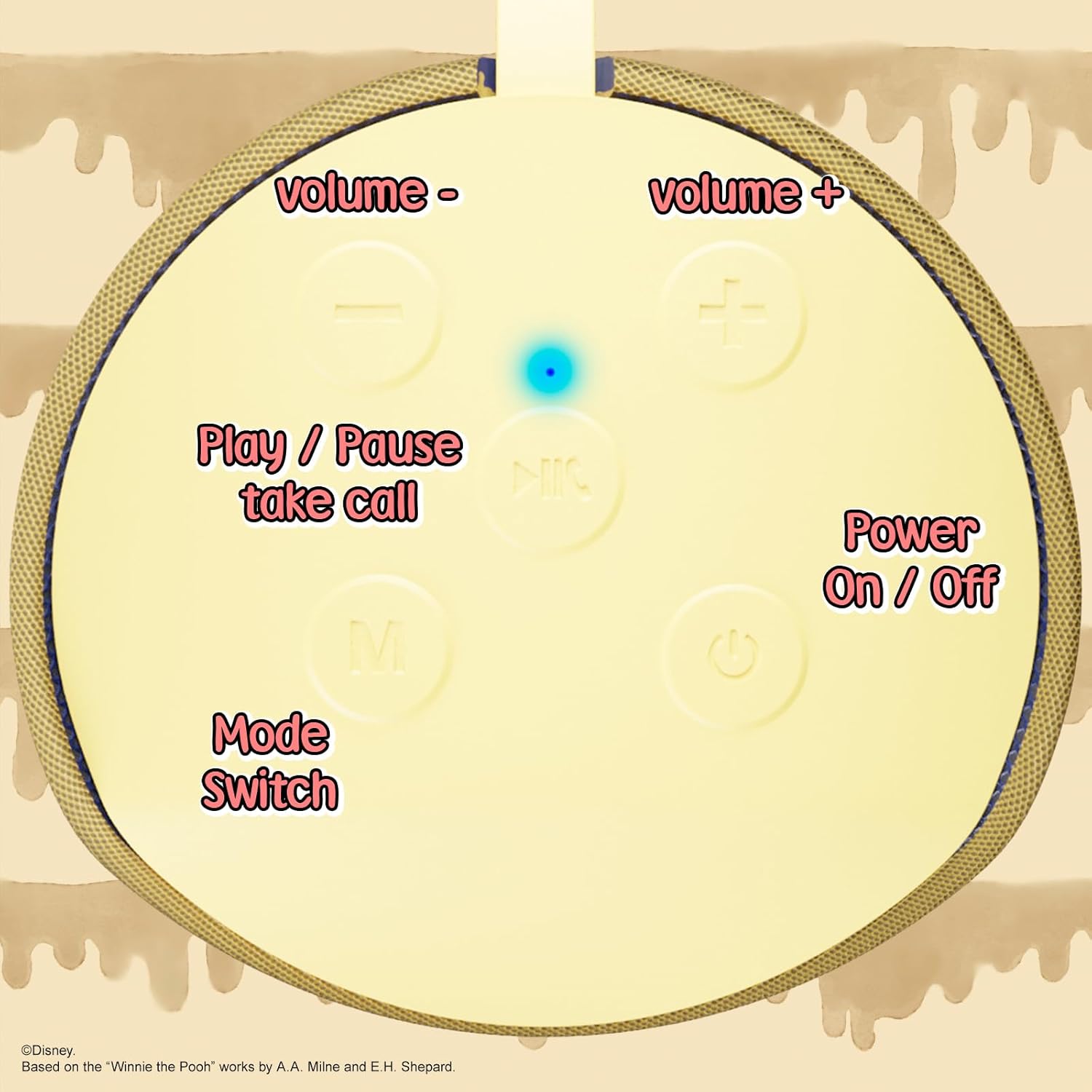
Image: A close-up of the speaker's top panel, displaying the control buttons.
- Botón de encendido / apagado: Mantenga presionado para encender o apagar el altavoz.
- Botón de reproducción/pausa: Press to play or pause audio. Also used to answer or end phone calls.
- Botón de subir volumen (+): Presione para aumentar el volumen. Mantenga presionado para pasar a la siguiente pista.
- Botón para bajar el volumen (-): Presiona para bajar el volumen. Mantén presionado para ir a la pista anterior.
- Botón de cambio de modo (M): Press to switch between Bluetooth, FM Radio, SD Card, and USB modes.
3.2 Puertos e Indicadores

Imagen: Un detalle view of the speaker's rear panel, highlighting the AUX port, SD card slot, USB port, and Micro USB charging port.
- Puerto AUX: For connecting external audio devices via the provided 3.5mm AUX cable.
- Ranura para tarjeta SD: Insert a microSD card for direct audio playback.
- Puerto USB: Inserte una unidad flash USB para la reproducción de audio directa.
- Puerto de carga micro USB: Conecte el cable de carga USB aquí para cargar el altavoz.
- Luz indicadora LED: Indica el estado de carga y el estado de emparejamiento de Bluetooth.
4. Configuración
4.1 Carga del altavoz
- Conecte el extremo Micro USB del cable de carga al puerto de carga Micro USB del altavoz.
- Conecte el extremo USB estándar del cable a un adaptador de corriente USB (no incluido) o al puerto USB de una computadora.
- The LED indicator light will illuminate during charging and turn off once fully charged.
- Una carga completa suele tardar aproximadamente 2 horas.
4.2 Emparejamiento Bluetooth
- Asegúrese de que el altavoz esté completamente cargado.
- Press and hold the Power On/Off button to turn on the speaker. You will hear an audible prompt, and the LED indicator will flash, indicating it's in pairing mode.
- En su dispositivo móvil (teléfono inteligente, tableta, etc.), habilite Bluetooth.
- Buscar available Bluetooth devices. The speaker will appear as "iJoy Winnie The Pooh Speaker" or similar.
- Select the speaker from the list to pair. Once successfully paired, you will hear a confirmation sound, and the LED indicator will stop flashing and remain solid.
- El altavoz se volverá a conectar automáticamente al último dispositivo emparejado cuando se encienda, si el Bluetooth del dispositivo está activo y dentro del alcance.
5. Instrucciones de funcionamiento
5.1 Modo Bluetooth
After successful pairing, you can stream audio wirelessly from your device to the speaker. Use your device's controls or the speaker's Play/Pause, Volume Up/Down buttons to manage playback.
Modo de radio 5.2 FM
- Presione el botón Mode (M) para cambiar al modo de radio FM.
- Presione el botón Reproducir/Pausa para escanear y guardar automáticamente las estaciones de FM disponibles.
- Utilice los botones Subir volumen (+) y Bajar volumen (-) (pulsación corta) para navegar entre las estaciones guardadas.
5.3 SD Card / USB Playback
- Insert a microSD card into the SD card slot or a USB flash drive into the USB port.
- El altavoz cambiará automáticamente al modo correspondiente y comenzará a reproducir audio. files. If not, press the Mode (M) button to select the correct mode.
- Use the speaker's Play/Pause, Volume Up/Down buttons to control playback.
5.4 Modo auxiliar
- Connect one end of the provided 3.5mm AUX cable to the speaker's AUX port.
- Conecte el otro extremo a la toma de auriculares de su dispositivo de audio.
- The speaker will automatically switch to AUX mode. If not, press the Mode (M) button.
- Control playback and volume primarily from your connected audio device.
5.5 Llamadas manos libres
Cuando se conecta mediante Bluetooth a un teléfono inteligente:
- Responder llamada: Presione el botón Reproducir/Pausa una vez.
- Finalizar llamada: Presione el botón Reproducir/Pausa una vez durante una llamada.
- Rechazar llamada: Mantenga presionado el botón Reproducir/Pausar.
6. Mantenimiento
- Limpie el altavoz con un paño suave y seco. No utilice limpiadores abrasivos ni disolventes.
- The speaker is IPX4 splashproof, meaning it can withstand splashes of water. Do not submerge it in water.
- Guarde el altavoz en un lugar fresco y seco cuando no esté en uso.
- Evite exponer el altavoz a temperaturas extremas, luz solar directa o humedad alta.
7. Solución de problemas
| Problema | Posible causa | Solución |
|---|---|---|
| El altavoz no se enciende | Batería baja | Cargue el altavoz completamente. |
| No se puede emparejar a través de Bluetooth | Speaker not in pairing mode / Device Bluetooth off / Too far from device | Asegúrate de que el altavoz esté en modo de emparejamiento (LED parpadeante). Activa el Bluetooth en tu dispositivo. Acerca el altavoz al dispositivo (a menos de 30 metros). |
| Sin sonido | Volume too low / Incorrect mode / Device not playing audio | Increase speaker and device volume. Press 'M' button to select correct mode. Ensure audio is playing on your connected device. |
| La recepción de radio FM es deficiente | Weak signal / Interference | Move the speaker to a different location. The AUX cable can act as an antenna; try connecting it. |
8. Especificaciones

Image: The speaker with visual indicators showing its height of 6.3 inches and width of 2.9 inches.
| Característica | Detalle |
|---|---|
| Número de modelo | SS-KH7C-FS4O |
| Tecnología de conectividad | Bluetooth |
| Rango de comunicación inalámbrica | Hasta 30 pies (10 metros) |
| Tipo de altavoz | Torre |
| Potencia máxima de salida del altavoz | 20 vatios |
| Modo de salida de audio | Mononucleosis infecciosa |
| Capacidad de la batería | 800 miliamp Horas |
| Tiempo de carga | Aproximadamente 2 horas |
| Recreo | Up to 3 Hours (depending on volume and usage) |
| Nivel de resistencia al agua | IPX4 (a prueba de salpicaduras) |
| Dimensiones del producto | 3" de profundidad x 3" de ancho x 6" de alto (7.62 cm de profundidad x 7.62 cm de ancho x 15.24 cm de alto) |
| Peso del artículo | 8 onzas (226.8 gramos) |
| Componentes incluidos | Bluetooth Speaker, USB Charging Cable, Backup AUX Cable, Owners Manual |
| Características especiales | Built-in Microphone, LED Indicator Lights, Portable, SD Card Slot, USB Port, FM Radio |
9. Garantía y soporte
9.1 Información de garantía
This iJoy Disney Winnie The Pooh Wireless Bluetooth Speaker comes with a 90-day manufacturer's warranty from the date of purchase. This warranty covers manufacturing defects and workmanship under normal use. It does not cover damage caused by misuse, accidents, unauthorized modifications, or normal wear and tear.
9.2 Atención al cliente
For technical assistance, warranty claims, or further inquiries, please contact iJoy customer support through their official website or the retailer where the product was purchased. Please have your model number (SS-KH7C-FS4O) and proof of purchase ready.