
1. Introducción
The TRIGKEY Key Mini N150 is a compact and efficient mini PC designed for various computing tasks, including office work, 4K video playback, web browsing, and educational use. It features an Intel Alder Lake N150 processor, DDR5 memory, and SSD storage, offering stable performance in a small form factor.
2. ¿Qué hay en la caja?
Verifique que todos los artículos estén presentes en el paquete:
- 1 x TRIGKEY Mini PC
- 1 x adaptador de corriente
- 1 cable HDMI
- 1 x Manual de usuario

This image displays the contents of the TRIGKEY Key Mini N150 package, including the mini PC unit, power adapter, HDMI cable, and the user manual.
3. Producto terminadoview
3.1. Características externas y puertos
The Key Mini N150 features a sleek and compact design, making it suitable for various environments. The front and rear panels provide essential connectivity options.

This image illustrates the front and rear interfaces of the mini PC. The front includes a power button, USB-C (data), and USB 3.2 ports. The rear panel features DC IN, two HDMI ports, multiple USB 3.2 ports, a 3.5mm audio jack, a CLR CMOS button, and a 2.5G LAN port.
3.2. Componentes internos
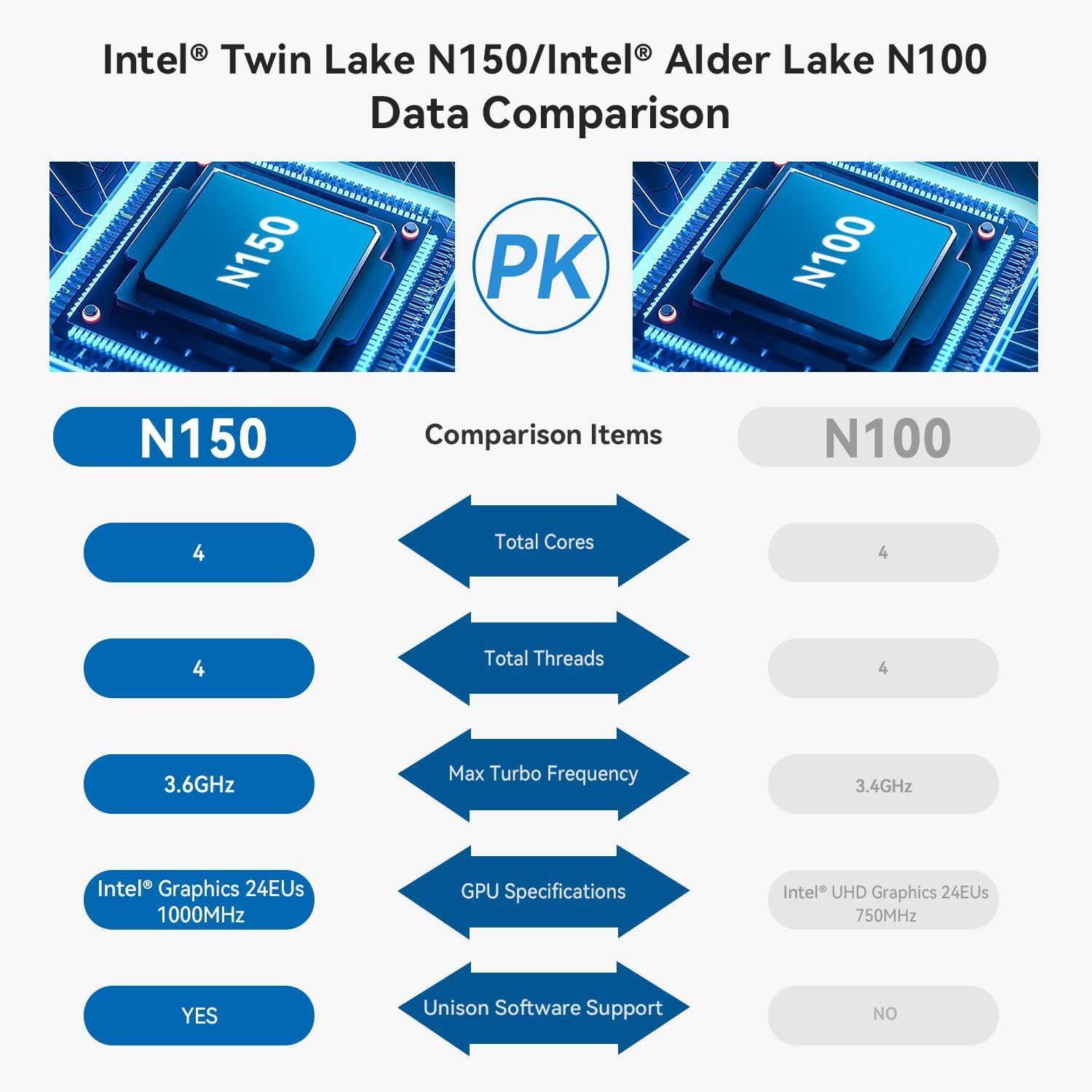
The mini PC is equipped with an Intel Twin Lake N150 Processor, 16GB DDR5 4800MHz RAM, and a 500GB SSD. It supports dual M.2 PCIe 3.0 SSDs for expanded storage.

Esta imagen proporciona una visión interna view of the mini PC, highlighting the DDR5 SODIMM memory module and the two M.2 SSD slots, one M.2 PCIe 3.0 x4 and one M.2 PCIe 3.0 x1.
3.3. Sistema de refrigeración
An innovative airflow design with a dust filter ensures stable operation and quiet performance by efficiently dissipating heat.

This image shows the underside of the mini PC, illustrating the new airflow design with a visible cooling fan and dust filter, designed for stable and quiet operation.
3.4. Vídeo del producto terminadoview
This official TRIGKEY video provides a visual overview of the Key Mini N150, showcasing its compact design, internal components, and key features like the Intel Twin Lake N150 processor and DDR5 memory.
4. Instrucciones de configuración
4.1. Conexión de periféricos
- Conectar monitor(es): Use the provided HDMI cable to connect your monitor(s) to the HDMI ports on the rear of the mini PC. The device supports dual 4K@60Hz displays.
- Conectar el teclado y el ratón: Plug your USB keyboard and mouse into any available USB 3.2 ports.
- Conectarse a la red (opcional): Para una conexión por cable, conecte un cable Ethernet al puerto LAN de 2.5 G. Para una conexión inalámbrica, asegúrese de que su red Wi-Fi esté disponible durante la configuración inicial.
4.2. Encendido
- Conecte el adaptador de corriente: Plug the power adapter into the DC IN port on the rear of the mini PC, then connect it to a power outlet.
- Encendido: Press the power button located on the front panel of the mini PC. The power indicator light will illuminate.
4.3. Configuración inicial del sistema operativo
Upon first boot, the operating system (WOS) will guide you through the initial setup process. Follow the on-screen instructions to configure language, region, network, and user accounts.
5. Instrucciones de funcionamiento
5.1. Funcionamiento básico
- Encendido/apagado: Press the power button to turn on the PC. To turn off, use the operating system's shutdown function. A short press of the power button can put the PC to sleep.
- Reanudar: Utilice la función de reinicio del sistema operativo.
5.2. Configuración de pantalla dual
The Key Mini N150 supports connecting two monitors simultaneously via its two HDMI ports for extended desktop or mirrored display modes. Configure display settings within your operating system.
5.3. Conectividad de red
- Wired (2.5G LAN): Connect an Ethernet cable to the LAN port for high-speed internet access.
- Inalámbrico (Wi-Fi 6): The integrated Intel AX101 Wi-Fi 6 module provides fast and stable wireless connectivity. Access Wi-Fi settings in your operating system to connect to available networks.
5.4. Bluetooth Devices
The mini PC includes Bluetooth 5.2 for connecting wireless peripherals such as keyboards, mice, headphones, and speakers. Pair devices through the Bluetooth settings in your operating system.
5.5. Intel Unison App Integration
Utilize the Intel Unison App to seamlessly connect your PC with mobile devices. This allows for features such as viewing photo galleries, transferring files, extending your PC screen to a tablet, making/receiving phone calls, and managing notifications.
This image illustrates the capabilities of the Intel Unison App, enabling users to connect their PC and mobile devices for features like photo viewción, file transfer, screen extension, calls, and notifications.
6. Especificaciones
| Característica | Especificación |
|---|---|
| Procesador | Intel Alder Lake N150 (4C/4T, up to 3.6GHz) |
| Coprocesador gráfico | Gráficos Intel 24EUs 1000 MHz |
| RAM | 16 GB DDR5 4800 MHz |
| Almacenamiento | 500GB SSD (supports dual M.2 PCIe 3.0 SSDs) |
| Resolución máxima de pantalla | 3840 x 2160 píxeles (4K) |
| Salida de pantalla | 2 x HDMI (Max 4K 60Hz) |
| Conectividad inalámbrica | Wi-Fi 6 (Intel AX101), Bluetooth 5.2 |
| Red local | Ethernet de 2.5 Gbps |
| Puertos USB | 4 x USB 3.2 (10Gbps), 1 x USB-C (Data 10Gbps) |
| Conector de audio | 1 x conector de audio de 3.5 mm |
| Sistema operativo | WOS |
| Peso del artículo | 1.81 libras |
| Dimensiones | 6.06 x 5.98 x 3.03 pulgadas |
| Color | Negro |
7. Mantenimiento
7.1. Limpieza
To maintain optimal performance and longevity, regularly clean the exterior of the mini PC with a soft, dry cloth. Ensure the ventilation openings are free from dust and obstructions. Do not use liquid cleaners directly on the device.
7.2. Expansión de almacenamiento
The Key Mini N150 supports dual M.2 PCIe 3.0 SSDs. To expand storage, you can install an additional M.2 2280 SSD in the available slot. Refer to the detailed instructions for opening the chassis and installing components if you are comfortable with hardware modifications. It is recommended to back up data before any hardware changes.
7.3. Actualizaciones de software
Regularly update your operating system and drivers to ensure system stability, security, and optimal performance. Check for updates through your operating system's settings.
8. Solución de problemas
8.1. Sin energía
- Asegúrese de que el adaptador de corriente esté conectado de forma segura tanto a la mini PC como a una toma de corriente que funcione.
- Verifique que la toma de corriente funcione enchufando otro dispositivo.
- Pruebe con un adaptador de corriente diferente si está disponible y es compatible.
8.2. No hay salida de pantalla
- Check that the HDMI cable is securely connected to both the mini PC and the monitor.
- Asegúrese de que el monitor esté encendido y configurado en la fuente de entrada correcta (HDMI 1, HDMI 2, etc.).
- Pruebe con un cable HDMI o monitor diferente si es posible.
8.3. Problemas de conectividad de red
- Wired: Verifique la conexión del cable Ethernet. Verifique que su enrutador/módem funcione correctamente.
- Inalámbrico: Ensure Wi-Fi is enabled in the operating system. Check if the correct Wi-Fi network is selected and the password is entered correctly. Restart your router/modem.
8.4. System Unresponsive / Boot Issues
- Perform a hard shutdown by pressing and holding the power button for 5-10 seconds. Then restart the PC.
- CLR CMOS: If experiencing persistent boot issues or BIOS configuration problems, locate the CLR CMOS button on the rear panel. With the PC powered off and disconnected from power, press this button (often requires a paperclip) to reset BIOS settings to default. Reconnect power and attempt to boot.
9. Garantía y soporte
TRIGKEY provides comprehensive support for its products:
- Garantía: Garantía de 1 año sin preocupaciones.
- Apoyo técnico: Soporte técnico de por vida.
- Servicio al cliente: Servicio al cliente 24 horas.
For any questions or assistance, please contact TRIGKEY customer service. Refer to the official TRIGKEY webSitio para obtener la información de contacto más actualizada.