
NOYAFA NF-859G
Manual del usuario del comprobador de cables de red NOYAFA NF-859G
Model: NF-859G | Brand: NOYAFA
Introducción
The NOYAFA NF-859G is a versatile network cable tester designed for comprehensive network cable testing. It integrates multiple functions including wire detection, alignment testing, crimping testing, PoE detection, visual fault location (VFL), and an LED flashlight. This manual provides detailed instructions for the proper setup, operation, maintenance, and troubleshooting of your device.
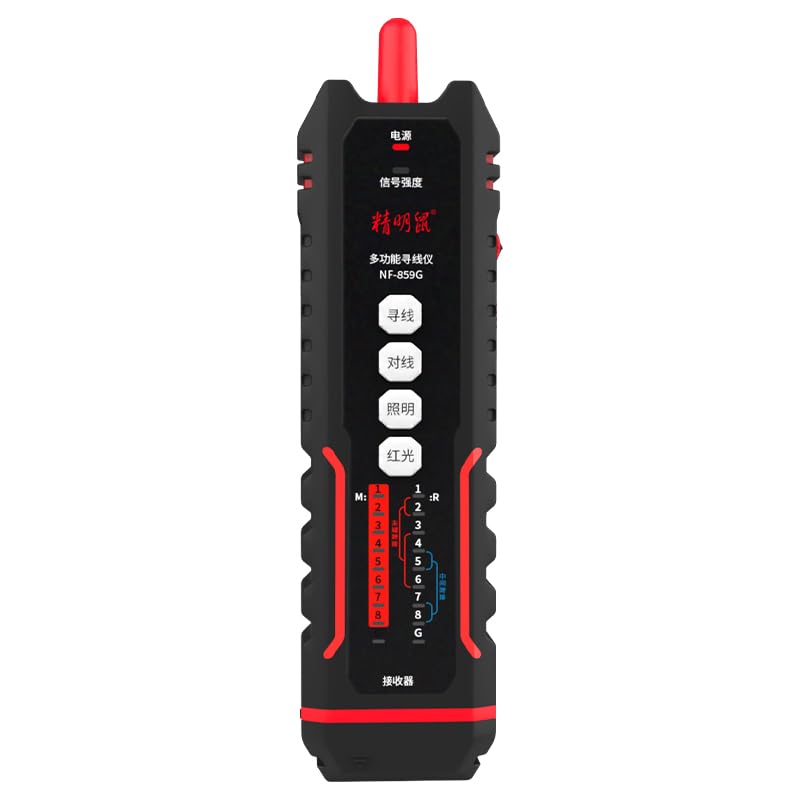
Image: The NOYAFA NF-859G Network Cable Tester, showing the main unit and the receiver.
Configuración
Desembalaje e inspección inicial
Carefully unpack the NOYAFA NF-859G Network Cable Tester. Verify that all components are present and undamaged. The package should include:
- Unidad de prueba principal
- Receiver (auxiliary machine)
- Manual de usuario (este documento)
- Nota: Las baterías no están incluidas y deben comprarse por separado.
Instalación de la batería
- Locate the battery compartment on the main tester unit and the receiver.
- Abra la tapa del compartimiento de la batería.
- Insert the required batteries, ensuring correct polarity (+/-). The device uses a 3.7V lithium polymer battery.
- Cierre bien la tapa del compartimento de la batería.
Instrucciones de funcionamiento
The NOYAFA NF-859G offers various testing modes. Familiarize yourself with the device's interface before operation.
Función de detección de cables
This function allows for tracing and locating cables. It supports both anti-interference mode and ordinary mode.
- Connect the cable to be traced to the main unit's appropriate port (RJ45/RJ11).
- Select the wire detection mode on the main unit.
- Use the receiver to trace the cable. The receiver will emit an audible signal when near the cable.
- Switch between anti-interference mode and ordinary mode as needed for optimal tracing in different environments.
Alignment Test (Cable Mapping)
Perform local and remote alignment tests to check for open circuits, short circuits, cross-overs, and split pairs in network cables.
- For local alignment test, connect both ends of the cable to the main unit.
- For remote alignment test, connect one end of the cable to the main unit and the other end to the receiver.
- Initiate the alignment test. The display will show the wiring status of the cable.
Prueba de prensado
Verify the proper crimping of RJ11 and RJ45 connectors.
- Insert the crimped RJ11 or RJ45 connector into the corresponding port on the main unit.
- Select the crimping test function. The device will indicate if the crimping is correct or if there are faults.
PoE (Power over Ethernet) Detection
Identify the power supply wire core and detect mid-span or end-span PoE configurations.
- Connect the network cable with PoE to the main unit.
- Activate the PoE detection function. The device will display information about the PoE type and power status.
Localizador visual de fallas (VFL)
The integrated 20mw red light function helps locate breaks and bends in fiber optic cables.
- Connect the fiber optic cable to the VFL port.
- Activate the VFL. A red laser light will be emitted.
- Observe the cable for light leakage, which indicates a fault.
- Caution: Avoid direct eye exposure to the laser light.
Linterna LED
The built-in LED flashlight provides illumination in dark working environments.
- Press the dedicated flashlight button to turn it on or off.
Mantenimiento
Proper maintenance ensures the longevity and accuracy of your NOYAFA NF-859G Network Cable Tester.
- Limpieza: Utilice un paño suave y seco para limpiar el dispositivo. No utilice limpiadores abrasivos ni disolventes.
- Almacenamiento: Guarde el dispositivo en un lugar fresco y seco, alejado de la luz solar directa y de temperaturas extremas. Si lo va a guardar durante un tiempo prolongado, retire las pilas para evitar fugas.
- Reemplazo de batería: Replace batteries when the low battery indicator appears. Always use the specified battery type (3.7V lithium polymer).
- Manejo: Evite dejar caer el dispositivo o someterlo a fuertes impactos.
Solución de problemas
This section addresses common issues you might encounter with your NOYAFA NF-859G.
| Problema | Posible causa | Solución |
|---|---|---|
| El dispositivo no se enciende. | Baterías bajas o agotadas; instalación incorrecta de la batería. | Check battery indicator. Replace batteries or ensure they are installed with correct polarity. |
| Resultados inexactos de la prueba del cable. | Damaged test cable; incorrect test mode selected; dirty connectors. | Use a known good test cable. Ensure the correct test mode (e.g., alignment test) is selected. Clean connectors. |
| Wire tracing signal is weak or absent. | Cable is shielded; interference from other cables; low battery on receiver. | Switch to anti-interference mode. Ensure receiver batteries are charged. Try tracing in a less congested area. |
| VFL red light is dim or not working. | Low battery; VFL port obstruction; internal fault. | Check battery level. Ensure VFL port is clean and unobstructed. If problem persists, contact support. |
Presupuesto
Key technical specifications for the NOYAFA NF-859G Network Cable Tester:
- Número de modelo: NF-859G
- Marca: NOYAFA
- Nombre genérico: Probador de cable de red
- Tecnología de conectividad: Ethernet
- Fuente de energía: Battery Powered (3.7V lithium polymer battery)
- Componentes incluidos: Main Tester Unit, Receiver (auxiliary machine)
- VFL Output Power: 20mw (Red Light Function)
- Wire Detection Modes: Anti-interference mode, Ordinary mode
- Conectores compatibles: RJ45, RJ11
- Tipos de cables admitidos: CAT5, CAT6, CAT5E, CAT6A
- Peso del artículo: 420 gramos
- Dimensiones del paquete: 28.8 x 16.6 x 5.3 cm
- Color: Negro
- Fabricante: NOYAFA
Garantía y soporte
For warranty information or technical support, please refer to the official NOYAFA webVisite el sitio web o contacte a su distribuidor local. Conserve el recibo de compra como comprobante para reclamaciones de garantía.
Fabricante: NOYAFA
Fecha de primera disponibilidad: 22 de septiembre de 2024
Para obtener más ayuda, visite el sitio web NOYAFA Brand Store on Amazon.