
1. Producto terminadoview
This manual provides instructions for the REOLINK 5MP PoE Outdoor Security Camera system, which includes two RLC-540A cameras and one RLN8-410 4K 8-Channel PoE Network Video Recorder (NVR) with a pre-installed 2TB hard drive. This system is designed for comprehensive outdoor surveillance, offering high-resolution video, advanced detection capabilities, and robust construction.

Imagen 1.1: Másview of the REOLINK 5MP PoE Security Camera System, showing two dome cameras, the NVR unit, and a 2TB hard drive.
2. ¿Qué hay en la caja?
- 2 x REOLINK RLC-540A 5MP PoE Outdoor Security Cameras
- 1 x REOLINK RLN8-410 4K 8-Channel PoE NVR (with pre-installed 2TB HDD)
- 2 x 1-meter Network Cables (for testing purposes)
- Adaptador de corriente NVR
- Ratón USB
- Cable HDMI
- Tornillos y anclajes de montaje
- Tapa impermeable para conector de red
- Guía de inicio rápido
3. Características principales
- Resolución Super HD de 5 MP: Capture clear and detailed images with 2592x1944 resolution.
- Visión nocturna en color: Equipped with warm spotlights to provide full-color video even in low-light conditions.
- IK10 a prueba de vandalismo: Robust construction designed to withstand impacts and protect against vandalism.
- Resistente a la intemperie IP67: Certified for outdoor use, resistant to dust and water ingress.
- Detección inteligente: Advanced technology for accurate detection of persons, vehicles, and animals, reducing false alarms.
- Alimentación a través de Ethernet (PoE): Simplifica la instalación al suministrar energía y datos a través de un único cable Ethernet.
- Disco duro preinstalado de 2 TB: Proporciona ampEl almacenamiento para grabación continua 24 horas al día, 7 días a la semana.
- Almacenamiento expandible: Supports up to 6TB external hard drive for extended recording capacity.
- Acceso remoto: Monitor your property from anywhere using the Reolink App or Client software.
- Audio bidireccional: (Implied by '2-way audio' icon in smart detection image) Communicate directly through the camera.
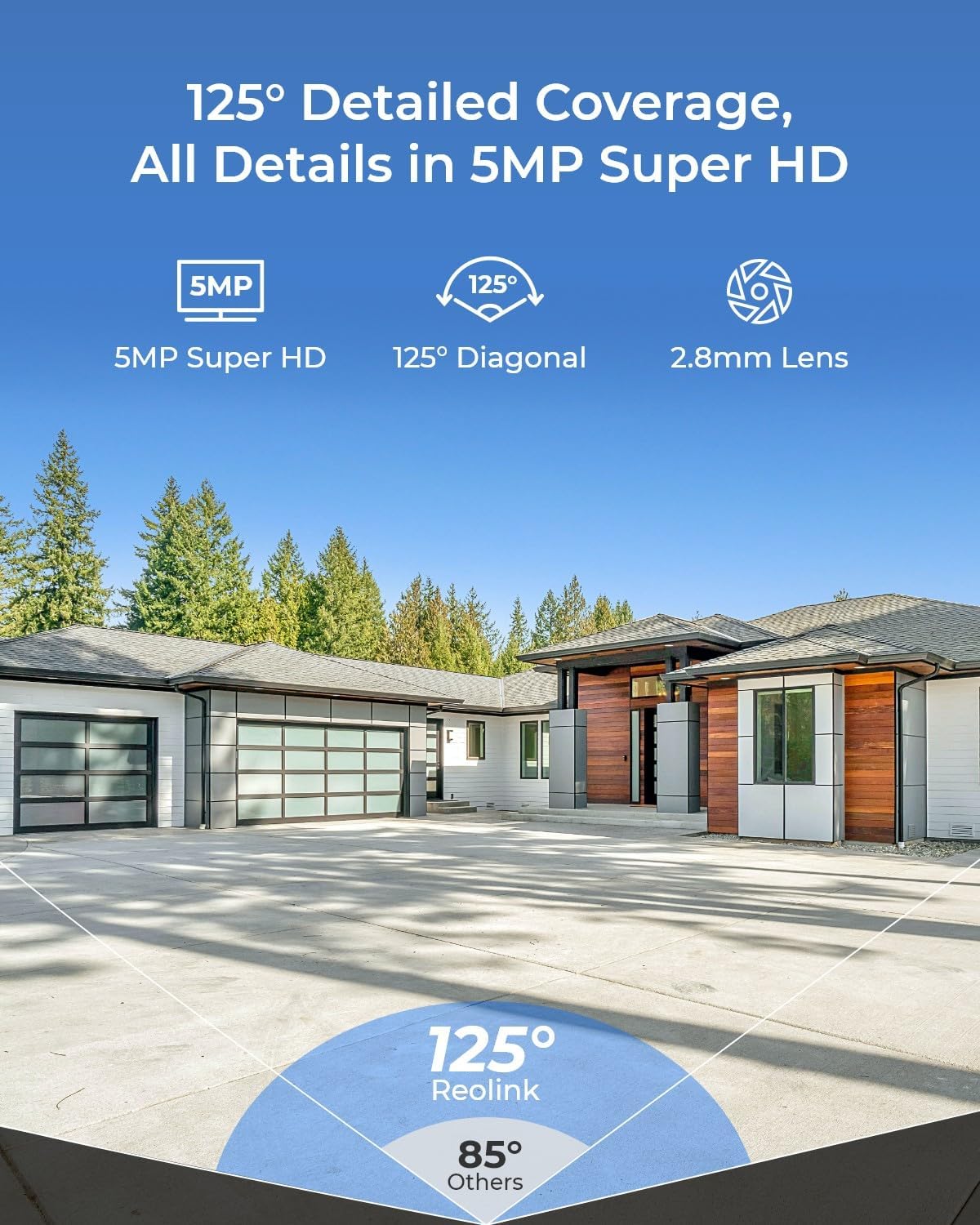
Image 3.1: Illustration of the camera's 125-degree diagonal field of view, providing detailed coverage in 5MP Super HD.

Image 3.2: Close-up of the RLC-540A camera, highlighting its IK10 vandal-proof and IP67 weatherproof design for reliable outdoor use.

Image 3.3: Comparison showing standard night vision (left) versus color night vision with 3000K warm light (right), capturing true-to-life details at night.

Image 3.4: Depiction of smart detection capabilities, identifying persons, vehicles, and animals, triggering instant alerts via push notifications and email.
4. Configuración e instalación
4.1 métodos de conexión
The RLC-540A cameras support Power over Ethernet (PoE) for simplified installation. Alternatively, they can be powered via a DC 12V power adapter (not included).

Image 4.1: Diagrams illustrating two connection methods: 01. PoE, where the camera connects to a PoE Switch/Reolink NVR (not included) or router via an Ethernet cable for both power and data; and 02. CC, where the camera connects to a router via an Ethernet cable and is powered by a DC 12V adapter (not included).
4.2 Pasos de configuración inicial
- Encienda la cámara: Connect the camera using either the PoE or DC method as shown above.
- Perform the initial setup: Scan the QR code on the camera via the Reolink App/Client or directly view the camera on the NVR UI to complete the setup process.

Image 4.2: Visual representation of an easy PoE connection, demonstrating how a single Ethernet cable provides both power and network connectivity to the camera from the NVR.
5. Operar el sistema
5.1 Grabación y almacenamiento de vídeo
The RLN8-410 NVR comes with a 2TB hard drive pre-installed, supporting 24/7 continuous recording. The storage capacity can be expanded up to 6TB with an external HDD.

Image 5.1: Illustration of the NVR's expandable storage, featuring a pre-installed 2TB HDD and support for up to 6TB external HDD. A table indicates recording duration based on the number of active channels.
5.2 Remote Access and Management
Access your camera feeds and NVR settings remotely using the Reolink App on your smartphone or the Reolink Client software on your computer.

Image 5.2: Depiction of remote access capabilities, showing live camera feeds on a smartphone, computer monitor, and laptop, accessible anytime, anywhere.
5.3 Detección inteligente y alertas
Configure smart detection settings to receive instant alerts for person, vehicle, or animal detection, minimizing irrelevant notifications.
5.4 Conversación bidireccional
Utilize the two-way audio feature to listen in and speak through the camera, enabling direct communication with visitors or deterring intruders.

Image 5.3: A hand holding a smartphone displaying the Reolink app interface with a two-way talk function, showing a person speaking through the camera.
6. Mantenimiento
El mantenimiento regular garantiza un rendimiento óptimo y la longevidad de su sistema de seguridad.
6.1 Limpieza
- Limpie periódicamente la lente de la cámara con un paño suave.amp Paño para eliminar el polvo y las manchas que puedan afectar la calidad de la imagen.
- Ensure the NVR unit is free from dust accumulation, especially around ventilation areas, to prevent overheating.
6.2 actualizaciones de firmware
- Check the official Reolink website or the Reolink App/Client regularly for firmware updates.
- Updating firmware can improve system stability, add new features, and enhance security.
7. Solución de problemas
P: ¿Cómo hago para que la cámara funcione?
A: Follow the initial setup steps outlined in Section 4.2: Power up the camera and perform the initial setup via the Reolink App/Client or NVR UI.
P: ¿Esta cámara es compatible con software/sistema/NVR de terceros?
A: Reolink PoE cameras are fully compatible only with the Reolink App/Client/NVR. Using third-party NVRs is not recommended to ensure full functionality and compatibility.
P: ¿Qué pasa si la cámara muestra una pantalla negra o pérdida de video en la interfaz de usuario del monitor Reolink NVR?
R: Si la versión de hardware de su NVR es H3MB18/N2MB02/N3MB01, primero actualice el NVR a la última versión de firmware. Después de la actualización, reinicie el NVR.
8. Especificaciones
| Característica | Especificación |
|---|---|
| Resolución de captura de video | 2592x1944 (5MP), 4K (NVR) |
| Color | Negro o gris |
| Número de canales (NVR) | 8 |
| Velocidad de cuadros | 15 fps, 20 fps, 25 fps |
| Tecnología con poca luz | Color de la noche |
| Tecnología de conectividad | Cableado (PoE) |
| Característica especial | Night Vision, Smart Detection (Person/Vehicle/Animal), IK10 Vandal-Proof, IP67 Weatherproof |
| Dispositivos compatibles | Reolink Cameras |
| Fuente de poder | Corded Electric (via PoE or DC 12V adapter) |
| Almacenamiento interno | Disco duro de 2 TB (preinstalado) |
| Almacenamiento externo | Up to 6TB External HDD |
9. Garantía y soporte
REOLINK proporciona una 2 año de garantía for this product, directly from the manufacturer. Additionally, customers benefit from Soporte técnico de por vida. For assistance, please visit the official Reolink support websitio o póngase en contacto con su servicio de atención al cliente.